Little Help?

Hell Bomb

Computer Nerd
Power User
Local time
2:00 AM
Messages
55
Location
United States, Montana
Hello everyone, i must be sounding like a moron my this point but o well. I am generally very good with computers till it comes to hardware then idk anything really. Well i got an error with the hardware in my computer and i was wondering if someone could help me out with it. My computer randomly shuts itself of without warning and no logical reason i can think of. It 90% of the time happens when i am not using the computer. Sometimes when i turn on the computer after it has shut itself off it will turn itself off immediately after about 2-10 minutes. Very percilular.

Computer Specs
Operating system: MS windows 7 ultimate 64-bit
CPU: AMD Athlon 64 x2 3800+ Toledo 90nm architecture
RAM: 2.0GB OCZ Dual-CHannel Ddr @ 215MHz (3-4-4-8)
Motherboard: NF-CK804 (Socket 939) NIVIDIA nForce4 Chipset
Hard Drive: 1000GB Wester Digital WCD WD1001Fals-00J7B0 ATA Device
Optical Drives: HL-DT-ST DVDRAM GH22LS40 ATA Device
Audio: Realek AC'97 Audio
Fans: V1 CPU Cooler (CL-P0401)

Overheating should not be a problem. The hottest thing in my computer is the hard atm is my hard drive at 44 degrees Celsius.
 
Last edited:

My Computer

OS
Windows 7
Tell us as much as you can about your power supply.

What does the bios say about its output?
 

My Computer

Computer type
PC/Desktop
Computer Manufacturer/Model Number
Ignatz Special; 4 speed manual gearbox; factory air conditioning; one of one
OS
Windows 7 Home Premium SP1, 64-bit
CPU
Intel Skylake i5-6600K, not overclocked
Motherboard
AsRock Z170M Extreme 4, micro ATX
Memory
8 GB HyperX DDR4-2666 (2 x 4 GB)
Graphics Card(s)
none; graphics are integrated on CPU
Sound Card
onboard: Realtek ALC1150; external: USB Behringer UF0-202
Monitor(s) Displays
Dell S2340M 23 inch IPS
Screen Resolution
1600 x 900
Hard Drives
System: Crucial MX100 series SSD, 128 GB;
Data: Samsung Spinpoint 103SJ, 1 TB;
Backup: WD Caviar Green WD30EZRX-00D8PB0, 3 TB
PSU
Rosewill SilentNight 500 watt fanless, semi-modular
Case
Antec Solo II
Cooling
Noctua NH-U12S; Noctua F12 intake, Noctua S12A exhaust
Keyboard
Microsoft 200 6JH-00001 USB
Mouse
Dell or Microsoft optical wired; USB
Antivirus
Microsoft Security Essentials and Malwarebytes Premium
Browser
Pale Moon
Other Info
All fans PWM; speeds at idle: CPU circa 500 rpm; intake circa 600 rpm; exhaust circa 600 rpm; CPU temps 27 idle and 47 C load in a warm room (27 C/81 F) when running Intel Extreme Tuning Utility stress test.
I thought that to but i got a new one, about 1 month old and it puts out around 650w. Its the "CORSAIR CMPSU-650TX 650W ATX12V / EPS12V SLI Ready CrossFire Ready 80 PLUS Certified Active PFC Compatible with Core i7 Power Supply - Retail"

Here is the link:
Newegg.com - CORSAIR CMPSU-650TX 650W ATX12V / EPS12V SLI Ready CrossFire Ready 80 PLUS Certified Active PFC Compatible with Core i7 Power Supply - Power Supplies

I don't think its the power supply as the problem started before i got the new one. I got the new power supply because of these issues.
 

My Computer

OS
Windows 7
What version of Win 7 are you running RTM or RC? How long has it been installed?
 

My Computer

Computer Manufacturer/Model Number
HP Pavilion a4302f
OS
Win 7 Pro x64, VM Win XP, Win7 Pro Sandbox, Kubuntu 11
CPU
AMD Athlon(tm) II X4 640 @ 3.0 Gbz
Memory
12GB 1066MHz DDR3 SDRAM - 2x4GB, 2x2GB
Graphics Card(s)
ATI Radeon HD 4350 HD Graphics/Audio with 512MB
Sound Card
Realtek High Definition Audio
Monitor(s) Displays
1. Dell 23" SP2307, 2. Mitsublishi 40" HDTV, Hannspree 25"
Screen Resolution
1. 2048x1152, 2. 1920-1080, 3. 1920x1200
Hard Drives
Int: 1 120 Gig SSD i
1 - 2.5" 500 USB External HDD
1 -1 Tb USB External HDD
Case
Mid Tower
Cooling
Standard Fans - 5 fans (very quiet)
Keyboard
Microsoft Wireless 2000
Mouse
Microsoft Wireless Mouse 5000
Internet Speed
10 Mbit (realistically 500 Kbit - 1.2 Mbit)
Other Info
Speakers - Bose Desktop (Excellent Sound)
1 external CD|DVD\Blue-ray Recorders/Players (Sony)
I had the Europe 7600 version for a while, now i have the official US release. Has this issue on both of them.

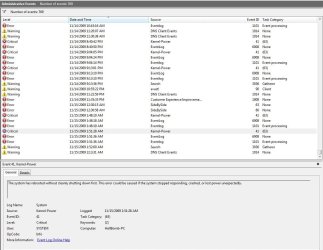
Was looking around in event viewer and i keep getting this error right before crash.

Event Before Crash
Audit events have been dropped by the transport. 0

Critical Error
The system has rebooted without cleanly shutting down first. This error could be caused if the system stopped responding, crashed, or lost power unexpectedly.

Error after crash
The previous system shutdown at 1:50:10 AM on ‎11/‎15/‎2009 was unexpected.
 

My Computer

OS
Windows 7
I have started both Speccy from piriform to keep track of internal heat and i have started resource monitor and will have them running over night and wil provide information about what happens before crash. in case it helps you guys out.
 

My Computer

OS
Windows 7
Enter event in your searchbox and open the event viewer :ar: windows logs :ar: applications and check for any critical errors.. take a screenshot ( snipping tool ) and attach it to your next post..
 

My Computer

Computer type
PC/Desktop
Computer Manufacturer/Model Number
LENOVO K450 @3.0GHZ
OS
64-bit Windows 8.1 Pro
CPU
Core(TM) i5 CPU 4330 Haswell @ 3.20GHz
Motherboard
LENOVO
Memory
12.00 GB
Graphics Card(s)
Intel(R) HD Graphics
Sound Card
Intel HD integtrated
Monitor(s) Displays
HP 25' ISP Monitor
Screen Resolution
1900/1020
Hard Drives
(1) ST1000DM003-1CH162 (2) Generic STORAGE DEVICE USB Device (3) Generic STORAGE DEVICE USB Device
Internet Speed
100mb down/10mb up

My Computer

Computer type
PC/Desktop
Computer Manufacturer/Model Number
76~2.0
OS
Windows 7 Ult x64 - SP1/ Windows 8 Pro x64
CPU
Intel Core i5-3570K 4.6GHz
Motherboard
Gigabyte GA-Z77X UD3H, f18
Memory
8GB (2X4GB) DDR3 1600 Corsair Vengeance CL8 1.5v
Graphics Card(s)
Sapphire HD 7770 Vapor-X OC 1GB DDR5
Sound Card
Onboard VIA VT2021
Monitor(s) Displays
22" LCD Dell
Screen Resolution
1680x1050
Hard Drives
Samsung 840Pro 128GB SSD,
Seagate Barracuda 500GB SATA2 7200rpm 32MB cache, Seagate Barracuda 1TB SATA2 7200rpm 32MB cache,
PSU
Corsair HX650W
Case
Cooler Master Storm Scout
Cooling
Corsair H80 2x12cm Noctua NF P12 , 2x14cm case fans
Keyboard
Logitech Wave
Mouse
CM Sentinel
Internet Speed
Dismal
Antivirus
Avast
Browser
Opera Next
Other Info
Haswell laptop: HP Envy 17t-j, i7-4700MQ, GeForce 740M 2GB DDR3, 17.3" Full HD 1920x1080, 16GB RAM, Samsung 840 Pro 128GB, 1TB Hitachi 7200 HDD,
Desktop: eSATA ports,
External eSATA Seagate 500GB SATA2 7200rpm,
External WD USB 500GB
I have tried the following and received no errors.
Disk Checkmemory diagnostics tool
 

Attachments

  • Capture.JPG
    Capture.JPG
    107.1 KB · Views: 5

My Computer

OS
Windows 7
Your saying you ran the mem test?
How many times did you run it?
It's better to know if the RAM is going bad then to keep searching for other things, it will take 4-5 test runs to get a good test.


Read this thread, there are a couple of things to check.
Crashing daily (The computer has rebooted from a bugcheck)

Windows 7 blue screens and other woes

Try re-loading all your mother board drivers, chipset, check if there is a new BIOS version.

Let us know if any of these helps.
 
Last edited:

My Computer

Computer type
PC/Desktop
Computer Manufacturer/Model Number
76~2.0
OS
Windows 7 Ult x64 - SP1/ Windows 8 Pro x64
CPU
Intel Core i5-3570K 4.6GHz
Motherboard
Gigabyte GA-Z77X UD3H, f18
Memory
8GB (2X4GB) DDR3 1600 Corsair Vengeance CL8 1.5v
Graphics Card(s)
Sapphire HD 7770 Vapor-X OC 1GB DDR5
Sound Card
Onboard VIA VT2021
Monitor(s) Displays
22" LCD Dell
Screen Resolution
1680x1050
Hard Drives
Samsung 840Pro 128GB SSD,
Seagate Barracuda 500GB SATA2 7200rpm 32MB cache, Seagate Barracuda 1TB SATA2 7200rpm 32MB cache,
PSU
Corsair HX650W
Case
Cooler Master Storm Scout
Cooling
Corsair H80 2x12cm Noctua NF P12 , 2x14cm case fans
Keyboard
Logitech Wave
Mouse
CM Sentinel
Internet Speed
Dismal
Antivirus
Avast
Browser
Opera Next
Other Info
Haswell laptop: HP Envy 17t-j, i7-4700MQ, GeForce 740M 2GB DDR3, 17.3" Full HD 1920x1080, 16GB RAM, Samsung 840 Pro 128GB, 1TB Hitachi 7200 HDD,
Desktop: eSATA ports,
External eSATA Seagate 500GB SATA2 7200rpm,
External WD USB 500GB
Yea its getting worce and worce, i am completly rebuilding my computer. i am rebuilding my computer, replaceing motherboard, processor, and memory. I was starting to suspect my memory to be honest. From my research led me to beleive that, but yes i ran the memory test repeating test 2 times twice. Never bothered to change the default settings.
 

My Computer

OS
Windows 7
Back
Top