Little Problem

MilotTutorials

New member
Local time
10:58 PM
Messages
26
Hi There, i just have a little problem, i cant set Windows Media Player, set Default, i set to Default, but when i open Winamp Playist it appears UAC, Idk if im true, i open Winamp, and it appears UAC, i click YES, the default Changes to Winamp, i click No, the default changes to Winamp, i click X, the default changes to Winamp, how can i stop doing this?... Please Help, i might post a Video, so you can understand it better. Thank You.

Sorry for not displaying UAC, idk Why... :(

This post will be Edited, when the Video will come. Thank you, Milot.

EDIT: Video

 
Last edited by a moderator:

My Computer

OS
Windows 7
I think that Winamp has an option to automatically associate itself with certain file types. You must choose which, if any of these that you want Winamp to open.
 

My Computer

Computer Manufacturer/Model Number
DIY
OS
W7x64 Pro, SuSe 12.1/** W7 x64 Pro, XP MCE
CPU
Phenom II 1090T w/Noctua NH-D14 /**4400+ X2 w/CM Hyper TX 3
Motherboard
ASRock 890FX Deluxe 4/**A8N-SLI
Memory
2 x 2GB Patriot PGS34g1600LLKA/**4x1GB Corsair VS
Graphics Card(s)
EVGA GTX460 SC/**EVGA 8800GTS
Sound Card
Asus Xonar D2X/**Xonar D1
Monitor(s) Displays
Acer X233H, Dell E152FPc /**LG M237-WD
Screen Resolution
1920x1080 & 1024x768/**1980x1080
Hard Drives
WDC 2TB, 1.5TB, 1TB, 500GB,Seagate 500GB , Maxtor 80GB /**500GB Seagate & WDC 1TB Black
PSU
CM RS600 w/ APC BX1000G/**Antec 500 TP w/ APC BX1000
Case
HAF922/**Antec 1040IIB
Cooling
3x200mm, 1x140 and 1x120mm/**5x80mm fans
Keyboard
Logitech Media USB/**Saitek Eclipse
Mouse
Cordless Trackman Wheel/**Ditto
Internet Speed
3.3Mbps
Other Info
SB 560 5.1 w/ Sennheiser RS140/**Creative T20 speakers, Dvico FusionHDTV7 Gold RT, Cisco E3000, HP 5510V AIO, Linksys E3000, Belkin F5U237 hub and **F5D8055 adapter
(** = 2nd rig)
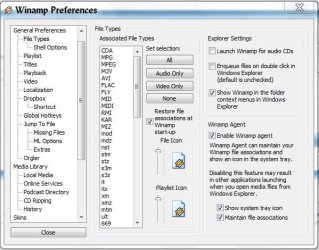
I don't have Winamp installed on the computer that I'm using at the moment, so I will have to go on memory, such as it may be. Right click the upper left corner of the display window of Winamp (containing the oscilloscope), and select Options. Thumb through the pages until you find File associations, it should be obvious.

EDIT: I went ahead and installed it. After Opions, select Preferences, then File Types as shown below:
 

Attachments

  • Winamp.JPG
    Winamp.JPG
    61.6 KB · Views: 5
Last edited:

My Computer

Computer Manufacturer/Model Number
DIY
OS
W7x64 Pro, SuSe 12.1/** W7 x64 Pro, XP MCE
CPU
Phenom II 1090T w/Noctua NH-D14 /**4400+ X2 w/CM Hyper TX 3
Motherboard
ASRock 890FX Deluxe 4/**A8N-SLI
Memory
2 x 2GB Patriot PGS34g1600LLKA/**4x1GB Corsair VS
Graphics Card(s)
EVGA GTX460 SC/**EVGA 8800GTS
Sound Card
Asus Xonar D2X/**Xonar D1
Monitor(s) Displays
Acer X233H, Dell E152FPc /**LG M237-WD
Screen Resolution
1920x1080 & 1024x768/**1980x1080
Hard Drives
WDC 2TB, 1.5TB, 1TB, 500GB,Seagate 500GB , Maxtor 80GB /**500GB Seagate & WDC 1TB Black
PSU
CM RS600 w/ APC BX1000G/**Antec 500 TP w/ APC BX1000
Case
HAF922/**Antec 1040IIB
Cooling
3x200mm, 1x140 and 1x120mm/**5x80mm fans
Keyboard
Logitech Media USB/**Saitek Eclipse
Mouse
Cordless Trackman Wheel/**Ditto
Internet Speed
3.3Mbps
Other Info
SB 560 5.1 w/ Sennheiser RS140/**Creative T20 speakers, Dvico FusionHDTV7 Gold RT, Cisco E3000, HP 5510V AIO, Linksys E3000, Belkin F5U237 hub and **F5D8055 adapter
(** = 2nd rig)
I don't have Winamp installed on the computer that I'm using at the moment, so I will have to go on memory, such as it may be. Right click the upper left corner of the display window of Winamp (containing the oscilloscope), and select Options. Thumb through the pages until you find File associations, it should be obvious.

EDIT: I went ahead and installed it. After Opions, select Preferences, then File Types as shown below:

Thanks bro, Thank you very much, sorry for taking your time, but anyway THANKS AGAIN, UAC its not appearing anymore, Thanks... :D :D
 

My Computer

OS
Windows 7
Back
Top