One thing that is bugging me is that I had many old emails (.eml files)
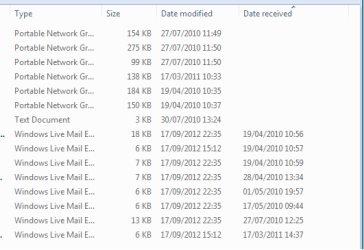
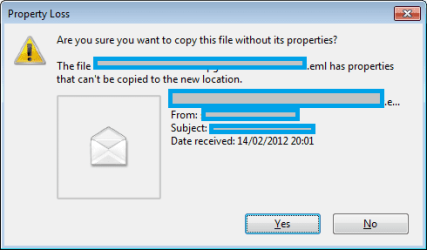
Since the WLM installation, when I browse to a folder containig any old emails, WLM (in cahoots with Explorer?) changes the Data Modified to the then current date.
-- why is that happening?
-- can I change it back?
-- can I stop it happening?
-- oddly, it did not always change all the emails in some folders.
My Computer
At a glance
Windows Home Premium (64)Intel Core i7 8608GB (4x2GB) Corsair TwinX XMS31GB Gainward 9500 GT
Computer type
PC/Desktop
Computer Manufacturer/Model Number
Scan 3XS P55 liteDAW
OS
Windows Home Premium (64)
CPU
Intel Core i7 860
Motherboard
Gigabyte GA-P55A-UD4
Memory
8GB (4x2GB) Corsair TwinX XMS3
Graphics Card(s)
1GB Gainward 9500 GT
Sound Card
M-Audio Delta 66
Monitor(s) Displays
Acer v223wBBd
Screen Resolution
1680 x 1050
Hard Drives
1 x 500 GB WD Barracuda (OS+Docs)
2 x 1TB Samsung Spinpoint F3 (Data)
I have old emails in WLM going back to the year 2000 when I was using Outlook Express in Windows 98. However each email has a "date" associated with it, not the "date modified" of a *.eml file stored in Windows Explorer. Perhaps it worked ok for me because I "imported" directly from the message store of the old email program using WLM's "import from Outlook Express" feature. Perhaps you will see the correct "date" if you open the email itself.
I have noticed that every so often many "modified" dates in Windows Explorer seem to get reset to the current date (at least in the case of Favorite websites). This never happened in Windows 98.
My Computer
At a glance
Windows 8 Pro w/MC 32-bitIntel Atom 1.86 GHz2 GBIntel GMA 500
Computer type
PC/Desktop
Computer Manufacturer/Model Number
OQO 2+
OS
Windows 8 Pro w/MC 32-bit
CPU
Intel Atom 1.86 GHz
Motherboard
OQO 2+
Memory
2 GB
Graphics Card(s)
Intel GMA 500
Sound Card
IDT
Monitor(s) Displays
LCD
Screen Resolution
800 x 480 (portable) 1280 x 1024 (docked)
Hard Drives
64 GB SSD
PSU
9 Ah Battery (portable) or OQO Brick (docked)
Case
Shirt Pocket Sized
Cooling
Tiny Fan
Keyboard
Slide out (portable) DiNovo Edge (docked)
Mouse
Eraser head (portable) Logitech Bluetooth (docked)
These old emails were dragged out of Outlook Express to disk on a Windows Xp system, then copied into folders on this Windows 7 PC.
I have not imported these old emails into WLM. But when I open the folder and hover over them the Date Modified changes.
If I import one into WLM then its date in there is correct. But it means that I cannot easily see the chronology in Explorer, so tracking down the right one can be difficult. All was fine in XP/Outlook Express.
----------------
Your reply prompted me to do a bit more investigation - there is a "Date Received" column in Explorer - and that lists the original date. (And it's a search term too)
Attachments
WLM_Date_received.png
6 KB
· Views: 7
My Computer
At a glance
Windows Home Premium (64)Intel Core i7 8608GB (4x2GB) Corsair TwinX XMS31GB Gainward 9500 GT
Computer type
PC/Desktop
Computer Manufacturer/Model Number
Scan 3XS P55 liteDAW
OS
Windows Home Premium (64)
CPU
Intel Core i7 860
Motherboard
Gigabyte GA-P55A-UD4
Memory
8GB (4x2GB) Corsair TwinX XMS3
Graphics Card(s)
1GB Gainward 9500 GT
Sound Card
M-Audio Delta 66
Monitor(s) Displays
Acer v223wBBd
Screen Resolution
1680 x 1050
Hard Drives
1 x 500 GB WD Barracuda (OS+Docs)
2 x 1TB Samsung Spinpoint F3 (Data)
...If I import one into WLM then its date in there is correct. But it means that I cannot easily see the chronology in Explorer, so tracking down the right one can be difficult. All was fine in XP/Outlook Express...
All is still fine in WLM. The problem is with Windows Explorer, which is why I store and view my emails in the mail program only. And when I back up my emails I back up the appropriate contents of the appdata folder holding the email data, but only view it after it is restored to WLM and can be viewed there.
My Computer
At a glance
Windows 8 Pro w/MC 32-bitIntel Atom 1.86 GHz2 GBIntel GMA 500
Computer type
PC/Desktop
Computer Manufacturer/Model Number
OQO 2+
OS
Windows 8 Pro w/MC 32-bit
CPU
Intel Atom 1.86 GHz
Motherboard
OQO 2+
Memory
2 GB
Graphics Card(s)
Intel GMA 500
Sound Card
IDT
Monitor(s) Displays
LCD
Screen Resolution
800 x 480 (portable) 1280 x 1024 (docked)
Hard Drives
64 GB SSD
PSU
9 Ah Battery (portable) or OQO Brick (docked)
Case
Shirt Pocket Sized
Cooling
Tiny Fan
Keyboard
Slide out (portable) DiNovo Edge (docked)
Mouse
Eraser head (portable) Logitech Bluetooth (docked)



 (And it's a search term too)