Live Mail "restores"- now old emails are doubled in quotes / delimited

DallasDave

New member
Local time
7:46 AM
Messages
1
Live Mail "restores"- now old emails are doubled in quotes / delimited

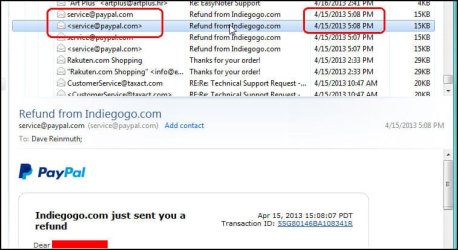
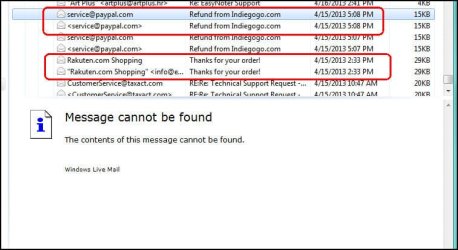
About once every year Windows Live Mail pukes and goes through some kind of "restore". After that, I have 2 of everything. One will have a "normal" header, but no email, the other will have a "delimited" header but a proper body. (Samples attached).
Does anyone know why it does this, and is there a way to fix these historic emails that appear "divided" ?

Live Mail "restores"- now historical emails are in quotes / delimited
 

Attachments
  • snap00156.jpg
    snap00156.jpg
    46.3 KB · Views: 0
  • snap00157.jpg
    snap00157.jpg
    52.5 KB · Views: 0

My Computer My Computer

At a glance

Windows 7 Home Premium x64unk8gunk
Computer type
Laptop
Computer Manufacturer/Model Number
Del
OS
Windows 7 Home Premium x64
CPU
unk
Motherboard
unk
Memory
8g
Graphics Card(s)
unk
Hard Drives
1T
Antivirus
McAffee
Browser
IE11
[SIZE="3":o[/SIZE]I'm having trouble New here. Can someone help me?
 

My Computer My Computer

At a glance

Windows 10 64bit
Computer type
Laptop
Computer Manufacturer/Model Number
MP
OS
Windows 10 64bit
I guess there is no one in here that will help me
 

My Computer My Computer

At a glance

Windows 10 64bit
Computer type
Laptop
Computer Manufacturer/Model Number
MP
OS
Windows 10 64bit
Hi michele, welcome to the Forum.

As you are running Windows 10 it would be best to join the Ten Forums, which is a sister forum to this one.

Windows 10 Forums
 

My Computer My Computer

At a glance

Windows 7 Home Premium 64 bit sp1Intel i5 3570 3.4Ghz Ivy Bridge SKT 1155 quad...G-Skill Rip Jaws 16Gb (8x2) DDR3 -1600 PC3 12...Gigabyte NVIDIA GT610 1Gb DDR3 810/1200 PCI-E...
Computer type
PC/Desktop
Computer Manufacturer/Model Number
Self built using existing case
OS
Windows 7 Home Premium 64 bit sp1
CPU
Intel i5 3570 3.4Ghz Ivy Bridge SKT 1155 quad core
Motherboard
Gigabyte Z77-HD3 SKT 1155 2xSata 3, 4x USB 3.0
Memory
G-Skill Rip Jaws 16Gb (8x2) DDR3 -1600 PC3 12800 CL 10 red
Graphics Card(s)
Gigabyte NVIDIA GT610 1Gb DDR3 810/1200 PCI-E 2.0 Silent
Sound Card
NVIDIA High Definition & Realtech High Definition Audio
Monitor(s) Displays
2 x Philips 226V4L 16:9 aspect ratio
Screen Resolution
1920 x 1080 HD
Hard Drives
Samsung 840 Pro 256gb SSD, SATA 3.
Hitachi Touro Portable 1tb, USB 3.0 HDD used for image b/ups.
PSU
Corsair VS450
Case
Codeng
Cooling
PSU fan & CPU fan
Keyboard
Logitech
Mouse
Logitech Wireless trackball M570
Internet Speed
Wireless 3G. 3mg down & 550kb up.
Antivirus
Bitdefender Internet Security 2020
Browser
Opera (Current Version) & Firefox
Other Info
MS Office 2013 Pro. Davis weather station software. MGE Nova 600 avr UPS.
Solution

Especially for Sent Items it is a problem. But I found a solution to get rid of the quotes of such messages!
Ensure one of your accounts in WLM is a Gmail account. Next, within WLM, move the quoted messages to the spam or trash folder in the gmail account. Wait a few minutes and then you will see the messages are processed and the quotes are gone! As last step, move the messages back to the account where they came from.
And next time: wait until WLM is finished completely...
 

My Computer My Computer

At a glance

Windows 7
OS
Windows 7
Back
Top