JavaScript is disabled. For a better experience, please enable JavaScript in your browser before proceeding.
You are using an out of date browser. It may not display this or other websites correctly.
You should upgrade or use an
alternative browser .
Live Messenger Start up problem.
I have Windows 7 Pro x64 and my wife uses Live Messenger for video chatting with her family.
Computer Manufacturer/Model Number Dell XPS 15 L502X OS Windows 7 Pro x64 CPU i5 2430M Motherboard Dell 0NJT03 Memory 6 G's Graphics Card(s) NVidia GE Force 540M Sound Card Nvidia High Definition Audio Monitor(s) Displays Asus VW246H Screen Resolution 1920 x 1080 Hard Drives Toshiba MIK5061 GSY Case Dell Cooling Air only Keyboard Dell Mouse MS Laser Internet Speed broadband 15 Mbit/s
Just call me Nick
Guru
VIP
Hiya pal
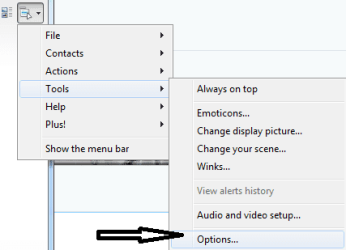
open live messenger...go to the tools tab, click it, and go down to
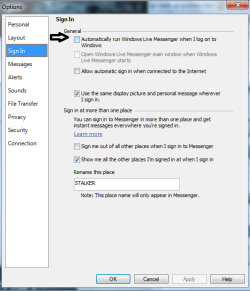
"options", and when it opens select the "general tab", then "uncheck" where
it says " automatically run windows live messenger when i log onto windows.
click apply, then ok.
Computer type PC/Desktop Computer Manufacturer/Model Number Self Built OS Windows 7 Ultimate 64bit CPU AMD Phenom Quad core 9950 black edition Motherboard Gigabyte Memory 16Gb Graphics Card(s) 2x XFX Radeon 5850 Sound Card PCI Express X-Fi Titanium / Logitech G35 Monitor(s) Displays 2x HP 2410i Screen Resolution 1920x1080 Hard Drives 2x 500Gb Seagate PSU Jean Tech Storm 700W Case Cooler Master COSMOS S Cooling Akasa Evo Blue Pro Keyboard Logitech G15 Mouse Mad Catz M.M.O. 7 Internet Speed 12mb
Computer type PC/Desktop Computer Manufacturer/Model Number Custom Build OS Windows 10 Pro x64 CPU Intel Core i5 4440 @Stock Motherboard Gigabyte Z97 D3H Memory 4 x 4GB HyperX Fury DDR3 Graphics Card(s) Gigabyte GTX 1050Ti O4G Sound Card Integrated Monitor(s) Displays Dell P2417H Screen Resolution 1920 x 1080 Hard Drives Samsung EVO 850 120GB / Toshiba DT01ACA050 1TB 7200prm 32MB PSU Riotoro Onyx 750W Case NZXT H500 Black-Red Cooling Stock CPU + NZXT 120mm + 2x120mm red fans Keyboard Modecom Volcano Lanparty Mouse Asus ROG Gladius / DeepCool E-Pad Plus Internet Speed DOCSIS 50/3 Mbit Browser Google Chrome Other Info Asus K55VJ(i5 3210M, GT635M / 2GB, 8GB DDR3, 500GB HDD)
New member
Member
Thread Starter
Thanks guys.
Computer Manufacturer/Model Number Dell XPS 15 L502X OS Windows 7 Pro x64 CPU i5 2430M Motherboard Dell 0NJT03 Memory 6 G's Graphics Card(s) NVidia GE Force 540M Sound Card Nvidia High Definition Audio Monitor(s) Displays Asus VW246H Screen Resolution 1920 x 1080 Hard Drives Toshiba MIK5061 GSY Case Dell Cooling Air only Keyboard Dell Mouse MS Laser Internet Speed broadband 15 Mbit/s
You're welcime!
Computer type PC/Desktop Computer Manufacturer/Model Number Custom Build OS Windows 10 Pro x64 CPU Intel Core i5 4440 @Stock Motherboard Gigabyte Z97 D3H Memory 4 x 4GB HyperX Fury DDR3 Graphics Card(s) Gigabyte GTX 1050Ti O4G Sound Card Integrated Monitor(s) Displays Dell P2417H Screen Resolution 1920 x 1080 Hard Drives Samsung EVO 850 120GB / Toshiba DT01ACA050 1TB 7200prm 32MB PSU Riotoro Onyx 750W Case NZXT H500 Black-Red Cooling Stock CPU + NZXT 120mm + 2x120mm red fans Keyboard Modecom Volcano Lanparty Mouse Asus ROG Gladius / DeepCool E-Pad Plus Internet Speed DOCSIS 50/3 Mbit Browser Google Chrome Other Info Asus K55VJ(i5 3210M, GT635M / 2GB, 8GB DDR3, 500GB HDD)