You are using an out of date browser. It may not display this or other websites correctly.
You should upgrade or use an
alternative browser.
Solved Live Photo Gallery Error
Capt. Cruncher
Guru
Gold Member
VIP
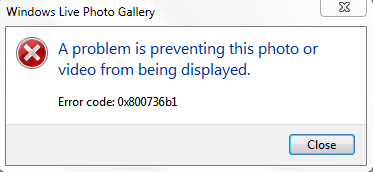
I got this error, does anyone know what it signifies? I have a new install and have only really downloaded and updated
-
Captured.PNG
4.9 KB
· Views: 12
- Computer type
- PC/Desktop
- Computer Manufacturer/Model Number
- Custom Asus Build
- OS
- Microsoft Windows 8.1 Pro 64-bit
- CPU
- Intel(R) Core(TM) i3-4130 CPU @ 3.40GHz
- Motherboard
- B85M-E
- Memory
- 8.00 GB
- Graphics Card(s)
- None
- Sound Card
- Realtek High Definition Audio
- Monitor(s) Displays
- Asus 23.6" Monitor
- Screen Resolution
- 1920 x 1080 x 32 bits (4294967296 colors) @ 60 Hz
- Hard Drives
- INTEL SSDSC2BW180A4
Samsung SSD 840 PRO Series
- PSU
- Seasonic S12II-380Bronze
- Case
- Lian Li
- Cooling
- Fan, Passive
- Keyboard
- Logitech K120
- Mouse
- Microsoft Touch Mouse
- Internet Speed
- 4ms Ping, 19.0 Mbps Download, 19.0 Mbps Upload
- Antivirus
- Eset Endpoint
- Browser
- Internet Explorer, Chrome
New member
Guru
Gold Member
VIP
What is the filetype of the file you want to display?
- Computer Manufacturer/Model Number
- HP, Dell, Gateway, Toshiba - 4 laptops and 2 desktops
- OS
- Vista, Windows7, Mint Mate, Zorin, Windows 8
- CPU
- from 1.6GHz Duo to i7
- Monitor(s) Displays
- 2x HP w2207
- Hard Drives
- 5x HDD, 7x SSD, 12x Externals
- Keyboard
- with trackball - no mices
- Mouse
- Trackball mice
- Internet Speed
- DSL 6000
Capt. Cruncher
Guru
Gold Member
VIP
Thread Starter
.PNG
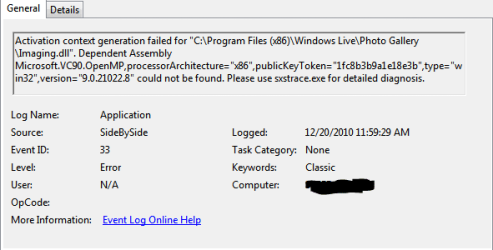
I have an event log for it too
-
Captured3.PNG
8.2 KB
· Views: 7
- Computer type
- PC/Desktop
- Computer Manufacturer/Model Number
- Custom Asus Build
- OS
- Microsoft Windows 8.1 Pro 64-bit
- CPU
- Intel(R) Core(TM) i3-4130 CPU @ 3.40GHz
- Motherboard
- B85M-E
- Memory
- 8.00 GB
- Graphics Card(s)
- None
- Sound Card
- Realtek High Definition Audio
- Monitor(s) Displays
- Asus 23.6" Monitor
- Screen Resolution
- 1920 x 1080 x 32 bits (4294967296 colors) @ 60 Hz
- Hard Drives
- INTEL SSDSC2BW180A4
Samsung SSD 840 PRO Series
- PSU
- Seasonic S12II-380Bronze
- Case
- Lian Li
- Cooling
- Fan, Passive
- Keyboard
- Logitech K120
- Mouse
- Microsoft Touch Mouse
- Internet Speed
- 4ms Ping, 19.0 Mbps Download, 19.0 Mbps Upload
- Antivirus
- Eset Endpoint
- Browser
- Internet Explorer, Chrome
New member
Guru
Gold Member
VIP
At first glance, that looks like a .dll problem. Run sfc /scannow in elevated Command Prompt. Maybe it can fix it.
- Computer Manufacturer/Model Number
- HP, Dell, Gateway, Toshiba - 4 laptops and 2 desktops
- OS
- Vista, Windows7, Mint Mate, Zorin, Windows 8
- CPU
- from 1.6GHz Duo to i7
- Monitor(s) Displays
- 2x HP w2207
- Hard Drives
- 5x HDD, 7x SSD, 12x Externals
- Keyboard
- with trackball - no mices
- Mouse
- Trackball mice
- Internet Speed
- DSL 6000
Capt. Cruncher
Guru
Gold Member
VIP
Thread Starter
didn't find integrity violations
- Computer type
- PC/Desktop
- Computer Manufacturer/Model Number
- Custom Asus Build
- OS
- Microsoft Windows 8.1 Pro 64-bit
- CPU
- Intel(R) Core(TM) i3-4130 CPU @ 3.40GHz
- Motherboard
- B85M-E
- Memory
- 8.00 GB
- Graphics Card(s)
- None
- Sound Card
- Realtek High Definition Audio
- Monitor(s) Displays
- Asus 23.6" Monitor
- Screen Resolution
- 1920 x 1080 x 32 bits (4294967296 colors) @ 60 Hz
- Hard Drives
- INTEL SSDSC2BW180A4
Samsung SSD 840 PRO Series
- PSU
- Seasonic S12II-380Bronze
- Case
- Lian Li
- Cooling
- Fan, Passive
- Keyboard
- Logitech K120
- Mouse
- Microsoft Touch Mouse
- Internet Speed
- 4ms Ping, 19.0 Mbps Download, 19.0 Mbps Upload
- Antivirus
- Eset Endpoint
- Browser
- Internet Explorer, Chrome
New member
Guru
Gold Member
VIP
Can you display other filetypes (e.g. .jpg) with it?
- Computer Manufacturer/Model Number
- HP, Dell, Gateway, Toshiba - 4 laptops and 2 desktops
- OS
- Vista, Windows7, Mint Mate, Zorin, Windows 8
- CPU
- from 1.6GHz Duo to i7
- Monitor(s) Displays
- 2x HP w2207
- Hard Drives
- 5x HDD, 7x SSD, 12x Externals
- Keyboard
- with trackball - no mices
- Mouse
- Trackball mice
- Internet Speed
- DSL 6000
Capt. Cruncher
Guru
Gold Member
VIP
Thread Starter
just tried, and no
same error
it may just be photo live, cause live movie maker plays video still. I can view pictures in other picture viewers.
only ting i think i did was make live photo the default
- Computer type
- PC/Desktop
- Computer Manufacturer/Model Number
- Custom Asus Build
- OS
- Microsoft Windows 8.1 Pro 64-bit
- CPU
- Intel(R) Core(TM) i3-4130 CPU @ 3.40GHz
- Motherboard
- B85M-E
- Memory
- 8.00 GB
- Graphics Card(s)
- None
- Sound Card
- Realtek High Definition Audio
- Monitor(s) Displays
- Asus 23.6" Monitor
- Screen Resolution
- 1920 x 1080 x 32 bits (4294967296 colors) @ 60 Hz
- Hard Drives
- INTEL SSDSC2BW180A4
Samsung SSD 840 PRO Series
- PSU
- Seasonic S12II-380Bronze
- Case
- Lian Li
- Cooling
- Fan, Passive
- Keyboard
- Logitech K120
- Mouse
- Microsoft Touch Mouse
- Internet Speed
- 4ms Ping, 19.0 Mbps Download, 19.0 Mbps Upload
- Antivirus
- Eset Endpoint
- Browser
- Internet Explorer, Chrome
New member
Guru
Gold Member
VIP
- Computer Manufacturer/Model Number
- HP, Dell, Gateway, Toshiba - 4 laptops and 2 desktops
- OS
- Vista, Windows7, Mint Mate, Zorin, Windows 8
- CPU
- from 1.6GHz Duo to i7
- Monitor(s) Displays
- 2x HP w2207
- Hard Drives
- 5x HDD, 7x SSD, 12x Externals
- Keyboard
- with trackball - no mices
- Mouse
- Trackball mice
- Internet Speed
- DSL 6000
Capt. Cruncher
Guru
Gold Member
VIP
Thread Starter
So I went into remove programs in windows, right clicked live essentials and clicked repair. Now it works. strange lol. but thanks for the help
- Computer type
- PC/Desktop
- Computer Manufacturer/Model Number
- Custom Asus Build
- OS
- Microsoft Windows 8.1 Pro 64-bit
- CPU
- Intel(R) Core(TM) i3-4130 CPU @ 3.40GHz
- Motherboard
- B85M-E
- Memory
- 8.00 GB
- Graphics Card(s)
- None
- Sound Card
- Realtek High Definition Audio
- Monitor(s) Displays
- Asus 23.6" Monitor
- Screen Resolution
- 1920 x 1080 x 32 bits (4294967296 colors) @ 60 Hz
- Hard Drives
- INTEL SSDSC2BW180A4
Samsung SSD 840 PRO Series
- PSU
- Seasonic S12II-380Bronze
- Case
- Lian Li
- Cooling
- Fan, Passive
- Keyboard
- Logitech K120
- Mouse
- Microsoft Touch Mouse
- Internet Speed
- 4ms Ping, 19.0 Mbps Download, 19.0 Mbps Upload
- Antivirus
- Eset Endpoint
- Browser
- Internet Explorer, Chrome
New member
Guru
Gold Member
VIP
Good deal. Thanks for reporting the solution. Try he FastStone anyhow. It is really a very attractive program with a lot of function.
- Computer Manufacturer/Model Number
- HP, Dell, Gateway, Toshiba - 4 laptops and 2 desktops
- OS
- Vista, Windows7, Mint Mate, Zorin, Windows 8
- CPU
- from 1.6GHz Duo to i7
- Monitor(s) Displays
- 2x HP w2207
- Hard Drives
- 5x HDD, 7x SSD, 12x Externals
- Keyboard
- with trackball - no mices
- Mouse
- Trackball mice
- Internet Speed
- DSL 6000


