Local Access Only Problem

suprattalljdm

New member
Please help me guys! I have been at this all day and I don't understand what is going on!

Router: Linksys WRT54G v5.0 with the most recent firmware 1.02.7 July 2009. I have tried all different security encryptions from None to WPA to WEP to WPA2.

Problem is that no matter if its a wired or a wireless connection, all I have is Local Access. I can access the router and make any changes, just can't get out to the net.

I've tried disabling IPV6, using regedit to modify broadcast flag info, static and dhcp, still coming up empty on this.

This is a router I have never used before, and I have a D Link router that I replaced it with to test and everything works fine. In fact, I'm using the wireless D Link connection to type this.

Does anyone have the fix to save my sanity? Thanks so much! :)
 

My Computer

OS
7 Home Premium
Please help me guys! I have been at this all day and I don't understand what is going on!

Router: Linksys WRT54G v5.0 with the most recent firmware 1.02.7 July 2009. I have tried all different security encryptions from None to WPA to WEP to WPA2.

Problem is that no matter if its a wired or a wireless connection, all I have is Local Access. I can access the router and make any changes, just can't get out to the net.

I've tried disabling IPV6, using regedit to modify broadcast flag info, static and dhcp, still coming up empty on this.

This is a router I have never used before, and I have a D Link router that I replaced it with to test and everything works fine. In fact, I'm using the wireless D Link connection to type this.

Does anyone have the fix to save my sanity? Thanks so much! :)

I have had the same problem with Linksys with 3 different customers. the last customer informed me they spoke with Linksys prior to my arrival and their tech support had them setup with WEP and had them to add 16 zeros in front of their WEP Key and it worked.

2nd customer we couldn't even get it to ever work. I had the customer to purchase a 2Wire Homeportal and worked flawlessly.

I have a Linksys here and have the same issue with it. I finally bought a netgear and worked flawlessly. I have my linksys sub netted out for my customers access if they need it.
 

My Computer

Computer Manufacturer/Model Number
Dell 1520
OS
Win7/Vista/XP/2k/Win3.1.1
CPU
3.2
Motherboard
Azues
Memory
4gig
Graphics Card(s)
8500GT
Sound Card
Creative 7n1
Monitor(s) Displays
Azuses 19"
Hard Drives
6
PSU
1
Case
1
Cooling
3
I tried using Linksys support online and on the phone, both gave me the same line:

"Your product is out of warranty and if you want us to help you troubleshoot then it will cost $29.99"

If I ever pull it out of my garage then I'll try the 16 0's but that is a ****ty glitch that a firmware update should have fixed a long time ago. Thanks anyway :)
 

My Computer

OS
7 Home Premium
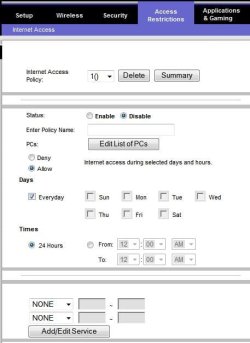
I'm not sure if not able to access the internet is an issue with the router.

Are you sure you have not made any restrictions on your router? check this tab.
 

Attachments

  • Noname.jpg
    Noname.jpg
    37.5 KB · Views: 30

My Computer

Computer Manufacturer/Model Number
Lenovo ThinkPad T60
OS
Windows 7 Ultimate 64Bit
CPU
GenuineIntel Intel(R) Core(TM) DuoCore T2400 @ 1.83GHz
Motherboard
Intel(R) 82801G (ICH7 Family)
Memory
2.00 GB
Graphics Card(s)
Mobile Intel(R) 945 Express Chipset
Sound Card
SoundMAX Integrated Digital HD Audio
Monitor(s) Displays
ThinkPad Display
Screen Resolution
1400x1050
Hard Drives
100Gb SATA
Keyboard
Standard Keyboard
Mouse
HID-compliant Mouse
Internet Speed
Cable Broadband - 54Mbps
Other Info
Intel(R) PRO/1000 PL Network Connection
11a/b/g Wireless LAN Mini PCI Express Adapter
Do you have Bonjour service installed either through iTunes or Adobe? If so, stop the service and disable it.
 

My Computer

Computer Manufacturer/Model Number
MSI
OS
Windows 7 Professional 64bit
CPU
Intel Celeron 2.4 GH
Memory
4 GB
Graphics Card(s)
NVidia GeForce 9800GT
Sound Card
ATI HDMI Audio
Monitor(s) Displays
Acer S231HL Dual Monitors
Hard Drives
Hitachi 300GB ATA
Maxtor 300GB USB
Cooling
Standard
Keyboard
Logitech wireless
Mouse
Logitech wireless
Internet Speed
Cable
Try reseting the router to its factory defaults (see manual) and the enter your configuration details manually (copy them over from your other router). Don't worry about wireless yet, do this on a wired connection with the wireless section disabled.
 

My Computer

Computer type
PC/Desktop
Computer Manufacturer/Model Number
Dwarf Dwf/11/2012 r09/2013
OS
Windows 8.1 Pro RTM x64
CPU
Intel Core-i5-3570K 4-core @ 3.4GHz (Ivy Bridge) (OC 4.4GHz)
Motherboard
ASRock Z77 Extreme4-M
Memory
4 x 4GB DDR3-1600 Corsair Vengeance CMZ8GX3M2A1600C9B (16GB)
Graphics Card(s)
MSI GeForce GTX770 Gaming OC 2GB
Sound Card
Realtek High Definition on board solution (ALC 898)
Monitor(s) Displays
ViewSonic VA1912w Widescreen (VGA)
Screen Resolution
1440x900
Hard Drives
OCZ Agility 3 SSD 120GB SATA III x2 (RAID 0)
Samsung HD501LJ 500GB SATA II x2
Hitachi HDS721010CLA332 1TB SATA II
Iomega 1.5TB Ext USB 2.0
WD 2.0TB Ext USB 3.0
PSU
XFX Pro Series 850W Semi-Modular
Case
Gigabyte IF233
Cooling
1 x 120mm Front Inlet 1 x 120mm Rear Exhaust
Keyboard
Microsoft Comfort Curve Keyboard 3000 (USB)
Mouse
Microsoft Comfort Mouse 3000 for Business (USB)
Internet Speed
NetGear DG834Gv3 ADSL Modem/Router (Ethernet) ~4.0 Mb/s (O2)
Antivirus
Avast! 8.0.1497
Browser
IE 11
Other Info
Optical Drive: HL-DT-ST BD-RE BH10LS30 SATA Bluray
Lexmark S305 Printer/Scanner/Copier (USB)
WEI Score: 8.1/8.1/8.5/8.5/8.25
Asus Eee PC 1011PX Netbook (Windows 7 x86 Starter)
Back
Top