Solved Local Area Connection doesn'thave a valid IP configuation

icacream

New member
Member
Local time
10:15 PM
Messages
89
hello
the title of the thread is the lovely message I get on my PC (cable to the modem), and I cannot go online though my connection works fine (= this message!!!)
please... HELP !!!!
 

My Computer My Computer

Computer type
PC/Desktop
OS
win7 x64 ultimate
CPU
3.30 gigahertz Intel Core i5-4590
Motherboard
Asus H97M-PLUS
Memory
8 MB
Graphics Card(s)
PNY Quadro K600
Screen Resolution
1920 x 1080
Try this simple idea first and see if it works for ya:

click start; programs, accessories, then right click on command prompt and select run as administrator. Then type ipconfig /release. Once the adapter releases; then type ipconfig /renew. IF that does nothing for ya; I would then do a power cycle of your network equipment which will reset them. Unplug the power cord to both the modem and router(if you have a separate router); then wait about a minute or so then plug the modem back in first and let that boot; then plug the router back in and let that boot. Try one or both of these and see if they help ya. If not post back and we can go from there.
 

My Computer My Computer

Computer type
PC/Desktop
Computer Manufacturer/Model Number
custom built
OS
Windows 7 ultimate 64-bit
CPU
Intel I7 2600K 3.4ghz
Motherboard
Asus Evo P8P67
Memory
Corsair 16gb ddr3 1600mhz
Graphics Card(s)
Nvidia Geforce gt 430
Sound Card
Sound Blaster Titanium x-fi pci express
Monitor(s) Displays
Dell E198WFP
Hard Drives
1 western digital 2TB drive.
PSU
Antec 1200 watt
Case
Inwin Dragon Rider
Cooling
6 case supplied cooling fans
Keyboard
logitech mk700
Mouse
logitech m705
Internet Speed
25-50mbps download; 10mbps upload(i think)
Antivirus
avg free 2014
Browser
mozilla firefox
Other Info
Also have a pretty bad speaker setup which is a klipsch promedia 5.1 surround speaker setup with huge subwoofer and lg blu ray player/writer. Also a hp officejet pro 8600 plus wireless all in one and a logitech s7500 webcam.
Here's what I got at renew :

An error occured while renewing interface local area connection : unable to cotact your DHCP server. Request has timed out.
 

My Computer My Computer

Computer type
PC/Desktop
OS
win7 x64 ultimate
CPU
3.30 gigahertz Intel Core i5-4590
Motherboard
Asus H97M-PLUS
Memory
8 MB
Graphics Card(s)
PNY Quadro K600
Screen Resolution
1920 x 1080
Have you tried the power cycle yet to reset the modem etc.? If not i would give that a shot and see what happens. if that does nothing; post back again and we can continue to try and resolve the problem. Also; one other thing; I might also try and contact your ISP and see if they had or are having any issues that may prevent being connected properly.
 

My Computer My Computer

Computer type
PC/Desktop
Computer Manufacturer/Model Number
custom built
OS
Windows 7 ultimate 64-bit
CPU
Intel I7 2600K 3.4ghz
Motherboard
Asus Evo P8P67
Memory
Corsair 16gb ddr3 1600mhz
Graphics Card(s)
Nvidia Geforce gt 430
Sound Card
Sound Blaster Titanium x-fi pci express
Monitor(s) Displays
Dell E198WFP
Hard Drives
1 western digital 2TB drive.
PSU
Antec 1200 watt
Case
Inwin Dragon Rider
Cooling
6 case supplied cooling fans
Keyboard
logitech mk700
Mouse
logitech m705
Internet Speed
25-50mbps download; 10mbps upload(i think)
Antivirus
avg free 2014
Browser
mozilla firefox
Other Info
Also have a pretty bad speaker setup which is a klipsch promedia 5.1 surround speaker setup with huge subwoofer and lg blu ray player/writer. Also a hp officejet pro 8600 plus wireless all in one and a logitech s7500 webcam.
Going out for the evening so I kill everything and will see how it goes tomorrow.
Will post back here whatever happens.
Thanks for your help !
 

My Computer My Computer

Computer type
PC/Desktop
OS
win7 x64 ultimate
CPU
3.30 gigahertz Intel Core i5-4590
Motherboard
Asus H97M-PLUS
Memory
8 MB
Graphics Card(s)
PNY Quadro K600
Screen Resolution
1920 x 1080
Going out for the evening so I kill everything and will see how it goes tomorrow.
Will post back here whatever happens.
Thanks for your help !

No problem dude. Just give that power cycle a shot and see what happens.
 

My Computer My Computer

Computer type
PC/Desktop
Computer Manufacturer/Model Number
custom built
OS
Windows 7 ultimate 64-bit
CPU
Intel I7 2600K 3.4ghz
Motherboard
Asus Evo P8P67
Memory
Corsair 16gb ddr3 1600mhz
Graphics Card(s)
Nvidia Geforce gt 430
Sound Card
Sound Blaster Titanium x-fi pci express
Monitor(s) Displays
Dell E198WFP
Hard Drives
1 western digital 2TB drive.
PSU
Antec 1200 watt
Case
Inwin Dragon Rider
Cooling
6 case supplied cooling fans
Keyboard
logitech mk700
Mouse
logitech m705
Internet Speed
25-50mbps download; 10mbps upload(i think)
Antivirus
avg free 2014
Browser
mozilla firefox
Other Info
Also have a pretty bad speaker setup which is a klipsch promedia 5.1 surround speaker setup with huge subwoofer and lg blu ray player/writer. Also a hp officejet pro 8600 plus wireless all in one and a logitech s7500 webcam.
You plug your PC directly into your ISP's modem via ethernet cable? No router in between?

As you point out, you're obviously connected to the Internet so you MUST have an IP address.

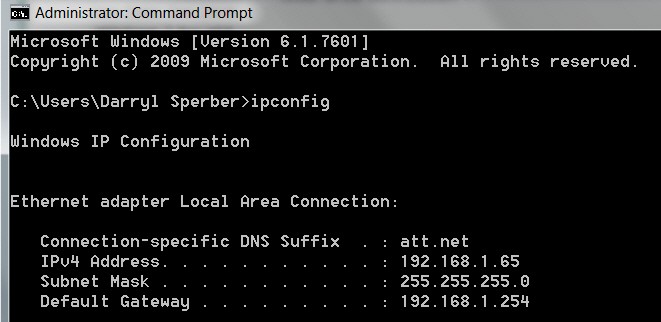
When a router is involved (e.g. 192.168.1.1), it normally acts as a DHCP server and assigns your PC an IP address of something like 192.168.1.2. You can tell this by running a Command Prompt and entering IPCONFIG. This will display a bunch of things, but if you scroll back to the "Ethernet local area connection" you would see both your IPV4 address as well as the router's address (from the LAN perspective of your PC) shown as the "Default Gateway". The actual external IP address assigned to your modem by the ISP's DHCP server is hidden from this view, although it can be revealed by doing a WHOAMI (say from Google) from a browser window once you're connected to the Internet.

If a router is NOT involved, then your modem serves as the direct portal between your PC and your ISP, where the true DHCP server lives. Again, doing IPCONFIG from a command prompt should reveal your PC's IP address as well as your ISP's server as the "Default Gateway". You MUST have an IP address and there MUST be a default gateway, if you're getting to the Internet. These would normally be assigned automatically, if your TCPIP configuration is set as "obtain address automatically".


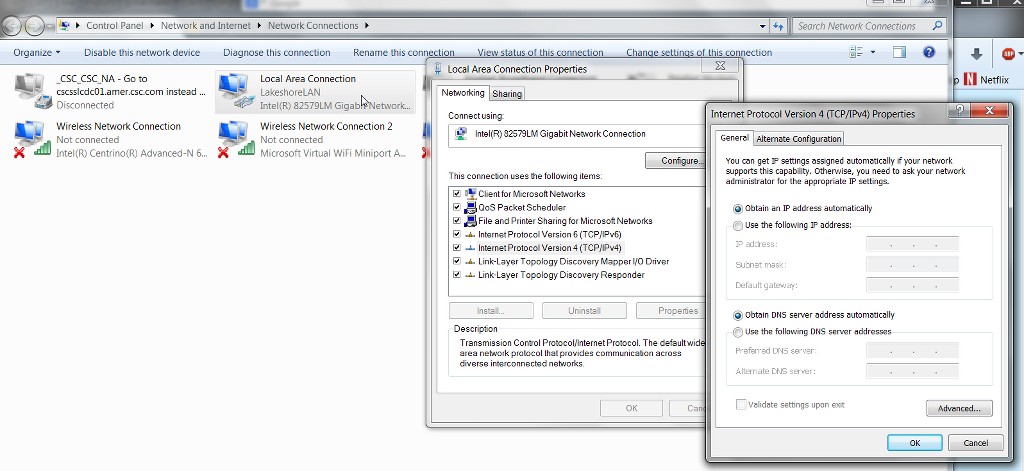
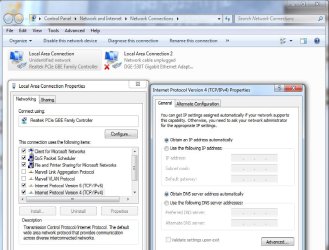
To double-check your TCPIP configuration, click on the Start button, and enter "network connections" in the "search programs and files" field (all without the surrounding quotes, of course). You should now see a presentation where your wired ethernet adapter is shown as "local area connection". Right-click on it and select "Properties" to get the Properties dialog window.

On the Networking tab of the Properties dialog, select the "Internet protocol version 4" item, and then push the Properties button to get the TCP/IPv4 window. You should then see "obtain an IP address automatically" checked, as well as the "obtain DNS server address automatically" checked.

Yes? Or do you have some manual settings set where it should show "obtain automatically"? Or what
 

My Computer My Computer

Computer type
PC/Desktop
Computer Manufacturer/Model Number
Home-built, two systems (1) and (2)
OS
Windows 7 Pro x64 (1), Win7 Pro X64 (2)
CPU
i5-3350p 3.1Ghz/6MB-cache (1); E8400 3.0Ghz/6MB-cache (2)
Motherboard
ASUS P8Z77-V Pro (1); ASUS P5Q3 (2)
Memory
8GB PC3-12800 DDR3 (1); 4GB PC3-10600 DDR3 (2)
Graphics Card(s)
ATI HD7750 (1), (see TV cards); ATI R7 250 (2)
Sound Card
Realtek ALC892 HD Audio (1); Realtek ALC1200 HD Audio (2)
Monitor(s) Displays
Eizo HD2441W LCD, Eizo S2433W (1); Eizo 24" S2433W (2)
Screen Resolution
1920x1200, 1920x1200 (1); 1920x1200 (2)
Hard Drives
(1) 1TB SATA-II (7200RPM), 2x2TB SATA-III (7200RPM), 250GB SATA-III (10000RPM) for OS; 2x2TB external USB 3.0

(2) 320GB SATA-II (7200RPM), 750GB SATA-II (7200RPM), 150GB SATA-II (10000RPM) for OS; 2TB external USB 3.0
PSU
Nesteq ECS-6001 600W (1); Nesteq ECS-5001 500W (2)
Case
Acousti-Case 360 (1) and (2)
Cooling
Noctua NH-U12P SE2 for CPU, 2x120mm case fans (1) and (2)
Keyboard
IBM PS/2 (1) and (2)
Mouse
Logitech MX Revolution wireless (1); Microsoft wired (2)
Internet Speed
100mbps down / 10mbps up
Antivirus
Microsoft Security Essentials; Malwarebyte Anti-Malware Pro
Browser
Firefox
Other Info
Ceton InfiniTV 4-tuner cablecard-enabled TV card as well as Hauppauge HVR-2250 OTA/ATSC 2-tuner TV card in (1), running under Win7 WMC
the power cycle did it... THKS matts

but you're right dsperber I fear I did not look at this correctly : I connect via ethernet but through a Netgear Pack 2 XAV5401 (XAVB5401) - CPL
this has worked fine since I installed my PC (early september this year) and yesterday all the lights showed as they should have...
I wonder whether anybody is familiar with these ??
could it be that it needs a reset after a number of weeks ?
this could very well have been the problem...
 

My Computer My Computer

Computer type
PC/Desktop
OS
win7 x64 ultimate
CPU
3.30 gigahertz Intel Core i5-4590
Motherboard
Asus H97M-PLUS
Memory
8 MB
Graphics Card(s)
PNY Quadro K600
Screen Resolution
1920 x 1080
the power cycle did it... THKS matts

but you're right dsperber I fear I did not look at this correctly : I connect via ethernet but through a Netgear Pack 2 XAV5401 (XAVB5401) - CPL
this has worked fine since I installed my PC (early september this year) and yesterday all the lights showed as they should have...
I wonder whether anybody is familiar with these ??
could it be that it needs a reset after a number of weeks ?
this could very well have been the problem...
The plot thickens...

Those Netgear XAV5401 gizmos are "ethernet over powerline" adapters which facilitate providing a "wired ethernet" connectivity to a remote location in your house, using the copper power wiring running through your walls as if it were ethernet cable. But those devices themselves are not your modem, nor are they a router. They are simply "extension boxes" to make it seem like you have a very long ethernet cable running from wherever your true modem/router lives at some place in your home and where the first gizmo is plugged in, to whatever other location in your home the second gizmo is located at, even though you don't really have that one long ethernet cable in actuality.

So, you STILL must have a true modem (and possibly router) somewhere in your home, into which the first of your pair of XAV5401 gizmos plugs into the wall. And you have these two gizmos communicating to each other over the copper power wire in your walls. And then at the remote end where the second gizmo is plugged it, you have your PC plugged into that second gizmo. Voila... wired connectivity from PC to your modem/router.

So, as all of these devices are electrical and subject to power surges/outages and other electrical disruptions, that's why it's really always the right course of diagnostic action to at least try power re-cycling all of them to OFF (and then back on ONE AT A TIME), as a reasonable and sensible first course of action to try and overcome anomalies and other malfunctions.

You power them all down, and then start powering them back on starting from the modem end. Wait till all the modem lights stabilize, and then power up the next connected device (say a router, or perhaps the first XAV5401 gizmo plugged in near the modem)... and again, wait for its lights to stabilize. In the case of the XAV5401 one of its lights will not yet be on until the second gizmo in the pair (at the remote end of the house) is also powered on and stabilized.

Etc., etc., with the PC finally being powered on LAST. Very often this power recycling of everything will magically clear all of your mysterious symptoms... like magic.

Anyway, ethernet-over-powerline adapters are a bit touchy. Generally they shouldn't go through surge-suppressors or extension cords or power-strips, but rather should be directly plugged into wall sockets. This gives them best-possible access to the copper power wiring in your walls. Same with going through a home circuit-breaker box (as most copper power lines do, eventually). You'll get better performance if you're lucky enough to find wall sockets that happen to be on the same copper wire run in the walls, before passing through a circuit breaker box. That way the copper wire in the walls is truly just like a single run of ethernet cable, magically faciliated through the pair of ethernet-over-powerline gizmos.

So, if you run IPCONFIG in a command prompt, do you now see a valid "default gateway" IP address as well as a valid "IPv4" IP address for your PC? No more error messages?

Excellent.

 

My Computer My Computer

Computer type
PC/Desktop
Computer Manufacturer/Model Number
Home-built, two systems (1) and (2)
OS
Windows 7 Pro x64 (1), Win7 Pro X64 (2)
CPU
i5-3350p 3.1Ghz/6MB-cache (1); E8400 3.0Ghz/6MB-cache (2)
Motherboard
ASUS P8Z77-V Pro (1); ASUS P5Q3 (2)
Memory
8GB PC3-12800 DDR3 (1); 4GB PC3-10600 DDR3 (2)
Graphics Card(s)
ATI HD7750 (1), (see TV cards); ATI R7 250 (2)
Sound Card
Realtek ALC892 HD Audio (1); Realtek ALC1200 HD Audio (2)
Monitor(s) Displays
Eizo HD2441W LCD, Eizo S2433W (1); Eizo 24" S2433W (2)
Screen Resolution
1920x1200, 1920x1200 (1); 1920x1200 (2)
Hard Drives
(1) 1TB SATA-II (7200RPM), 2x2TB SATA-III (7200RPM), 250GB SATA-III (10000RPM) for OS; 2x2TB external USB 3.0

(2) 320GB SATA-II (7200RPM), 750GB SATA-II (7200RPM), 150GB SATA-II (10000RPM) for OS; 2TB external USB 3.0
PSU
Nesteq ECS-6001 600W (1); Nesteq ECS-5001 500W (2)
Case
Acousti-Case 360 (1) and (2)
Cooling
Noctua NH-U12P SE2 for CPU, 2x120mm case fans (1) and (2)
Keyboard
IBM PS/2 (1) and (2)
Mouse
Logitech MX Revolution wireless (1); Microsoft wired (2)
Internet Speed
100mbps down / 10mbps up
Antivirus
Microsoft Security Essentials; Malwarebyte Anti-Malware Pro
Browser
Firefox
Other Info
Ceton InfiniTV 4-tuner cablecard-enabled TV card as well as Hauppauge HVR-2250 OTA/ATSC 2-tuner TV card in (1), running under Win7 WMC
well, thanks a lot :)
this is the best explanation I ever got of my set up !
I only have a modem - well, it's what they call a BOX here, but I guess that's what it is, gives me net and phone

I was somewhat rough with powering everything back as I had simply cut power to the whole room (from the main electrical board) and switched it back on this morning.... and my connection is fine !!!!

when I run IPCONFIG I get all kind of stuff which means nothing to me
just curious about the Tunnel adapter isatap.... media disconnected.... is that ok ?


IPC_zpse19068ca.jpg
 

My Computer My Computer

Computer type
PC/Desktop
OS
win7 x64 ultimate
CPU
3.30 gigahertz Intel Core i5-4590
Motherboard
Asus H97M-PLUS
Memory
8 MB
Graphics Card(s)
PNY Quadro K600
Screen Resolution
1920 x 1080
I only have a modem - well, it's what they call a BOX here, but I guess that's what it is, gives me net and phone
Right. Depending on your provider, and the type of equipment, it might be just a modem by itself (with one single ethernet port on the back, along with one or two telephone jacks), or it might be a combination modem+router (with probably four ethernet ports on the back) that might even support wireless as well as wired connections.

Since your screenshot shows an IP address of 192.168.x.x for both your IPv4 address as well as that of the default gateway, I'm going to guess you actually have a combination modem+router, since that's the type of IP addressing assignment scheme which is characteristic of a router, rather than that of a modem.

From your point of view, it really doesn't matter much. But just for full understanding of what your equipment looks like, does your "BOX" have just one ethernet port on its rear, or does it have four? That really is the giveaway that it's just a modem (with one ethernet port) or a combination modem+router (with four ethernet ports). If you could provide the manufacturer brand name and model, that would confirm it.

But again, it's not really that important if you only have one PC at the far reaches other end of your house and you're connecting "wired" to the BOX via the pair of ethernet-over-powerline gizmos. It only becomes significant if you also had wireless laptops and wanted to share the Internet connection through the BOX via wireless, and/or if you had additional laptops or PCs or "smart TV's or BluRay players" elsewhere in the house and again wanted to let them get to the Internet for their streaming apps. Now the wired/wireless router functionality would come into play, as would your apparent lack of true ethernet cabling running throughout your house. You'd then either need (1) additional ethernet-over-powerline adapters, or (2) wireless access points to provide secondary wireless networks elsewhere in the house if the remote location couldn't get primary wireless connectivity from the BOX acceptably well, or (3) wireless range extenders to try and "amplify" the primary wireless network from the BOX to remote areas of the home where the primary wireless network itself is not reaching.

But if none of these situations applies to you yet, then there's really no need to complicate things, or this discussion.


I was somewhat rough with powering everything back as I had simply cut power to the whole room (from the main electrical board) and switched it back on this morning.... and my connection is fine !!!!
The "progressive power-on sequence" I described (allowing each unit in sequence to stabilize before powering on the next one) is just kind of the recommended approach which has the highest probability of success. But in the end the proof is in the pudding, so if you're now back in business that's all that matters.


when I run IPCONFIG I get all kind of stuff which means nothing to me
just curious about the Tunnel adapter isatap.... media disconnected.... is that ok ?
Not relevant to your setup. The IPv4 connectivity is all your basic home devices make use of. And it looks fine.
 

My Computer My Computer

Computer type
PC/Desktop
Computer Manufacturer/Model Number
Home-built, two systems (1) and (2)
OS
Windows 7 Pro x64 (1), Win7 Pro X64 (2)
CPU
i5-3350p 3.1Ghz/6MB-cache (1); E8400 3.0Ghz/6MB-cache (2)
Motherboard
ASUS P8Z77-V Pro (1); ASUS P5Q3 (2)
Memory
8GB PC3-12800 DDR3 (1); 4GB PC3-10600 DDR3 (2)
Graphics Card(s)
ATI HD7750 (1), (see TV cards); ATI R7 250 (2)
Sound Card
Realtek ALC892 HD Audio (1); Realtek ALC1200 HD Audio (2)
Monitor(s) Displays
Eizo HD2441W LCD, Eizo S2433W (1); Eizo 24" S2433W (2)
Screen Resolution
1920x1200, 1920x1200 (1); 1920x1200 (2)
Hard Drives
(1) 1TB SATA-II (7200RPM), 2x2TB SATA-III (7200RPM), 250GB SATA-III (10000RPM) for OS; 2x2TB external USB 3.0

(2) 320GB SATA-II (7200RPM), 750GB SATA-II (7200RPM), 150GB SATA-II (10000RPM) for OS; 2TB external USB 3.0
PSU
Nesteq ECS-6001 600W (1); Nesteq ECS-5001 500W (2)
Case
Acousti-Case 360 (1) and (2)
Cooling
Noctua NH-U12P SE2 for CPU, 2x120mm case fans (1) and (2)
Keyboard
IBM PS/2 (1) and (2)
Mouse
Logitech MX Revolution wireless (1); Microsoft wired (2)
Internet Speed
100mbps down / 10mbps up
Antivirus
Microsoft Security Essentials; Malwarebyte Anti-Malware Pro
Browser
Firefox
Other Info
Ceton InfiniTV 4-tuner cablecard-enabled TV card as well as Hauppauge HVR-2250 OTA/ATSC 2-tuner TV card in (1), running under Win7 WMC
combination modem+router (with probably four ethernet ports on the back) that might even support wireless as well as wired connections.

you guessed right : 4 ethernet ports and supports wifi :)
my IS provided it and I can't see any brand name on it

I really want to thank you for your clear explanations... it's not always that I really understand what's said on this site :D
 

My Computer My Computer

Computer type
PC/Desktop
OS
win7 x64 ultimate
CPU
3.30 gigahertz Intel Core i5-4590
Motherboard
Asus H97M-PLUS
Memory
8 MB
Graphics Card(s)
PNY Quadro K600
Screen Resolution
1920 x 1080
I am having a similar, though not quite the same, issue. I have a computer I built for my mother about a year ago. All worked fine until a couple of weeks ago, when she called to say she couldn't access the internet. I couldn't resolve the issue at her house, so brought the computer home to work on it. The computer is not at all able to acquire an IP address from the router. The router does not see this computer connected to the network. I should point out that it is connected via ethernet using the same cable I use to connect my "lab" computer, which connects without issue.
I thought possibly the ethernet on the motherboard was at issue, so put a PCI Ethernet adaptor in, but that had the same issue. I've removed the firewall software to rule that out. I read this thread and tried executing the ipconfig/release, but not surprisingly get a message that "An address has not yet been associated with the network endpoint."
I'm stuck as to why this computer cannot get an IP address and thus connect to the internet. Any insight or thoughts would be greatly appreciated.
 

My Computer My Computer

Computer type
PC/Desktop
OS
Windows 7
I'm stuck as to why this computer cannot get an IP address and thus connect to the internet. Any insight or thoughts would be greatly appreciated.
First, what happens when you run IPCONFIG in a command-prompt window? What shows, if anything, for "ethernet local area connection"?

eZ0Yaq.jpg


Also, check your TCPIP IPv4 configuration. Click on the Start button, and enter "network connections" in the "search programs and files" field (all without the surrounding quotes, of course). You should now see a presentation where your wired ethernet adapter is shown as "local area connection". Screenshot of this would be helpful.

Select (left-click) and then right-click on that "local area connection" link, and select "Properties" to get the Properties dialog window.

On the Networking tab of the Properties dialog, select the "Internet protocol version 4" item, and then push the Properties button to get the TCP/IPv4 window. You should then see "obtain an IP address automatically" checked, as well as the "obtain DNS server address automatically" checked.

Yes? Or do you have some manual settings set where it should show "obtain automatically"? Or what?

hC1SE2.jpg


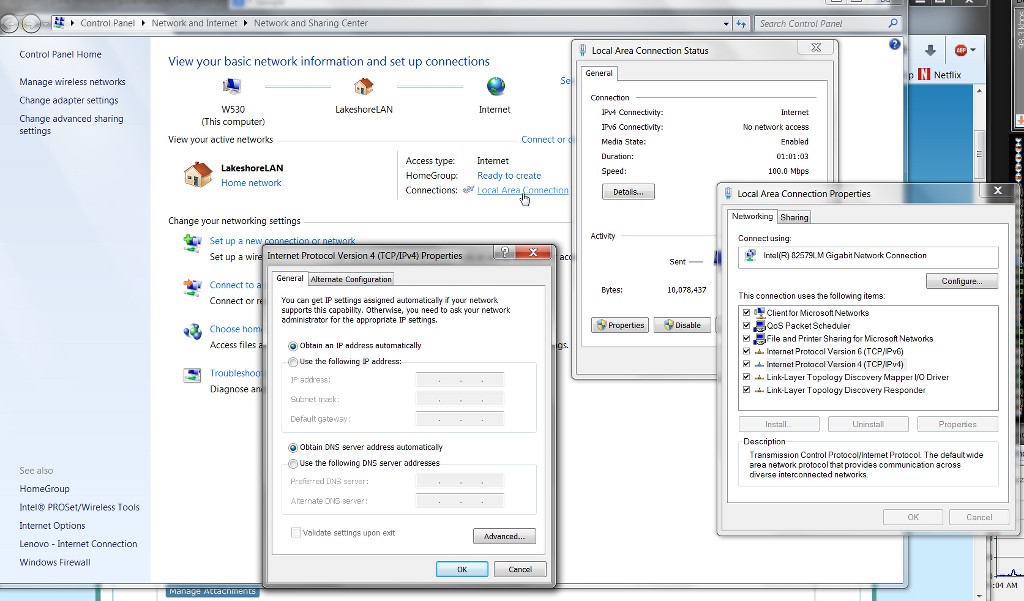
Additionally, if you click on the network icon in the system tray, select "open network and sharing center". Screenshot please.

Then left-click on the "local area connection" link, to get connection status dialog window. Push the Properties button, to get the Properties dialog window. Then select the TCPIP IPv4 item, push the Properties button, to get the IPv4 Properties dialog window. Again, this should show "obtain address automatically". Does it?

ZmpLd5.jpg
 

My Computer My Computer

Computer type
PC/Desktop
Computer Manufacturer/Model Number
Home-built, two systems (1) and (2)
OS
Windows 7 Pro x64 (1), Win7 Pro X64 (2)
CPU
i5-3350p 3.1Ghz/6MB-cache (1); E8400 3.0Ghz/6MB-cache (2)
Motherboard
ASUS P8Z77-V Pro (1); ASUS P5Q3 (2)
Memory
8GB PC3-12800 DDR3 (1); 4GB PC3-10600 DDR3 (2)
Graphics Card(s)
ATI HD7750 (1), (see TV cards); ATI R7 250 (2)
Sound Card
Realtek ALC892 HD Audio (1); Realtek ALC1200 HD Audio (2)
Monitor(s) Displays
Eizo HD2441W LCD, Eizo S2433W (1); Eizo 24" S2433W (2)
Screen Resolution
1920x1200, 1920x1200 (1); 1920x1200 (2)
Hard Drives
(1) 1TB SATA-II (7200RPM), 2x2TB SATA-III (7200RPM), 250GB SATA-III (10000RPM) for OS; 2x2TB external USB 3.0

(2) 320GB SATA-II (7200RPM), 750GB SATA-II (7200RPM), 150GB SATA-II (10000RPM) for OS; 2TB external USB 3.0
PSU
Nesteq ECS-6001 600W (1); Nesteq ECS-5001 500W (2)
Case
Acousti-Case 360 (1) and (2)
Cooling
Noctua NH-U12P SE2 for CPU, 2x120mm case fans (1) and (2)
Keyboard
IBM PS/2 (1) and (2)
Mouse
Logitech MX Revolution wireless (1); Microsoft wired (2)
Internet Speed
100mbps down / 10mbps up
Antivirus
Microsoft Security Essentials; Malwarebyte Anti-Malware Pro
Browser
Firefox
Other Info
Ceton InfiniTV 4-tuner cablecard-enabled TV card as well as Hauppauge HVR-2250 OTA/ATSC 2-tuner TV card in (1), running under Win7 WMC
Thanks for the reply.
Screen shots are going to be a problem to supply, since the computer at issue is unable to connect to anything, even within my home network.
To answer your questions:
1) IPCONFIG shows the following:
Connection-specific DNS Suffix : "my note - it's blank"
Link-Local IPv6 address : "looks to be a MAC address"
Autoconfiguration IPv4 address : 169.254.199.49
Subnet Mask : 255.255.0.0

Tunnel adapter Local Area Connection* 11:
Media State : Media disconnected

Note: The IPv4 address above is not the current IP address of my modem.

2) Since I'm unable to provide a screenshot of the network connections, it says:
Local Area Connection
Unidentified network
Realtek PCIe GBE Family Controller

3) In Properties, yes, "obtain an IP address automatically" is checked, and "obtain DNS server address automatically" is also checked. This is true for both IPv4 and IPv6 properties.


4) Again, in lieu of screenshots, the "network and sharing center" shows "Unidentified network" where I would expect to see my home network. Yes, the properties here show "obtain an IP address automatically"

Additionally, clicking "See full map" yields "Windows cannot create the network map".
 

My Computer My Computer

Computer type
PC/Desktop
OS
Windows 7
To answer your questions:
1) IPCONFIG shows the following:
Connection-specific DNS Suffix : "my note - it's blank"
Link-Local IPv6 address : "looks to be a MAC address"
Autoconfiguration IPv4 address : 169.254.199.49
Subnet Mask : 255.255.0.0

Note: The IPv4 address above is not the current IP address of my modem.
What do you mean by this? Are you saying that this IP address is left over from when the PC was at your mother's house?

Obviously, if this PC is connected to a router then the IP address should be something like 192.168.*.*, or 10.0.0.*, or similar. The above value looks like an actual IP address assigned to a modem by the DHCP server of the ISP, when you're connected directly to the single ethernet port on the modem rather than going through a router.

Also, there's no "default gateway" item shown?


2) Since I'm unable to provide a screenshot of the network connections, it says:
Local Area Connection
Unidentified network
Realtek PCIe GBE Family Controller
What happens if you select this Realtek object, and then right-click and select "disable". The network icon in the system tray should then show a red "X" on it.

Then right-click again, and now select "enable". The red "X" should disappear, and something should try to connect, and then you'll either see an exclamation mark on the network icon or not (if it actually succeeded in connecting).

What happens? And do you still see "unidentified network" in network connections? Or is it now your home LAN's network name?


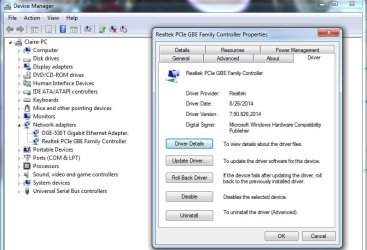
Your Device Manager -> network adapters shows the Realtek PCIe GBE item properly installed with current drivers?

What happens if you try all this but with the add-on PCIe ethernet adapter card you said you added? If you connect an ethernet cable from the card's port to the router (and of course you need to re-boot), what now (i.e. to all the same earlier questions I had)?

You do need to re-boot and restart Windows when making network cable connection changes, just to be sure that's happening. Hot swapping doesn't really work here.
 

My Computer My Computer

Computer type
PC/Desktop
Computer Manufacturer/Model Number
Home-built, two systems (1) and (2)
OS
Windows 7 Pro x64 (1), Win7 Pro X64 (2)
CPU
i5-3350p 3.1Ghz/6MB-cache (1); E8400 3.0Ghz/6MB-cache (2)
Motherboard
ASUS P8Z77-V Pro (1); ASUS P5Q3 (2)
Memory
8GB PC3-12800 DDR3 (1); 4GB PC3-10600 DDR3 (2)
Graphics Card(s)
ATI HD7750 (1), (see TV cards); ATI R7 250 (2)
Sound Card
Realtek ALC892 HD Audio (1); Realtek ALC1200 HD Audio (2)
Monitor(s) Displays
Eizo HD2441W LCD, Eizo S2433W (1); Eizo 24" S2433W (2)
Screen Resolution
1920x1200, 1920x1200 (1); 1920x1200 (2)
Hard Drives
(1) 1TB SATA-II (7200RPM), 2x2TB SATA-III (7200RPM), 250GB SATA-III (10000RPM) for OS; 2x2TB external USB 3.0

(2) 320GB SATA-II (7200RPM), 750GB SATA-II (7200RPM), 150GB SATA-II (10000RPM) for OS; 2TB external USB 3.0
PSU
Nesteq ECS-6001 600W (1); Nesteq ECS-5001 500W (2)
Case
Acousti-Case 360 (1) and (2)
Cooling
Noctua NH-U12P SE2 for CPU, 2x120mm case fans (1) and (2)
Keyboard
IBM PS/2 (1) and (2)
Mouse
Logitech MX Revolution wireless (1); Microsoft wired (2)
Internet Speed
100mbps down / 10mbps up
Antivirus
Microsoft Security Essentials; Malwarebyte Anti-Malware Pro
Browser
Firefox
Other Info
Ceton InfiniTV 4-tuner cablecard-enabled TV card as well as Hauppauge HVR-2250 OTA/ATSC 2-tuner TV card in (1), running under Win7 WMC
Screen shots are going to be a problem to supply, since the computer at issue is unable to connect to anything, even within my home network.

I have been there : screenshots go from one computer to an other one via a USB stick..... :D
 

My Computer My Computer

Computer type
PC/Desktop
OS
win7 x64 ultimate
CPU
3.30 gigahertz Intel Core i5-4590
Motherboard
Asus H97M-PLUS
Memory
8 MB
Graphics Card(s)
PNY Quadro K600
Screen Resolution
1920 x 1080
What do you mean by this? Are you saying that this IP address is left over from when the PC was at your mother's house?
Obviously, if this PC is connected to a router then the IP address should be something like 192.168.*.*, or 10.0.0.*, or similar. The above value looks like an actual IP address assigned to a modem by the DHCP server of the ISP, when you're connected directly to the single ethernet port on the modem rather than going through a router.
Also, there's no "default gateway" item shown?

The computer is connected to a router at my house, as it was also when at my mother's house. The IP address may have been my mother's, but it should be 192.168.*.* at either location.
I've attached the screen shot of the ipconfig.


What happens if you select this Realtek object, and then right-click and select "disable". The network icon in the system tray should then show a red "X" on it.
Then right-click again, and now select "enable". The red "X" should disappear, and something should try to connect, and then you'll either see an exclamation mark on the network icon or not (if it actually succeeded in connecting).
What happens? And do you still see "unidentified network" in network connections? Or is it now your home LAN's network name?
As expected, I get the red "X" on disable and an exclamation mark on reenable. And I still get unidentified network. I've attached a screenshot from before the disable. An interesting point on this is upon reenabling, the network showed as public instead of as Home Network, as shown in the screenshot.
I changed it back to Home network, but it has no impact.

Your Device Manager -> network adapters shows the Realtek PCIe GBE item properly installed with current drivers?
Yes.

What happens if you try all this but with the add-on PCIe ethernet adapter card you said you added? If you connect an ethernet cable from the card's port to the router (and of course you need to re-boot), what now (i.e. to all the same earlier questions I had)?
You do need to re-boot and restart Windows when making network cable connection changes, just to be sure that's happening. Hot swapping doesn't really work here.
This yields the same results across the board.

I very much appreciate the assistance. I'm stumped.
 

Attachments

  • ipconfig.jpg
    ipconfig.jpg
    44.9 KB · Views: 5
  • NetworkInfo1.jpg
    NetworkInfo1.jpg
    91.6 KB · Views: 1
  • NetworkSettings1.jpg
    NetworkSettings1.jpg
    90.6 KB · Views: 0
  • driver1.jpg
    driver1.jpg
    64.2 KB · Views: 0

My Computer My Computer

Computer type
PC/Desktop
OS
Windows 7
Toughie.

For one, that's an unusual IP address to show up as "autoconfiguration IPv4 address". It resolves to

ICANN,
Internet Assigned Numbers Authority
12025 Waterfront Drive
Suite 300
Los Angeles
CA
90292
United States

I've never seen "autoconfiguration IPv4 address" appear from IPCONFIG, so I don't know what that actually is conveying to us.

And of course the absence of any "default gateway" is probably just a side consequence of really not communicating correctly with the router at all, and hence not the modem, and hence not the ISP. This is simply another way of saying "no Internet access".


If your router is 192.168.x.x, can you use your second PC to talk to it and see what "attached devices" shows as?

If the problem PC is physically connected to the router via cable, you'd think the router would have some recognition of its identity and would have wanted to assign an IP address.


One more thing that is at least curious to me. Your Local Area Connection Properties dialog shows some reference to Marvel VLAN. Is this a VPN setup of some type? What is this?

I ask, because I have my own VPN connections to customer machines for my work. Whenever VPN is active there is no access to the true open Internet (e.g. web browsing, email, etc.), because the secure connections facilitated by the VPN tunneling disable all of that non-secured activity. I can only communicate with the remote customer mainframe, but nothing else at all. Can't even talk to other PC's on my home LAN, because TCPIP has been completely disabled. My PC can't even talk to the internal PCIe Ceton TV tuner card inside my machine, because each tuner on the card is communicated with via IP address and TCPIP, which is completely unavailable as long my VPN connection is active. And as soon as I end the VPN connection all normal TCPIP activities are returned to normal life and are once again available.

So... what are those Marvel Link Aggregation Protocol and Marvel VLAN Protocol things I see??
 

My Computer My Computer

Computer type
PC/Desktop
Computer Manufacturer/Model Number
Home-built, two systems (1) and (2)
OS
Windows 7 Pro x64 (1), Win7 Pro X64 (2)
CPU
i5-3350p 3.1Ghz/6MB-cache (1); E8400 3.0Ghz/6MB-cache (2)
Motherboard
ASUS P8Z77-V Pro (1); ASUS P5Q3 (2)
Memory
8GB PC3-12800 DDR3 (1); 4GB PC3-10600 DDR3 (2)
Graphics Card(s)
ATI HD7750 (1), (see TV cards); ATI R7 250 (2)
Sound Card
Realtek ALC892 HD Audio (1); Realtek ALC1200 HD Audio (2)
Monitor(s) Displays
Eizo HD2441W LCD, Eizo S2433W (1); Eizo 24" S2433W (2)
Screen Resolution
1920x1200, 1920x1200 (1); 1920x1200 (2)
Hard Drives
(1) 1TB SATA-II (7200RPM), 2x2TB SATA-III (7200RPM), 250GB SATA-III (10000RPM) for OS; 2x2TB external USB 3.0

(2) 320GB SATA-II (7200RPM), 750GB SATA-II (7200RPM), 150GB SATA-II (10000RPM) for OS; 2TB external USB 3.0
PSU
Nesteq ECS-6001 600W (1); Nesteq ECS-5001 500W (2)
Case
Acousti-Case 360 (1) and (2)
Cooling
Noctua NH-U12P SE2 for CPU, 2x120mm case fans (1) and (2)
Keyboard
IBM PS/2 (1) and (2)
Mouse
Logitech MX Revolution wireless (1); Microsoft wired (2)
Internet Speed
100mbps down / 10mbps up
Antivirus
Microsoft Security Essentials; Malwarebyte Anti-Malware Pro
Browser
Firefox
Other Info
Ceton InfiniTV 4-tuner cablecard-enabled TV card as well as Hauppauge HVR-2250 OTA/ATSC 2-tuner TV card in (1), running under Win7 WMC
To be honest, I'm not sure what the Marvel Link Aggregation Protocol and Marvel VLAN Protocol are. They were added when I updated the driver. That said, they were not there when the issue started. I updated the driver, they appeared upon that update, and I still had the same issue.
I have 13 devices listed by my router, 8 active and 5 inactive. Of the 8 active, 2 are desktop computers. None are the problem computer.
I agree, the fact that the router doesn't see the computer is probably the most baffling aspect of this. I've had computers with issues connecting before, and it was usually some configuration issue or firewall issue, and regardless, they would show up in the routers list of devices. I've never seen this before, and am stumped on why it's happening.
Particularly in light of the fact that it was working for nearly a year without issue until a couple of weeks ago.
 

My Computer My Computer

Computer type
PC/Desktop
OS
Windows 7
Back
Top