local area connection error

subana

New member
Local time
11:59 PM
Messages
12
Sometimes I will be on my computer and all of a sudden it will lose the internet. When this happens I click on diagnose connection issues and each time I get this message:

local area connection doesn't have a valid ip configuration

The 'diagnose connection issues' button will fix it but I want to find out why this keeps happening. Sometimes it will happen once a day or once a week and tonight it has happened 3 times!

I have a Dell Inspiron One 19 (it's an all-in-one computer). I also have a Belkin N300 router but this problem began before I got the router. My ISP is AT&T DSL. And I do have the DSL filter on the phone line.

Thanks.
 

My Computer

Computer Manufacturer/Model Number
dell inspiron one 19
OS
windows 7 (64 bit)
CPU
amd athlon II (dual core)
Motherboard
asus
Memory
6 gb
Graphics Card(s)
1024 mb ati radeon
Sound Card
thx tru studio pc
Monitor(s) Displays
19" lcd
Hard Drives
1000 gb sata hard drive (7200 rpm)
Case
all in one
The next time this occurs, please follow this. You don't need to do step three, but the first two steps provide me with information to assist you.

Oh, and if you could actually provide a second screen shot, of when your internet is working normally (following the first two steps), I would greatly appreciate it. :)
 

My Computer

Computer Manufacturer/Model Number
HP 6000 Pro Micro Tower
OS
W7 Professional x64
CPU
Core 2 Duo 2.93
Memory
2 GB
Graphics Card(s)
ATI Radeon 4695
Monitor(s) Displays
Two HP 17's
Hard Drives
150GB Sata Drive
Case
Tiny. Kinda cute.
Keyboard
HP Supplied. Surprisingly nice.
Mouse
Gateway Mouse from an E2610D
Internet Speed
45 mbps
The next time this occurs, please follow this. You don't need to do step three, but the first two steps provide me with information to assist you.

Oh, and if you could actually provide a second screen shot, of when your internet is working normally (following the first two steps), I would greatly appreciate it. :)

I certainly will! Thank you
 

My Computer

Computer Manufacturer/Model Number
dell inspiron one 19
OS
windows 7 (64 bit)
CPU
amd athlon II (dual core)
Motherboard
asus
Memory
6 gb
Graphics Card(s)
1024 mb ati radeon
Sound Card
thx tru studio pc
Monitor(s) Displays
19" lcd
Hard Drives
1000 gb sata hard drive (7200 rpm)
Case
all in one
it took a few days for this to happen again

The next time this occurs, please follow this. You don't need to do step three, but the first two steps provide me with information to assist you.

Oh, and if you could actually provide a second screen shot, of when your internet is working normally (following the first two steps), I would greatly appreciate it. :)

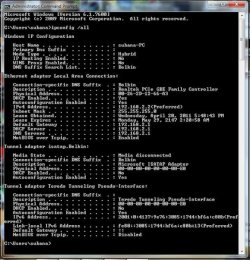
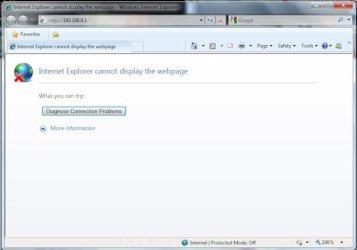
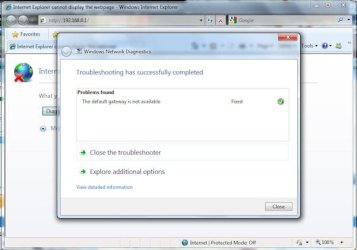
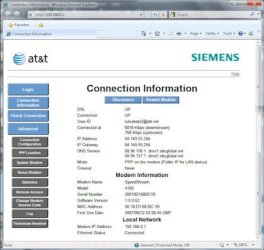
anyway, here is the info you asked for (I hope the size of the files aren't too big.......
 

Attachments

  • cmd.jpg
    cmd.jpg
    73.9 KB · Views: 23
  • diagnose.jpg
    diagnose.jpg
    27.7 KB · Views: 12
  • troubleshooter.jpg
    troubleshooter.jpg
    34.7 KB · Views: 19
  • connected.jpg
    connected.jpg
    32.3 KB · Views: 13

My Computer

Computer Manufacturer/Model Number
dell inspiron one 19
OS
windows 7 (64 bit)
CPU
amd athlon II (dual core)
Motherboard
asus
Memory
6 gb
Graphics Card(s)
1024 mb ati radeon
Sound Card
thx tru studio pc
Monitor(s) Displays
19" lcd
Hard Drives
1000 gb sata hard drive (7200 rpm)
Case
all in one
Hi Subana,

Might be a good idea to update your Network Adapter's driver to the latest one that you may download from the manufacturer's site.

Also, disable the problematic Network Adapter's power saving mode from Device Manager, locate the Network Adapter=> Properties=> Power Management tab. In here, uncheck boxes.

Please give us an update.
 

My Computer

Computer Manufacturer/Model Number
Lenovo Desktop/Samsung Laptop
OS
Win7 & Win8 64bit
CPU
Intel i5
Internet Speed
Charter-20 Mbps
Antivirus
Avast
Browser
FF, IE9 and Chrome
thank you!

Hi Subana,

Might be a good idea to update your Network Adapter's driver to the latest one that you may download from the manufacturer's site.

Also, disable the problematic Network Adapter's power saving mode from Device Manager, locate the Network Adapter=> Properties=> Power Management tab. In here, uncheck boxes.

Please give us an update.

I'll do that. I'll also let you know if it happens again, thanks!
 

My Computer

Computer Manufacturer/Model Number
dell inspiron one 19
OS
windows 7 (64 bit)
CPU
amd athlon II (dual core)
Motherboard
asus
Memory
6 gb
Graphics Card(s)
1024 mb ati radeon
Sound Card
thx tru studio pc
Monitor(s) Displays
19" lcd
Hard Drives
1000 gb sata hard drive (7200 rpm)
Case
all in one
We'll await for the next update.
 

My Computer

Computer Manufacturer/Model Number
Lenovo Desktop/Samsung Laptop
OS
Win7 & Win8 64bit
CPU
Intel i5
Internet Speed
Charter-20 Mbps
Antivirus
Avast
Browser
FF, IE9 and Chrome
Back
Top