Local connection cannot get a valid ip config

richie1913

New member
Local time
12:33 AM
Messages
42
Windows 7 ultimate 64 bit
4gb ddr2
amd athlon x2 6000+
Broadcom netxtreme 57xx gigabite controller (integrated)
Fresh Install today.(no updates or sevice pack on yet)
I have had this problem for about 4 months now,It started when i put my daughters xp laptop into the local connection(I use a 3 dongle to connect to Internet always have and never had any trouble,shared connection).

I got xp working on my network no trouble,the trouble began when i switched off and went to bed.The next morning I replugged my xbox 360 into the local adapter and got the unidentified connection,to cut a long story short I have tried all fixes I could find on the Internet but nothing worked,so I manually assigned a ip address in the ip4 properties and everything i put on local adapter now works but it still says public unidentified network.

So today I formatted and re-installed windows 7 expecting this problem to be fixed but no,it is exactly the same,I am going bald way to quick as It Is,I need some help please.


I have this error in event log every time i restart or disable/enable local connection .event id 1001
Your computer was not assigned an address from the network (by the DHCP Server) for the Network Card with network address 0x001EC93E0D7B. The following error occurred: 0x79. Your computer will continue to try and obtain an address on its own from the network address (DHCP) server.


Also this one :
The Mobile IP Route Manager service failed to start due to the following error:
This driver has been blocked from loading

+ The DHCP allocator has disabled itself on IP address 169.254.149.243, since the IP address is outside the 192.168.137.0/255.255.255.0 scope from which addresses are being allocated to DHCP clients. To enable the DHCP allocator on this IP address, change the scope to include the IP address, or change the IP address to fall within the scope.

+ The DNS proxy agent was unable to allocate 0 bytes of memory. This may indicate that the system is low on virtual memory, or that the memory manager has encountered an internal error.

+Router Advertisement settings have been changed on the network adapter 11. The current M - Managed Address Configuration flag is true and the O - Other Stateful Configuration flag is true. User Action: If you are seeing this event frequently, then it could be due to frequent change in M and O flag settings on the router in the network. Please contact your network administrator to have it resolved.
 
Last edited:

My Computer

Computer Manufacturer/Model Number
Dell Optiplex740 Enhanced
OS
windows7 ultimate 32 bit
CPU
Amd dual core 6000
Motherboard
Nvidia 6150le
Memory
4Gigs
Graphics Card(s)
nvidia 9600+(1gig)
Sound Card
Sigmatel
Monitor(s) Displays
Relisys 1720 19 Inch widescreen LCD
Screen Resolution
1920x
Hard Drives
350gb
PSU
300w
Internet Speed
7.2mb
Call your ISP and have them reset the IP. This is the only fix that I have found. If you can get into the routers web based page, you might be able to reset it from there your self.
 

My Computer

Computer Manufacturer/Model Number
Custom built
OS
Windows 7 Ultimate 64 bit
CPU
AMD Phenom II X4 965 Black Edition
Motherboard
Gigabyte GA-MA790X-DS4
Memory
GSkill 4 X 2 GB PC 8500
Graphics Card(s)
XFX Radeon HD 6790 D
Sound Card
On board RealTek HD
Monitor(s) Displays
Dual monitors:Samsung SyncMaster S20B300
Screen Resolution
1600 X 900
Hard Drives
Seagate Barracuda 1TB (primary)
Seagate Barracuda 2 X 320 GB
PSU
Ultra X4 750 watt fully modular
Case
Thermaltake Overseer RX 1 full tower
Cooling
Core-Contact 92 mm CPU Cooler
Keyboard
Logitech G510
Mouse
Razor DeathAdder
Internet Speed
50/5 Mbps UL/DL
Other Info
Optical: Super Muliti DVD burner w/lightscribe, Hauppauge WinTV HVR-1800
Also when i check the network map this shows up,even though any computers or my xbox360 gets out straight into the local connection on the back of the computer,i am sure the hub never used to be there when it used to work correctly.

tp://s644.photobucket.com/albums/uu169/richie19132009/?action=view&current=hub.png]
th_hub.png
[/URL]
 

My Computer

Computer Manufacturer/Model Number
Dell Optiplex740 Enhanced
OS
windows7 ultimate 32 bit
CPU
Amd dual core 6000
Motherboard
Nvidia 6150le
Memory
4Gigs
Graphics Card(s)
nvidia 9600+(1gig)
Sound Card
Sigmatel
Monitor(s) Displays
Relisys 1720 19 Inch widescreen LCD
Screen Resolution
1920x
Hard Drives
350gb
PSU
300w
Internet Speed
7.2mb
That's too much info. Can you summarise the problem?
 

My Computer

Computer Manufacturer/Model Number
Lenovo ThinkPad T60
OS
Windows 7 Ultimate 64Bit
CPU
GenuineIntel Intel(R) Core(TM) DuoCore T2400 @ 1.83GHz
Motherboard
Intel(R) 82801G (ICH7 Family)
Memory
2.00 GB
Graphics Card(s)
Mobile Intel(R) 945 Express Chipset
Sound Card
SoundMAX Integrated Digital HD Audio
Monitor(s) Displays
ThinkPad Display
Screen Resolution
1400x1050
Hard Drives
100Gb SATA
Keyboard
Standard Keyboard
Mouse
HID-compliant Mouse
Internet Speed
Cable Broadband - 54Mbps
Other Info
Intel(R) PRO/1000 PL Network Connection
11a/b/g Wireless LAN Mini PCI Express Adapter
Sorry,driving me nuts.
It says i am connected to multiple networks,when i am not basically.
Network adapter cannot get a valid ip address either
Fresh Install
 

My Computer

Computer Manufacturer/Model Number
Dell Optiplex740 Enhanced
OS
windows7 ultimate 32 bit
CPU
Amd dual core 6000
Motherboard
Nvidia 6150le
Memory
4Gigs
Graphics Card(s)
nvidia 9600+(1gig)
Sound Card
Sigmatel
Monitor(s) Displays
Relisys 1720 19 Inch widescreen LCD
Screen Resolution
1920x
Hard Drives
350gb
PSU
300w
Internet Speed
7.2mb
How about doing some screenshots of your network connections?
 

My Computer

Computer Manufacturer/Model Number
Lenovo ThinkPad T60
OS
Windows 7 Ultimate 64Bit
CPU
GenuineIntel Intel(R) Core(TM) DuoCore T2400 @ 1.83GHz
Motherboard
Intel(R) 82801G (ICH7 Family)
Memory
2.00 GB
Graphics Card(s)
Mobile Intel(R) 945 Express Chipset
Sound Card
SoundMAX Integrated Digital HD Audio
Monitor(s) Displays
ThinkPad Display
Screen Resolution
1400x1050
Hard Drives
100Gb SATA
Keyboard
Standard Keyboard
Mouse
HID-compliant Mouse
Internet Speed
Cable Broadband - 54Mbps
Other Info
Intel(R) PRO/1000 PL Network Connection
11a/b/g Wireless LAN Mini PCI Express Adapter
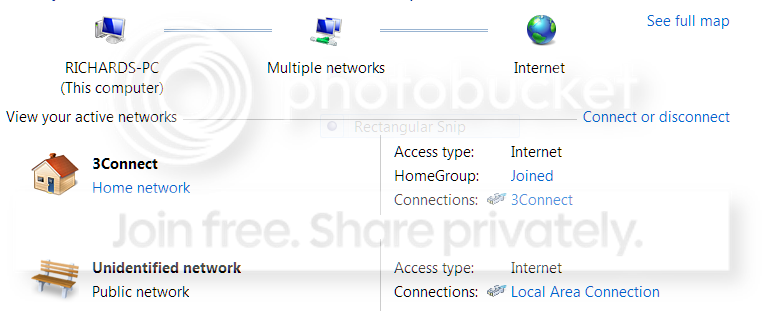
Here is the basic network connections.


3connect.png
 

My Computer

Computer Manufacturer/Model Number
Dell Optiplex740 Enhanced
OS
windows7 ultimate 32 bit
CPU
Amd dual core 6000
Motherboard
Nvidia 6150le
Memory
4Gigs
Graphics Card(s)
nvidia 9600+(1gig)
Sound Card
Sigmatel
Monitor(s) Displays
Relisys 1720 19 Inch widescreen LCD
Screen Resolution
1920x
Hard Drives
350gb
PSU
300w
Internet Speed
7.2mb
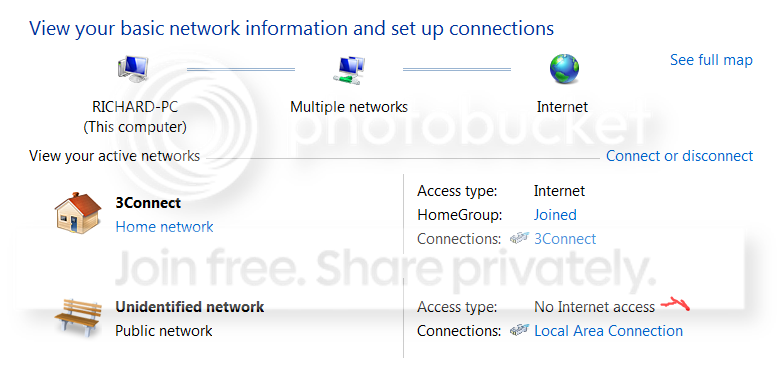
Sometimes looks like this also + I cant get a full map because it is a public profile,sometimes i can change it to work or home and it will stick on the restart,then i get the full map which is the first image i posted.


On this image it says no network/internet acess next to the red mark,but everything still works ok,of course only after manually assigning a ip address in the ip4 properties on my network adapter,if i leave it on auto nothing works apart from 3 connect.

NETWORKCONN.png
 

My Computer

Computer Manufacturer/Model Number
Dell Optiplex740 Enhanced
OS
windows7 ultimate 32 bit
CPU
Amd dual core 6000
Motherboard
Nvidia 6150le
Memory
4Gigs
Graphics Card(s)
nvidia 9600+(1gig)
Sound Card
Sigmatel
Monitor(s) Displays
Relisys 1720 19 Inch widescreen LCD
Screen Resolution
1920x
Hard Drives
350gb
PSU
300w
Internet Speed
7.2mb
That looks like the two connections does not have internet sharing.

Have you tried Bridging the connections?
 

My Computer

Computer Manufacturer/Model Number
Lenovo ThinkPad T60
OS
Windows 7 Ultimate 64Bit
CPU
GenuineIntel Intel(R) Core(TM) DuoCore T2400 @ 1.83GHz
Motherboard
Intel(R) 82801G (ICH7 Family)
Memory
2.00 GB
Graphics Card(s)
Mobile Intel(R) 945 Express Chipset
Sound Card
SoundMAX Integrated Digital HD Audio
Monitor(s) Displays
ThinkPad Display
Screen Resolution
1400x1050
Hard Drives
100Gb SATA
Keyboard
Standard Keyboard
Mouse
HID-compliant Mouse
Internet Speed
Cable Broadband - 54Mbps
Other Info
Intel(R) PRO/1000 PL Network Connection
11a/b/g Wireless LAN Mini PCI Express Adapter
Yes,it says i need to select 2 lan or high speed connections that are not been used by internet sharing or sharing the connection.

Even with 3 connect out of the way/disconnected ,my local adapter still says unidentified,no valid ip address
 

My Computer

Computer Manufacturer/Model Number
Dell Optiplex740 Enhanced
OS
windows7 ultimate 32 bit
CPU
Amd dual core 6000
Motherboard
Nvidia 6150le
Memory
4Gigs
Graphics Card(s)
nvidia 9600+(1gig)
Sound Card
Sigmatel
Monitor(s) Displays
Relisys 1720 19 Inch widescreen LCD
Screen Resolution
1920x
Hard Drives
350gb
PSU
300w
Internet Speed
7.2mb
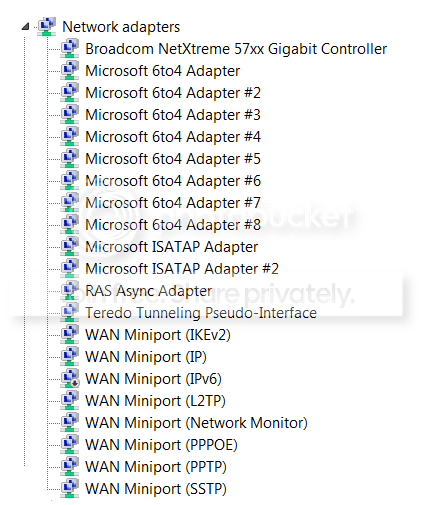
Another thing are all these network connections meant to be there,this is a fresh install and i have no idea what any of them are really.The ipv 6 one that is disabled is now enabled, I was just testing something.


connections.png
 

My Computer

Computer Manufacturer/Model Number
Dell Optiplex740 Enhanced
OS
windows7 ultimate 32 bit
CPU
Amd dual core 6000
Motherboard
Nvidia 6150le
Memory
4Gigs
Graphics Card(s)
nvidia 9600+(1gig)
Sound Card
Sigmatel
Monitor(s) Displays
Relisys 1720 19 Inch widescreen LCD
Screen Resolution
1920x
Hard Drives
350gb
PSU
300w
Internet Speed
7.2mb
Last bit of info,really sorry about the amount of It,going out for a few hours.
Here Is a network report from speccy.First one is just with the local adapter no usb dongle(3 connect),still unidentified network reported.Second one with 3 connect connected(I have not manually assigned a ip address to the network adapter so nothing is working when i did the reports,if i assign a ip address then everything works but still unidentified network/no network access or internet access shown but works fine.Number 3 is the assigned ip address.
Hope someone can figure it out,thanks for helping.

1. Windows 7 laptop connected to local adapter,nothing working,unidentified network/public
WinInet Info
LAN Connection
Local system uses a local area network to connect to the Internet
Local system has RAS to connect to the Internet
Wi-Fi Info
Wi-Fi not enabled
WinHTTPInfo
WinHTTPSessionProxyType No proxy
Session Proxy
Session Proxy Bypass
Connect Retries 5
Connect Timeout 60000
HTTP Version HTTP 1.1
Max Connects Per 1.0 Servers INFINITE
Max Connects Per Servers INFINITE
Max HTTP automatic redirects 10
Max HTTP status continue 10
Send Timeout 30000
IEProxy Auto Detect Yes
IEProxy Auto Config
IEProxy
IEProxy Bypass
Default Proxy Config Access Type No proxy
Default Config Proxy
Default Config Proxy Bypass
Sharing and Discovery
Network Discovery Enabled
File and Printer Sharing Enabled
Media Sharing Disabled
Adapters List
Broadcom NetXtreme 57xx Gigabit Controller
IP Address 169.254.149.243
Subnet mask 255.255.0.0
Gateway server 0.0.0.0
Network Shares


2. Windows 7 laptop connected to local adapter,with 3 connect connected nothing working network wise,unidentified network/public.I can get onto the Internet with my computer.
Network
You are connected to the internet
Connected through 3Connect
IP Address 92.41.3.77
Subnet mask 255.255.255.255
Gateway server 0.0.0.0
Preferred DNS server 217.171.132.1
Alternate DNS server 217.171.135.1
DHCP Disabled
External IP Address 92.41.3.77
Adapter Type PPP
NetBIOS over TCP/IP Unknown
NETBIOS Node Type Hybrid node
Link Speed 0 kbps
Computer Name
NetBIOS Name RICHARD-PC
DNS Name Richard-PC
Domain Name Richard-PC
Remote Desktop
Console
State Active
Domain Richard-PC
WinInet Info
3Connect
Local system has a valid connection to the Internet, but it might or might not be currently connected
Local system uses a modem to connect to the Internet
Local system has RAS to connect to the Internet
Wi-Fi Info
Wi-Fi not enabled
WinHTTPInfo
WinHTTPSessionProxyType No proxy
Session Proxy
Session Proxy Bypass
Connect Retries 5
Connect Timeout 60000
HTTP Version HTTP 1.1
Max Connects Per 1.0 Servers INFINITE
Max Connects Per Servers INFINITE
Max HTTP automatic redirects 10
Max HTTP status continue 10
Send Timeout 30000
IEProxy Auto Detect No
IEProxy Auto Config
IEProxy
IEProxy Bypass
Default Proxy Config Access Type No proxy
Default Config Proxy
Default Config Proxy Bypass
Sharing and Discovery
Network Discovery Enabled
File and Printer Sharing Enabled
Adapters List
3Connect
IP Address 92.41.3.77
Subnet mask 255.255.255.255
Gateway server 0.0.0.0
Broadcom NetXtreme 57xx Gigabit Controller
IP Address 169.254.149.243
Subnet mask 255.255.0.0
Gateway server 0.0.0.0
Network Shares
Users C:\Users


3 Windows 7 laptop connected to local adapter,with 3 connect connected,assigned manual ip address to network adapter on ipv 4 properties but still unidentified network/public but everything now works even though it says no network access Network
You are connected to the internet
Connected through 3Connect
IP Address 92.41.3.77
Subnet mask 255.255.255.255
Gateway server 0.0.0.0
Preferred DNS server
DHCP Disabled
Adapter Type PPP
NetBIOS over TCP/IP Unknown
NETBIOS Node Type Hybrid node
Link Speed 0 kbps
Computer Name
NetBIOS Name RICHARD-PC
DNS Name Richard-PC
Domain Name Richard-PC
Remote Desktop
Console
State Active
Domain Richard-PC
WinInet Info
3Connect
Local system has a valid connection to the Internet, but it might or might not be currently connected
Local system uses a modem to connect to the Internet
Local system has RAS to connect to the Internet
Wi-Fi Info
Wi-Fi not enabled
WinHTTPInfo
WinHTTPSessionProxyType No proxy
Session Proxy
Session Proxy Bypass
Connect Retries 5
Connect Timeout 60000
HTTP Version HTTP 1.1
Max Connects Per 1.0 Servers INFINITE
Max Connects Per Servers INFINITE
Max HTTP automatic redirects 10
Max HTTP status continue 10
Send Timeout 30000
IEProxy Auto Detect No
IEProxy Auto Config
IEProxy
IEProxy Bypass
Default Proxy Config Access Type No proxy
Default Config Proxy
Default Config Proxy Bypass
Sharing and Discovery
Network Discovery Enabled
File and Printer Sharing Enabled
Adapters List
Broadcom NetXtreme 57xx Gigabit Controller
IP Address 192.168.137.1
Subnet mask 255.255.255.0
Gateway server 0.0.0.0
3Connect
IP Address 92.41.3.77
Subnet mask 255.255.255.255
Gateway server 0.0.0.0
Network Shares
Users C:\Users
 

My Computer

Computer Manufacturer/Model Number
Dell Optiplex740 Enhanced
OS
windows7 ultimate 32 bit
CPU
Amd dual core 6000
Motherboard
Nvidia 6150le
Memory
4Gigs
Graphics Card(s)
nvidia 9600+(1gig)
Sound Card
Sigmatel
Monitor(s) Displays
Relisys 1720 19 Inch widescreen LCD
Screen Resolution
1920x
Hard Drives
350gb
PSU
300w
Internet Speed
7.2mb
Even with 3 connect out of the way/disconnected ,my local adapter still says unidentified,no valid ip address

What are you connecting the ethernet cable to, a router? Sorry if you meantioned it before. The unidentifying network is just a connection that does not formally support internet (or is not internet shared).
 

My Computer

Computer Manufacturer/Model Number
Lenovo ThinkPad T60
OS
Windows 7 Ultimate 64Bit
CPU
GenuineIntel Intel(R) Core(TM) DuoCore T2400 @ 1.83GHz
Motherboard
Intel(R) 82801G (ICH7 Family)
Memory
2.00 GB
Graphics Card(s)
Mobile Intel(R) 945 Express Chipset
Sound Card
SoundMAX Integrated Digital HD Audio
Monitor(s) Displays
ThinkPad Display
Screen Resolution
1400x1050
Hard Drives
100Gb SATA
Keyboard
Standard Keyboard
Mouse
HID-compliant Mouse
Internet Speed
Cable Broadband - 54Mbps
Other Info
Intel(R) PRO/1000 PL Network Connection
11a/b/g Wireless LAN Mini PCI Express Adapter
Hello,

What type of AV/Firewall/Security Software do you have installed?

For now, see if resetting the TCP/IP and Winsock helps.
Click on Start=> All Programs => Accessories and right click on Command Prompt, select "Run as Administrator" to open a command prompt.

Reset IPv4 TCP/IP stack to installation defaults. netsh int ipv4 reset reset.log press enter
Reset IPv6 TCP/IP stack to installation defaults. netsh int ipv6 reset reset.log press enter
Reset WINSOCK entries to installation defaults: netsh winsock reset catalog press enter

Restart the computer after and test your connection after and post an update.
 

My Computer

Computer Manufacturer/Model Number
Lenovo Desktop/Samsung Laptop
OS
Win7 & Win8 64bit
CPU
Intel i5
Internet Speed
Charter-20 Mbps
Antivirus
Avast
Browser
FF, IE9 and Chrome
Just done another fresh Install after installing ubuntu to see what that could find.
In network connections under ubuntu there was a loopback interface,my ethernet and a 1 unidentified is this normal or have i got a ghost network adapter bcause windows only finds my ethernet which has no ip address unless i manually assign one but still get unidentified network.

Just Installed windows 7 again I have my daughters windows 7 netbook connected from her local adapter to my local adapter with a standard ethernet cable that i have changed to see if that was the problem.Coming up with unidentified network multiple networks.Not connected to Internet it looks like it does below,as soon as i connect to the internet i get multiple networks,ethernet one unidentified/public 3connect home.

Network screen looks like this

RC-PC unidentified network X internet


When i do connect to the Internet I use a 3 usb dongle and share its connection with my laptops and xbox360 depending on which one i use

I will try the commands and post back soon.

No antivirus Installed using windows firewall for now(fresh Install)

Everything reset apart from ipv6 when i tried that one it came up with There are no user settings to be reset

Just tried to do homegroup but got these erros:

This is on a fresh Install,multiple networks detected and enable ipv6(It Is enabled as far as I can see)

One more thing,when i click on the unidentified network to try to delete or merge it nothing shows up only 3 connect if connected
 
Last edited:

My Computer

Computer Manufacturer/Model Number
Dell Optiplex740 Enhanced
OS
windows7 ultimate 32 bit
CPU
Amd dual core 6000
Motherboard
Nvidia 6150le
Memory
4Gigs
Graphics Card(s)
nvidia 9600+(1gig)
Sound Card
Sigmatel
Monitor(s) Displays
Relisys 1720 19 Inch widescreen LCD
Screen Resolution
1920x
Hard Drives
350gb
PSU
300w
Internet Speed
7.2mb
Thats what i already do to get things working.
I have kind of gave up with this now,I did manage to fix it once everything went back to how it should be.only problem was i didn't do it step by step,i changed lots of things and cannot remember what i did,and anyway as soon as i re-booted it was all broken again,but there is something you maybe be able to answer for me.

Why Is it still all broken after a complete re-install and do you think If I used something like dban to wipe the hard drive that would solve It + If I bought a new network card would that solve the problem.

Thanks for your help
 

My Computer

Computer Manufacturer/Model Number
Dell Optiplex740 Enhanced
OS
windows7 ultimate 32 bit
CPU
Amd dual core 6000
Motherboard
Nvidia 6150le
Memory
4Gigs
Graphics Card(s)
nvidia 9600+(1gig)
Sound Card
Sigmatel
Monitor(s) Displays
Relisys 1720 19 Inch widescreen LCD
Screen Resolution
1920x
Hard Drives
350gb
PSU
300w
Internet Speed
7.2mb
Have you done any modifications from your router? Even to do some experiments? Sorry if this advice has been brought up.

I'll start of with the router's firmware update.
Changing your network security from removing it then apply the lowest security which is WEP, test your connection, if you get a solid connection go for WPA then WPA2.

If none of the above works, perhaps a reset to the factory default then reconfigure from scratch.

Still No-Go then you may try replicating the problematic network adapter.
 

My Computer

Computer Manufacturer/Model Number
Lenovo Desktop/Samsung Laptop
OS
Win7 & Win8 64bit
CPU
Intel i5
Internet Speed
Charter-20 Mbps
Antivirus
Avast
Browser
FF, IE9 and Chrome
I dont think use a router for anything or do I?
usb dongle for the internet
xbox360 or laptop connected via ethernet cable directly from each other.
 

My Computer

Computer Manufacturer/Model Number
Dell Optiplex740 Enhanced
OS
windows7 ultimate 32 bit
CPU
Amd dual core 6000
Motherboard
Nvidia 6150le
Memory
4Gigs
Graphics Card(s)
nvidia 9600+(1gig)
Sound Card
Sigmatel
Monitor(s) Displays
Relisys 1720 19 Inch widescreen LCD
Screen Resolution
1920x
Hard Drives
350gb
PSU
300w
Internet Speed
7.2mb
I dont think use a router for anything or do I?
My own connection is Modem=> Router=> Computers (wired and wireless a USB WiFi adapter can also be utilized.)
If I bought a new network card would that solve the problem.
Oh okay, I thought you are connected to a router or modem bec. of your post quoted above above ....and your USB dongle has the latest driver I suppose?
Then, perhaps you may try replacing it.
I dont think use a router for anything or do I?
usb dongle for the internet
xbox360 or laptop connected via ethernet cable directly from each other.
 

My Computer

Computer Manufacturer/Model Number
Lenovo Desktop/Samsung Laptop
OS
Win7 & Win8 64bit
CPU
Intel i5
Internet Speed
Charter-20 Mbps
Antivirus
Avast
Browser
FF, IE9 and Chrome
Back
Top