Local Group Policy Editor - Open

How to Open Local Group Policy Editor in Windows


   Information
This tutorial will show you how to open the Local Group Policy Editor in Windows 7, Windows 8, and Windows 10.

To search for a group policy or for it's registry key, value, and etc..., see:

Group Policy Search

and

Download Details - Microsoft Download Center - Group Policy Settings Reference for Windows and Windows Server


   Note
The Local Group Policy Editor is a Microsoft Management Console (MMC) snap-in that provides a single user interface through which all the Computer Configuration and User Configuration settings of Local Group Policy objects can be managed for your computer.
  • Computer Configuration
    Administrators can use Computer Configuration to set policies that are applied to computer, regardless of who logs on to the computers. Computer Configuration typically contains sub-items for software settings, Windows settings, and administrative templates.
  • User Configuration
    Administrators can use User Configuration to set policies that apply to users, regardless of which computer they log on to. User Configuration typically contains sub-items for software settings, Windows settings, and administrative templates.
By default the Local Group Policy Editor is applied to all users unless you use a specific users or groups, or all users except administrators Local Group Policy Editor to apply User Configuration policies.


   Warning

  • You will need to be an administrator to open the Local Group Policy Editor.
  • In Windows 7, the Local Group Policy Editor will only be available in the Professional, Ultimate, and Enterprise editions.
  • In Windows RT, 8, and 8.1, the Local Group Policy Editor will only be available in the Pro and Enterprise editions.
  • In Windows 10, the Local Group Policy Editor will only be available in the Pro, Enterprise, and Education editions.
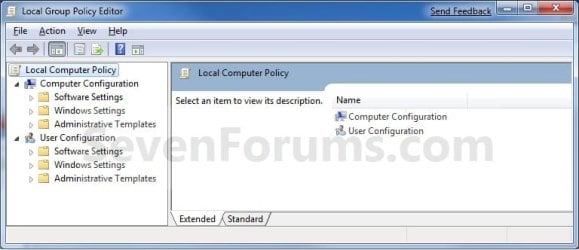
EXAMPLE: Local Group Policy Editor
Group_Policy.jpg
Here's How:
1. Press the Windows + R keys to open the Run dialog, type gpedit.msc, and press Enter. NOTE: This file is located at C:\Windows\System32\gpedit.msc.
2. If prompted by UAC, click on Yes.

3. You can now set and manage the Local Group Policies on your computer to how you want them.
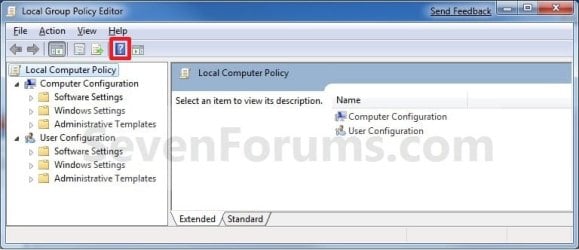
NOTE: For more details and information about how to use the Local Group Policy Editor, click on the blue ? toolbar icon. (See screenshot below)
Group_Policy_Help.jpg
That's it,
Shawn


Last edited:
well, i have the home premium ed, and instead have C:\Windows\System32\compmgmt.msc that opens the same pannel

Hello Isag,

I'm sorry, but the Computer Management (compmgmt.msc) window is not the same as the Local Group Policy Editor window (gpedit.msc). Group Policy is just not available in Home Premium. :(
 

My Computer

Computer type
PC/Desktop
Computer Manufacturer/Model Number
Self built custom
OS
64-bit Windows 11 Pro for Workstations
CPU
Intel i7-8700K OC'd to 5 GHz
Motherboard
ASUS ROG Maximus XI Formula Z390
Memory
64 GB (4x16GB) G.SKILL TridentZ RGB DDR4 3600 MHz
Graphics Card(s)
ASUS ROG-STRIX-GTX1080TI-O11G-GAMING
Sound Card
Integrated
Monitor(s) Displays
2 x Samsung Odyssey G7 27"
Screen Resolution
2560x1440
Hard Drives
1TB Samsung 990 PRO M.2,
4TB Samsung 990 PRO PRO M.2,
TerraMaster F8 SSD Plus NAS
PSU
Seasonic Prime Titanium 850W
Case
Thermaltake Core P3
Cooling
Corsair Hydro H115i
Keyboard
Logitech wireless K800
Mouse
Logitech MX Master 4
Internet Speed
2 Gb/s Download and 100 Mb/s Upload
Antivirus
Malwarebyte Anti-Malware Premium
Browser
Google Chrome
Other Info
Logitech Z625 speaker system,
Logitech BRIO 4K Pro webcam,
HP Color LaserJet Pro MFP M477fdn,
APC SMART-UPS RT 1000 XL - SURT1000XLI,
Galaxy S23 Plus phone
No Group Policy avail., found fix

Hi All...

I was unable, or at least too impatient, to locate/install Group Policy Editor. While there appeared to be a couple copies of gpedit.msc on my machine, none of them worked.

I was however able to rectify the "renaming" issue by completing the following adjustment:

Control Panel> Folder Options> View [tab]>

Checkbox "Always Show Icons, never thumbnails"

This appears to have solved my issue fixing all the mp3 tags and folders I have on my machine, thanks.
 

My Computer

Computer Manufacturer/Model Number
Alienware M17x
OS
Windows 7 Home Premium 64-bit SP1
CPU
Intel Core2 Duo T9600 2.8GHz
Memory
4096MB x2 DDR3 (1333MHz)
Graphics Card(s)
NVIDIA GeForce GTX 260M
Hard Drives
500 GB ST950042 0ASG SCSI Disk Device
Hello EvilSlosh, and welcome to Seven Forums.

I'm sorry, but Group Policy (gpedit.msc) is not included in Windows 7 Home Premium. :(
 

My Computer

Computer type
PC/Desktop
Computer Manufacturer/Model Number
Self built custom
OS
64-bit Windows 11 Pro for Workstations
CPU
Intel i7-8700K OC'd to 5 GHz
Motherboard
ASUS ROG Maximus XI Formula Z390
Memory
64 GB (4x16GB) G.SKILL TridentZ RGB DDR4 3600 MHz
Graphics Card(s)
ASUS ROG-STRIX-GTX1080TI-O11G-GAMING
Sound Card
Integrated
Monitor(s) Displays
2 x Samsung Odyssey G7 27"
Screen Resolution
2560x1440
Hard Drives
1TB Samsung 990 PRO M.2,
4TB Samsung 990 PRO PRO M.2,
TerraMaster F8 SSD Plus NAS
PSU
Seasonic Prime Titanium 850W
Case
Thermaltake Core P3
Cooling
Corsair Hydro H115i
Keyboard
Logitech wireless K800
Mouse
Logitech MX Master 4
Internet Speed
2 Gb/s Download and 100 Mb/s Upload
Antivirus
Malwarebyte Anti-Malware Premium
Browser
Google Chrome
Other Info
Logitech Z625 speaker system,
Logitech BRIO 4K Pro webcam,
HP Color LaserJet Pro MFP M477fdn,
APC SMART-UPS RT 1000 XL - SURT1000XLI,
Galaxy S23 Plus phone
How do users of Windows Home Basic use Group Policy ?

Is there a work around ?
 

My Computer

Computer Manufacturer/Model Number
Dell
OS
Windows 7 Home Basic 64-bit
CPU
Core i3
Memory
3 GB
Hello Harish, and welcome to Seven Forums.

Sorry, but Group Policy is not available in Windows Home Basic, nor can it be added. :(

The only workaround would be to set the group policy settings via regedit instead. To help, the links in the green info box at the top of the tutorial can help show you the registry locations for group policy settings. In addition, there may be a tutorial already written that will have a .reg file already created to make it easy to change as well. If you like, you could look through the tutorial index for any that may be created.

Hope this helps,
Shawn
 

My Computer

Computer type
PC/Desktop
Computer Manufacturer/Model Number
Self built custom
OS
64-bit Windows 11 Pro for Workstations
CPU
Intel i7-8700K OC'd to 5 GHz
Motherboard
ASUS ROG Maximus XI Formula Z390
Memory
64 GB (4x16GB) G.SKILL TridentZ RGB DDR4 3600 MHz
Graphics Card(s)
ASUS ROG-STRIX-GTX1080TI-O11G-GAMING
Sound Card
Integrated
Monitor(s) Displays
2 x Samsung Odyssey G7 27"
Screen Resolution
2560x1440
Hard Drives
1TB Samsung 990 PRO M.2,
4TB Samsung 990 PRO PRO M.2,
TerraMaster F8 SSD Plus NAS
PSU
Seasonic Prime Titanium 850W
Case
Thermaltake Core P3
Cooling
Corsair Hydro H115i
Keyboard
Logitech wireless K800
Mouse
Logitech MX Master 4
Internet Speed
2 Gb/s Download and 100 Mb/s Upload
Antivirus
Malwarebyte Anti-Malware Premium
Browser
Google Chrome
Other Info
Logitech Z625 speaker system,
Logitech BRIO 4K Pro webcam,
HP Color LaserJet Pro MFP M477fdn,
APC SMART-UPS RT 1000 XL - SURT1000XLI,
Galaxy S23 Plus phone
Just reading through posts - What amazing amount of patience you all have!
 

My Computer

Computer type
PC/Desktop
Computer Manufacturer/Model Number
Asus CG1330
OS
Win7 64bit Home Premium
CPU
AMD Phenom(tm) II X6 1035T Processor
Motherboard
ASUSTeK Computer INC. CG1330 Rev X.0x
Memory
8GB Installed - 7.75 Usable
Graphics Card(s)
ATI Radeon HD 5700 Series & ATI Radeon 3000 Graphic
Sound Card
AMD High Definition Audio
Monitor(s) Displays
LG E2350 23" LED & Viewsonic VX2035wm 20"
Screen Resolution
LG ~ 1920x1080 60Hz; Viewsonic 1680x1050 60Hz
Hard Drives
(1) WD - WD1001FALS-99Y6A0 SATA 1TB, (1) 1.5TB USB HDD (2) Seagate 1TB USB HDDs
PSU
450WT
Case
Factory ASUS CG1330
Cooling
Factory ASUS with modified 120MM Inlet 180MM Exhaust
Keyboard
Logitech G15 Gamer
Mouse
Logitech MX500 IE Gamer
Internet Speed
RoadRunner ~ There is never Enough Speed!
Antivirus
Sym Ent 12.x
Browser
IE10 Build 10.0.9200.16635 ~ Ver 10.0.7
Other Info
BIOS Date: 01/28/2011 Ver: 05.01
Is there any chance to add gpedit to context menu? I've tried with the registry file below but I get an error message about invalid Win-32 program.

Code:
Windows Registry Editor Version 5.00

[HKEY_CLASSES_ROOT\Directory\Background\shell\Group Policy]
@="Group Policy"
"HasLUAShield"=""
"Extended"=""
"Position"="Top"

[HKEY_CLASSES_ROOT\Directory\Background\shell\Group Policy\command]
@="gpedit.msc"
 

My Computer

OS
None
Hello bl00keRs,

Sure is. You almost have the .reg file correct. You were just missing the part bolded in red below. :)


Code:
Windows Registry Editor Version 5.00
 
[HKEY_CLASSES_ROOT\Directory\Background\shell\Group Policy]
@="Group Policy"
"HasLUAShield"=""
"Extended"=""
"Position"="Top"
 
[HKEY_CLASSES_ROOT\Directory\Background\shell\Group Policy\command]
@="[B][COLOR=red]mmc.exe /s[/COLOR][/B] gpedit.msc"
 

My Computer

Computer type
PC/Desktop
Computer Manufacturer/Model Number
Self built custom
OS
64-bit Windows 11 Pro for Workstations
CPU
Intel i7-8700K OC'd to 5 GHz
Motherboard
ASUS ROG Maximus XI Formula Z390
Memory
64 GB (4x16GB) G.SKILL TridentZ RGB DDR4 3600 MHz
Graphics Card(s)
ASUS ROG-STRIX-GTX1080TI-O11G-GAMING
Sound Card
Integrated
Monitor(s) Displays
2 x Samsung Odyssey G7 27"
Screen Resolution
2560x1440
Hard Drives
1TB Samsung 990 PRO M.2,
4TB Samsung 990 PRO PRO M.2,
TerraMaster F8 SSD Plus NAS
PSU
Seasonic Prime Titanium 850W
Case
Thermaltake Core P3
Cooling
Corsair Hydro H115i
Keyboard
Logitech wireless K800
Mouse
Logitech MX Master 4
Internet Speed
2 Gb/s Download and 100 Mb/s Upload
Antivirus
Malwarebyte Anti-Malware Premium
Browser
Google Chrome
Other Info
Logitech Z625 speaker system,
Logitech BRIO 4K Pro webcam,
HP Color LaserJet Pro MFP M477fdn,
APC SMART-UPS RT 1000 XL - SURT1000XLI,
Galaxy S23 Plus phone
You're most welcome. :)
 

My Computer

Computer type
PC/Desktop
Computer Manufacturer/Model Number
Self built custom
OS
64-bit Windows 11 Pro for Workstations
CPU
Intel i7-8700K OC'd to 5 GHz
Motherboard
ASUS ROG Maximus XI Formula Z390
Memory
64 GB (4x16GB) G.SKILL TridentZ RGB DDR4 3600 MHz
Graphics Card(s)
ASUS ROG-STRIX-GTX1080TI-O11G-GAMING
Sound Card
Integrated
Monitor(s) Displays
2 x Samsung Odyssey G7 27"
Screen Resolution
2560x1440
Hard Drives
1TB Samsung 990 PRO M.2,
4TB Samsung 990 PRO PRO M.2,
TerraMaster F8 SSD Plus NAS
PSU
Seasonic Prime Titanium 850W
Case
Thermaltake Core P3
Cooling
Corsair Hydro H115i
Keyboard
Logitech wireless K800
Mouse
Logitech MX Master 4
Internet Speed
2 Gb/s Download and 100 Mb/s Upload
Antivirus
Malwarebyte Anti-Malware Premium
Browser
Google Chrome
Other Info
Logitech Z625 speaker system,
Logitech BRIO 4K Pro webcam,
HP Color LaserJet Pro MFP M477fdn,
APC SMART-UPS RT 1000 XL - SURT1000XLI,
Galaxy S23 Plus phone
Help! I think I might have done something bad! :eek:

I uninstalled GWX.exe by manually taking ownership of the file and deleting it, using Windows Explorer (Win7HomePremium) in administrator mode.

Then out of curiosity, I tried to delete the GWX folder and it deleted!? I thought I only took ownership of the GWX.exe file. So I tried to delete the folder below GWX called "he-IL" and it gave the usual message with a "Try Again" button so I hit Cancel.

Then I tried to delete the folder above GWX called GroupPolicyUser and it deleted!!

So I accidentally deleted folder
C:\Windows\SysWOW64\GroupPolicyUsers

I went to the recycle bin and then dragged the folder back to
c:\Windows\SysWOW64\
And it appeared to fail because the folder GroupPolicyUsers did not reappear but there was a folder that was highlighted called $RZPC2NR.

Should I rename it to GroupPolicyUsers ? The properties of the folder was zero bytes (empty folder) as is the folder "GroupPolicy"
 

My Computer

Computer Manufacturer/Model Number
ASUS Notebook K52F
OS
Windows 7 Home Premium 64 bit
CPU
Intel Core i3 2.4Ghz M370
Memory
4GB
Graphics Card(s)
Intel HD Graphics
Sound Card
Conexant SmartAudio HD, Intel Display Audio
Monitor(s) Displays
Generic PnP Monitor
Screen Resolution
1366x768
Hard Drives
ST9500325AS
Cooling
Active
Mouse
Elan PS/2 Port Smart-Pad
Internet Speed
1.5 Mbps wireless connection via relays to town

My Computer

Computer type
PC/Desktop
Computer Manufacturer/Model Number
Self built custom
OS
64-bit Windows 11 Pro for Workstations
CPU
Intel i7-8700K OC'd to 5 GHz
Motherboard
ASUS ROG Maximus XI Formula Z390
Memory
64 GB (4x16GB) G.SKILL TridentZ RGB DDR4 3600 MHz
Graphics Card(s)
ASUS ROG-STRIX-GTX1080TI-O11G-GAMING
Sound Card
Integrated
Monitor(s) Displays
2 x Samsung Odyssey G7 27"
Screen Resolution
2560x1440
Hard Drives
1TB Samsung 990 PRO M.2,
4TB Samsung 990 PRO PRO M.2,
TerraMaster F8 SSD Plus NAS
PSU
Seasonic Prime Titanium 850W
Case
Thermaltake Core P3
Cooling
Corsair Hydro H115i
Keyboard
Logitech wireless K800
Mouse
Logitech MX Master 4
Internet Speed
2 Gb/s Download and 100 Mb/s Upload
Antivirus
Malwarebyte Anti-Malware Premium
Browser
Google Chrome
Other Info
Logitech Z625 speaker system,
Logitech BRIO 4K Pro webcam,
HP Color LaserJet Pro MFP M477fdn,
APC SMART-UPS RT 1000 XL - SURT1000XLI,
Galaxy S23 Plus phone
HalleluYah!! Thank you so much, Brink! Yahweh bless you and keep you!
--Zac
 

My Computer

Computer Manufacturer/Model Number
ASUS Notebook K52F
OS
Windows 7 Home Premium 64 bit
CPU
Intel Core i3 2.4Ghz M370
Memory
4GB
Graphics Card(s)
Intel HD Graphics
Sound Card
Conexant SmartAudio HD, Intel Display Audio
Monitor(s) Displays
Generic PnP Monitor
Screen Resolution
1366x768
Hard Drives
ST9500325AS
Cooling
Active
Mouse
Elan PS/2 Port Smart-Pad
Internet Speed
1.5 Mbps wireless connection via relays to town

My Computer

Computer type
Laptop
Computer Manufacturer/Model Number
Dell Latitude E6540 Laptop
OS
Windows 7 Professional 64bit
CPU
Intel Core i7 4600M @ 2.90GHz
Motherboard
Dell Inc. 0CYT5F (SOCKET 0)
Memory
16.0GB Dual-Channel DDR3 @ 797MHz (11-11-11-28)
Graphics Card(s)
Intel HD Graphics 4600 (Dell) 2048MB ATI AMD Radeon HD 8790M
Sound Card
Realtek High Definition Audio
Monitor(s) Displays
HP ZR30w (2560x1600@60Hz)
Hard Drives
256GB LITEONIT LMT-256M6M-41 mm SATA (SSD)
1TB Samsung SSD 860 EVO mSATA SATA (SSD)
2TB USB 3.0 USB Device
115GB SanDisk Ultra Fit USB
Other Info
Multiple Dell E-Port Plus II Port Replicator/Docking Stations 0Y72NH USB 3.0 + 130W AC Adapters
Hi Crimson,

That works just as well as the searching for the file name. You can do a search with "edit" in the Control Panel to get the same result though.
View attachment 37136
Personally, I just created a shortcut from the C:\Windows\System32\gpedit.msc file, and use it to make it easier to open from.

Hope this helps,
Shawn

My computer shows differently...
 

Attachments

  • no good.JPG
    no good.JPG
    60.8 KB · Views: 441

My Computer

Computer type
PC/Desktop
Computer Manufacturer/Model Number
*MY* production
OS
Microsoft Windows 7 Ultimate 64Bit
CPU
Intel(R) i7(TM) @ 3.50GHz
Motherboard
ASUS P34
Memory
32GB
Graphics Card(s)
NVIDIA GeForce 9500 GT 1GB
Sound Card
some onboard sound
Monitor(s) Displays
Dell E228WFP
Screen Resolution
1680x1050 pixs
Hard Drives
Western Digital Caviar 2TB

Western Digital Passport 320GB
(portable drive)

OCZ Vector 256GB SSD
PSU
Antec 750W
Case
Coolermaster Storm Scout
Cooling
ZALMAN 120mm 2 Ball Cooling Fan x 4
Keyboard
A4Tech
Mouse
A4Tech NB-75D (Battery Free)
Internet Speed
Comcast Cable Internet
Browser
Google Chrome
Other Info
Second machine I built
You might see if searching for "group" instead may have it show in the Control Panel instead.

Either way, you can type gpedit.msc in the Run (Win+R) dialog to open it. :)
 

My Computer

Computer type
PC/Desktop
Computer Manufacturer/Model Number
Self built custom
OS
64-bit Windows 11 Pro for Workstations
CPU
Intel i7-8700K OC'd to 5 GHz
Motherboard
ASUS ROG Maximus XI Formula Z390
Memory
64 GB (4x16GB) G.SKILL TridentZ RGB DDR4 3600 MHz
Graphics Card(s)
ASUS ROG-STRIX-GTX1080TI-O11G-GAMING
Sound Card
Integrated
Monitor(s) Displays
2 x Samsung Odyssey G7 27"
Screen Resolution
2560x1440
Hard Drives
1TB Samsung 990 PRO M.2,
4TB Samsung 990 PRO PRO M.2,
TerraMaster F8 SSD Plus NAS
PSU
Seasonic Prime Titanium 850W
Case
Thermaltake Core P3
Cooling
Corsair Hydro H115i
Keyboard
Logitech wireless K800
Mouse
Logitech MX Master 4
Internet Speed
2 Gb/s Download and 100 Mb/s Upload
Antivirus
Malwarebyte Anti-Malware Premium
Browser
Google Chrome
Other Info
Logitech Z625 speaker system,
Logitech BRIO 4K Pro webcam,
HP Color LaserJet Pro MFP M477fdn,
APC SMART-UPS RT 1000 XL - SURT1000XLI,
Galaxy S23 Plus phone
You might see if searching for "group" instead may have it show in the Control Panel instead.

Either way, you can type gpedit.msc in the Run (Win+R) dialog to open it. :)

Nope.. can't open neither...
 

Attachments

  • NOPE....JPG
    NOPE....JPG
    62 KB · Views: 199

My Computer

Computer type
PC/Desktop
Computer Manufacturer/Model Number
*MY* production
OS
Microsoft Windows 7 Ultimate 64Bit
CPU
Intel(R) i7(TM) @ 3.50GHz
Motherboard
ASUS P34
Memory
32GB
Graphics Card(s)
NVIDIA GeForce 9500 GT 1GB
Sound Card
some onboard sound
Monitor(s) Displays
Dell E228WFP
Screen Resolution
1680x1050 pixs
Hard Drives
Western Digital Caviar 2TB

Western Digital Passport 320GB
(portable drive)

OCZ Vector 256GB SSD
PSU
Antec 750W
Case
Coolermaster Storm Scout
Cooling
ZALMAN 120mm 2 Ball Cooling Fan x 4
Keyboard
A4Tech
Mouse
A4Tech NB-75D (Battery Free)
Internet Speed
Comcast Cable Internet
Browser
Google Chrome
Other Info
Second machine I built
What edition of Windows 7 do you have installed?
 

My Computer

Computer type
PC/Desktop
Computer Manufacturer/Model Number
Self built custom
OS
64-bit Windows 11 Pro for Workstations
CPU
Intel i7-8700K OC'd to 5 GHz
Motherboard
ASUS ROG Maximus XI Formula Z390
Memory
64 GB (4x16GB) G.SKILL TridentZ RGB DDR4 3600 MHz
Graphics Card(s)
ASUS ROG-STRIX-GTX1080TI-O11G-GAMING
Sound Card
Integrated
Monitor(s) Displays
2 x Samsung Odyssey G7 27"
Screen Resolution
2560x1440
Hard Drives
1TB Samsung 990 PRO M.2,
4TB Samsung 990 PRO PRO M.2,
TerraMaster F8 SSD Plus NAS
PSU
Seasonic Prime Titanium 850W
Case
Thermaltake Core P3
Cooling
Corsair Hydro H115i
Keyboard
Logitech wireless K800
Mouse
Logitech MX Master 4
Internet Speed
2 Gb/s Download and 100 Mb/s Upload
Antivirus
Malwarebyte Anti-Malware Premium
Browser
Google Chrome
Other Info
Logitech Z625 speaker system,
Logitech BRIO 4K Pro webcam,
HP Color LaserJet Pro MFP M477fdn,
APC SMART-UPS RT 1000 XL - SURT1000XLI,
Galaxy S23 Plus phone

Attachments

  • WinVer.JPG
    WinVer.JPG
    29.6 KB · Views: 1,111

My Computer

Computer type
PC/Desktop
Computer Manufacturer/Model Number
*MY* production
OS
Microsoft Windows 7 Ultimate 64Bit
CPU
Intel(R) i7(TM) @ 3.50GHz
Motherboard
ASUS P34
Memory
32GB
Graphics Card(s)
NVIDIA GeForce 9500 GT 1GB
Sound Card
some onboard sound
Monitor(s) Displays
Dell E228WFP
Screen Resolution
1680x1050 pixs
Hard Drives
Western Digital Caviar 2TB

Western Digital Passport 320GB
(portable drive)

OCZ Vector 256GB SSD
PSU
Antec 750W
Case
Coolermaster Storm Scout
Cooling
ZALMAN 120mm 2 Ball Cooling Fan x 4
Keyboard
A4Tech
Mouse
A4Tech NB-75D (Battery Free)
Internet Speed
Comcast Cable Internet
Browser
Google Chrome
Other Info
Second machine I built
Ah, that's why then.

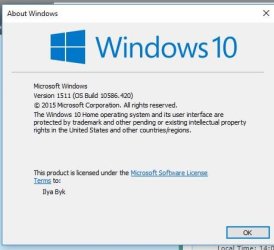
Local Group Policy Editor is not included in the Windows 10 Home edition. It's only in the Pro, Enterprise, or Education editions instead.
 

My Computer

Computer type
PC/Desktop
Computer Manufacturer/Model Number
Self built custom
OS
64-bit Windows 11 Pro for Workstations
CPU
Intel i7-8700K OC'd to 5 GHz
Motherboard
ASUS ROG Maximus XI Formula Z390
Memory
64 GB (4x16GB) G.SKILL TridentZ RGB DDR4 3600 MHz
Graphics Card(s)
ASUS ROG-STRIX-GTX1080TI-O11G-GAMING
Sound Card
Integrated
Monitor(s) Displays
2 x Samsung Odyssey G7 27"
Screen Resolution
2560x1440
Hard Drives
1TB Samsung 990 PRO M.2,
4TB Samsung 990 PRO PRO M.2,
TerraMaster F8 SSD Plus NAS
PSU
Seasonic Prime Titanium 850W
Case
Thermaltake Core P3
Cooling
Corsair Hydro H115i
Keyboard
Logitech wireless K800
Mouse
Logitech MX Master 4
Internet Speed
2 Gb/s Download and 100 Mb/s Upload
Antivirus
Malwarebyte Anti-Malware Premium
Browser
Google Chrome
Other Info
Logitech Z625 speaker system,
Logitech BRIO 4K Pro webcam,
HP Color LaserJet Pro MFP M477fdn,
APC SMART-UPS RT 1000 XL - SURT1000XLI,
Galaxy S23 Plus phone
Back
Top