
I recovered from a non-boot Win7 using the Command prompt, and this was my boot file listing after I was successful in booting back into my Dell latitude :
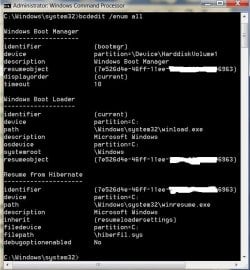
Everything ran fine, and then I saw the following when I re-visited the X:\Sources> recovery media :
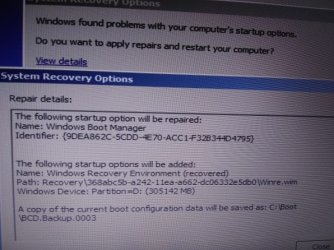
...suggesting that I needed further repair/recovery.
I fussed about it for awhile, but then agreed to the repair which re-wrote the boot files as this :
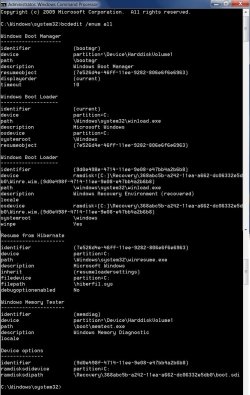
This looks alot more normal to some of the examples seen on the internet, but most of those other's have a value for LOCALE (usually "en-US"), and DEBUGOPTIONENABLED as "Yes". I am guessing that LOCALE assigns the keyboard preferences, and DEBUG is something I may have trouble understanding enough to utilize fully.
Do these two listed items make for much of a difference in functioning - and if so - is there a procedure to set them specifically as have been seen otherwise ?
Everything ran fine, and then I saw the following when I re-visited the X:\Sources> recovery media :
...suggesting that I needed further repair/recovery.
I fussed about it for awhile, but then agreed to the repair which re-wrote the boot files as this :
This looks alot more normal to some of the examples seen on the internet, but most of those other's have a value for LOCALE (usually "en-US"), and DEBUGOPTIONENABLED as "Yes". I am guessing that LOCALE assigns the keyboard preferences, and DEBUG is something I may have trouble understanding enough to utilize fully.
Do these two listed items make for much of a difference in functioning - and if so - is there a procedure to set them specifically as have been seen otherwise ?
My Computers
-
At a glance
Windows 7 professional x64 bitDual core4 Gb- Computer type
- Laptop
- Computer Manufacturer/Model Number
- Dell Latitude E6400
- OS
- Windows 7 professional x64 bit
- CPU
- Dual core
- Memory
- 4 Gb
- Hard Drives
- WD Scopio black 320 Gb
- Antivirus
- none
- Browser
- Chrome; Edge; Fox
-
- Computer type
- PC/Desktop