Locating system restore points

Involute

New member
Local time
4:27 AM
Messages
55
I use task scheduler to create a system restore point at startup and at midnight (Win7 x64). When I view the history of this task within the task scheduler, it shows it doing what it's supposed to do, with both task and action completing. When I try to actually restore from a a restore point, however, the wizard only shows points created in association with s/w installs. How come the scheduled ones aren't showing up? How do I restore from one of them? Thanks.
 

My Computer

Computer Manufacturer/Model Number
Titanus
OS
Windows 7 Pro x64
CPU
Intel i7-970
Motherboard
Asus P-6X58D-E
Memory
12GB
Graphics Card(s)
Nvidia Quadro 4000
Sound Card
Creative SB X-Fi
Monitor(s) Displays
Samsung SyncMaster 204T
Hard Drives
Corsair Nova V128 128GB SSD; WD Velociraptor 600GB (x2 configured as RAID 1)
Case
Tuniq 3
Cooling
ECO Advanced Liquid Cooling
Internet Speed
Cable
Scheduled Task run as?

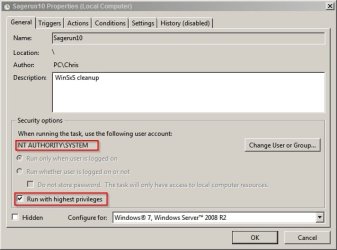
Did you schedule the task to run as NTAUTHORITY/SYSTEM with the highest privileges?

Sagerun10 Properties (Local Computer).jpg

Personally I keep system restore disabled and make regular system image backups instead!

Suggestion: You might consider installing System Restore Manager as it makes selecting restore points to either restore to or delete really easy as well as setting the frequency that windows creates restore points. You can set it to twice per day if you want.

Or if you can remember to create a system restore point manually on demand then this will do it for you really fast:

Quick Restore Point Maker

You just need to create an elevated shortcut to the executable and pin it to your start menu. Restore points whenever you like with just a click.
 

My Computer

Computer type
Laptop
Computer Manufacturer/Model Number
ASUS
OS
Microsoft Windows 7 Home Premium 64-bit 7601 Multiprocessor Free Service Pack 1
CPU
AMD C-60 APU with Radeon(tm) HD Graphics
Motherboard
ASUSTeK COMPUTER INC. X501U
Memory
4.00 GB
Graphics Card(s)
AMD Radeon HD 6290 Graphics
Sound Card
(1) AMD High Definition Audio Device (2) Realtek High Defi
Screen Resolution
1366 x 768 x 32 bits (4294967296 colors) @ 60 Hz
Hard Drives
Hitachi HTS545050A7E380 SATA Disk Device
Antivirus
Comodo CIS & FW, SecureAplus App Whitelisting, Threatfire
Browser
Cyberfox 64bit, Opera 64bit, Airfox
Other Info
Spy-The-Spy, HitmanPro.Alert, Norton Connect Safe, MJRegWatcher, BitDefender TrafficLight, Voodoo Shield, Zemana AntiMalware
Thanks for the pointers, Callender. I tried Quick Restore Point Maker and it works well for spur-of-the-moment things. For my scheduled restore points, it seems like Win7 should be able to do what I need already without having to install something like System Restore Manager, so I'd like to try to get that working first. In fact, as I said, it seems like it's doing it, just maybe putting the restore points somewhere where the wizard isn't looking (just a guess).

My security options were just SYSTEM with "Run with highest priority" unchecked. I couldn't figure out how to change SYSTEM to NT AUTHORITY\SYSTEM, but I checked "Run with highest priority" and ran the task, but it still didn't show up in the wizard.
 

My Computer

Computer Manufacturer/Model Number
Titanus
OS
Windows 7 Pro x64
CPU
Intel i7-970
Motherboard
Asus P-6X58D-E
Memory
12GB
Graphics Card(s)
Nvidia Quadro 4000
Sound Card
Creative SB X-Fi
Monitor(s) Displays
Samsung SyncMaster 204T
Hard Drives
Corsair Nova V128 128GB SSD; WD Velociraptor 600GB (x2 configured as RAID 1)
Case
Tuniq 3
Cooling
ECO Advanced Liquid Cooling
Internet Speed
Cable
System Restore issues

If I understand correctly you've set up a scheduled task to create system restore points but you don't see them. Other than that System Restore works correctly.

If that's not the case see the tutorial on fixing System Restore here:

http://www.sevenforums.com/tutorials/57746-system-restore-general-troubleshooting-fix-issues.html

System Restore is disabled on my machine but if you go to select a restore point there should be an option to "show more restore points". If that doesn't help, did you create a new task or edit the existing system restore task?

Assuming that you edited the existing task - there's actually no need to change settings to NTAUTHORITY/SYSTEM. I read your post as if you'd created a task from scratch.

Does the History tab show that it runs when you've set it to run?

Does the Settings tab have "Run scheduled task as soon as possible after a scheduled start is missed"?

Do you see any other restore points at all that have been created?
 

My Computer

Computer type
Laptop
Computer Manufacturer/Model Number
ASUS
OS
Microsoft Windows 7 Home Premium 64-bit 7601 Multiprocessor Free Service Pack 1
CPU
AMD C-60 APU with Radeon(tm) HD Graphics
Motherboard
ASUSTeK COMPUTER INC. X501U
Memory
4.00 GB
Graphics Card(s)
AMD Radeon HD 6290 Graphics
Sound Card
(1) AMD High Definition Audio Device (2) Realtek High Defi
Screen Resolution
1366 x 768 x 32 bits (4294967296 colors) @ 60 Hz
Hard Drives
Hitachi HTS545050A7E380 SATA Disk Device
Antivirus
Comodo CIS & FW, SecureAplus App Whitelisting, Threatfire
Browser
Cyberfox 64bit, Opera 64bit, Airfox
Other Info
Spy-The-Spy, HitmanPro.Alert, Norton Connect Safe, MJRegWatcher, BitDefender TrafficLight, Voodoo Shield, Zemana AntiMalware
> If I understand correctly you've set up a scheduled task to create system restore points but you don't see them.

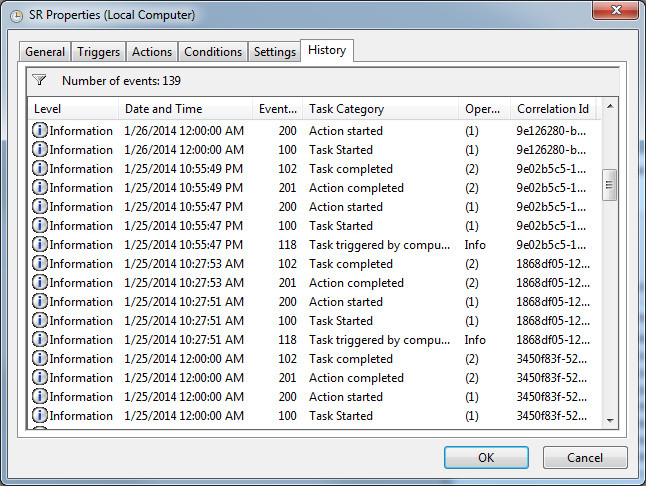
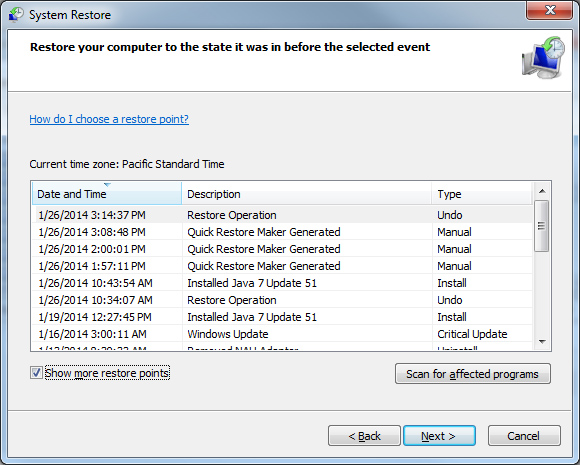
I see the task ran successfully in the History tab of the task scheduler; they've run when they're supposed to. I don't see them when running the System Restore wizard, even when I click on "show more restore points."

The image below shows the History tab from the Task Scheduler and indicates the task ran successfully several times on 1/25 (and, if you were able to scroll down, on 1/24, 1/23, etc.).

S4ILvlH.jpg


This image of the wizard shows no restore points were created between 1/26 and 1/19:

LWKAhQJ.jpg


> did you create a new task or edit the existing system restore task?

I edited the existing one.

> Does the Settings tab have "Run scheduled task as soon as possible after a scheduled start is missed"?

Yes.

> Do you see any other restore points at all that have been created?
 

My Computer

Computer Manufacturer/Model Number
Titanus
OS
Windows 7 Pro x64
CPU
Intel i7-970
Motherboard
Asus P-6X58D-E
Memory
12GB
Graphics Card(s)
Nvidia Quadro 4000
Sound Card
Creative SB X-Fi
Monitor(s) Displays
Samsung SyncMaster 204T
Hard Drives
Corsair Nova V128 128GB SSD; WD Velociraptor 600GB (x2 configured as RAID 1)
Case
Tuniq 3
Cooling
ECO Advanced Liquid Cooling
Internet Speed
Cable
Puzzled

Well I must admit to being puzzled by this. However it does seem that you have a fair number of old system restore points that were created. As far as I know - any restore points that are more than a few days old are likely to fail anyway so you could delete all of the older ones and free up some space.

If you click "Start" then right click "My Computer" then choose "Properties" - on the Advanced Tab check that System Protection is on for all drives and also check the amount of space that's reserved for system restore points. Increase it if needed.

It might be worth noting that the task needs to be set to delayed so that it doesn't run immediately on boot and that it won't be able to create a restore point unless your machine is left idle (i.e. not being used by you). I guess that means that task scheduler will show that the task has run even though a system restore point wasn't actually created.

So the test needed is to power up your machine then leave it alone for a while to see if restore points get created via the scheduled task when you're not touching the machine.
 

My Computer

Computer type
Laptop
Computer Manufacturer/Model Number
ASUS
OS
Microsoft Windows 7 Home Premium 64-bit 7601 Multiprocessor Free Service Pack 1
CPU
AMD C-60 APU with Radeon(tm) HD Graphics
Motherboard
ASUSTeK COMPUTER INC. X501U
Memory
4.00 GB
Graphics Card(s)
AMD Radeon HD 6290 Graphics
Sound Card
(1) AMD High Definition Audio Device (2) Realtek High Defi
Screen Resolution
1366 x 768 x 32 bits (4294967296 colors) @ 60 Hz
Hard Drives
Hitachi HTS545050A7E380 SATA Disk Device
Antivirus
Comodo CIS & FW, SecureAplus App Whitelisting, Threatfire
Browser
Cyberfox 64bit, Opera 64bit, Airfox
Other Info
Spy-The-Spy, HitmanPro.Alert, Norton Connect Safe, MJRegWatcher, BitDefender TrafficLight, Voodoo Shield, Zemana AntiMalware
Back
Top