Lock Computer With USB Drive

turbomalum

New member
Local time
4:18 PM
Messages
4
First off, I am glad to finally join the forums. I have been reading/learning from this site for a while but I now have a question that needs help.

I know in older versions of Windows you can copy the boot.ini (as well as other files) to a USB Drive which does not allow the computer to boot without the USB Drive in the computer. From a little research it appears that W7 does not have a boot.ini file.

Is there anyway I would be able to perform the task of requiring my USB Drive to be in place to boot my laptop? If there is no way to do this simply with files could someone recommend a program which will do the same?

Thanks
-TurboMaLuM
 

My Computer

OS
Windows 7 x64
Hello Turbomalum, and welcome to Seven Forums.

If you have Windows 7 Ultimate or Enterprise, then you can use BitLocker with a USB flash drive to only be able to startup your computer with the USB flash drive connected.

Hope this helps,
Shawn
 

My Computer

Computer type
PC/Desktop
Computer Manufacturer/Model Number
Self built custom
OS
64-bit Windows 11 Pro for Workstations
CPU
Intel i7-8700K OC'd to 5 GHz
Motherboard
ASUS ROG Maximus XI Formula Z390
Memory
64 GB (4x16GB) G.SKILL TridentZ RGB DDR4 3600 MHz
Graphics Card(s)
ASUS ROG-STRIX-GTX1080TI-O11G-GAMING
Sound Card
Integrated
Monitor(s) Displays
2 x Samsung Odyssey G7 27"
Screen Resolution
2560x1440
Hard Drives
1TB Samsung 990 PRO M.2,
4TB Samsung 990 PRO PRO M.2,
TerraMaster F8 SSD Plus NAS
PSU
Seasonic Prime Titanium 850W
Case
Thermaltake Core P3
Cooling
Corsair Hydro H115i
Keyboard
Logitech wireless K800
Mouse
Logitech MX Master 4
Internet Speed
2 Gb/s Download and 100 Mb/s Upload
Antivirus
Malwarebyte Anti-Malware Premium
Browser
Google Chrome
Other Info
Logitech Z625 speaker system,
Logitech BRIO 4K Pro webcam,
HP Color LaserJet Pro MFP M477fdn,
APC SMART-UPS RT 1000 XL - SURT1000XLI,
Galaxy S23 Plus phone
hi Brink! :cool:

can you elaborate on the procedure for doing this?
 

My Computer

Computer Manufacturer/Model Number
homebuilt
OS
WIN7 Ultimate, 64bit OEM
CPU
i5-750 quad core
Motherboard
MSI P55-GD55 (MS-7589) (CPU1)
Memory
8GB dual channel DDR3 @ 668MHZ (9-9-9-24) 4 x 2GB each
Graphics Card(s)
ATI Radeon HD5750
Sound Card
onboard
Monitor(s) Displays
LG widescreen LCD 1920 x 1080 FLATRON
Hard Drives
2 x WD 500 GB SATA drives, room for 8 more in the drive bays. 1 WD USB 320 GB used for backup the system.
PSU
SEASONIC M-12D 850 watt sli ready
Case
ANTEC DARK FLEET (biggest one they make)
Cooling
case: 6 x 120mm fans 2 x 140mm fans, CPU: Corsair H50
Keyboard
generic
Mouse
microsoft wireless
Internet Speed
bloody slow thanks to Canadian ISP's throttling our net
Other Info
soon to have a ZALMAN RESERATOR just for the GPU...also dedicated 500 GB of virtual memory for paging file,caching
never mind, i COMPLETELY missed the link you had in your post......DOH! :o
 

My Computer

Computer Manufacturer/Model Number
homebuilt
OS
WIN7 Ultimate, 64bit OEM
CPU
i5-750 quad core
Motherboard
MSI P55-GD55 (MS-7589) (CPU1)
Memory
8GB dual channel DDR3 @ 668MHZ (9-9-9-24) 4 x 2GB each
Graphics Card(s)
ATI Radeon HD5750
Sound Card
onboard
Monitor(s) Displays
LG widescreen LCD 1920 x 1080 FLATRON
Hard Drives
2 x WD 500 GB SATA drives, room for 8 more in the drive bays. 1 WD USB 320 GB used for backup the system.
PSU
SEASONIC M-12D 850 watt sli ready
Case
ANTEC DARK FLEET (biggest one they make)
Cooling
case: 6 x 120mm fans 2 x 140mm fans, CPU: Corsair H50
Keyboard
generic
Mouse
microsoft wireless
Internet Speed
bloody slow thanks to Canadian ISP's throttling our net
Other Info
soon to have a ZALMAN RESERATOR just for the GPU...also dedicated 500 GB of virtual memory for paging file,caching
LOL, no problem Bushman. :)
 

My Computer

Computer type
PC/Desktop
Computer Manufacturer/Model Number
Self built custom
OS
64-bit Windows 11 Pro for Workstations
CPU
Intel i7-8700K OC'd to 5 GHz
Motherboard
ASUS ROG Maximus XI Formula Z390
Memory
64 GB (4x16GB) G.SKILL TridentZ RGB DDR4 3600 MHz
Graphics Card(s)
ASUS ROG-STRIX-GTX1080TI-O11G-GAMING
Sound Card
Integrated
Monitor(s) Displays
2 x Samsung Odyssey G7 27"
Screen Resolution
2560x1440
Hard Drives
1TB Samsung 990 PRO M.2,
4TB Samsung 990 PRO PRO M.2,
TerraMaster F8 SSD Plus NAS
PSU
Seasonic Prime Titanium 850W
Case
Thermaltake Core P3
Cooling
Corsair Hydro H115i
Keyboard
Logitech wireless K800
Mouse
Logitech MX Master 4
Internet Speed
2 Gb/s Download and 100 Mb/s Upload
Antivirus
Malwarebyte Anti-Malware Premium
Browser
Google Chrome
Other Info
Logitech Z625 speaker system,
Logitech BRIO 4K Pro webcam,
HP Color LaserJet Pro MFP M477fdn,
APC SMART-UPS RT 1000 XL - SURT1000XLI,
Galaxy S23 Plus phone
all righty, followed Brinks tutorial, zero issues, easy to do!

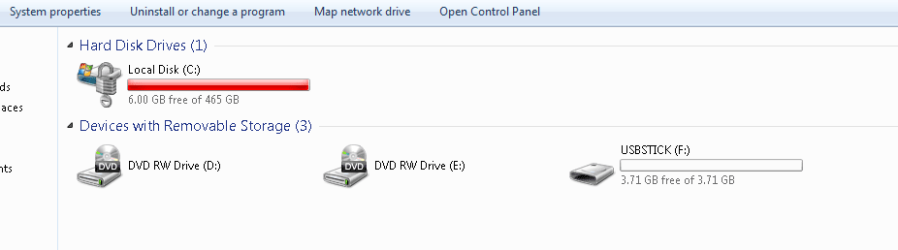
however, right now the drive is encrypting, and it shows a red bar and only 6GB free (out of 500GB. Previously i had 275Gb free prior to setting up Bitlocker with USB lock.

thoughts on the red bar and only 6GB free?

screen shot coming
 

Attachments

  • capture1system.PNG
    capture1system.PNG
    6.9 KB · Views: 34

My Computer

Computer Manufacturer/Model Number
homebuilt
OS
WIN7 Ultimate, 64bit OEM
CPU
i5-750 quad core
Motherboard
MSI P55-GD55 (MS-7589) (CPU1)
Memory
8GB dual channel DDR3 @ 668MHZ (9-9-9-24) 4 x 2GB each
Graphics Card(s)
ATI Radeon HD5750
Sound Card
onboard
Monitor(s) Displays
LG widescreen LCD 1920 x 1080 FLATRON
Hard Drives
2 x WD 500 GB SATA drives, room for 8 more in the drive bays. 1 WD USB 320 GB used for backup the system.
PSU
SEASONIC M-12D 850 watt sli ready
Case
ANTEC DARK FLEET (biggest one they make)
Cooling
case: 6 x 120mm fans 2 x 140mm fans, CPU: Corsair H50
Keyboard
generic
Mouse
microsoft wireless
Internet Speed
bloody slow thanks to Canadian ISP's throttling our net
Other Info
soon to have a ZALMAN RESERATOR just for the GPU...also dedicated 500 GB of virtual memory for paging file,caching
Hello Bushman,

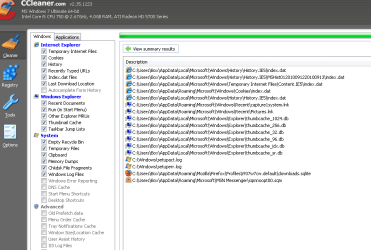
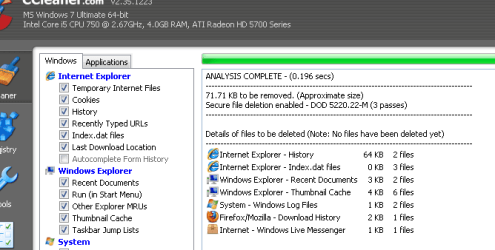
Not sure why your hard drive filled up like that. You might run Disk Cleanup, or the free program CCleaner, to see what they come up with.
 

My Computer

Computer type
PC/Desktop
Computer Manufacturer/Model Number
Self built custom
OS
64-bit Windows 11 Pro for Workstations
CPU
Intel i7-8700K OC'd to 5 GHz
Motherboard
ASUS ROG Maximus XI Formula Z390
Memory
64 GB (4x16GB) G.SKILL TridentZ RGB DDR4 3600 MHz
Graphics Card(s)
ASUS ROG-STRIX-GTX1080TI-O11G-GAMING
Sound Card
Integrated
Monitor(s) Displays
2 x Samsung Odyssey G7 27"
Screen Resolution
2560x1440
Hard Drives
1TB Samsung 990 PRO M.2,
4TB Samsung 990 PRO PRO M.2,
TerraMaster F8 SSD Plus NAS
PSU
Seasonic Prime Titanium 850W
Case
Thermaltake Core P3
Cooling
Corsair Hydro H115i
Keyboard
Logitech wireless K800
Mouse
Logitech MX Master 4
Internet Speed
2 Gb/s Download and 100 Mb/s Upload
Antivirus
Malwarebyte Anti-Malware Premium
Browser
Google Chrome
Other Info
Logitech Z625 speaker system,
Logitech BRIO 4K Pro webcam,
HP Color LaserJet Pro MFP M477fdn,
APC SMART-UPS RT 1000 XL - SURT1000XLI,
Galaxy S23 Plus phone
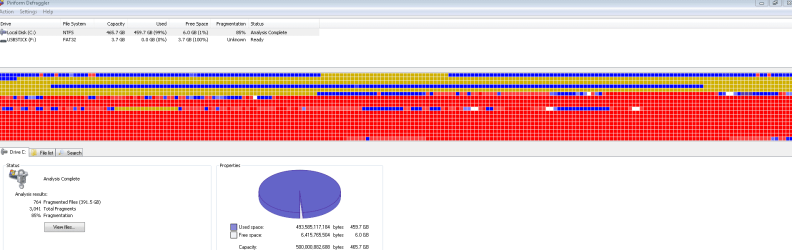
here is screenshots from CCleaner , CCleaner-registry + Defraggler. I defragged the system drive this morning , prior to running the Bitlocker/usb lock tutorial.....The system drive filled up instantly as soon as i started encrypting it with bitlocker

:eek:
 

Attachments

  • Capture.PNG
    Capture.PNG
    18.5 KB · Views: 10
  • Capture1.PNG
    Capture1.PNG
    11.2 KB · Views: 8
  • Capture2defraggler.PNG
    Capture2defraggler.PNG
    14 KB · Views: 11

My Computer

Computer Manufacturer/Model Number
homebuilt
OS
WIN7 Ultimate, 64bit OEM
CPU
i5-750 quad core
Motherboard
MSI P55-GD55 (MS-7589) (CPU1)
Memory
8GB dual channel DDR3 @ 668MHZ (9-9-9-24) 4 x 2GB each
Graphics Card(s)
ATI Radeon HD5750
Sound Card
onboard
Monitor(s) Displays
LG widescreen LCD 1920 x 1080 FLATRON
Hard Drives
2 x WD 500 GB SATA drives, room for 8 more in the drive bays. 1 WD USB 320 GB used for backup the system.
PSU
SEASONIC M-12D 850 watt sli ready
Case
ANTEC DARK FLEET (biggest one they make)
Cooling
case: 6 x 120mm fans 2 x 140mm fans, CPU: Corsair H50
Keyboard
generic
Mouse
microsoft wireless
Internet Speed
bloody slow thanks to Canadian ISP's throttling our net
Other Info
soon to have a ZALMAN RESERATOR just for the GPU...also dedicated 500 GB of virtual memory for paging file,caching
doesn't seem to be affecting anything (yet) i played COD modern warfare 2 all morning, while running GIMP photo render and encrypting the drive in the background........

BTW great tutorial, easy to follow!
 

My Computer

Computer Manufacturer/Model Number
homebuilt
OS
WIN7 Ultimate, 64bit OEM
CPU
i5-750 quad core
Motherboard
MSI P55-GD55 (MS-7589) (CPU1)
Memory
8GB dual channel DDR3 @ 668MHZ (9-9-9-24) 4 x 2GB each
Graphics Card(s)
ATI Radeon HD5750
Sound Card
onboard
Monitor(s) Displays
LG widescreen LCD 1920 x 1080 FLATRON
Hard Drives
2 x WD 500 GB SATA drives, room for 8 more in the drive bays. 1 WD USB 320 GB used for backup the system.
PSU
SEASONIC M-12D 850 watt sli ready
Case
ANTEC DARK FLEET (biggest one they make)
Cooling
case: 6 x 120mm fans 2 x 140mm fans, CPU: Corsair H50
Keyboard
generic
Mouse
microsoft wireless
Internet Speed
bloody slow thanks to Canadian ISP's throttling our net
Other Info
soon to have a ZALMAN RESERATOR just for the GPU...also dedicated 500 GB of virtual memory for paging file,caching
What you are seeing is Bitlocker encrypting the drive. It basicly has to move data from it's current location to the unencrypted portion of the drive then encrypts those sectors and moves the data back to the encrypted portion of the drive. Once the drive is fully encrypted it will return to normal and the red will go away.
 

My Computer

Computer Manufacturer/Model Number
Desktop, built by me. Laptop, built by ASUS
OS
Vista HP, Vista Ultimate, XP Pro, Seven Ultimate x2
CPU
Desktop, AMD Athlon X2 6400+. Laptop, Intel C2D T9400
Motherboard
Desktop, K9N Diamond. Laptop, Asus G50VT
Memory
Desktop, 4 GB PC2 6400. Laptop, 4 GB PC2 6400
Graphics Card(s)
Desktop, Nvidia 8800 Ultra OC. Laptop, Nvidia 9800M GS
Sound Card
Desktop, intergrated. Laptop, intergrated
Monitor(s) Displays
Sharp Aquos, In built Laptop, Dell ultra sharp
Screen Resolution
46 inch 1920x1080, 15.4 inch 1680x1050, 24 inch, 1920x1200
Hard Drives
Desktop, Veloci Raptor, Raptor X, WD 500GB. Laptop, 250 GB seagate and 320 GB Western Digital both at 7200 RPM. Plus one 320 GB external passport.
PSU
Desktop, Ultra X3 600 watt modular PSU, Laptop, a brick PSU
Case
Desktop, Ultra eXo Aluminum Chassis. Laptop, It's a laptop
Cooling
Desktop, 2 120mm ball bearing fans, ChillTec Thermo Electric
Keyboard
Desktop. Microsoft Natural Ergonomic Keyboard 4000
Mouse
Desktop, Logitech track ball wired.
Internet Speed
10 Mb I think
Other Info
There is no truth to any of our reality but what we want to believe.

LPR
i suspected something like that..........

.

cheers :cool::cool:
 

My Computer

Computer Manufacturer/Model Number
homebuilt
OS
WIN7 Ultimate, 64bit OEM
CPU
i5-750 quad core
Motherboard
MSI P55-GD55 (MS-7589) (CPU1)
Memory
8GB dual channel DDR3 @ 668MHZ (9-9-9-24) 4 x 2GB each
Graphics Card(s)
ATI Radeon HD5750
Sound Card
onboard
Monitor(s) Displays
LG widescreen LCD 1920 x 1080 FLATRON
Hard Drives
2 x WD 500 GB SATA drives, room for 8 more in the drive bays. 1 WD USB 320 GB used for backup the system.
PSU
SEASONIC M-12D 850 watt sli ready
Case
ANTEC DARK FLEET (biggest one they make)
Cooling
case: 6 x 120mm fans 2 x 140mm fans, CPU: Corsair H50
Keyboard
generic
Mouse
microsoft wireless
Internet Speed
bloody slow thanks to Canadian ISP's throttling our net
Other Info
soon to have a ZALMAN RESERATOR just for the GPU...also dedicated 500 GB of virtual memory for paging file,caching
What you are seeing is Bitlocker encrypting the drive. It basicly has to move data from it's current location to the unencrypted portion of the drive then encrypts those sectors and moves the data back to the encrypted portion of the drive. Once the drive is fully encrypted it will return to normal and the red will go away.

:doh:

I had thought that image was from after it was finished.
 
Last edited:

My Computer

Computer type
PC/Desktop
Computer Manufacturer/Model Number
Self built custom
OS
64-bit Windows 11 Pro for Workstations
CPU
Intel i7-8700K OC'd to 5 GHz
Motherboard
ASUS ROG Maximus XI Formula Z390
Memory
64 GB (4x16GB) G.SKILL TridentZ RGB DDR4 3600 MHz
Graphics Card(s)
ASUS ROG-STRIX-GTX1080TI-O11G-GAMING
Sound Card
Integrated
Monitor(s) Displays
2 x Samsung Odyssey G7 27"
Screen Resolution
2560x1440
Hard Drives
1TB Samsung 990 PRO M.2,
4TB Samsung 990 PRO PRO M.2,
TerraMaster F8 SSD Plus NAS
PSU
Seasonic Prime Titanium 850W
Case
Thermaltake Core P3
Cooling
Corsair Hydro H115i
Keyboard
Logitech wireless K800
Mouse
Logitech MX Master 4
Internet Speed
2 Gb/s Download and 100 Mb/s Upload
Antivirus
Malwarebyte Anti-Malware Premium
Browser
Google Chrome
Other Info
Logitech Z625 speaker system,
Logitech BRIO 4K Pro webcam,
HP Color LaserJet Pro MFP M477fdn,
APC SMART-UPS RT 1000 XL - SURT1000XLI,
Galaxy S23 Plus phone
woot! right when the encryption was finished, bang!, right back to the old free space (275Gb or so) :cool:
 

My Computer

Computer Manufacturer/Model Number
homebuilt
OS
WIN7 Ultimate, 64bit OEM
CPU
i5-750 quad core
Motherboard
MSI P55-GD55 (MS-7589) (CPU1)
Memory
8GB dual channel DDR3 @ 668MHZ (9-9-9-24) 4 x 2GB each
Graphics Card(s)
ATI Radeon HD5750
Sound Card
onboard
Monitor(s) Displays
LG widescreen LCD 1920 x 1080 FLATRON
Hard Drives
2 x WD 500 GB SATA drives, room for 8 more in the drive bays. 1 WD USB 320 GB used for backup the system.
PSU
SEASONIC M-12D 850 watt sli ready
Case
ANTEC DARK FLEET (biggest one they make)
Cooling
case: 6 x 120mm fans 2 x 140mm fans, CPU: Corsair H50
Keyboard
generic
Mouse
microsoft wireless
Internet Speed
bloody slow thanks to Canadian ISP's throttling our net
Other Info
soon to have a ZALMAN RESERATOR just for the GPU...also dedicated 500 GB of virtual memory for paging file,caching
Back
Top