
I don't know if this is possible, but I thought I might give it a shot and ask.
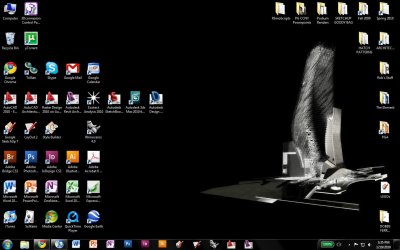
Is it possible to lock desktop icons in position to form a custom desktop layout? I'm an architecture school student and use a wide variety of programs ranging from AutoCAD to Photoshop to Word, etc., and with the amount of files I need to create, save, and access, and the number of programs I need to use, I want to be able to have and maintain an organized desktop that won't go to shambles in the space of a few days. You'll see how I've arranged my folders and program shortcuts in the attached image, but now I'd like to find some way to lock them in their positions so they don't budge.
Right now, I have them aligned to the grid, but sometimes saving or downloading a file knocks them out of the grid into another spot. I've heard that turning off the grid alignment might take care of the problem, but if at all possible, I'd like them to be able to stay in their spot (for example, if I were to try and drag the icon out of place, it wouldn't move or would snap back to its designated position). Is there any way I can maintain this workspace?
-Rob
P.S.: I know that some people may say that I should just remember to save and download to places other than the Desktop, but sometimes I unfortunately just have to do this stuff fast.
Is it possible to lock desktop icons in position to form a custom desktop layout? I'm an architecture school student and use a wide variety of programs ranging from AutoCAD to Photoshop to Word, etc., and with the amount of files I need to create, save, and access, and the number of programs I need to use, I want to be able to have and maintain an organized desktop that won't go to shambles in the space of a few days. You'll see how I've arranged my folders and program shortcuts in the attached image, but now I'd like to find some way to lock them in their positions so they don't budge.
Right now, I have them aligned to the grid, but sometimes saving or downloading a file knocks them out of the grid into another spot. I've heard that turning off the grid alignment might take care of the problem, but if at all possible, I'd like them to be able to stay in their spot (for example, if I were to try and drag the icon out of place, it wouldn't move or would snap back to its designated position). Is there any way I can maintain this workspace?
-Rob
P.S.: I know that some people may say that I should just remember to save and download to places other than the Desktop, but sometimes I unfortunately just have to do this stuff fast.
Attachments
My Computer
- Computer Manufacturer/Model Number
- Lenovo ThinkPad W700
- OS
- Windows 7 Professional 64-bit
- CPU
- Intel Core 2 Duo T9600 2.8 GHz
- Memory
- 4 GB RAM with Intel 2GB Turbo Memory Cache
- Graphics Card(s)
- NVIDIA Quadro FX 2700M