
How to Remove the Lock Icon from Files and Folders in Windows 7
Information
In Windows 7, the padlock overlay icon on a file or folder indicates that the item is shared with nobody, which is to say, the item can only be accessed by a single user (with exceptions). Consequently, if you can access a folder that has a golden lock, you are likely the only user who may access that item on your PC. A more technical definition follows.
Criteria determining whether an item features a golden lock icon overlay:
Note that ‘NT Authority\SYSTEM’ and ‘NT Service\TustedInstaller’ should not be confused as users or groups. The former is a special Windows identity while the latter is a service.
This tutorial will show you how to remove or restore the lock icon overlay on files and folders for all users without altering any sharing settings or neutralising any of the conditions above in Windows 7.
You must be logged in as an administrator to be able to do the steps in this tutorial.
Criteria determining whether an item features a golden lock icon overlay:
- The item must have zero or only a single allow Access Control Entry (ACE) specifying any user. Exceptions: allow ACEs that apply to “This folder only” or “Files only”.
- The item must not have any group allow ACEs. Exceptions: the ‘Administrators’ group, and allow ACEs that apply to “This folder only” or “Files only”.
- The immediate parent folder must have at least one group allow ACE. Exceptions: the ‘Administrators’ group, and allow ACEs that apply to “This folder only” or “Files only”.
- Finally, your user account must be the user that satisfies condition 1, OR
- you must be the owner of the item, OR
- the item must include an ‘Administrators’ ACE with the ‘Read permission’ access right, and Explorer must be running elevated.
Note that ‘NT Authority\SYSTEM’ and ‘NT Service\TustedInstaller’ should not be confused as users or groups. The former is a special Windows identity while the latter is a service.
This tutorial will show you how to remove or restore the lock icon overlay on files and folders for all users without altering any sharing settings or neutralising any of the conditions above in Windows 7.
You must be logged in as an administrator to be able to do the steps in this tutorial.
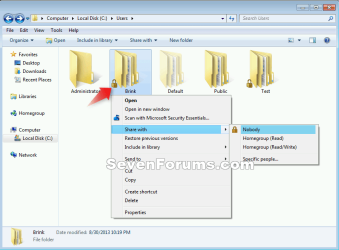
EXAMPLE: Lock icon on folder
Here's How:
1. Do step 2, 3, or 4 below for what you would like to do, and if you have a 32-bit or 64-bit Windows 7.
2. To Remove Lock Icon on Files and Folders in 32-bit and 64-bit Windows 7
A) Click on the Download button below to download the .bat file below, and go to step 5 below.
Remove_Lock_Icon_from_Files_Folders.bat
Download
3. To Restore Lock Icon on Files and Folders in 32-bit Windows 7
NOTE: This is the default setting in 32-bit Windows 7.
A) Click on the Download button below to download the .bat file below, and go to step 5 below.
32-bit_Restore_Lock_Icon_on_Files_Folders.bat
Download
4. To Restore Lock Icon on Files and Folders in 64-bit Windows 7
NOTE: This is the default setting in 64-bit Windows 7.
A) Click on the Download button below to download the .bat file below, and go to step 5 below.
64-bit_Restore_Lock_Icon_on_Files_Folders.bat
Download
5. Save the .bat file to your desktop.
6. Right click on the downloaded .bat file, and click on Run as administrator.
7. If prompted, click on Run and Yes to approve.
NOTE: If you like, you can stop getting the Run prompt by unblocking the downloaded .bat file.
8. You will now notice a command prompt quickly flash open and close and your screen flicker as the registry changes are applied and explorer is restarted.
That's it,
Shawn
Attachments
Last edited:


