
Hi,
I've recently been testing out some face login programs, and although I have now uninstalled them all, it seems that my lock screen setup has been affected.
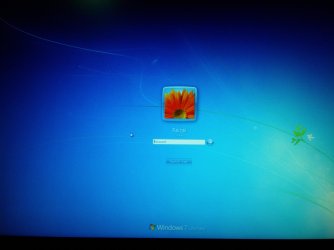
Whenever I *previously* used to lock my screen (using either Windows Key-L or after being woken from sleep or hibernation), it would show my user account tile with my user name, and under that was the password box (as in the picture below)
But now, when I lock my screen using Windows-L or when it locks automatically after being woken from sleep or hibernation, it just shows a smaller tile with my user name under it (as in the picture below), and the switch user button under it, but nowhere to enter a password.
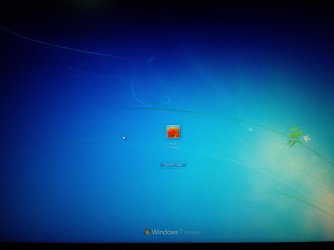
I have to click on the tile and then that takes me to the first screen shown above where I am able to then enter the password. I know it seems a little picky but I did prefer the setup I had previously.
I've already tried changing the following settings in Local Security Policy without success:
Does anyone know what I can do so that the lock screen with the password box is shown immediately (first pic above) when the computer is locked?
thanks in advance!
I've recently been testing out some face login programs, and although I have now uninstalled them all, it seems that my lock screen setup has been affected.
Whenever I *previously* used to lock my screen (using either Windows Key-L or after being woken from sleep or hibernation), it would show my user account tile with my user name, and under that was the password box (as in the picture below)
But now, when I lock my screen using Windows-L or when it locks automatically after being woken from sleep or hibernation, it just shows a smaller tile with my user name under it (as in the picture below), and the switch user button under it, but nowhere to enter a password.
I have to click on the tile and then that takes me to the first screen shown above where I am able to then enter the password. I know it seems a little picky but I did prefer the setup I had previously.
I've already tried changing the following settings in Local Security Policy without success:
- Display user information when the session is locked
- Do not display last user name
Does anyone know what I can do so that the lock screen with the password box is shown immediately (first pic above) when the computer is locked?
thanks in advance!
Last edited:
My Computer
- Computer Manufacturer/Model Number
- Asus K53S Series Laptop
- OS
- Windows 7 Home Premium 64bit
- CPU
- Intel Core i7-2630QM CPU @ 2.00GHz
- Memory
- 8GB
- Graphics Card(s)
- Intel HD Graphics Family, NVIDIA GeForce GT 540M
- Sound Card
- Realtek High Definition Audio
- Monitor(s) Displays
- Generic PnP Monitor
- Screen Resolution
- 1680x1050
- Hard Drives
- OCZ Vertex Plus 120G
- Keyboard
- Logitech S510 cordless keyboard
- Mouse
- Microsoft Wireless Mobile Mouse 4000
- Internet Speed
- 20GB


