Another user given tools again to mess with junctions...when will it ever end? Listen please, before pointing people to the "Take ownership..." stuff, you should ask if they are trying to mess with those compatibility junctions. Take ownership is not a cure all...
Hi
I´m back. Well, ihave downloaded and installed the register files But unfortunately "the targets remain..." i would say. Actually, the folders are mine, i mean i am the administrator and user. Just to narrow it down, i got to open, for example the cookie folders, local configurations, recent files.....
I think i managed to get rid of the lock in the Administrator´s folder using the downloaded program as instructed by the Captain. But it didin´t work with the others.
madgirl
As LogicEarth mentioned, the junctions are there for compatibility, and should not be removed or otherwise tampered with.
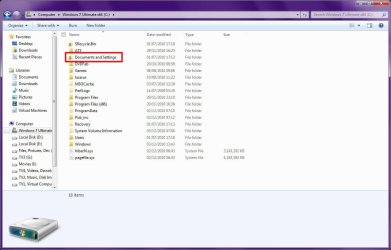
If you will recall, on Windows XP, all user-related settings and files was stored in "C:\Documents and Settings". Some programs incorrectly hard-coded the access paths to that folder, and although it worked on XP, it would be a big problem on Windows 7 because that folder no longer exists, and the program would no longer function correctly. So Windows creates the "Documents and Settings" junction to automatically and invisibly redirect such poorly written programs to the "Users" folder.
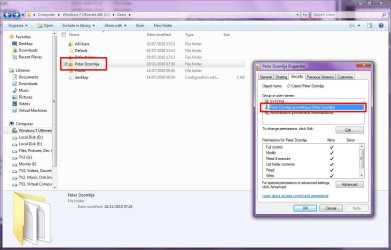
But if the folder does belong to you, then the lock is there also for security, as it prevents other users from accessing your files. The following screenshot show the lock icon on my user folder, "Peter Dzomlija", and the security settings for it shows only "SYSTEM", "Peter Dzomlija" and "Administrators". Should I be concerned? No, because if another user is created on my computer, then it means they they will not have access to that folder or anything inside it.
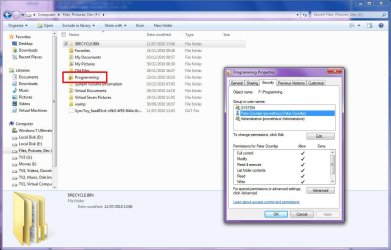
The same applies to a folder that I created myself for hold all my programming projects. I don't mind other users accessing stuff like my videos or music, but my programming is mine alone, so the securities have been edited to allow access to only myself and important system processes:
Essentially what the lock icon means is that the folder has limited access to only specific users...



