Solved Locked out, what to I try next?

Mike1000

New member
Please Help I cannot get past boot errors. It started like this.... Power supply went south, so tried to fix it 5 capacitors looked overloaded so replace these in the hope that this would fix the problem. No joy. So scrapped that plan and bought a replacement from ebay, unfortunately go the model for an Optiplex 755, checked pinputs and power ratings and these seem to be identical, so move to the next step. Tried to boot the computer but end up with the boot manager, I can get into the Boot Options with F12 and the Advanced Boot Options with F8. Have tried all options but only end up in Window Error Recovery again and again, have tried putting a recovery disk in onboard CD, remote Cd and USB drive in Safe Mode it only loads files up to CLASSPNP.SYS the goes back to Windows Error Recovery screen ... What do I do next???
 

My Computers

System One System Two

  • Computer type
    PC/Desktop
    Computer Manufacturer/Model Number
    Dell Optiplex760
    OS
    Windows 7
  • Computer type
    PC/Desktop
What do I do next???


First and foremost. You should never mess around with a PSU unless you know how to work on something like that and the understanding of electrical safety. Those capacitors can store a deadly charge for a very long time and can kill you if it hits your heart just right. I believe we're talking about a tenth of an amp.

Now, how did the PSU go legs up?


What do I do next???

Check the hard drive with disk checking software like Hard Disk Sentinel. Hard Disk Sentinel - HDD health and temperature monitoring And/Or use the HDD manufacture software. The live boot environment from Hiren's Boot CD has some HDD checking software.


A power issue can have the potential of taking out computer hardware. Up to and including the HDD. When I say power issue I'm talking about a surge, power sag, brown out, abrupt power loss, near by lighting strike (think in the miles), etc. I use a UPS (Uninterruptible Power Supply) made by Cyberpower for this reason. If for example the power goes out even for a brief second, I'll still have continuous power so my hardware won't take a hit. Even if my PSU has built in safety technology. If there's a total loss of power I have approximately 15 minutes to do a proper computer shut down. Thereby saving my hardware from an abrupt loss of power potentially damaging the hardware and of course my data.

I'll see if I can't find the specs on those two PSUs here in a second. What concerns me is that they are for two different models. They are probably the same or greater Amp rating on the 12 and 5 volt rails, but I need to verify that. Even then, the PSU is more than likely not your problem. It's sounds like the HDD.

- - - Updated - - -

Well, as suspected trying to find PSU specs from a Dell OEM PSU is like trying to find a needle in a hay stack. Since the wattage is more for the 755 than the 760, I'm assuming it's gonna power the motherboard, the CPU and all the other hardware without issue. It's just that these PSUs are OEM and may be specific on the amps provided by the 12 volt rails and what not. Even though the motherboard connectors and whatnot may be the same, it's your rail's amp capacity that's the real factor. Where's is for a custom computer build using an Antec PSU or what ever, they tell you what the rails are capable of and whatnot.

Anyhow, I think it's more than likely a good PSU candidate for the computer. They do sell PSU testing hardware. But those won't tell you Amp capability on the rails. Even if you used a clamp meter in DC mode you're only getting Amp draw. I know there is a specific piece of equipment (probably expensive) that will show Amp capability. I've seen them used for Li-ion batteries. Not sure about PSUs though. I'm sure they got 'em.
 

My Computer

Computer type
PC/Desktop
OS
Windows 7 Ultimate x64
Hello F22 Simpilot, thanks for the advice, I don't think the power supply is a problem as it powers the computer OK and allows me to move through the various function key options, also running test diagnostics from the hard disk. As mentioned the cables are the same and the power ratings on the side of the units are the same. I have tried to repair the OS and reinstall it from scratch from the hard disk and this appears to work OK, however, on rebooting the system just goes through the Windows Error Recovery screen again and again.

- - - Updated - - -

I think the power supply just died through old age. 5 capacitors ranging from 680 microFarad to 2200 microFarad 16 volt were clearly stressed, so I though it worth replacing them, as I had done so with a previous computer to good effect. Obviously there was a further problem beyond my capability to troubleshoot. So I then decided to replace the unit.

- - - Updated - - -

Checked the disk with the basic windows tools provided chkdsk x: This finds no disk errors, hardware check tells me that all hardware passes the testing, including the hard disk. Can't understand why reinstalling windows from scratch does not resolve the issue. The only problem reported was "Failed to transfer logged messages to the event log with status 50" on doing the chkdsk
 

My Computers

System One System Two

  • Computer type
    PC/Desktop
    Computer Manufacturer/Model Number
    Dell Optiplex760
    OS
    Windows 7
  • Computer type
    PC/Desktop
If you run disk check and it finds bad blocks it writes them as bad and not in use so next time you run it then it wont find any erros so its highley likeley the disk is toast
 

My Computer

Computer type
PC/Desktop
OS
win 8 32 bit
Thanks for the comment Samuria, not too sure if that fits in as the OS doesn't report any errors when re-installing, also all the tools load and cmd runs OK
 

My Computers

System One System Two

  • Computer type
    PC/Desktop
    Computer Manufacturer/Model Number
    Dell Optiplex760
    OS
    Windows 7
  • Computer type
    PC/Desktop
chkdsk x:

why are you checking x: ?


If boot.wim from the installation media is loading up fine, that indicates the problem is likely the storage media.

do you have a spare hd or preferably a ssd that you can pop in and try installing win7 onto ?

You can borrow my boot media so you can see what you are doing and it has useful tools included
17514x64v30.iso
 

My Computers

System One System Two

  • Computer type
    PC/Desktop
    OS
    7 X64
    CPU
    i5 8400
    Motherboard
    gigabyte b365m ds3h
    Memory
    2x8gb 3200mhz
    Hard Drives
    various
    PSU
    pure power 11 400w cm
    Case
    Coolermaster
    Cooling
    cryorig m9i
  • Computer type
    PC/Desktop
    OS
    7x64
    CPU
    g5400
    Motherboard
    ga b365m ds3h
    Memory
    8gb ddr4 2400
    PSU
    xfx pro 450w
Hello SIW2, use of your tools sounds a good idea, many thanks for that. I tried repair of the disk and of the boot sectors from the windows toolset, and then in desperation a complete reinstall, which also didn't work. I then used cmd and found the current location was a sub directory on X: which had a few windows files, possibly a subset for the tools. So I did a chkdsk on it.

I have a backup of my data and a copy on my new laptop so I can reinstate it once up and working. How do you suggest I proceed with the tools?

- - - Updated - - -

Not sure I have managed to load anything from any installation media apart from the HD, The computer reads a list of files from CD and USB but only as far as CLASSPNP.SYS, it then restarts again.
 

My Computers

System One System Two

  • Computer type
    PC/Desktop
    Computer Manufacturer/Model Number
    Dell Optiplex760
    OS
    Windows 7
  • Computer type
    PC/Desktop
I then used cmd and found the current location was a sub directory on X: which had a few windows files, possibly a subset for the tools. So I did a chkdsk on it.

X: is the letter assigned to winpe running in ram. It is not your hard disk.

Take a look and see what letter your windows installation has. It might be C or D as seen from booted media.

Then run chkdsk like this:

You might have a small 100mb system partition on your hard disk which is not assigned a drive letter in windows and could show up as C from the boot media with your windows partition showing as D from the boot media.

chkdsk C: /r

and then

chldsk D: /r

will check both of those.

It will take a while because the /r switch tells it to check for bad sectors as well as filesystem errors.

If there are no errors from chkdsk, then another possibilty is that your installation media is corrupt, which is not all that unusual but you seem to have tried more than one installation media source.
 

My Computers

System One System Two

  • Computer type
    PC/Desktop
    OS
    7 X64
    CPU
    i5 8400
    Motherboard
    gigabyte b365m ds3h
    Memory
    2x8gb 3200mhz
    Hard Drives
    various
    PSU
    pure power 11 400w cm
    Case
    Coolermaster
    Cooling
    cryorig m9i
  • Computer type
    PC/Desktop
    OS
    7x64
    CPU
    g5400
    Motherboard
    ga b365m ds3h
    Memory
    8gb ddr4 2400
    PSU
    xfx pro 450w
Is worth going to disk makers website they will have a tool specific to the drive to test it. Any chldsk you run see the report at the end look for any bad sectors
 

My Computer

Computer type
PC/Desktop
OS
win 8 32 bit
Thanks for the tools SIW2, a bit of a revelation. no wonder I couldn't find c: it doesn't exist. I have:-

RECOVERY (E:) 5.16 GB free of 11.7 GB
RECOVERY (R:) 5.16 GB free of 11.7 GB
SYSTEM (S:) 260 MB free of 299 MB
WINDOWS (W:) 905 GB free of 919 GB
BOOT (X:) 28.6 MB free of 31.0 MB
F: is CD Drive (internal)
G: is Removable Disk (USB stick)

I suspect that E: and R: are mapped onto the same files, contents are:
RECOVERY empty
WIM
Image.swm 3,788,794 KB
Image2.swm 2,374,410 KB
WINPE
boot.sdi 3,096 KB
WINPE.WIM 302,616 KB

I tried a System Restore in Dism++ using the file WINPE.WIM as the Target Image but it could not find the file

What do I do now?
 

My Computers

System One System Two

  • Computer type
    PC/Desktop
    Computer Manufacturer/Model Number
    Dell Optiplex760
    OS
    Windows 7
  • Computer type
    PC/Desktop
1.

The pnp letter assignments are odd. Not sure why the earlier letters arent assigned and my boot media is supposed to auto allocate letter Y to the usb stick.
In addititon this is strange:
RECOVERY (E:) 5.16 GB free of 11.7 GB
RECOVERY (R:) 5.16 GB free of 11.7 GB

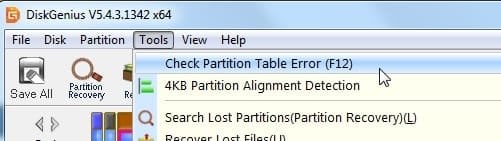
Might be a partition table error. You could run diskgenius and see if it finds a problem.
In the top pane click Tools , then from the menu check partition table
dg-chechk partition-table.jpg

------------------------------------------------------------

2. Did you run chkdsk ?

There is also the option to check for bad sectors using diskgenius.

---------------------------------------------------------

3. Image.swm 3,788,794 KB
Image2.swm 2,374,410 KB

Sounds like the manufacturer recovery files used to reinstall windows. ( .swm indicates a split wim file )

You can load install.swm in 7-zip and see what is in it.

You could also run dism++ , select tools in left pane, select imagex, then browse to install.swm and it should show you basic info.

You could then try dism++ system restore:

First format partition W: to NTFS

then point dism++ system restore at install.swm and try restoring to W: ( if there are two images shown in install.swm, select the larger one)

( it could also be done by File>apply image but that is slightly different procedure )
--------------------------------------------------------------

4. NOTE - you can take screenshots using the little camera icon on the booted media taskbar. Save the pictures onto the usb stick ,so they can be posted up here.

---------------------------------------------------------------

5.
BOOT (X:) 28.6 MB free of 31.0 MB

It is not clear to me what you are running. The 17514x64v30.iso media should show .99gb assigned to X:
 
Last edited:

My Computers

System One System Two

  • Computer type
    PC/Desktop
    OS
    7 X64
    CPU
    i5 8400
    Motherboard
    gigabyte b365m ds3h
    Memory
    2x8gb 3200mhz
    Hard Drives
    various
    PSU
    pure power 11 400w cm
    Case
    Coolermaster
    Cooling
    cryorig m9i
  • Computer type
    PC/Desktop
    OS
    7x64
    CPU
    g5400
    Motherboard
    ga b365m ds3h
    Memory
    8gb ddr4 2400
    PSU
    xfx pro 450w
PS. Have tried CHKDSK /r on E: S; and X: with no bad sectors and no problems found. W: is verifying in 5 stages and taking a long time
 

My Computers

System One System Two

  • Computer type
    PC/Desktop
    Computer Manufacturer/Model Number
    Dell Optiplex760
    OS
    Windows 7
  • Computer type
    PC/Desktop
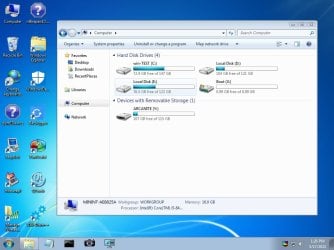
If you are using my boot media, it should look something like this with the letter Y assigned to the usb stick and X: as 0.99gb

17514x64v30-screen.jpg
 

My Computers

System One System Two

  • Computer type
    PC/Desktop
    OS
    7 X64
    CPU
    i5 8400
    Motherboard
    gigabyte b365m ds3h
    Memory
    2x8gb 3200mhz
    Hard Drives
    various
    PSU
    pure power 11 400w cm
    Case
    Coolermaster
    Cooling
    cryorig m9i
  • Computer type
    PC/Desktop
    OS
    7x64
    CPU
    g5400
    Motherboard
    ga b365m ds3h
    Memory
    8gb ddr4 2400
    PSU
    xfx pro 450w
CHKDSK now 85% complete on W:, checking it between jet washing the patio

- - - Updated - - -

Will wait until it finishes and then try an install from your boot media. I presume the best way would be to run Dism++ from the USB stick, then remove the USB and load the .ISO onto it, then reboot the new .ISO from within DISM++
 

My Computers

System One System Two

  • Computer type
    PC/Desktop
    Computer Manufacturer/Model Number
    Dell Optiplex760
    OS
    Windows 7
  • Computer type
    PC/Desktop
then reboot the new .ISO from within DISM++

you cant reboot an iso from within dism++.

Presumably you have win7 installation media in an .iso file?

You could copy the contents of the .iso file onto the 17514x64v30 usb stick - but do not overwrite the boot.wim that is already on the usb stick.

That way you could run windows setup.


OR you could just copy the install.wim from the windows 7 installation .iso onto the usb stick.

That way you could browse to the install.wim on the usb stick using dism++ an Apply it - or probably easier to use winntsetup which will automatically create the boot critical files.

However, neither dism++ nor winntsetup do partitioning. So the disk needs to be partitioned first.
 

My Computers

System One System Two

  • Computer type
    PC/Desktop
    OS
    7 X64
    CPU
    i5 8400
    Motherboard
    gigabyte b365m ds3h
    Memory
    2x8gb 3200mhz
    Hard Drives
    various
    PSU
    pure power 11 400w cm
    Case
    Coolermaster
    Cooling
    cryorig m9i
  • Computer type
    PC/Desktop
    OS
    7x64
    CPU
    g5400
    Motherboard
    ga b365m ds3h
    Memory
    8gb ddr4 2400
    PSU
    xfx pro 450w
OK W: has 4K in bad sectors, now repaired, will try booting again.

- - - Updated - - -

No joy tried booting from your USB3_WIN7_2021 file but only got "No boot device available" despite running system checks and hardware passing OK.
Will come back to it later
 

My Computers

System One System Two

  • Computer type
    PC/Desktop
    Computer Manufacturer/Model Number
    Dell Optiplex760
    OS
    Windows 7
  • Computer type
    PC/Desktop
No joy tried booting from your USB3_WIN7_2021 file

:huh: Why?

There is a .zip file of that name. It is not bootable. It contains an update and some drivers which can be integrated into installation media to add usb3 support.
 

My Computers

System One System Two

  • Computer type
    PC/Desktop
    OS
    7 X64
    CPU
    i5 8400
    Motherboard
    gigabyte b365m ds3h
    Memory
    2x8gb 3200mhz
    Hard Drives
    various
    PSU
    pure power 11 400w cm
    Case
    Coolermaster
    Cooling
    cryorig m9i
  • Computer type
    PC/Desktop
    OS
    7x64
    CPU
    g5400
    Motherboard
    ga b365m ds3h
    Memory
    8gb ddr4 2400
    PSU
    xfx pro 450w
Sorry not making much progress. Used Dism++ to check the disk and also used the repair function. Still no joy, the computer won't reboot. I cant use the .ISO from USB as the computer tells me "No boot device available" when I remove the HD from the list of boot options.
 

My Computers

System One System Two

  • Computer type
    PC/Desktop
    Computer Manufacturer/Model Number
    Dell Optiplex760
    OS
    Windows 7
  • Computer type
    PC/Desktop
All attempts to repair were unsucessfull so I had to install a new copy of Win7. The floppy drive appeared to not work so this was disabled and USB port used.
 

My Computers

System One System Two

  • Computer type
    PC/Desktop
    Computer Manufacturer/Model Number
    Dell Optiplex760
    OS
    Windows 7
  • Computer type
    PC/Desktop
So you installed Windows 7 on a bad hard drive?
 

My Computer

Computer type
PC/Desktop
OS
Windows 7 Ultimate x64
Back
Top