Solved Locking a folder... Possible in Windows 7?

kdogg

Enlightened
Member
VIP
Local time
10:21 PM
Messages
69
Location
Michigan
Is it possible to lock a folder within Windows 7 so NO one can enter it? Not even myself with Admin rights, without knowing a password.

Lets just say I have this folder called, um, "X"... Which we could also call "XXX" if we wanted to, cough... :o

I have a 14 and a 16 year old who use my desktop to watch movies and I would like them to not be able to enter or find due to indexing said folder called "X"... I don't care if they can SEE the folder, I just want it to pop up a prompt for a password if and when someone double clicks on it, trying to enter it, even IF they are logged in on my login, the one with Admin access.

Is this possible? If not within Windows 7, are there any programs that will do this? I know you can use programs to make encrypted container files on the drives but the bitch with those is that you have to pre-set the size so for example if you make one 20GB, and it's only got 1~2GB of data in it, it still uses the full 20GB. I just want to password protect a couple folders even when people are on my own login.

Thanks!
 

My Computer

Computer Manufacturer/Model Number
My Own Computer!
OS
Windows 7 Ultimate x64
CPU
AMD Athlon II X2 245 Regor 2.9GHz Socket AM3 65W Dual-Core
Motherboard
ASUS M4A88TD-M/USB3 880G
Memory
Crucial Ballistix Tracer 8GB (4x2GB) DDR3 1600 (PC3 12800)
Graphics Card(s)
ATI Radeon HD3870 X2
Sound Card
Onboard HD Audio
Monitor(s) Displays
Westinghouse 22" LCD, Samsung 46" LCD TV
Screen Resolution
1680x1050, Extended Display Setup
Hard Drives
2x Western Digital 74GB Raptors SATA Raid (OS & Games Drive)
1x Western Digital 1.5TB SATA (Storage)
1x Western Digital 2TB SATA (Storage)
PSU
Antec 550 Watt
Case
Antec Three Hundred
Cooling
3x Antec 120mm Fans & OEM CPU/GPU Coolers
Keyboard
Microsoft Comfort Curve Keyboard 2000
Mouse
Microsoft Bluetooth Explorer Mouse
Internet Speed
Comcastic Cable Internet! When it works!

My Computer

Computer type
PC/Desktop
Computer Manufacturer/Model Number
Dell XPS 420
OS
Windows 10, Home Clean Install
CPU
Intel Core2 processsor Q8200(2.33Ghz 1333FSB) Quad Core Tech
Motherboard
Dell
Memory
6 gb
Graphics Card(s)
ATI Radeon 256MB HD3650
Sound Card
Intergrated 7.1 Channel Audio
Monitor(s) Displays
Dell SP2009W 20"
Hard Drives
640 GB Serial ATA Hard drive
Cooling
Fan
Keyboard
Dell USB Keyboard
Mouse
Dell Premium Optical USB
Internet Speed
DSL 2.85

My Computers

System One System Two

  • Computer type
    PC/Desktop
    Computer Manufacturer/Model Number
    Custom builds = 2
    OS
    W7 Ultimate x64/W10 Pro x64/W11 Pro Triple Boot - Main PC W7 Remote PC Micro ATX W7 Pro x64/W11 Pro
    CPU
    AMD Phenom II X4 975 Deneb 3.6ghz - 965 2nd remote pc
    Motherboard
    Gigabyte GA-790XTA-UD4-Gigabyte GA-880GM-D2H remote pc
    Memory
    Kingston Hyper X DDR3 1600 1.5v 16gb - Hyper X Fury 8gb 2nd
    Graphics Card(s)
    MSI HD Radeon 5750 1gb - MSI HD Radeon 6450 on mini tower
    Sound Card
    Creative Labs X-Fi Xtreme Audio P - Realtek onooard 2nd case
    Monitor(s) Displays
    ASUS VW199T-P 19" HP 2082a Main-HP 2082a 20" remote pc
    Screen Resolution
    Asus 1440x900 - HP 1600x900
    Hard Drives
    WD Black 1TB HD per OS W7, W10, and pending W11 presently on 500gb OS Drive - Pending Triple 1TB HDs for Spanned Storage/backup volume
    Single 2TB external USB enclosure, single 1TB System 7 Host/Boot drive, Pending 8TB external HD for system image b
    PSU
    Corsair 750TX - primary / Corsair CX600 - second
    Case
    Antec 900-2 - SSD compatible / NZXT Vulcan mini tower
    Cooling
    Zalman CNPS9900A
    Keyboard
    AZIO L70 Backlit Letters Gaming - ONN Cordless/USB
    Mouse
    MSI DS200 Programmable, Logitech Cordless
    Internet Speed
    30mbps upgrade - primary hard wired - mini tower usb WiFi
    Antivirus
    GFI VIPRE Internet Security 2014 on W7 2016 beta on W10,
    Browser
    Cyberfox, WaterFox 64bit FF variants, FireFox x64, Pale Moon
    Other Info
    Accomdata fan cooled usb 2.0 PIDE/Sata II, III external enclosure.
    Sambient usb/eSata PATA/Sata II, III external enclosure.
  • Computer type
    PC/Desktop
    System Manufacturer/Model Number
    CUSTOM ASSEMBLY
    OS
    W7 Pro x64/W11 Pro
    CPU
    AMD Deneb 3.6ghz - 965
    Motherboard
    Gigabyte GA-880GM-D2H remote pc
    Memory
    Kingston Hyper X Fury 8gb
    Graphics Card(s)
    MSI HD Radeon 6450 DVI Output
    Sound Card
    Realtek onooard Creative or Other separate PENDING
    Monitor(s) Displays
    VIZIO 32" LCD TV Separate LCD Pending
    Screen Resolution
    1600x1080
    Hard Drives
    WD 500GB OS Host/Boot WD Green 1TB Storage/Backup
    PSU
    Corsair 600W - THERMALTAKE 600W spare case
    Case
    NZXT Vulcan mini tower
    Cooling
    Twin 120mm Top Fans - 240mm Side Cover
    Keyboard
    ONN Cordless/USB Logitech Cordless
    Mouse
    ONN USB/Cordless - Logitech Cordless
    Internet Speed
    DSL 5G
    Browser
    MS Edge, FireFox, WaterFox x64, FireFox Nightly
    Other Info
    OS Testing-Remote Access to Main TeamViewer
AHH it's kinda like .htaccess access! Why didn't I think of something like that!

Thanks guys.
 

My Computer

Computer Manufacturer/Model Number
My Own Computer!
OS
Windows 7 Ultimate x64
CPU
AMD Athlon II X2 245 Regor 2.9GHz Socket AM3 65W Dual-Core
Motherboard
ASUS M4A88TD-M/USB3 880G
Memory
Crucial Ballistix Tracer 8GB (4x2GB) DDR3 1600 (PC3 12800)
Graphics Card(s)
ATI Radeon HD3870 X2
Sound Card
Onboard HD Audio
Monitor(s) Displays
Westinghouse 22" LCD, Samsung 46" LCD TV
Screen Resolution
1680x1050, Extended Display Setup
Hard Drives
2x Western Digital 74GB Raptors SATA Raid (OS & Games Drive)
1x Western Digital 1.5TB SATA (Storage)
1x Western Digital 2TB SATA (Storage)
PSU
Antec 550 Watt
Case
Antec Three Hundred
Cooling
3x Antec 120mm Fans & OEM CPU/GPU Coolers
Keyboard
Microsoft Comfort Curve Keyboard 2000
Mouse
Microsoft Bluetooth Explorer Mouse
Internet Speed
Comcastic Cable Internet! When it works!
@gregrocker, If you zip up the files, even with a password, anyone who tries to open the zip will still see a list of the file names contained in the zip ( which could be embarrasing..cough, cough!). To overcome this, if you create a new passworded zip file with just the passworded zip file in it, then all that is visible is the title of the original zip file and not the original contents list.
 

My Computer

OS
win7
Zip the file or folder using 7zip, assign a password, test it, then delete the source file.

I have to agree with Greg. I have WinZip since 1998 and I have a bunch of files that are confidential. I go to the folder, select all, right click and use the Shell to send them to WinZip. In the process, I use a password. I then delete the source files and the zip file sits in the folder ready for me to open it whenever I want. It's a lot easier than using the system's permissions. Plus the files are quickly send in a zip file via email if you ever have the need.

WinZip is a lot less bulky than WinRAR IMO. I just upgraded to WinZip 14.5, change it legacy Toolbar and it works great withi Windows 7. A good investment for 20 bucks for lots of reasons. Good luck! :geek:
 

My Computer

Computer Manufacturer/Model Number
My own Custom Build: Asus, Corsair, Transcend, AMD, PNY, Ultra
OS
W7 64 Bit
CPU
AMD Phenom x4 4000Mhz
Memory
8 GB DDR-2
Graphics Card(s)
PNY-NVIDIA GeForce GTX 460 1GB GDDR5 PCI-e
Monitor(s) Displays
Dual: Flatron L1942T
Hard Drives
C: Drive (Agility 2 Solid State Drive 60 GB)
D: Drive (HDD Internal Western Digital 640 GB)
PSU
650 Watt
Cooling
Corsair Hydro H6 Liquid Cooler
Internet Speed
25 mbps down - 3 mbps up
7Zip is used here without fuss. As far as Winrar I never found anything bulky about that one amd has a made a good replacement for Winzip even with only the shareware version on.

One option for securing an entire folder is to encrypt a large enough usb flash drive to store them there. That can take with you in your pocket and still only access files with a password lock inplace. You wouldn't have any worry about files and folders being left vulnerable on your desktop. http://www.sevenforums.com/tutorial...ption-internal-data-hard-drives-turn-off.html

That could also apply to a second storage drive or opt to store files on an external usb HD and unplug to go!
 

My Computers

System One System Two

  • Computer type
    PC/Desktop
    Computer Manufacturer/Model Number
    Custom builds = 2
    OS
    W7 Ultimate x64/W10 Pro x64/W11 Pro Triple Boot - Main PC W7 Remote PC Micro ATX W7 Pro x64/W11 Pro
    CPU
    AMD Phenom II X4 975 Deneb 3.6ghz - 965 2nd remote pc
    Motherboard
    Gigabyte GA-790XTA-UD4-Gigabyte GA-880GM-D2H remote pc
    Memory
    Kingston Hyper X DDR3 1600 1.5v 16gb - Hyper X Fury 8gb 2nd
    Graphics Card(s)
    MSI HD Radeon 5750 1gb - MSI HD Radeon 6450 on mini tower
    Sound Card
    Creative Labs X-Fi Xtreme Audio P - Realtek onooard 2nd case
    Monitor(s) Displays
    ASUS VW199T-P 19" HP 2082a Main-HP 2082a 20" remote pc
    Screen Resolution
    Asus 1440x900 - HP 1600x900
    Hard Drives
    WD Black 1TB HD per OS W7, W10, and pending W11 presently on 500gb OS Drive - Pending Triple 1TB HDs for Spanned Storage/backup volume
    Single 2TB external USB enclosure, single 1TB System 7 Host/Boot drive, Pending 8TB external HD for system image b
    PSU
    Corsair 750TX - primary / Corsair CX600 - second
    Case
    Antec 900-2 - SSD compatible / NZXT Vulcan mini tower
    Cooling
    Zalman CNPS9900A
    Keyboard
    AZIO L70 Backlit Letters Gaming - ONN Cordless/USB
    Mouse
    MSI DS200 Programmable, Logitech Cordless
    Internet Speed
    30mbps upgrade - primary hard wired - mini tower usb WiFi
    Antivirus
    GFI VIPRE Internet Security 2014 on W7 2016 beta on W10,
    Browser
    Cyberfox, WaterFox 64bit FF variants, FireFox x64, Pale Moon
    Other Info
    Accomdata fan cooled usb 2.0 PIDE/Sata II, III external enclosure.
    Sambient usb/eSata PATA/Sata II, III external enclosure.
  • Computer type
    PC/Desktop
    System Manufacturer/Model Number
    CUSTOM ASSEMBLY
    OS
    W7 Pro x64/W11 Pro
    CPU
    AMD Deneb 3.6ghz - 965
    Motherboard
    Gigabyte GA-880GM-D2H remote pc
    Memory
    Kingston Hyper X Fury 8gb
    Graphics Card(s)
    MSI HD Radeon 6450 DVI Output
    Sound Card
    Realtek onooard Creative or Other separate PENDING
    Monitor(s) Displays
    VIZIO 32" LCD TV Separate LCD Pending
    Screen Resolution
    1600x1080
    Hard Drives
    WD 500GB OS Host/Boot WD Green 1TB Storage/Backup
    PSU
    Corsair 600W - THERMALTAKE 600W spare case
    Case
    NZXT Vulcan mini tower
    Cooling
    Twin 120mm Top Fans - 240mm Side Cover
    Keyboard
    ONN Cordless/USB Logitech Cordless
    Mouse
    ONN USB/Cordless - Logitech Cordless
    Internet Speed
    DSL 5G
    Browser
    MS Edge, FireFox, WaterFox x64, FireFox Nightly
    Other Info
    OS Testing-Remote Access to Main TeamViewer
lock with Winrar yes.
 

My Computer

OS
Windows 7 Ultimate x64
CPU
AMD Athlon II X2 250 3.00GHz
Motherboard
Gigabyte Ltd. Ga-790XT -USB3
Memory
6GB Ram DDR3
Graphics Card(s)
ATI HD 4600 1GB
Sound Card
Realtek HD Audio
Monitor(s) Displays
LG L192WS
Screen Resolution
1440 x 900
Keyboard
Genius
Mouse
Genius
Internet Speed
8MB Download 1MB Upload
Please use WinRAR or something similar and add a password.

I messed around with encryption and locked myself out of lots of data, haha.
 

My Computers

System One System Two

  • Computer type
    PC/Desktop
    Computer Manufacturer/Model Number
    PowerSpec G164
    OS
    WIN10
    CPU
    AMD Ryzen 5 3600 6-Core Processor 3.59 GHz
    Memory
    16.0 GB
    Internet Speed
    VERY FAST>>>!!!
  • Antivirus
    ESET Security Premium
Please use WinRAR or something similar and add a password.

I messed around with encryption and locked myself out of lots of data, haha.

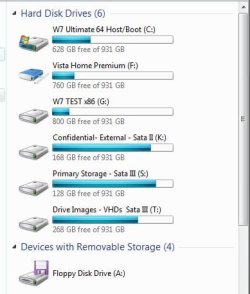
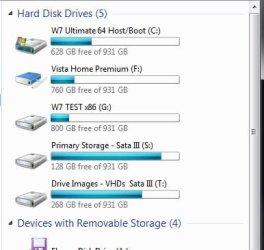
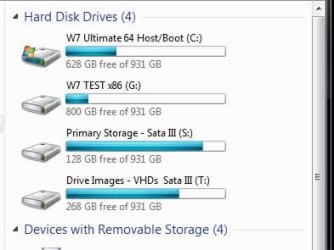
Here I have a different solution for making certain drives simply "disappear" rather then forgetting or not being able to decrypt a drive. Note the 3 screens here where the first shows two separate drives about to vanish one being in an external usb enclosure no longer seen in the second.

In the 3rd you will notice another drive vanished as well namely a drive image that was mounted. "The case of the missing drives" :D
 

Attachments

  • One Confidential HD.jpg
    One Confidential HD.jpg
    32.4 KB · Views: 0
  • One Confidential HD Disappears.jpg
    One Confidential HD Disappears.jpg
    26.7 KB · Views: 0
  • One Vista HD Disappears.jpg
    One Vista HD Disappears.jpg
    23.6 KB · Views: 0

My Computers

System One System Two

  • Computer type
    PC/Desktop
    Computer Manufacturer/Model Number
    Custom builds = 2
    OS
    W7 Ultimate x64/W10 Pro x64/W11 Pro Triple Boot - Main PC W7 Remote PC Micro ATX W7 Pro x64/W11 Pro
    CPU
    AMD Phenom II X4 975 Deneb 3.6ghz - 965 2nd remote pc
    Motherboard
    Gigabyte GA-790XTA-UD4-Gigabyte GA-880GM-D2H remote pc
    Memory
    Kingston Hyper X DDR3 1600 1.5v 16gb - Hyper X Fury 8gb 2nd
    Graphics Card(s)
    MSI HD Radeon 5750 1gb - MSI HD Radeon 6450 on mini tower
    Sound Card
    Creative Labs X-Fi Xtreme Audio P - Realtek onooard 2nd case
    Monitor(s) Displays
    ASUS VW199T-P 19" HP 2082a Main-HP 2082a 20" remote pc
    Screen Resolution
    Asus 1440x900 - HP 1600x900
    Hard Drives
    WD Black 1TB HD per OS W7, W10, and pending W11 presently on 500gb OS Drive - Pending Triple 1TB HDs for Spanned Storage/backup volume
    Single 2TB external USB enclosure, single 1TB System 7 Host/Boot drive, Pending 8TB external HD for system image b
    PSU
    Corsair 750TX - primary / Corsair CX600 - second
    Case
    Antec 900-2 - SSD compatible / NZXT Vulcan mini tower
    Cooling
    Zalman CNPS9900A
    Keyboard
    AZIO L70 Backlit Letters Gaming - ONN Cordless/USB
    Mouse
    MSI DS200 Programmable, Logitech Cordless
    Internet Speed
    30mbps upgrade - primary hard wired - mini tower usb WiFi
    Antivirus
    GFI VIPRE Internet Security 2014 on W7 2016 beta on W10,
    Browser
    Cyberfox, WaterFox 64bit FF variants, FireFox x64, Pale Moon
    Other Info
    Accomdata fan cooled usb 2.0 PIDE/Sata II, III external enclosure.
    Sambient usb/eSata PATA/Sata II, III external enclosure.
  • Computer type
    PC/Desktop
    System Manufacturer/Model Number
    CUSTOM ASSEMBLY
    OS
    W7 Pro x64/W11 Pro
    CPU
    AMD Deneb 3.6ghz - 965
    Motherboard
    Gigabyte GA-880GM-D2H remote pc
    Memory
    Kingston Hyper X Fury 8gb
    Graphics Card(s)
    MSI HD Radeon 6450 DVI Output
    Sound Card
    Realtek onooard Creative or Other separate PENDING
    Monitor(s) Displays
    VIZIO 32" LCD TV Separate LCD Pending
    Screen Resolution
    1600x1080
    Hard Drives
    WD 500GB OS Host/Boot WD Green 1TB Storage/Backup
    PSU
    Corsair 600W - THERMALTAKE 600W spare case
    Case
    NZXT Vulcan mini tower
    Cooling
    Twin 120mm Top Fans - 240mm Side Cover
    Keyboard
    ONN Cordless/USB Logitech Cordless
    Mouse
    ONN USB/Cordless - Logitech Cordless
    Internet Speed
    DSL 5G
    Browser
    MS Edge, FireFox, WaterFox x64, FireFox Nightly
    Other Info
    OS Testing-Remote Access to Main TeamViewer
Thanks to the links on here I've just downloaded and installed "My Lockbox". Seems to work great and free so long as you only need one folder (no limit to number of sub folders) plus you can lock it automatically when PC goes into standby or hibernation or no activity for a (variable) time. Excellent - thanks guys!
 

My Computer

OS
Windows Home Premium 64bit
@nighthawk:- It may be better to suggest using Trucrypt for drive encryption (especially USB drives) as not everyone has Ultimate or Enterprise. Also, if the user wants to use the USB drive on other computers, they can have a copy of Truecrypt on the same USB drive but on a seperate unencrypted part of it.
 

My Computer

OS
win7
Back
Top