Log On Automatically at Startup

How to Automatically Log On a User Account at Windows 7 Startup


   Information
This will show you how to select or change a user account to have Windows 7 automatically log on to at startup.
   Note

  • If you only have one user account that is not password protected on the computer, then Windows 7 will automatically log on to that account at startup.
  • If you have more than one user account and the user account that you want to have Windows 7 log on to automatically at startup does not have a created password, then leave the password fields blank in step 6 below.
   Warning
This can only be done while logged on to an administrator account. It cannot be done from within a standard account.
If you change the password for the user account you have set to have Windows 7 automatically log on to, then you will also need to change it here as well.


Setting your computer to automatically log on to a user account at startup could pose a security risk if you share the computer or there are other people about that could use your computer. If your computer logs on automatically, they will have the same access as whatever user account you have set to be logged on to at start up.
   Tip
Microsoft has made available a hotfix that will resolve a problem where the taskbar customizations are lost and reset to defaults when automatic logon is enabled in Windows 7 and Windows Server 2008 R2.
EXAMPLE: Log On Screen
NOTE: With Automatic Log On, you will not see this anymore. Windows 7 will boot into the desktop of the selected user account instead.
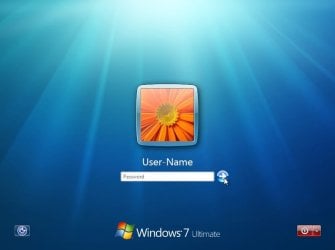
Log-On_Screen.jpg


OPTION ONE

To Turn On or Off Automatic Log On at Startup in Netplwiz


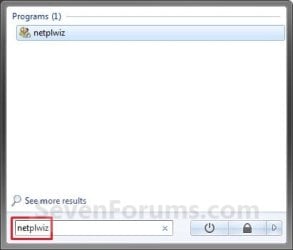
1. Open the Start Menu, type netplwiz in the search box, and press Enter. (see screenshots below)
Start_Menu.jpgStart_Menu2.jpg
2. Do step 3, 4, or 5 below for what you would like to do.


3. To Turn On Automatic Log On for a User Account
A) Check the Users must enter a user name and password to use this computer box. (see screenshot below)

   Note
If your computer is joined to a domain, then you will not have the Users must enter a user name and password to use this computer option.
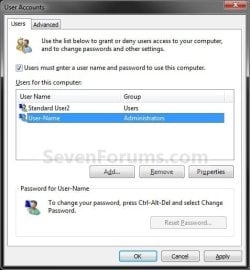
Select_User_Name.jpg
B) Click on the user account name, that you want to have automatically log on at startup, to highlight it. (see screenshot above)

C) Uncheck the Users must enter a user name and password to use this computer box. (see screenshot below)
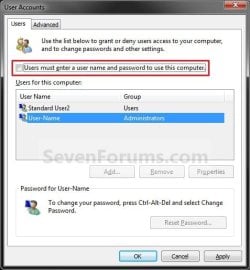
Uncheck_Box.jpg
D) Click on OK, and go to step 6 below. (see screenshot above)
4. To Turn Off Automatic Log On
A) Check the Users must enter a user name and password to use this computer box. (see screenshot below step 3A)

B) Click on OK. (see screenshot below step 3A)

C) You are finished.
5. To Change the User Account to Automatically Log On to
NOTE: For this step, you would have already had a user account selected to log on to automatically in step 3.
A) Check the Users must enter a user name and password to use this computer box, and click on the Apply button. (see screenshot below step 3A)

   Note
If your computer is joined to a domain, then you will not have the Users must enter a user name and password to use this computer option.


B) Select the other user account name, that you want to have automatically log on at startup instead, to highlight it.

C) Uncheck the Users must enter a user name and password to use this computer box. (see screenshot below step 3C)

D) Click on OK, and go to step 6 below. (see screenshot below step 3C)
6. Enter the User Account Password
A) In the Password field, enter the selected user account's password. (See screenshot below)
NOTE: If the user account does not have a password, then leave this field empty. See the WARNING at the top of the tutorial.

B) In the Confirm Password field, enter the selected user account's password again to confirm that it is the same as in step 6A above.

C) Click on OK.
Password.jpg


OPTION TWO

To Turn On or Off Automatic Log On at Startup in Registry Editor


   Warning
:busted: This option is not as secure as using OPTION ONE above.

It is recommended to use OPTION ONE above if you are able to instead. OPTION ONE will save the password in the Credential Manager where it's encrypted and cannot be viewed by anyone.

This option (OPTION TWO) will save the entered password (steps 4G-4H) in the DefaultPassword string value in Registry Editor where it can be seen by anyone with access.


1. Press the :winkey: + R keys to open the Run dialog, type regedit, and click on OK.

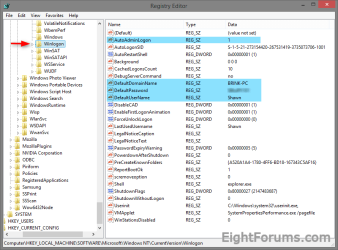
2. In Registry Editor, navigate to the location below. (see screenshot below)
HKEY_LOCAL_MACHINE\SOFTWARE\Microsoft\Windows NT\CurrentVersion\Winlogon
Automatic_log_on_Regsitry-1.png
3. Do step 4 or 5 below for what you would like to do.


4. To Turn On Automatic Log On for a Domain, Local, or Microsoft Account
NOTE: You could also use this step to change what user account you would like Windows 8 to sign-in to automatically at startup.
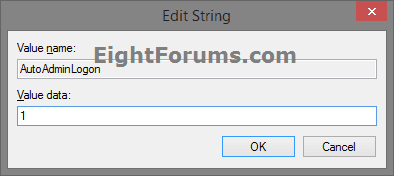
A) In the right pane on Winlogon, double click/tap on the AutoAdminLogon string value to modify it. (see screenshot below step 2)

B) Type 1, and click/tap on OK. (see screenshot below)
Automatic_log_on_Regsitry-1A.png
C) Double click/tap on the DefaultDomainName string value to modify it. (see screenshot below step 2)

D) Type the computer name (if local) or domain name, and click/tap on OK. (see screenshot below)
Automatic_log_on_Regsitry-2.png
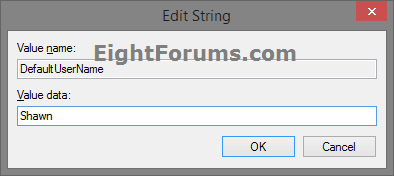
E) Double click/tap on the DefaultUserName string value to modify it. (see screenshot below step 2)

F) Type the user name (ex: Shawn) of the account you want to automatically be signed in to at startup, and click/tap on OK. (see screenshot below)

NOTE: This will be the same name as the user account's C:\Users\(UserName) profile folder.
Automatic_log_on_Regsitry-3.png
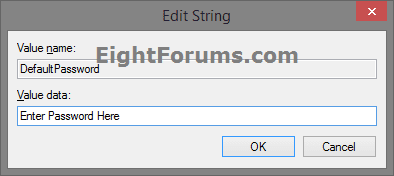
G) Double click/tap on the DefaultPassword string value to modify it. (see screenshot below step 2)

NOTE: If you do not have a DefaultPassword string value, then right click or press and hold on an empty area in the right pane of the Winlogon key, click/tap on New and String Value, type DefaultPassword, and press Enter.

H) Type the password of the user account you want to automatically be signed in to at startup, and click/tap on OK. (see screenshot below)
Automatic_log_on_Regsitry-4.png
I) Go to step 6 below.
5. To Turn Off Automatic Log On for All Users
A) In the right pane on Winlogon, double click/tap on the AutoAdminLogon string value to modify it. (see screenshot below step 2)

B) Type 0 (zero), and click/tap on OK. (see screenshot below step 4B)

C) Right click or press and hold on the DefaultPassword string value, and click/tap on Delete. (see screenshot below step 2)

NOTE: If you do not have a DefaultPassword string value, then that's ok, and go to step 6 below.

D) Click/tap on Yes to confirm. (see screenshot below)
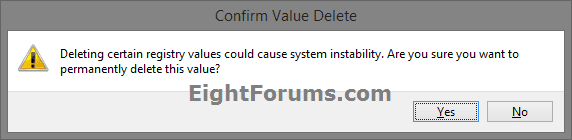
Automatic_log_on_Regsitry-5.png
E) Go to step 6 below.
6. When finished, close Registry Editor.
That's it,
Shawn


Last edited:
You might go through the steps again turn off and then back on to automatically log on to that user to see if that may toggle it to work again.
 

My Computer

Computer type
PC/Desktop
Computer Manufacturer/Model Number
Self built custom
OS
64-bit Windows 11 Pro for Workstations
CPU
Intel i7-8700K OC'd to 5 GHz
Motherboard
ASUS ROG Maximus XI Formula Z390
Memory
64 GB (4x16GB) G.SKILL TridentZ RGB DDR4 3600 MHz
Graphics Card(s)
ASUS ROG-STRIX-GTX1080TI-O11G-GAMING
Sound Card
Integrated
Monitor(s) Displays
2 x Samsung Odyssey G7 27"
Screen Resolution
2560x1440
Hard Drives
1TB Samsung 990 PRO M.2,
4TB Samsung 990 PRO PRO M.2,
TerraMaster F8 SSD Plus NAS
PSU
Seasonic Prime Titanium 850W
Case
Thermaltake Core P3
Cooling
Corsair Hydro H115i
Keyboard
Logitech wireless K800
Mouse
Logitech MX Master 4
Internet Speed
2 Gb/s Download and 100 Mb/s Upload
Antivirus
Malwarebyte Anti-Malware Premium
Browser
Google Chrome
Other Info
Logitech Z625 speaker system,
Logitech BRIO 4K Pro webcam,
HP Color LaserJet Pro MFP M477fdn,
APC SMART-UPS RT 1000 XL - SURT1000XLI,
Galaxy S23 Plus phone
You're most welcome William. :)
 

My Computer

Computer type
PC/Desktop
Computer Manufacturer/Model Number
Self built custom
OS
64-bit Windows 11 Pro for Workstations
CPU
Intel i7-8700K OC'd to 5 GHz
Motherboard
ASUS ROG Maximus XI Formula Z390
Memory
64 GB (4x16GB) G.SKILL TridentZ RGB DDR4 3600 MHz
Graphics Card(s)
ASUS ROG-STRIX-GTX1080TI-O11G-GAMING
Sound Card
Integrated
Monitor(s) Displays
2 x Samsung Odyssey G7 27"
Screen Resolution
2560x1440
Hard Drives
1TB Samsung 990 PRO M.2,
4TB Samsung 990 PRO PRO M.2,
TerraMaster F8 SSD Plus NAS
PSU
Seasonic Prime Titanium 850W
Case
Thermaltake Core P3
Cooling
Corsair Hydro H115i
Keyboard
Logitech wireless K800
Mouse
Logitech MX Master 4
Internet Speed
2 Gb/s Download and 100 Mb/s Upload
Antivirus
Malwarebyte Anti-Malware Premium
Browser
Google Chrome
Other Info
Logitech Z625 speaker system,
Logitech BRIO 4K Pro webcam,
HP Color LaserJet Pro MFP M477fdn,
APC SMART-UPS RT 1000 XL - SURT1000XLI,
Galaxy S23 Plus phone
auto login after logout

The procedure does work, but only at reboot. We use machines on shop floor (kiosk type application). We have a large base of XP machines and with XP we utilize the logout functionality for the users to initialize if something does not work. In XP the system will login automatically after a logout (unless the shift key is held down). Is this possible in Win7? Major change to system's if necessary.
thxs in advance.
 

My Computer

Computer Manufacturer/Model Number
HP
OS
win7 pro 64 SP1
Hello Rohack, and welcome to Seven Forums.

Yes, this only works for the log on at startup on the local computer instead.
 

My Computer

Computer type
PC/Desktop
Computer Manufacturer/Model Number
Self built custom
OS
64-bit Windows 11 Pro for Workstations
CPU
Intel i7-8700K OC'd to 5 GHz
Motherboard
ASUS ROG Maximus XI Formula Z390
Memory
64 GB (4x16GB) G.SKILL TridentZ RGB DDR4 3600 MHz
Graphics Card(s)
ASUS ROG-STRIX-GTX1080TI-O11G-GAMING
Sound Card
Integrated
Monitor(s) Displays
2 x Samsung Odyssey G7 27"
Screen Resolution
2560x1440
Hard Drives
1TB Samsung 990 PRO M.2,
4TB Samsung 990 PRO PRO M.2,
TerraMaster F8 SSD Plus NAS
PSU
Seasonic Prime Titanium 850W
Case
Thermaltake Core P3
Cooling
Corsair Hydro H115i
Keyboard
Logitech wireless K800
Mouse
Logitech MX Master 4
Internet Speed
2 Gb/s Download and 100 Mb/s Upload
Antivirus
Malwarebyte Anti-Malware Premium
Browser
Google Chrome
Other Info
Logitech Z625 speaker system,
Logitech BRIO 4K Pro webcam,
HP Color LaserJet Pro MFP M477fdn,
APC SMART-UPS RT 1000 XL - SURT1000XLI,
Galaxy S23 Plus phone
Nice tut Brink :)
 

My Computer

Computer Manufacturer/Model Number
Alienware
OS
Windows 7 Ultimate x64
CPU
I7
Motherboard
GA-X58-USB3
Memory
6 x 1.5V DDR3 DIMM sockets supporting up to 24 GB of system
Graphics Card(s)
GeForce GTX 580
Sound Card
Realtek ALC892 codec 2/4/5.1/7.1-channel
Monitor(s) Displays
NEC Display Solutions E321 Black 32"
Screen Resolution
1366 x 768
Hard Drives
OCZ Colossus LT Series OCZSSD2-1CLSLT1T 3.5" 1TB SATA II MLC Internal Solid State Drive
PSU
XFX Black Edition XPS-850W-BES 850W ATX12V
Case
Antec
Cooling
Zalman
Keyboard
Microsoft
Mouse
Microsoft
Thank you Seth. :)
 

My Computer

Computer type
PC/Desktop
Computer Manufacturer/Model Number
Self built custom
OS
64-bit Windows 11 Pro for Workstations
CPU
Intel i7-8700K OC'd to 5 GHz
Motherboard
ASUS ROG Maximus XI Formula Z390
Memory
64 GB (4x16GB) G.SKILL TridentZ RGB DDR4 3600 MHz
Graphics Card(s)
ASUS ROG-STRIX-GTX1080TI-O11G-GAMING
Sound Card
Integrated
Monitor(s) Displays
2 x Samsung Odyssey G7 27"
Screen Resolution
2560x1440
Hard Drives
1TB Samsung 990 PRO M.2,
4TB Samsung 990 PRO PRO M.2,
TerraMaster F8 SSD Plus NAS
PSU
Seasonic Prime Titanium 850W
Case
Thermaltake Core P3
Cooling
Corsair Hydro H115i
Keyboard
Logitech wireless K800
Mouse
Logitech MX Master 4
Internet Speed
2 Gb/s Download and 100 Mb/s Upload
Antivirus
Malwarebyte Anti-Malware Premium
Browser
Google Chrome
Other Info
Logitech Z625 speaker system,
Logitech BRIO 4K Pro webcam,
HP Color LaserJet Pro MFP M477fdn,
APC SMART-UPS RT 1000 XL - SURT1000XLI,
Galaxy S23 Plus phone
thanks for the tutorial, Brink
saves some seconds and clicks
i created this account to thank you :D
 

My Computer

OS
Windows 7 Ultimate SP1 32 bit
You're most welcome unown, and welcome to Seven Forums. :)
 

My Computer

Computer type
PC/Desktop
Computer Manufacturer/Model Number
Self built custom
OS
64-bit Windows 11 Pro for Workstations
CPU
Intel i7-8700K OC'd to 5 GHz
Motherboard
ASUS ROG Maximus XI Formula Z390
Memory
64 GB (4x16GB) G.SKILL TridentZ RGB DDR4 3600 MHz
Graphics Card(s)
ASUS ROG-STRIX-GTX1080TI-O11G-GAMING
Sound Card
Integrated
Monitor(s) Displays
2 x Samsung Odyssey G7 27"
Screen Resolution
2560x1440
Hard Drives
1TB Samsung 990 PRO M.2,
4TB Samsung 990 PRO PRO M.2,
TerraMaster F8 SSD Plus NAS
PSU
Seasonic Prime Titanium 850W
Case
Thermaltake Core P3
Cooling
Corsair Hydro H115i
Keyboard
Logitech wireless K800
Mouse
Logitech MX Master 4
Internet Speed
2 Gb/s Download and 100 Mb/s Upload
Antivirus
Malwarebyte Anti-Malware Premium
Browser
Google Chrome
Other Info
Logitech Z625 speaker system,
Logitech BRIO 4K Pro webcam,
HP Color LaserJet Pro MFP M477fdn,
APC SMART-UPS RT 1000 XL - SURT1000XLI,
Galaxy S23 Plus phone
Last edited by a moderator:

My Computer

Computer type
PC/Desktop
Computer Manufacturer/Model Number
Medion Erazer (note to self: insert model number) - with custom additions
OS
Windows 10 Pro x64
CPU
Intel Core i5 7400 @ 3.00GHz
Motherboard
OEM supllied with PC
Memory
8GB 2133Mhz DDR4 (OEM supplied)
Graphics Card(s)
Gygabyte Windforce GTX 1050Ti (Factory Overclocked)
Sound Card
Realtek
Monitor(s) Displays
Acer Al1980 + HKC
Screen Resolution
1360*768(HKC) / 1280*1024(Acer)
Hard Drives
1TB Toshiba
1TB WD Caviar Green
120GB Samsung Evo 840
PSU
OEM supplied (no power rating on case)
Case
OEM Supplied
Cooling
Stock
Keyboard
Logitech Wireless
Mouse
Logitect Wireless
Internet Speed
40Mb/s Down 10Mb/s Up
Antivirus
Defender
Browser
Firefox
Hello Brink,
I used this procedure for my Mom's computer and due to some circumstances, I want to undo these steps. It might be the chicken or the egg, but I'm not sure what to do first or in what order it should be done.

Any assistance would be greatly appreciated.

Greg
 

My Computer

Computer Manufacturer/Model Number
Alienware Aurora
OS
Windows 7 Professional (64bit)
CPU
Core i7 Extreme 975 @ 3.33GHz overclocked to 3.6 GHz
Motherboard
Alienware 0H869M
Memory
12 GB DDR3 1333MHz
Graphics Card(s)
NVIDIA GeForce GTX 295 1.8 GB RAM
Sound Card
Creative SB X-Fi Titanium
Monitor(s) Displays
Dell 2407WFP
Screen Resolution
1920 x 1200
Hard Drives
OCZ Vertex 2 100GB SSD - Primary Drive, Western Digital 300GB SATA-II 3GB/X, 10,000 RPM, 16MB Cache - Secondary Drive
PSU
875 Watt
Case
Cosmic Black
Cooling
Alienware High-Performance Liquid Cooling
Keyboard
Logitech
Mouse
Logitech
Internet Speed
60/3MB Service
Other Info
Logitech Z-5500 THX-Certified 505-Watt 5.1 Digital Surround Sound Speaker System
Hello Greg,

No worries. You would just need to check the Users must enter a user name and password to use this computer box to turn off automatic log on to a user account. :)

Hope this helps,
Shawn
 

My Computer

Computer type
PC/Desktop
Computer Manufacturer/Model Number
Self built custom
OS
64-bit Windows 11 Pro for Workstations
CPU
Intel i7-8700K OC'd to 5 GHz
Motherboard
ASUS ROG Maximus XI Formula Z390
Memory
64 GB (4x16GB) G.SKILL TridentZ RGB DDR4 3600 MHz
Graphics Card(s)
ASUS ROG-STRIX-GTX1080TI-O11G-GAMING
Sound Card
Integrated
Monitor(s) Displays
2 x Samsung Odyssey G7 27"
Screen Resolution
2560x1440
Hard Drives
1TB Samsung 990 PRO M.2,
4TB Samsung 990 PRO PRO M.2,
TerraMaster F8 SSD Plus NAS
PSU
Seasonic Prime Titanium 850W
Case
Thermaltake Core P3
Cooling
Corsair Hydro H115i
Keyboard
Logitech wireless K800
Mouse
Logitech MX Master 4
Internet Speed
2 Gb/s Download and 100 Mb/s Upload
Antivirus
Malwarebyte Anti-Malware Premium
Browser
Google Chrome
Other Info
Logitech Z625 speaker system,
Logitech BRIO 4K Pro webcam,
HP Color LaserJet Pro MFP M477fdn,
APC SMART-UPS RT 1000 XL - SURT1000XLI,
Galaxy S23 Plus phone
Hello Greg,

No worries. You would just need to check the Users must enter a user name and password to use this computer box to turn off automatic log on to a user account. :)

Hope this helps,
Shawn


Daaa.....that's way to easy. I might even fumble through that one.

As usual, this site has come through again for me. Thanks so much, I'll take care of that this weekend.

Thanks Brink!
 

My Computer

Computer Manufacturer/Model Number
Alienware Aurora
OS
Windows 7 Professional (64bit)
CPU
Core i7 Extreme 975 @ 3.33GHz overclocked to 3.6 GHz
Motherboard
Alienware 0H869M
Memory
12 GB DDR3 1333MHz
Graphics Card(s)
NVIDIA GeForce GTX 295 1.8 GB RAM
Sound Card
Creative SB X-Fi Titanium
Monitor(s) Displays
Dell 2407WFP
Screen Resolution
1920 x 1200
Hard Drives
OCZ Vertex 2 100GB SSD - Primary Drive, Western Digital 300GB SATA-II 3GB/X, 10,000 RPM, 16MB Cache - Secondary Drive
PSU
875 Watt
Case
Cosmic Black
Cooling
Alienware High-Performance Liquid Cooling
Keyboard
Logitech
Mouse
Logitech
Internet Speed
60/3MB Service
Other Info
Logitech Z-5500 THX-Certified 505-Watt 5.1 Digital Surround Sound Speaker System
You're most welcome Greg. :)
 

My Computer

Computer type
PC/Desktop
Computer Manufacturer/Model Number
Self built custom
OS
64-bit Windows 11 Pro for Workstations
CPU
Intel i7-8700K OC'd to 5 GHz
Motherboard
ASUS ROG Maximus XI Formula Z390
Memory
64 GB (4x16GB) G.SKILL TridentZ RGB DDR4 3600 MHz
Graphics Card(s)
ASUS ROG-STRIX-GTX1080TI-O11G-GAMING
Sound Card
Integrated
Monitor(s) Displays
2 x Samsung Odyssey G7 27"
Screen Resolution
2560x1440
Hard Drives
1TB Samsung 990 PRO M.2,
4TB Samsung 990 PRO PRO M.2,
TerraMaster F8 SSD Plus NAS
PSU
Seasonic Prime Titanium 850W
Case
Thermaltake Core P3
Cooling
Corsair Hydro H115i
Keyboard
Logitech wireless K800
Mouse
Logitech MX Master 4
Internet Speed
2 Gb/s Download and 100 Mb/s Upload
Antivirus
Malwarebyte Anti-Malware Premium
Browser
Google Chrome
Other Info
Logitech Z625 speaker system,
Logitech BRIO 4K Pro webcam,
HP Color LaserJet Pro MFP M477fdn,
APC SMART-UPS RT 1000 XL - SURT1000XLI,
Galaxy S23 Plus phone
Just wanted to thank you for this post. Using a HTPC and set it up so it shuts down automtically at night and boots up by it self in the morning. The login screen was a real nuisance!!
 

My Computer

OS
Windows 7
You're most welcome Roberto, and welcome to Seven Forums. :)
 

My Computer

Computer type
PC/Desktop
Computer Manufacturer/Model Number
Self built custom
OS
64-bit Windows 11 Pro for Workstations
CPU
Intel i7-8700K OC'd to 5 GHz
Motherboard
ASUS ROG Maximus XI Formula Z390
Memory
64 GB (4x16GB) G.SKILL TridentZ RGB DDR4 3600 MHz
Graphics Card(s)
ASUS ROG-STRIX-GTX1080TI-O11G-GAMING
Sound Card
Integrated
Monitor(s) Displays
2 x Samsung Odyssey G7 27"
Screen Resolution
2560x1440
Hard Drives
1TB Samsung 990 PRO M.2,
4TB Samsung 990 PRO PRO M.2,
TerraMaster F8 SSD Plus NAS
PSU
Seasonic Prime Titanium 850W
Case
Thermaltake Core P3
Cooling
Corsair Hydro H115i
Keyboard
Logitech wireless K800
Mouse
Logitech MX Master 4
Internet Speed
2 Gb/s Download and 100 Mb/s Upload
Antivirus
Malwarebyte Anti-Malware Premium
Browser
Google Chrome
Other Info
Logitech Z625 speaker system,
Logitech BRIO 4K Pro webcam,
HP Color LaserJet Pro MFP M477fdn,
APC SMART-UPS RT 1000 XL - SURT1000XLI,
Galaxy S23 Plus phone
Hello Tang,

The only downside would be that if you have a computer trying to log on to your via a network, they will be able to easily log on to your computer with your account since it did not have a password. I would recommend to create a password for your account, then apply this tutorial for auto logon. This way you can still have your computer log on to your account automatically, but no computer on a network will be able to without your password.

Hope this helps,
Shawn

This was massively important for me to read! I have a network that may allow for possible security risks, but being the only user of my computer and working down the list found here:

http://www.sevenforums.com/tutorials/11728-optimize-windows-7-a.html

I decided to turn off my password...

...then I found this step in the list shortly afterwards. Kind of funny, and so I followed the steps to allow automatic log-in, but what I am going to do now is make sure I create a password for my administrator account again to provide added security over the network.

Thanks
 

My Computer

Computer type
PC/Desktop
Computer Manufacturer/Model Number
Dell
OS
Windows 7 Professional 64bit
CPU
Intel Core i5-3320M @ 2.60GHz
Memory
8GB
Graphics Card(s)
Intel HD Graphics 4000 (integrated)
Sound Card
IDT Audio (integrated)
Monitor(s) Displays
generic dual monitors (various brands)
Screen Resolution
1366 x 768
Hard Drives
500GB built in 5400RPM
various externals (Lacie 4TB, WD 3TB)
PSU
pretty standard.. no sparks or melting
Case
mainly consists of plastic, metal and a few screws
Cooling
there is a fan... somewhere... I can hear it.
Mouse
Microsoft Intellimouse Explorer 3.0
Internet Speed
50 down / 10 up
Antivirus
Avast
Browser
Chrome
Other Info
I have a secondary laptop (replaced due to multiple issues):
- Zoostorm i5, 16GB RAM

I also have desktops:
- AMD Bulldozer, 8GB RAM - keeps turning off - currently unusable
- Acer Core 2 Duo, 2GB RAM - won't boot - currently unusable

I have various other ancient desktops that I don't seem to want to get rid of.
I cant get this to work..There are different things other the sc shots and I'm very computer smart to start with.....:cry:
 

My Computer

Computer type
PC/Desktop
Computer Manufacturer/Model Number
Custom/Digital Storm
OS
Windows 7 Ultimate x64
CPU
Intel Core i5 3570K 3.40 GHz (Unlocked CPU) (Quad Core)
Motherboard
ASUS SABERTOOTH Z77 (Intel Z77
Memory
16GB DDR3 1600MHz
Graphics Card(s)
NVIDIA GeForce GTX 680 2GB
Sound Card
Creative Labs X-Fi Titanium HD 24-bit
Monitor(s) Displays
SyncMaster 245 24"
Screen Resolution
1920X1200
PSU
1050W Corsair Pro Silver 1050HX
Case
Cooler Master
Cooling
Air
Internet Speed
High-Speed Cable / DSL / Network Connections)
Antivirus
Avast
Browser
IE 10
Other Info
OS Boost: Yes, Disable and tweak all of the non-crucial services on the operating system
Windows OS: Microsoft Windows 7 Ultimate (64-Bit Edition)
Hello Clayp,

Could you post back with a few screenshots showing what you are seeing instead? :)
 

My Computer

Computer type
PC/Desktop
Computer Manufacturer/Model Number
Self built custom
OS
64-bit Windows 11 Pro for Workstations
CPU
Intel i7-8700K OC'd to 5 GHz
Motherboard
ASUS ROG Maximus XI Formula Z390
Memory
64 GB (4x16GB) G.SKILL TridentZ RGB DDR4 3600 MHz
Graphics Card(s)
ASUS ROG-STRIX-GTX1080TI-O11G-GAMING
Sound Card
Integrated
Monitor(s) Displays
2 x Samsung Odyssey G7 27"
Screen Resolution
2560x1440
Hard Drives
1TB Samsung 990 PRO M.2,
4TB Samsung 990 PRO PRO M.2,
TerraMaster F8 SSD Plus NAS
PSU
Seasonic Prime Titanium 850W
Case
Thermaltake Core P3
Cooling
Corsair Hydro H115i
Keyboard
Logitech wireless K800
Mouse
Logitech MX Master 4
Internet Speed
2 Gb/s Download and 100 Mb/s Upload
Antivirus
Malwarebyte Anti-Malware Premium
Browser
Google Chrome
Other Info
Logitech Z625 speaker system,
Logitech BRIO 4K Pro webcam,
HP Color LaserJet Pro MFP M477fdn,
APC SMART-UPS RT 1000 XL - SURT1000XLI,
Galaxy S23 Plus phone
Brink I got it to work..Thank you.:D
 

My Computer

Computer type
PC/Desktop
Computer Manufacturer/Model Number
Custom/Digital Storm
OS
Windows 7 Ultimate x64
CPU
Intel Core i5 3570K 3.40 GHz (Unlocked CPU) (Quad Core)
Motherboard
ASUS SABERTOOTH Z77 (Intel Z77
Memory
16GB DDR3 1600MHz
Graphics Card(s)
NVIDIA GeForce GTX 680 2GB
Sound Card
Creative Labs X-Fi Titanium HD 24-bit
Monitor(s) Displays
SyncMaster 245 24"
Screen Resolution
1920X1200
PSU
1050W Corsair Pro Silver 1050HX
Case
Cooler Master
Cooling
Air
Internet Speed
High-Speed Cable / DSL / Network Connections)
Antivirus
Avast
Browser
IE 10
Other Info
OS Boost: Yes, Disable and tweak all of the non-crucial services on the operating system
Windows OS: Microsoft Windows 7 Ultimate (64-Bit Edition)
Back
Top