Log On Automatically at Startup

How to Automatically Log On a User Account at Windows 7 Startup


   Information
This will show you how to select or change a user account to have Windows 7 automatically log on to at startup.
   Note

  • If you only have one user account that is not password protected on the computer, then Windows 7 will automatically log on to that account at startup.
  • If you have more than one user account and the user account that you want to have Windows 7 log on to automatically at startup does not have a created password, then leave the password fields blank in step 6 below.
   Warning
This can only be done while logged on to an administrator account. It cannot be done from within a standard account.
If you change the password for the user account you have set to have Windows 7 automatically log on to, then you will also need to change it here as well.


Setting your computer to automatically log on to a user account at startup could pose a security risk if you share the computer or there are other people about that could use your computer. If your computer logs on automatically, they will have the same access as whatever user account you have set to be logged on to at start up.
   Tip
Microsoft has made available a hotfix that will resolve a problem where the taskbar customizations are lost and reset to defaults when automatic logon is enabled in Windows 7 and Windows Server 2008 R2.
EXAMPLE: Log On Screen
NOTE: With Automatic Log On, you will not see this anymore. Windows 7 will boot into the desktop of the selected user account instead.
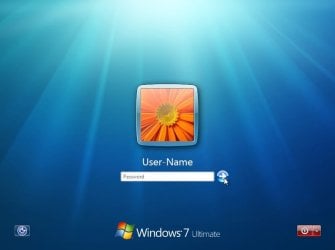
Log-On_Screen.jpg


OPTION ONE

To Turn On or Off Automatic Log On at Startup in Netplwiz


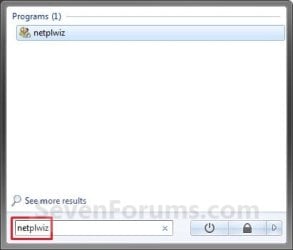
1. Open the Start Menu, type netplwiz in the search box, and press Enter. (see screenshots below)
Start_Menu.jpgStart_Menu2.jpg
2. Do step 3, 4, or 5 below for what you would like to do.


3. To Turn On Automatic Log On for a User Account
A) Check the Users must enter a user name and password to use this computer box. (see screenshot below)

   Note
If your computer is joined to a domain, then you will not have the Users must enter a user name and password to use this computer option.
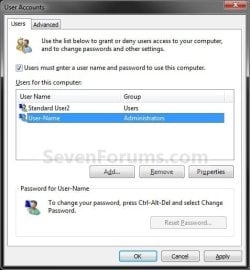
Select_User_Name.jpg
B) Click on the user account name, that you want to have automatically log on at startup, to highlight it. (see screenshot above)

C) Uncheck the Users must enter a user name and password to use this computer box. (see screenshot below)
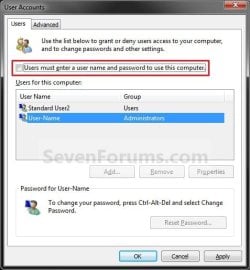
Uncheck_Box.jpg
D) Click on OK, and go to step 6 below. (see screenshot above)
4. To Turn Off Automatic Log On
A) Check the Users must enter a user name and password to use this computer box. (see screenshot below step 3A)

B) Click on OK. (see screenshot below step 3A)

C) You are finished.
5. To Change the User Account to Automatically Log On to
NOTE: For this step, you would have already had a user account selected to log on to automatically in step 3.
A) Check the Users must enter a user name and password to use this computer box, and click on the Apply button. (see screenshot below step 3A)

   Note
If your computer is joined to a domain, then you will not have the Users must enter a user name and password to use this computer option.


B) Select the other user account name, that you want to have automatically log on at startup instead, to highlight it.

C) Uncheck the Users must enter a user name and password to use this computer box. (see screenshot below step 3C)

D) Click on OK, and go to step 6 below. (see screenshot below step 3C)
6. Enter the User Account Password
A) In the Password field, enter the selected user account's password. (See screenshot below)
NOTE: If the user account does not have a password, then leave this field empty. See the WARNING at the top of the tutorial.

B) In the Confirm Password field, enter the selected user account's password again to confirm that it is the same as in step 6A above.

C) Click on OK.
Password.jpg


OPTION TWO

To Turn On or Off Automatic Log On at Startup in Registry Editor


   Warning
:busted: This option is not as secure as using OPTION ONE above.

It is recommended to use OPTION ONE above if you are able to instead. OPTION ONE will save the password in the Credential Manager where it's encrypted and cannot be viewed by anyone.

This option (OPTION TWO) will save the entered password (steps 4G-4H) in the DefaultPassword string value in Registry Editor where it can be seen by anyone with access.


1. Press the :winkey: + R keys to open the Run dialog, type regedit, and click on OK.

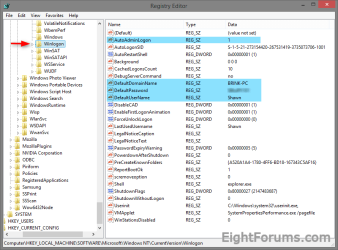
2. In Registry Editor, navigate to the location below. (see screenshot below)
HKEY_LOCAL_MACHINE\SOFTWARE\Microsoft\Windows NT\CurrentVersion\Winlogon
Automatic_log_on_Regsitry-1.png
3. Do step 4 or 5 below for what you would like to do.


4. To Turn On Automatic Log On for a Domain, Local, or Microsoft Account
NOTE: You could also use this step to change what user account you would like Windows 8 to sign-in to automatically at startup.
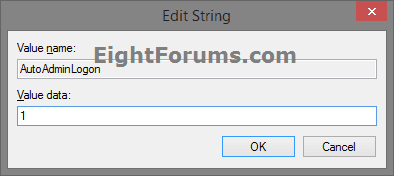
A) In the right pane on Winlogon, double click/tap on the AutoAdminLogon string value to modify it. (see screenshot below step 2)

B) Type 1, and click/tap on OK. (see screenshot below)
Automatic_log_on_Regsitry-1A.png
C) Double click/tap on the DefaultDomainName string value to modify it. (see screenshot below step 2)

D) Type the computer name (if local) or domain name, and click/tap on OK. (see screenshot below)
Automatic_log_on_Regsitry-2.png
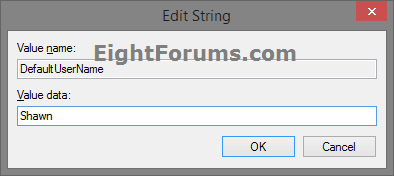
E) Double click/tap on the DefaultUserName string value to modify it. (see screenshot below step 2)

F) Type the user name (ex: Shawn) of the account you want to automatically be signed in to at startup, and click/tap on OK. (see screenshot below)

NOTE: This will be the same name as the user account's C:\Users\(UserName) profile folder.
Automatic_log_on_Regsitry-3.png
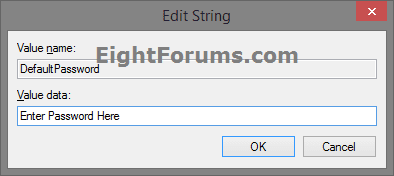
G) Double click/tap on the DefaultPassword string value to modify it. (see screenshot below step 2)

NOTE: If you do not have a DefaultPassword string value, then right click or press and hold on an empty area in the right pane of the Winlogon key, click/tap on New and String Value, type DefaultPassword, and press Enter.

H) Type the password of the user account you want to automatically be signed in to at startup, and click/tap on OK. (see screenshot below)
Automatic_log_on_Regsitry-4.png
I) Go to step 6 below.
5. To Turn Off Automatic Log On for All Users
A) In the right pane on Winlogon, double click/tap on the AutoAdminLogon string value to modify it. (see screenshot below step 2)

B) Type 0 (zero), and click/tap on OK. (see screenshot below step 4B)

C) Right click or press and hold on the DefaultPassword string value, and click/tap on Delete. (see screenshot below step 2)

NOTE: If you do not have a DefaultPassword string value, then that's ok, and go to step 6 below.

D) Click/tap on Yes to confirm. (see screenshot below)
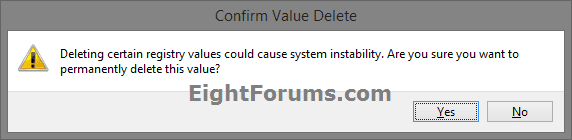
Automatic_log_on_Regsitry-5.png
E) Go to step 6 below.
6. When finished, close Registry Editor.
That's it,
Shawn


Last edited:
I had it do it to me one time, and reapplying this tutorial here again made it stick afterwards. Not sure what caused it not to the first time though.

I've reset everything in the POWER PLAN to either DISABLE, OFF or NEVER so I shall see when I re-boot.

Thanks for your help.
 
Last edited by a moderator:

My Computer

Computer Manufacturer/Model Number
AsRock ION330
OS
Windows 7
CPU
Atom 330
Motherboard
ASRock ION
Memory
4Gb
Graphics Card(s)
Nvidia ION
Sound Card
Nvidia ION
Monitor(s) Displays
42" Pioneer Plasma
Screen Resolution
1920 x 1080
Hard Drives
300Gb SATA internal, and 2Tb in NAS on LAN.
PSU
Standard
Case
ASRock
Cooling
ASRock
Keyboard
Basic
Mouse
Basic
Internet Speed
50 Mb/s
Other Info
6" 4"", top lip, and walks about a lot !!
I tried this from within a "standard user" account. It does not work. It needs to be done from within an administrator account to work. FYI
 

My Computer

Computer Manufacturer/Model Number
Keeps changing - (Custom)
OS
Windows 7 Professional x64
CPU
Intel Core i7 860
Motherboard
Gigabyte GA-P55-UD4P
Memory
4GB DDR3 Mushkin 1600Mhz @ 7-8-7-20
Graphics Card(s)
MSI GTS250 1GB DDR3 Twin Frozr
Sound Card
Onboard realtek
Monitor(s) Displays
Samsung SyncMaster 24" P2450 + Samsung 20" 2033
Screen Resolution
1920 X 1080 and 1600 X 900 (#2 system 1440 X 900)
Hard Drives
Patriot Inferno 120GB SSD + 3 WD Blue 640GB drives
PSU
Corsair 750 HX Modular
Case
Lancool PC-K62
Cooling
Cooler Master TX3 CPU cooler and 4-140mm and 1-120mm case
Keyboard
Gigabyte USB keyboard
Mouse
Microsoft wireless laser mouse 5000
Internet Speed
7 Mb down 1.5 up
Other Info
System #2: AMD Phenom II X6 1055T (Freezer 7 Pro cooler) - Gigabyte 880GMA-UD2H - WD 500GB Black - 9500GT (1GB) 500W OCZ modular PSU - Antec 200 case. System #3 (LapTop) Core 2 Duo T6670 - 320GB 7200RPM HD - 4GB DDR3 RAM.
Thanks Nate - it has now been sorted.
 

My Computer

Computer Manufacturer/Model Number
AsRock ION330
OS
Windows 7
CPU
Atom 330
Motherboard
ASRock ION
Memory
4Gb
Graphics Card(s)
Nvidia ION
Sound Card
Nvidia ION
Monitor(s) Displays
42" Pioneer Plasma
Screen Resolution
1920 x 1080
Hard Drives
300Gb SATA internal, and 2Tb in NAS on LAN.
PSU
Standard
Case
ASRock
Cooling
ASRock
Keyboard
Basic
Mouse
Basic
Internet Speed
50 Mb/s
Other Info
6" 4"", top lip, and walks about a lot !!
Thanks Nate - it has now been sorted.

Oh That's just general information for everyone to know. I didn't see it in the tutorial.

Have a good day.
 

My Computer

Computer Manufacturer/Model Number
Keeps changing - (Custom)
OS
Windows 7 Professional x64
CPU
Intel Core i7 860
Motherboard
Gigabyte GA-P55-UD4P
Memory
4GB DDR3 Mushkin 1600Mhz @ 7-8-7-20
Graphics Card(s)
MSI GTS250 1GB DDR3 Twin Frozr
Sound Card
Onboard realtek
Monitor(s) Displays
Samsung SyncMaster 24" P2450 + Samsung 20" 2033
Screen Resolution
1920 X 1080 and 1600 X 900 (#2 system 1440 X 900)
Hard Drives
Patriot Inferno 120GB SSD + 3 WD Blue 640GB drives
PSU
Corsair 750 HX Modular
Case
Lancool PC-K62
Cooling
Cooler Master TX3 CPU cooler and 4-140mm and 1-120mm case
Keyboard
Gigabyte USB keyboard
Mouse
Microsoft wireless laser mouse 5000
Internet Speed
7 Mb down 1.5 up
Other Info
System #2: AMD Phenom II X6 1055T (Freezer 7 Pro cooler) - Gigabyte 880GMA-UD2H - WD 500GB Black - 9500GT (1GB) 500W OCZ modular PSU - Antec 200 case. System #3 (LapTop) Core 2 Duo T6670 - 320GB 7200RPM HD - 4GB DDR3 RAM.
Thank you Nate. I added this to the Warning box.
 

My Computer

Computer type
PC/Desktop
Computer Manufacturer/Model Number
Self built custom
OS
64-bit Windows 11 Pro for Workstations
CPU
Intel i7-8700K OC'd to 5 GHz
Motherboard
ASUS ROG Maximus XI Formula Z390
Memory
64 GB (4x16GB) G.SKILL TridentZ RGB DDR4 3600 MHz
Graphics Card(s)
ASUS ROG-STRIX-GTX1080TI-O11G-GAMING
Sound Card
Integrated
Monitor(s) Displays
2 x Samsung Odyssey G7 27"
Screen Resolution
2560x1440
Hard Drives
1TB Samsung 990 PRO M.2,
4TB Samsung 990 PRO PRO M.2,
TerraMaster F8 SSD Plus NAS
PSU
Seasonic Prime Titanium 850W
Case
Thermaltake Core P3
Cooling
Corsair Hydro H115i
Keyboard
Logitech wireless K800
Mouse
Logitech MX Master 4
Internet Speed
2 Gb/s Download and 100 Mb/s Upload
Antivirus
Malwarebyte Anti-Malware Premium
Browser
Google Chrome
Other Info
Logitech Z625 speaker system,
Logitech BRIO 4K Pro webcam,
HP Color LaserJet Pro MFP M477fdn,
APC SMART-UPS RT 1000 XL - SURT1000XLI,
Galaxy S23 Plus phone
Can you please explain how this option works on a pc with two user accounts? I'd like the ability to auto login to a specific user, but still allow the second user to login as needed. Is there some sort of time delay prior to auto login?

Thanks
 

My Computer

OS
W7
Hello Jaminator,

Sorry, but this option only allows for the one selected user account to be automatically logged on to at startup. The only way the other user can log on with this option enabled is to either "Switch User" (Start Menu) from with the other account and log on, or log off the other account and log on.

With two users that both need to log on often, it may be best to not have automatic log on enabled.

Hope this helps,
Shawn
 

My Computer

Computer type
PC/Desktop
Computer Manufacturer/Model Number
Self built custom
OS
64-bit Windows 11 Pro for Workstations
CPU
Intel i7-8700K OC'd to 5 GHz
Motherboard
ASUS ROG Maximus XI Formula Z390
Memory
64 GB (4x16GB) G.SKILL TridentZ RGB DDR4 3600 MHz
Graphics Card(s)
ASUS ROG-STRIX-GTX1080TI-O11G-GAMING
Sound Card
Integrated
Monitor(s) Displays
2 x Samsung Odyssey G7 27"
Screen Resolution
2560x1440
Hard Drives
1TB Samsung 990 PRO M.2,
4TB Samsung 990 PRO PRO M.2,
TerraMaster F8 SSD Plus NAS
PSU
Seasonic Prime Titanium 850W
Case
Thermaltake Core P3
Cooling
Corsair Hydro H115i
Keyboard
Logitech wireless K800
Mouse
Logitech MX Master 4
Internet Speed
2 Gb/s Download and 100 Mb/s Upload
Antivirus
Malwarebyte Anti-Malware Premium
Browser
Google Chrome
Other Info
Logitech Z625 speaker system,
Logitech BRIO 4K Pro webcam,
HP Color LaserJet Pro MFP M477fdn,
APC SMART-UPS RT 1000 XL - SURT1000XLI,
Galaxy S23 Plus phone
Will this also work using Remote Desktop? It asks for your passsword/
 

My Computer

OS
Windows 7 Ultimate
Hello Chris,

Sorry but no. :(
 

My Computer

Computer type
PC/Desktop
Computer Manufacturer/Model Number
Self built custom
OS
64-bit Windows 11 Pro for Workstations
CPU
Intel i7-8700K OC'd to 5 GHz
Motherboard
ASUS ROG Maximus XI Formula Z390
Memory
64 GB (4x16GB) G.SKILL TridentZ RGB DDR4 3600 MHz
Graphics Card(s)
ASUS ROG-STRIX-GTX1080TI-O11G-GAMING
Sound Card
Integrated
Monitor(s) Displays
2 x Samsung Odyssey G7 27"
Screen Resolution
2560x1440
Hard Drives
1TB Samsung 990 PRO M.2,
4TB Samsung 990 PRO PRO M.2,
TerraMaster F8 SSD Plus NAS
PSU
Seasonic Prime Titanium 850W
Case
Thermaltake Core P3
Cooling
Corsair Hydro H115i
Keyboard
Logitech wireless K800
Mouse
Logitech MX Master 4
Internet Speed
2 Gb/s Download and 100 Mb/s Upload
Antivirus
Malwarebyte Anti-Malware Premium
Browser
Google Chrome
Other Info
Logitech Z625 speaker system,
Logitech BRIO 4K Pro webcam,
HP Color LaserJet Pro MFP M477fdn,
APC SMART-UPS RT 1000 XL - SURT1000XLI,
Galaxy S23 Plus phone
works greta to me thanks
 

My Computer

OS
Windows 7
CPU
Intel E8400
Motherboard
Asus Maximus Formula
Memory
4x1GB OCZ Flex PC 9200
Graphics Card(s)
XFX GTX 260
Sound Card
SupremeFX II
Monitor(s) Displays
Samsung T220
Screen Resolution
1680x1050
Hard Drives
SataII Seagate 160Gb + Seagate Maxtor 500GB 32mb Cache
PSU
Asus 450W
Cooling
Thermalright Ultra-120 Extreme
Keyboard
Genius Slimstar 330 Keyboard
Mouse
Logitech G5 Laser Mouse
Internet Speed
1mb/sec
Hi Larry,

Yes, all user passwords are automatically encrypted in Windows 7 without a way to be able to see them by default. :)
I'm pleased about that.
 
Last edited:

My Computer

Computer Manufacturer/Model Number
Custom
OS
Windows 7 Professional 32-bit
CPU
Intel(R) Pentium(R) D CPU 3.00 GHz
Motherboard
Asus P5B-VM
Memory
Kingston DDR2 3 gigs total Dual channels Symmetric
Graphics Card(s)
NVIDIA GeForce 8600 GT
Sound Card
Hi defonition Sound max
Monitor(s) Displays
CisNet
Screen Resolution
1280*1024
Hard Drives
WDC WD16000AA-00L7A0 SATA DRIVE
WDC IDE Drive 80 gigs.
PSU
Raidmax 380 watt
Case
Generic brand
Cooling
Standard fan
Keyboard
Logitech Cordless desktop EX100
Mouse
Logitech Cordless desktop EX100
Internet Speed
5.0 mbs
Other Info
MSE anti-virus
I have 2 accounts on my PC and want to auto-login to my main account on startup. Neither has passwords. How do do I accomplish this?
 

My Computer

OS
Windows 7 Premium x64
CPU
AMD Athlon 64 X2 Dual Core 5200+ 2.61GHz
Memory
4GB
Hello FTBoomer,

You can just select the user account that you want to have automatically logged onto with at startup, and just leave the password box empty since it does not have one while doing the tutorial. :)

Hope this helps,
Shawn
 

My Computer

Computer type
PC/Desktop
Computer Manufacturer/Model Number
Self built custom
OS
64-bit Windows 11 Pro for Workstations
CPU
Intel i7-8700K OC'd to 5 GHz
Motherboard
ASUS ROG Maximus XI Formula Z390
Memory
64 GB (4x16GB) G.SKILL TridentZ RGB DDR4 3600 MHz
Graphics Card(s)
ASUS ROG-STRIX-GTX1080TI-O11G-GAMING
Sound Card
Integrated
Monitor(s) Displays
2 x Samsung Odyssey G7 27"
Screen Resolution
2560x1440
Hard Drives
1TB Samsung 990 PRO M.2,
4TB Samsung 990 PRO PRO M.2,
TerraMaster F8 SSD Plus NAS
PSU
Seasonic Prime Titanium 850W
Case
Thermaltake Core P3
Cooling
Corsair Hydro H115i
Keyboard
Logitech wireless K800
Mouse
Logitech MX Master 4
Internet Speed
2 Gb/s Download and 100 Mb/s Upload
Antivirus
Malwarebyte Anti-Malware Premium
Browser
Google Chrome
Other Info
Logitech Z625 speaker system,
Logitech BRIO 4K Pro webcam,
HP Color LaserJet Pro MFP M477fdn,
APC SMART-UPS RT 1000 XL - SURT1000XLI,
Galaxy S23 Plus phone
hi bring
i want to learn something
you say "If you only have one user account that is not password protected on the computer, then Windows 7 will automatically log on to that account at startup."

so for this tuttorial must be more than one account.
İf i want to log in another account which is not set for automatically log on what will i do?
 

My Computer

Computer Manufacturer/Model Number
asus f3sv240dr
OS
vista
CPU
t7700
Memory
2 gb
Graphics Card(s)
8600M
Hard Drives
250 GB
Hello Nonpasaran,

It's also for if you have the account password protected. If you wish to log on automatically to another account at startup, then using the tutorial, you would just check the box, select the account that you want logged on at startup instead, then uncheck the box again.

Hope this helps,
Shawn
 

My Computer

Computer type
PC/Desktop
Computer Manufacturer/Model Number
Self built custom
OS
64-bit Windows 11 Pro for Workstations
CPU
Intel i7-8700K OC'd to 5 GHz
Motherboard
ASUS ROG Maximus XI Formula Z390
Memory
64 GB (4x16GB) G.SKILL TridentZ RGB DDR4 3600 MHz
Graphics Card(s)
ASUS ROG-STRIX-GTX1080TI-O11G-GAMING
Sound Card
Integrated
Monitor(s) Displays
2 x Samsung Odyssey G7 27"
Screen Resolution
2560x1440
Hard Drives
1TB Samsung 990 PRO M.2,
4TB Samsung 990 PRO PRO M.2,
TerraMaster F8 SSD Plus NAS
PSU
Seasonic Prime Titanium 850W
Case
Thermaltake Core P3
Cooling
Corsair Hydro H115i
Keyboard
Logitech wireless K800
Mouse
Logitech MX Master 4
Internet Speed
2 Gb/s Download and 100 Mb/s Upload
Antivirus
Malwarebyte Anti-Malware Premium
Browser
Google Chrome
Other Info
Logitech Z625 speaker system,
Logitech BRIO 4K Pro webcam,
HP Color LaserJet Pro MFP M477fdn,
APC SMART-UPS RT 1000 XL - SURT1000XLI,
Galaxy S23 Plus phone
thanks for quick replay shawn
 

My Computer

Computer Manufacturer/Model Number
asus f3sv240dr
OS
vista
CPU
t7700
Memory
2 gb
Graphics Card(s)
8600M
Hard Drives
250 GB
You're welcome Nonpasaran. :)
 

My Computer

Computer type
PC/Desktop
Computer Manufacturer/Model Number
Self built custom
OS
64-bit Windows 11 Pro for Workstations
CPU
Intel i7-8700K OC'd to 5 GHz
Motherboard
ASUS ROG Maximus XI Formula Z390
Memory
64 GB (4x16GB) G.SKILL TridentZ RGB DDR4 3600 MHz
Graphics Card(s)
ASUS ROG-STRIX-GTX1080TI-O11G-GAMING
Sound Card
Integrated
Monitor(s) Displays
2 x Samsung Odyssey G7 27"
Screen Resolution
2560x1440
Hard Drives
1TB Samsung 990 PRO M.2,
4TB Samsung 990 PRO PRO M.2,
TerraMaster F8 SSD Plus NAS
PSU
Seasonic Prime Titanium 850W
Case
Thermaltake Core P3
Cooling
Corsair Hydro H115i
Keyboard
Logitech wireless K800
Mouse
Logitech MX Master 4
Internet Speed
2 Gb/s Download and 100 Mb/s Upload
Antivirus
Malwarebyte Anti-Malware Premium
Browser
Google Chrome
Other Info
Logitech Z625 speaker system,
Logitech BRIO 4K Pro webcam,
HP Color LaserJet Pro MFP M477fdn,
APC SMART-UPS RT 1000 XL - SURT1000XLI,
Galaxy S23 Plus phone
Great info, thanks.
Also I think the question raised by Tang below and your answer to it are good points to know.
 

My Computer

OS
w7
You're welcome Obonecanobe. :)
 

My Computer

Computer type
PC/Desktop
Computer Manufacturer/Model Number
Self built custom
OS
64-bit Windows 11 Pro for Workstations
CPU
Intel i7-8700K OC'd to 5 GHz
Motherboard
ASUS ROG Maximus XI Formula Z390
Memory
64 GB (4x16GB) G.SKILL TridentZ RGB DDR4 3600 MHz
Graphics Card(s)
ASUS ROG-STRIX-GTX1080TI-O11G-GAMING
Sound Card
Integrated
Monitor(s) Displays
2 x Samsung Odyssey G7 27"
Screen Resolution
2560x1440
Hard Drives
1TB Samsung 990 PRO M.2,
4TB Samsung 990 PRO PRO M.2,
TerraMaster F8 SSD Plus NAS
PSU
Seasonic Prime Titanium 850W
Case
Thermaltake Core P3
Cooling
Corsair Hydro H115i
Keyboard
Logitech wireless K800
Mouse
Logitech MX Master 4
Internet Speed
2 Gb/s Download and 100 Mb/s Upload
Antivirus
Malwarebyte Anti-Malware Premium
Browser
Google Chrome
Other Info
Logitech Z625 speaker system,
Logitech BRIO 4K Pro webcam,
HP Color LaserJet Pro MFP M477fdn,
APC SMART-UPS RT 1000 XL - SURT1000XLI,
Galaxy S23 Plus phone
Log in Screen

I thought this would mean that I don't have to log in all the time when I open my lid. So is there a way that Windows just starts when I start the laptop or wake it from sleep. It is really annoying to click on that stupid box with my picture in it when I am the only user of the machine! Have I missed the point? I am a complete newbie!
Mawk
 
Back
Top