Log On Screen - Change

How to Change Log On Screen Background in Windows 7


   Information
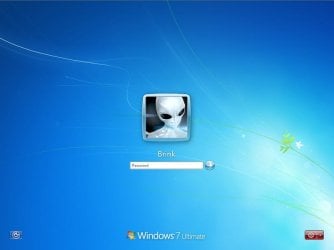
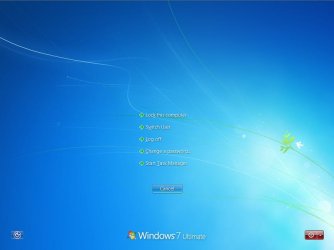
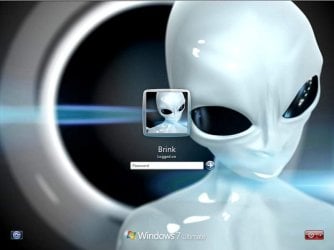
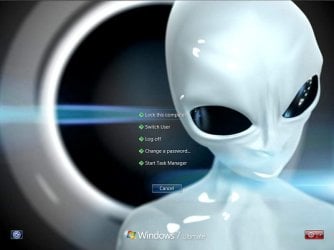
This will show you how to change the default Windows 7 log on screen background to a custom image of your choice. The log on screen consists of the Welcome, Ctrl+Alt+Del, Shutdown, Lock Computer, Switch User, Log On, and Log Off screens.
   Tip
If you need or want the default Windows 7 log on screen background image, then you can click on the Download button below to get it. It is normally located at C:\Windows\System32\oobe\background.bmp by default in Windows 7. While this is the looks like the log on screen background image, it is not the location to change the log on screen background image of.
Download


   Warning
The custom image that you use must be a .jpg image less than 256 KB in size, or this will not work.

EXAMPLE: Default Log On and Ctrl+Alt+Del screensLog_On_Screen.jpg

CTRL_ALT_DEL_Screen.jpg


EXAMPLE: Custom Log On and Ctrl+Alt+Del screensCustom_Log_On_Screen.jpg

Custom_CTRL_ALT_DEL_Screen.jpg


OPTION ONE

Using the "Windows 7 Logon Background Changer" Program


NOTE: This will let you easily change the default Windows 7 log on screen automatically with a stand-alone exe program called by our member Julien (aka: link8583). You can use OPTION FOUR below to restore the default Windows 7 log on screen, or just select the image using this program.1. If you have not already, download the latest version of Windows 7 Logon Background Changer.

2. Extract (drag and drop) the Win7LogonBackgroundChanger folder to your desktop, and run the Win7LogonBackgroundChanger.exe file in it.
NOTE: This is only a standalone EXE file, and does not install on your computer.

3. Click on Run in the Open File - Security Warning dialog box.

   Tip
If you click on the Settings button, you could click on the Prevent other users from changing the background option to prevent standard users from being able to run this program to change the log on screen until the next time you change it. This option will give them a UAC prompt for them to have to type in an administrator's password before being able to run the program.
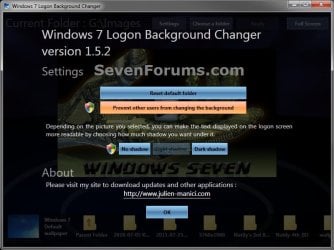
Settings.jpg


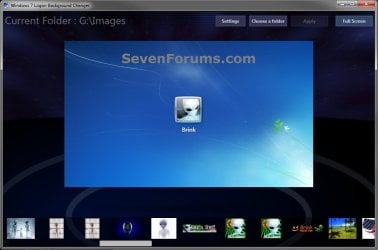
4. Click on the Choose a folder button at the top. (see screenshot below)Logon-Main.jpg

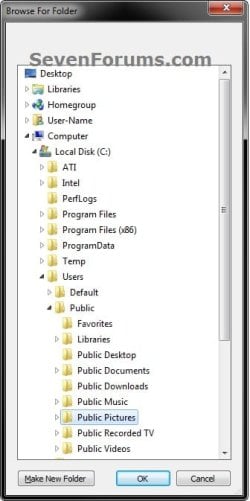
5. Navigate to and select the folder that contains the image you want to use for your log on screen background, and click on OK. (see screenshot below)Select.jpg

6. Select the image you want to use in the bottom row to have it displayed in the main window of the program, then click on the Apply button at the top. (see screenshot below step 4)
NOTE: You can click on the arrows boxed in red below to scroll through the available images. If you select an image that is over 256KB in size, it will automatically be reduced in size to be below 256KB.

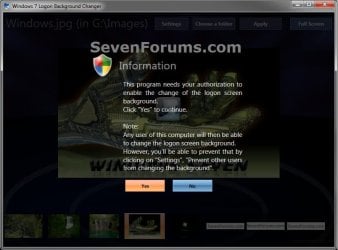
7. If prompted, click on Yes to apply. (see screenshot below)Change-Confirm.jpg

A) If prompted by UAC, then click on Yes.

8. When it's finished, your log on screen has now been changed. You can press Ctrl+Alt+Del to test it. Click on Cancel to return to the desktop.

9. When finished, you can close the Windows 7 Logon Background Changer program.
WARNING: It is important to wait until the program has completely finished creating the images and applying the background before closing the program or testing it.

10. Depending on how light or dark your background image is, you may want to change the log on screen text shadow to make it look better as well.


OPTION TWO

Using the "Tweaks.com Logon Changer for Windows 7" Program


NOTE: This will let you easily change and restore the default Windows 7 log on screen automatically with another stand-alone exe program. 1. If you have not already, download the latest version of the Tweaks.com Logon Changer for Windows 7 program, and save it to your desktop.

2. Open the downloaded tweakslogon.zip file, extract (drag and drop) the TweaksLogon.exe file to your desktop, and run the program.

3. Click on Run in the Open File - Security Warning dialog box.

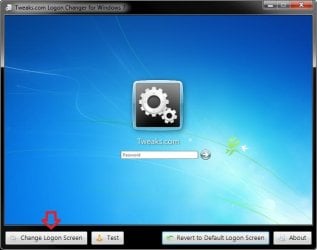
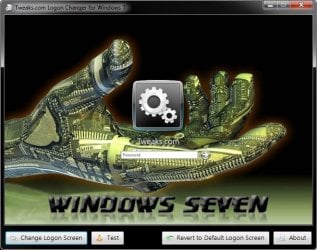
4. To Change the Log On Screen in Windows 7A) Click on the Change Logon Screen button. (see screenshot below)Tweaks-1.jpg

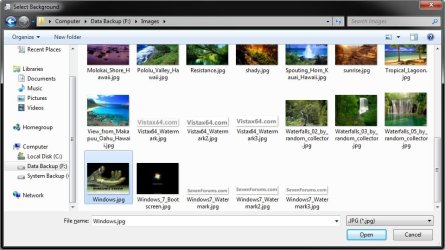
B) Navigate to and select the JPG image that you want to have as the new log on screen background, then click on Open. (see screenshot below)Tweaks-2.jpg

   Note
If the selected image is to large, then click on OK after clicking on Open to have it automatically resized for you.

Note.jpg


C) Go to step 6.

5. To Restore the Default Log On Screen in Windows 7
NOTE: I find that this step doesn't work to well in this program. If you find the same, then you can use OPTION FOUR below to restore the default Windows 7 log on screen. A) Click on the Restore to Default Logon Screen button. (see screenshot below)Tweaks-4.jpg


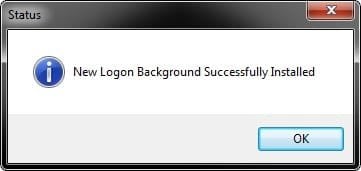
6. Click on OK. The log on screen has now been changed. (see screenshot below)Tweaks-3.jpg

7. If you would like, click on the Test button to see how the new logon screen looks in case you change your mind and wish to change it again.
NOTE: This will take you to the Lock screen. You can log on again to your user account to be right back where you were without anything being closed.

8. When finished, close the program.


OPTION THREE

To Manually Change the Log On Screen in Windows 7


NOTE: This was discovered by Rafael Rivera at Within Windows. You should also visit his website for more detailed information on this.1. Unhide file type extensions.

2. Click on the Download button to download the file below.Use_Custom_Log_On_Screen.reg


Download


3. Save the .reg file to the desktop.

4. Right click on the extracted .reg file and click on Merge.

5. Click on Run, Yes (UAC), Yes, and OK when prompted.

6. Save the custom .jpg image you want to use to the desktop with the name backgroundDefault.jpg.
WARNING: The custom image that you use must be a .jpg image less than 256 KB in size, or this will not work.

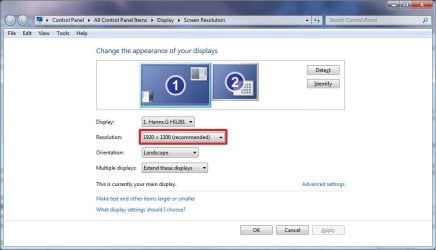
7. Check to see what your primary display screen resolution is. (See screenshot below)
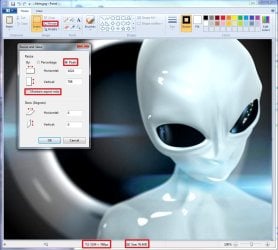
NOTE: For example, mine is 1920 x 1280.Screen_Resolution.jpg

8. Open Paint, and click on the File icon (top left corner), Open, and navigate to and select the .jpg image from step 6.
NOTE: You can open Paint by typing mspaint.exe in the Start menu search line and pressing enter.

9. In Paint, click on Resize, dot Pixels, uncheck Maintain aspect ratio, then resize the .jpg image to the screen resolution size in step 7. (See screenshot below)Paint.jpg

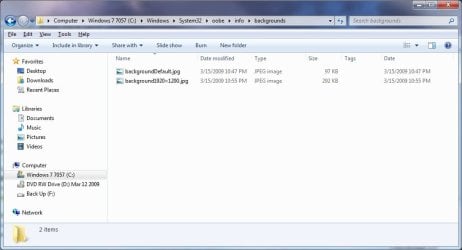
10. In Paint, click on the File icon (top left corner), Save as, then save the new .jpg file to the desktop with the exact file name below with the screen resolution size of the image.
NOTE: For example, since by screen resolution is 1920 x 1280, I will resize the image to this size and save it with the name background1920×1200.jpg.
   Warning
The custom image that you use must be a .jpg image less than 256 KB in size, or this will not work. The backgroundDefault.jpg (step 6) image will be Streched to Fit and used by default if Windows 7 cannot find or use the correct screen resolution image file created in this step. These are the only sizes supported by the log on screen.
  • background768×1280.jpg
  • background960×1280.jpg
  • background900×1440.jpg
  • background1024×768.jpg
  • background1024×1280.jpg
  • background1280×768.jpg
  • background1280×960.jpg
  • background1280×1024.jpg
  • background1360×768.jpg
  • background1440×900.jpg
  • background1600×1200.jpg
  • background1920×1200.jpg


11. When done, close Paint.

12. In Windows Explorer, navigate to
C:\Windows\System32\oobe\info\backgrounds. (See screenshot below step 13)
NOTE: If you do not have any of these folders (ex: info and backgrounds usually), then create a new folder for the missing folder and rename it to the missing folder's name. If you are prompted by UAC when creating and renaming the folders, just click on Yes to approve.

13. Copy and Paste the .jpg files from step 10, and from step 6 into the C:\Windows\system32\oobe\info\backgrounds folder, then close the window. (See screenshot below)backgrounds_Folder.jpg

14. You're logon screen is now changed. You can press Ctrl+Alt+Del to test it. Click on Cancel to return to the desktop.
NOTE: You can now delete the .reg and .zip files on the desktop if you like.

15. You can now hide the file extensions again if you like.

16. Depending on how light or dark your background image is, you may want to change the log on screen text shadow to make it look better as well.


OPTION FOUR

To Restore the Default Log On Screen


NOTE: This will restore the default Windows 7 log on screen if it was changed from either OPTION ONE, OPTION TWO, or OPTION THREE above.1. Click on the Download button to download the file below.Use_Default_Log_On_Screen.reg


Download


2. Save, and the .reg file to the desktop.

3. Right click on the extracted .reg file and click on Merge.

4. Click on Run, Yes (UAC), Yes, and OK when prompted.

5. You're logon screen is now changed back to the default one. You can press Ctrl+Alt+Del to test it. Click on Cancel to return to the desktop.
NOTE: You can now delete the downloaded .reg and .zip files if you like.

That's it,
Shawn


Attachments

Last edited:
Almost any wallpaper pics will work. Here is some have a look. Wallpapers - NeoSmart PhotoSky Gallery
thank you soooooooooooooooooooooooooooo much :) :) :)
KK you are most welcome. I downloaded a couple myself just now. Just right clicked the image and selected open new link, then right clicked and save pic as. Very nice high res file.
Yes I downloaded a few just now :) thank you again, that website has great wallpapers.
 

My Computer

Computer type
PC/Desktop
Computer Manufacturer/Model Number
Self assembled
OS
Windows 10 Home 64Bit
CPU
Intel Core i5 10400 @ 2.90GHz
Motherboard
Intel Corporation DG41WV (PROCESSOR)
Memory
8.00GB Single-Channel Unknown @ 1329MHz (16-20-20-38)
Sound Card
Realtek High Definition Audio
Monitor(s) Displays
DELL E170S
Screen Resolution
1280x1024 pixels
Hard Drives
931GB TOSHIBA DT01ACA100 (SATA)
238GB TEAM TM8PS7256G (SATA SSD)
Case
Nothing Fancy
Cooling
Fans
Keyboard
A4 Tech Co LTD
Mouse
A4 Tech Co Ltd/Logitech
Internet Speed
25 Mbps

My Computer

Computer Manufacturer/Model Number
iRush Pro
OS
Windows 7 Ultimate x64
CPU
Intel Core i5 2500K Processor
Motherboard
Intel H67 Chipset Motherboard (Micro ATX)
Memory
2x4GB DDR3 1333Mhz Memory
Graphics Card(s)
Novatech Radeon 6770 1GB Graphics Card
Hard Drives
1TB
PSU
Novatech 500W
Case
Novatech ATX Gaming Case
Cooling
-
Keyboard
Novatech Wired Keyboard
Mouse
Novatech Wired Mouse
Internet Speed
VirginMedia 10MB/s
Hello Joe,

Here you go mate. :)
 

Attachments

My Computer

Computer type
PC/Desktop
Computer Manufacturer/Model Number
Self built custom
OS
64-bit Windows 11 Pro for Workstations
CPU
Intel i7-8700K OC'd to 5 GHz
Motherboard
ASUS ROG Maximus XI Formula Z390
Memory
64 GB (4x16GB) G.SKILL TridentZ RGB DDR4 3600 MHz
Graphics Card(s)
ASUS ROG-STRIX-GTX1080TI-O11G-GAMING
Sound Card
Integrated
Monitor(s) Displays
2 x Samsung Odyssey G7 27"
Screen Resolution
2560x1440
Hard Drives
1TB Samsung 990 PRO M.2,
4TB Samsung 990 PRO PRO M.2,
TerraMaster F8 SSD Plus NAS
PSU
Seasonic Prime Titanium 850W
Case
Thermaltake Core P3
Cooling
Corsair Hydro H115i
Keyboard
Logitech wireless K800
Mouse
Logitech MX Master 4
Internet Speed
2 Gb/s Download and 100 Mb/s Upload
Antivirus
Malwarebyte Anti-Malware Premium
Browser
Google Chrome
Other Info
Logitech Z625 speaker system,
Logitech BRIO 4K Pro webcam,
HP Color LaserJet Pro MFP M477fdn,
APC SMART-UPS RT 1000 XL - SURT1000XLI,
Galaxy S23 Plus phone

My Computer

Computer Manufacturer/Model Number
iRush Pro
OS
Windows 7 Ultimate x64
CPU
Intel Core i5 2500K Processor
Motherboard
Intel H67 Chipset Motherboard (Micro ATX)
Memory
2x4GB DDR3 1333Mhz Memory
Graphics Card(s)
Novatech Radeon 6770 1GB Graphics Card
Hard Drives
1TB
PSU
Novatech 500W
Case
Novatech ATX Gaming Case
Cooling
-
Keyboard
Novatech Wired Keyboard
Mouse
Novatech Wired Mouse
Internet Speed
VirginMedia 10MB/s
Sorry, but the avatar cannot be used by anyone else here to avoid confusion of them mistaken another member as me, so I don't give that one out because of this. :(
 

My Computer

Computer type
PC/Desktop
Computer Manufacturer/Model Number
Self built custom
OS
64-bit Windows 11 Pro for Workstations
CPU
Intel i7-8700K OC'd to 5 GHz
Motherboard
ASUS ROG Maximus XI Formula Z390
Memory
64 GB (4x16GB) G.SKILL TridentZ RGB DDR4 3600 MHz
Graphics Card(s)
ASUS ROG-STRIX-GTX1080TI-O11G-GAMING
Sound Card
Integrated
Monitor(s) Displays
2 x Samsung Odyssey G7 27"
Screen Resolution
2560x1440
Hard Drives
1TB Samsung 990 PRO M.2,
4TB Samsung 990 PRO PRO M.2,
TerraMaster F8 SSD Plus NAS
PSU
Seasonic Prime Titanium 850W
Case
Thermaltake Core P3
Cooling
Corsair Hydro H115i
Keyboard
Logitech wireless K800
Mouse
Logitech MX Master 4
Internet Speed
2 Gb/s Download and 100 Mb/s Upload
Antivirus
Malwarebyte Anti-Malware Premium
Browser
Google Chrome
Other Info
Logitech Z625 speaker system,
Logitech BRIO 4K Pro webcam,
HP Color LaserJet Pro MFP M477fdn,
APC SMART-UPS RT 1000 XL - SURT1000XLI,
Galaxy S23 Plus phone
Is it just me or is the Windows 7 Logon Background Changer program really resource intensive? Upon start up it rapidly used up to 1.3 GB of RAM. And if I leave it alone for a few minutes, it actually creeps up to 6.5 GB of RAM (out of 8 GB). Pretty much eats up all RAM available (RAM usage was up to 95%). Not to mention it used 25-30% of CPU (that's at least one whole core) constantly.

And the first time I changed the background with this program, I logged out and logged back in but all I got was a complete black screen with a mouse. I had to restart it.

I mean I'm not going to be running this program all the time or for long periods of time but I hope this program was just poorly optimized and didn't do something to my system.
 

My Computer

OS
Windows 7 Pro x64
CPU
Q6600 3.2 Ghz
Memory
4 GB DDR2
Graphics Card(s)
GTX 275
Monitor(s) Displays
SyncMaster 2443
Screen Resolution
1920x1200
Hard Drives
500 GB 7200 RPM Seagate Barracuda
2 TB WD Green
2 TB WD Green
Internet Speed
50 Mbps down/3 Mbps up
Hello Cyborg,

No it shouldn't be using that much RAM unless there may be some sort of issue.
 
Last edited:

My Computer

Computer type
PC/Desktop
Computer Manufacturer/Model Number
Self built custom
OS
64-bit Windows 11 Pro for Workstations
CPU
Intel i7-8700K OC'd to 5 GHz
Motherboard
ASUS ROG Maximus XI Formula Z390
Memory
64 GB (4x16GB) G.SKILL TridentZ RGB DDR4 3600 MHz
Graphics Card(s)
ASUS ROG-STRIX-GTX1080TI-O11G-GAMING
Sound Card
Integrated
Monitor(s) Displays
2 x Samsung Odyssey G7 27"
Screen Resolution
2560x1440
Hard Drives
1TB Samsung 990 PRO M.2,
4TB Samsung 990 PRO PRO M.2,
TerraMaster F8 SSD Plus NAS
PSU
Seasonic Prime Titanium 850W
Case
Thermaltake Core P3
Cooling
Corsair Hydro H115i
Keyboard
Logitech wireless K800
Mouse
Logitech MX Master 4
Internet Speed
2 Gb/s Download and 100 Mb/s Upload
Antivirus
Malwarebyte Anti-Malware Premium
Browser
Google Chrome
Other Info
Logitech Z625 speaker system,
Logitech BRIO 4K Pro webcam,
HP Color LaserJet Pro MFP M477fdn,
APC SMART-UPS RT 1000 XL - SURT1000XLI,
Galaxy S23 Plus phone
I just ran the standalone program.

I'm guessing the program just loads every single image in the folder and every sub-folder into memory. It actually hangs for a while when browsing to a folder with lots of images which is when the memory and CPU starts ramping up. Not really a big deal for a program that's sparsely used to change images I guess.
 

My Computer

OS
Windows 7 Pro x64
CPU
Q6600 3.2 Ghz
Memory
4 GB DDR2
Graphics Card(s)
GTX 275
Monitor(s) Displays
SyncMaster 2443
Screen Resolution
1920x1200
Hard Drives
500 GB 7200 RPM Seagate Barracuda
2 TB WD Green
2 TB WD Green
Internet Speed
50 Mbps down/3 Mbps up
That's most likely the reason then if it's loading all of the images into the viewing area at the top of the program.
 
Last edited:

My Computer

Computer type
PC/Desktop
Computer Manufacturer/Model Number
Self built custom
OS
64-bit Windows 11 Pro for Workstations
CPU
Intel i7-8700K OC'd to 5 GHz
Motherboard
ASUS ROG Maximus XI Formula Z390
Memory
64 GB (4x16GB) G.SKILL TridentZ RGB DDR4 3600 MHz
Graphics Card(s)
ASUS ROG-STRIX-GTX1080TI-O11G-GAMING
Sound Card
Integrated
Monitor(s) Displays
2 x Samsung Odyssey G7 27"
Screen Resolution
2560x1440
Hard Drives
1TB Samsung 990 PRO M.2,
4TB Samsung 990 PRO PRO M.2,
TerraMaster F8 SSD Plus NAS
PSU
Seasonic Prime Titanium 850W
Case
Thermaltake Core P3
Cooling
Corsair Hydro H115i
Keyboard
Logitech wireless K800
Mouse
Logitech MX Master 4
Internet Speed
2 Gb/s Download and 100 Mb/s Upload
Antivirus
Malwarebyte Anti-Malware Premium
Browser
Google Chrome
Other Info
Logitech Z625 speaker system,
Logitech BRIO 4K Pro webcam,
HP Color LaserJet Pro MFP M477fdn,
APC SMART-UPS RT 1000 XL - SURT1000XLI,
Galaxy S23 Plus phone
Thanks for this Brink, at first it didn't work because I didn't make the Backgrounddefault.jpg.

:thumbsup:
 

My Computer

Computer type
PC/Desktop
Computer Manufacturer/Model Number
Novatech iRush Pro
OS
Windows 7 Ultimate SP1 - 64 Bit
CPU
Intel Core i5 2500k
Motherboard
Foxconn H67M-S/H67M-V/H67
Memory
2x4GB DDR3 1333Hz
Graphics Card(s)
Ati Radeon 6770
Sound Card
None
Monitor(s) Displays
Samsung S22B150
Screen Resolution
1920x1080
Hard Drives
2x500GB
PSU
500W
Cooling
Fan
Keyboard
HP KU0316
Mouse
Wireless Logitech M185
Internet Speed
20MB/s
Antivirus
Avast Free
Browser
Google Chrome
Other Info
Logitech M185 Mouse
KU-M316 Keyboard
You're most welcome Infinite. I'm happy to hear that you got it working. :)
 

My Computer

Computer type
PC/Desktop
Computer Manufacturer/Model Number
Self built custom
OS
64-bit Windows 11 Pro for Workstations
CPU
Intel i7-8700K OC'd to 5 GHz
Motherboard
ASUS ROG Maximus XI Formula Z390
Memory
64 GB (4x16GB) G.SKILL TridentZ RGB DDR4 3600 MHz
Graphics Card(s)
ASUS ROG-STRIX-GTX1080TI-O11G-GAMING
Sound Card
Integrated
Monitor(s) Displays
2 x Samsung Odyssey G7 27"
Screen Resolution
2560x1440
Hard Drives
1TB Samsung 990 PRO M.2,
4TB Samsung 990 PRO PRO M.2,
TerraMaster F8 SSD Plus NAS
PSU
Seasonic Prime Titanium 850W
Case
Thermaltake Core P3
Cooling
Corsair Hydro H115i
Keyboard
Logitech wireless K800
Mouse
Logitech MX Master 4
Internet Speed
2 Gb/s Download and 100 Mb/s Upload
Antivirus
Malwarebyte Anti-Malware Premium
Browser
Google Chrome
Other Info
Logitech Z625 speaker system,
Logitech BRIO 4K Pro webcam,
HP Color LaserJet Pro MFP M477fdn,
APC SMART-UPS RT 1000 XL - SURT1000XLI,
Galaxy S23 Plus phone
Hello Sword, and welcome to Seven Forums.

That's the log on screen instead of the lock screen though. In the lock screen, you click on "Switch User" to see the shut down button instead. :(
 

My Computer

Computer type
PC/Desktop
Computer Manufacturer/Model Number
Self built custom
OS
64-bit Windows 11 Pro for Workstations
CPU
Intel i7-8700K OC'd to 5 GHz
Motherboard
ASUS ROG Maximus XI Formula Z390
Memory
64 GB (4x16GB) G.SKILL TridentZ RGB DDR4 3600 MHz
Graphics Card(s)
ASUS ROG-STRIX-GTX1080TI-O11G-GAMING
Sound Card
Integrated
Monitor(s) Displays
2 x Samsung Odyssey G7 27"
Screen Resolution
2560x1440
Hard Drives
1TB Samsung 990 PRO M.2,
4TB Samsung 990 PRO PRO M.2,
TerraMaster F8 SSD Plus NAS
PSU
Seasonic Prime Titanium 850W
Case
Thermaltake Core P3
Cooling
Corsair Hydro H115i
Keyboard
Logitech wireless K800
Mouse
Logitech MX Master 4
Internet Speed
2 Gb/s Download and 100 Mb/s Upload
Antivirus
Malwarebyte Anti-Malware Premium
Browser
Google Chrome
Other Info
Logitech Z625 speaker system,
Logitech BRIO 4K Pro webcam,
HP Color LaserJet Pro MFP M477fdn,
APC SMART-UPS RT 1000 XL - SURT1000XLI,
Galaxy S23 Plus phone
Thank you Brink, for a minute there I thought that you knew a hack for it. Then I realized that if the only user on that computer is you, it will show almost the same as the lockout window because there are no other tiles. Also it says "logged on", not locked...

Thank you for the quick reply.
 

My Computer

OS
Windows 7 Pro/Enterprise x86/x64
Anytime mate. :)
 

My Computer

Computer type
PC/Desktop
Computer Manufacturer/Model Number
Self built custom
OS
64-bit Windows 11 Pro for Workstations
CPU
Intel i7-8700K OC'd to 5 GHz
Motherboard
ASUS ROG Maximus XI Formula Z390
Memory
64 GB (4x16GB) G.SKILL TridentZ RGB DDR4 3600 MHz
Graphics Card(s)
ASUS ROG-STRIX-GTX1080TI-O11G-GAMING
Sound Card
Integrated
Monitor(s) Displays
2 x Samsung Odyssey G7 27"
Screen Resolution
2560x1440
Hard Drives
1TB Samsung 990 PRO M.2,
4TB Samsung 990 PRO PRO M.2,
TerraMaster F8 SSD Plus NAS
PSU
Seasonic Prime Titanium 850W
Case
Thermaltake Core P3
Cooling
Corsair Hydro H115i
Keyboard
Logitech wireless K800
Mouse
Logitech MX Master 4
Internet Speed
2 Gb/s Download and 100 Mb/s Upload
Antivirus
Malwarebyte Anti-Malware Premium
Browser
Google Chrome
Other Info
Logitech Z625 speaker system,
Logitech BRIO 4K Pro webcam,
HP Color LaserJet Pro MFP M477fdn,
APC SMART-UPS RT 1000 XL - SURT1000XLI,
Galaxy S23 Plus phone
So is there a chance that I can get the log on screen to span across 3 monitors :D (Nvidia surround)
 

My Computer

Computer type
PC/Desktop
Computer Manufacturer/Model Number
Jeepmann/Custom Built
OS
Windows 7 Ultimate 64bit
CPU
Intel Core i7-2600K Sandy Bridge 3.4GHz (@[email protected])
Motherboard
Asus Maximus IV Extreme LGA 1155 Intel P67
Memory
G.SKILL Ripjaws X Series 16GB 1600Mhz (4 x 4GB) (Stock)
Graphics Card(s)
x2 EVGA GeForce GTX 760's w/ACXCoolers in SLI Surround
Sound Card
On-Board
Monitor(s) Displays
3x Acer 24" HDMI Widescreen LCD Monitor
Screen Resolution
3@ 1920x1080 (5760x1080 In Surround)
Hard Drives
Samsung 830 128gb ssd
Western Digital Caviar Black 640GB 7200 RPM
Western Digital Caviar Black 500GB 7200 RPM
Seagate 2tb 7200 RPM
PSU
COOLER MASTER Silent Pro 1000W
Case
COOLER MASTER HAF X Black
Cooling
CORSAIR Hydro H70
Keyboard
Logitech G510
Mouse
Zalman M300
Internet Speed
100mbps-ish Down & 5mbps-ish Up
Other Info
I installed the stock 140mm case fan outside of case then installed the H70+ 1 of its 120mm fans inside case. Used the 2nd 120mm from the H70 to go in the Gpu tunnel.
230mm Front,200mm side,200mm top,120mm Gpu tunnel,120mm&140mm on H70.
I used the Windows 7 logon changer program, mentioned in the options here.

Ok, when you change the logon image with that program, there is an option to "lock" the settings sothe logon background cannot be changed again by someone else.

What does this mean, and how is it achieved?

thanks.
 

My Computer

OS
7 Ult x64 sp1
CPU
intel i
Motherboard
z68
Memory
ddr3 2GB+
Graphics Card(s)
nvidia pcie
Monitor(s) Displays
lcd
Hard Drives
sata2
PSU
600W
Cooling
fans
Hello nevesswodniw,

The only way to prevent another user from using the program to change the log on screen is to have them use their own "Standerd" user account instead of letting them use your administrator account. A standard user account will not be able to run the program.
 

My Computer

Computer type
PC/Desktop
Computer Manufacturer/Model Number
Self built custom
OS
64-bit Windows 11 Pro for Workstations
CPU
Intel i7-8700K OC'd to 5 GHz
Motherboard
ASUS ROG Maximus XI Formula Z390
Memory
64 GB (4x16GB) G.SKILL TridentZ RGB DDR4 3600 MHz
Graphics Card(s)
ASUS ROG-STRIX-GTX1080TI-O11G-GAMING
Sound Card
Integrated
Monitor(s) Displays
2 x Samsung Odyssey G7 27"
Screen Resolution
2560x1440
Hard Drives
1TB Samsung 990 PRO M.2,
4TB Samsung 990 PRO PRO M.2,
TerraMaster F8 SSD Plus NAS
PSU
Seasonic Prime Titanium 850W
Case
Thermaltake Core P3
Cooling
Corsair Hydro H115i
Keyboard
Logitech wireless K800
Mouse
Logitech MX Master 4
Internet Speed
2 Gb/s Download and 100 Mb/s Upload
Antivirus
Malwarebyte Anti-Malware Premium
Browser
Google Chrome
Other Info
Logitech Z625 speaker system,
Logitech BRIO 4K Pro webcam,
HP Color LaserJet Pro MFP M477fdn,
APC SMART-UPS RT 1000 XL - SURT1000XLI,
Galaxy S23 Plus phone
Hello nevesswodniw,

The only way to prevent another user from using the program to change the log on screen is to have them use their own "Standerd" user account instead of letting them use your administrator account. A standard user account will not be able to run the program.

Hi brink,

I think maybe I didn't word the question properly, sorry :p

What I meant was, in the actual program, there is a setting to "lock" the setting so no one else can change the background, I was just curious as to what that option in the program means.

I'll try the program again today, to see what the exact setting is, I'm just going by memory.

Thanks.
 

My Computer

OS
7 Ult x64 sp1
CPU
intel i
Motherboard
z68
Memory
ddr3 2GB+
Graphics Card(s)
nvidia pcie
Monitor(s) Displays
lcd
Hard Drives
sata2
PSU
600W
Cooling
fans
Back
Top