Log On Screen - Change

How to Change Log On Screen Background in Windows 7


   Information
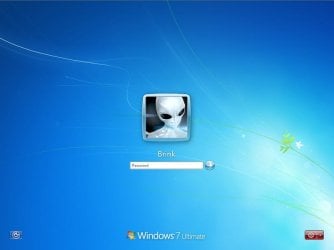
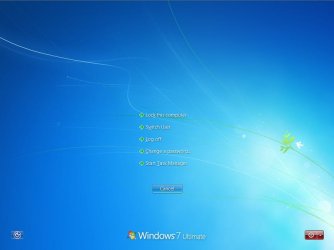
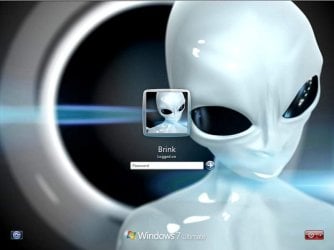
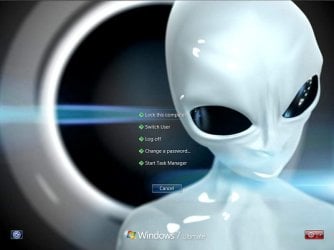
This will show you how to change the default Windows 7 log on screen background to a custom image of your choice. The log on screen consists of the Welcome, Ctrl+Alt+Del, Shutdown, Lock Computer, Switch User, Log On, and Log Off screens.
   Tip
If you need or want the default Windows 7 log on screen background image, then you can click on the Download button below to get it. It is normally located at C:\Windows\System32\oobe\background.bmp by default in Windows 7. While this is the looks like the log on screen background image, it is not the location to change the log on screen background image of.
Download


   Warning
The custom image that you use must be a .jpg image less than 256 KB in size, or this will not work.

EXAMPLE: Default Log On and Ctrl+Alt+Del screensLog_On_Screen.jpg

CTRL_ALT_DEL_Screen.jpg


EXAMPLE: Custom Log On and Ctrl+Alt+Del screensCustom_Log_On_Screen.jpg

Custom_CTRL_ALT_DEL_Screen.jpg


OPTION ONE

Using the "Windows 7 Logon Background Changer" Program


NOTE: This will let you easily change the default Windows 7 log on screen automatically with a stand-alone exe program called by our member Julien (aka: link8583). You can use OPTION FOUR below to restore the default Windows 7 log on screen, or just select the image using this program.1. If you have not already, download the latest version of Windows 7 Logon Background Changer.

2. Extract (drag and drop) the Win7LogonBackgroundChanger folder to your desktop, and run the Win7LogonBackgroundChanger.exe file in it.
NOTE: This is only a standalone EXE file, and does not install on your computer.

3. Click on Run in the Open File - Security Warning dialog box.

   Tip
If you click on the Settings button, you could click on the Prevent other users from changing the background option to prevent standard users from being able to run this program to change the log on screen until the next time you change it. This option will give them a UAC prompt for them to have to type in an administrator's password before being able to run the program.
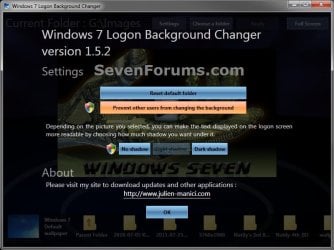
Settings.jpg


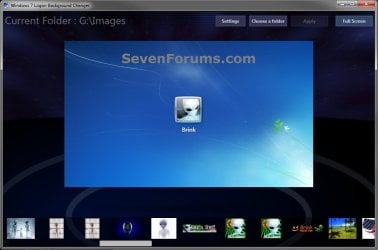
4. Click on the Choose a folder button at the top. (see screenshot below)Logon-Main.jpg

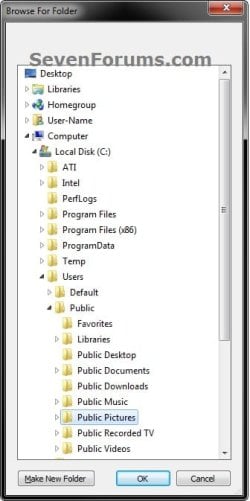
5. Navigate to and select the folder that contains the image you want to use for your log on screen background, and click on OK. (see screenshot below)Select.jpg

6. Select the image you want to use in the bottom row to have it displayed in the main window of the program, then click on the Apply button at the top. (see screenshot below step 4)
NOTE: You can click on the arrows boxed in red below to scroll through the available images. If you select an image that is over 256KB in size, it will automatically be reduced in size to be below 256KB.

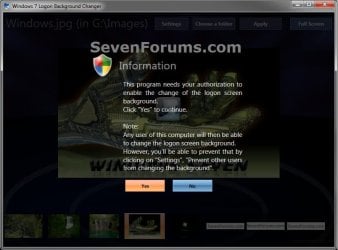
7. If prompted, click on Yes to apply. (see screenshot below)Change-Confirm.jpg

A) If prompted by UAC, then click on Yes.

8. When it's finished, your log on screen has now been changed. You can press Ctrl+Alt+Del to test it. Click on Cancel to return to the desktop.

9. When finished, you can close the Windows 7 Logon Background Changer program.
WARNING: It is important to wait until the program has completely finished creating the images and applying the background before closing the program or testing it.

10. Depending on how light or dark your background image is, you may want to change the log on screen text shadow to make it look better as well.


OPTION TWO

Using the "Tweaks.com Logon Changer for Windows 7" Program


NOTE: This will let you easily change and restore the default Windows 7 log on screen automatically with another stand-alone exe program. 1. If you have not already, download the latest version of the Tweaks.com Logon Changer for Windows 7 program, and save it to your desktop.

2. Open the downloaded tweakslogon.zip file, extract (drag and drop) the TweaksLogon.exe file to your desktop, and run the program.

3. Click on Run in the Open File - Security Warning dialog box.

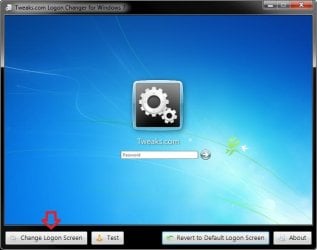
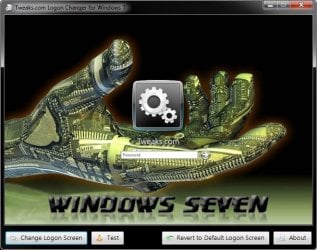
4. To Change the Log On Screen in Windows 7A) Click on the Change Logon Screen button. (see screenshot below)Tweaks-1.jpg

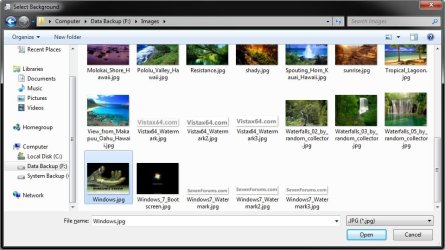
B) Navigate to and select the JPG image that you want to have as the new log on screen background, then click on Open. (see screenshot below)Tweaks-2.jpg

   Note
If the selected image is to large, then click on OK after clicking on Open to have it automatically resized for you.

Note.jpg


C) Go to step 6.

5. To Restore the Default Log On Screen in Windows 7
NOTE: I find that this step doesn't work to well in this program. If you find the same, then you can use OPTION FOUR below to restore the default Windows 7 log on screen. A) Click on the Restore to Default Logon Screen button. (see screenshot below)Tweaks-4.jpg


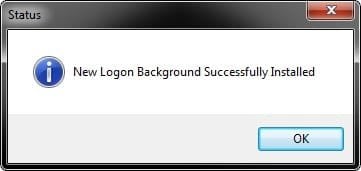
6. Click on OK. The log on screen has now been changed. (see screenshot below)Tweaks-3.jpg

7. If you would like, click on the Test button to see how the new logon screen looks in case you change your mind and wish to change it again.
NOTE: This will take you to the Lock screen. You can log on again to your user account to be right back where you were without anything being closed.

8. When finished, close the program.


OPTION THREE

To Manually Change the Log On Screen in Windows 7


NOTE: This was discovered by Rafael Rivera at Within Windows. You should also visit his website for more detailed information on this.1. Unhide file type extensions.

2. Click on the Download button to download the file below.Use_Custom_Log_On_Screen.reg


Download


3. Save the .reg file to the desktop.

4. Right click on the extracted .reg file and click on Merge.

5. Click on Run, Yes (UAC), Yes, and OK when prompted.

6. Save the custom .jpg image you want to use to the desktop with the name backgroundDefault.jpg.
WARNING: The custom image that you use must be a .jpg image less than 256 KB in size, or this will not work.

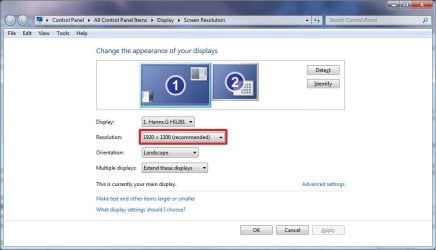
7. Check to see what your primary display screen resolution is. (See screenshot below)
NOTE: For example, mine is 1920 x 1280.Screen_Resolution.jpg

8. Open Paint, and click on the File icon (top left corner), Open, and navigate to and select the .jpg image from step 6.
NOTE: You can open Paint by typing mspaint.exe in the Start menu search line and pressing enter.

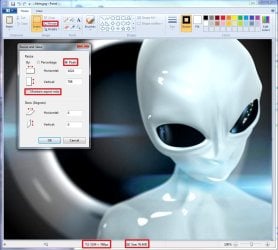
9. In Paint, click on Resize, dot Pixels, uncheck Maintain aspect ratio, then resize the .jpg image to the screen resolution size in step 7. (See screenshot below)Paint.jpg

10. In Paint, click on the File icon (top left corner), Save as, then save the new .jpg file to the desktop with the exact file name below with the screen resolution size of the image.
NOTE: For example, since by screen resolution is 1920 x 1280, I will resize the image to this size and save it with the name background1920×1200.jpg.
   Warning
The custom image that you use must be a .jpg image less than 256 KB in size, or this will not work. The backgroundDefault.jpg (step 6) image will be Streched to Fit and used by default if Windows 7 cannot find or use the correct screen resolution image file created in this step. These are the only sizes supported by the log on screen.
  • background768×1280.jpg
  • background960×1280.jpg
  • background900×1440.jpg
  • background1024×768.jpg
  • background1024×1280.jpg
  • background1280×768.jpg
  • background1280×960.jpg
  • background1280×1024.jpg
  • background1360×768.jpg
  • background1440×900.jpg
  • background1600×1200.jpg
  • background1920×1200.jpg


11. When done, close Paint.

12. In Windows Explorer, navigate to
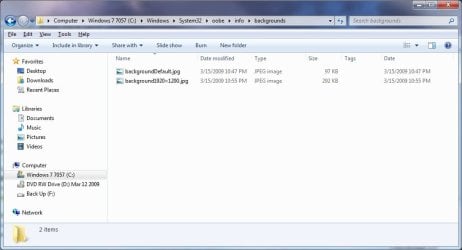
C:\Windows\System32\oobe\info\backgrounds. (See screenshot below step 13)
NOTE: If you do not have any of these folders (ex: info and backgrounds usually), then create a new folder for the missing folder and rename it to the missing folder's name. If you are prompted by UAC when creating and renaming the folders, just click on Yes to approve.

13. Copy and Paste the .jpg files from step 10, and from step 6 into the C:\Windows\system32\oobe\info\backgrounds folder, then close the window. (See screenshot below)backgrounds_Folder.jpg

14. You're logon screen is now changed. You can press Ctrl+Alt+Del to test it. Click on Cancel to return to the desktop.
NOTE: You can now delete the .reg and .zip files on the desktop if you like.

15. You can now hide the file extensions again if you like.

16. Depending on how light or dark your background image is, you may want to change the log on screen text shadow to make it look better as well.


OPTION FOUR

To Restore the Default Log On Screen


NOTE: This will restore the default Windows 7 log on screen if it was changed from either OPTION ONE, OPTION TWO, or OPTION THREE above.1. Click on the Download button to download the file below.Use_Default_Log_On_Screen.reg


Download


2. Save, and the .reg file to the desktop.

3. Right click on the extracted .reg file and click on Merge.

4. Click on Run, Yes (UAC), Yes, and OK when prompted.

5. You're logon screen is now changed back to the default one. You can press Ctrl+Alt+Del to test it. Click on Cancel to return to the desktop.
NOTE: You can now delete the downloaded .reg and .zip files if you like.

That's it,
Shawn


Attachments

Last edited:
Hi there checked again on another machine

Yes it's definitely a Defect in 7048 -- however I'm not changing desktops too often so this I can live with.

(Actually the standard logon screen in 7048 isn't too hideous but it's nice being able to customize it easily).

Cheers
jimbo

Now for Monday night "Footie" (Soccer and some glasses of Scotch.

Thanks for all the info -- great board this one.
 

My Computer

Computer type
PC/Desktop
Computer Manufacturer/Model Number
Custom built, several laptops HP/ASUS
OS
Linux CENTOS 7 / various Windows OS'es and servers
CPU
Intel i7 Intel i5
Memory
8GB, 16GB
Graphics Card(s)
On Motherboard
Sound Card
Realtek HD audio
Monitor(s) Displays
Apple Cinema display, Samsung LCD
Screen Resolution
1920 X 1080
Hard Drives
4 X 1TB SATA
Mouse
Toshiba wireless laser
Internet Speed
> 20MB up
Nope, you had it almost correct Jimbo. It's when you change themes is when the log on screen goes back to default. I added a warning under OPTION ONE for a workaround for this.
 

My Computer

Computer type
PC/Desktop
Computer Manufacturer/Model Number
Self built custom
OS
64-bit Windows 11 Pro for Workstations
CPU
Intel i7-8700K OC'd to 5 GHz
Motherboard
ASUS ROG Maximus XI Formula Z390
Memory
64 GB (4x16GB) G.SKILL TridentZ RGB DDR4 3600 MHz
Graphics Card(s)
ASUS ROG-STRIX-GTX1080TI-O11G-GAMING
Sound Card
Integrated
Monitor(s) Displays
2 x Samsung Odyssey G7 27"
Screen Resolution
2560x1440
Hard Drives
1TB Samsung 990 PRO M.2,
4TB Samsung 990 PRO PRO M.2,
TerraMaster F8 SSD Plus NAS
PSU
Seasonic Prime Titanium 850W
Case
Thermaltake Core P3
Cooling
Corsair Hydro H115i
Keyboard
Logitech wireless K800
Mouse
Logitech MX Master 4
Internet Speed
2 Gb/s Download and 100 Mb/s Upload
Antivirus
Malwarebyte Anti-Malware Premium
Browser
Google Chrome
Other Info
Logitech Z625 speaker system,
Logitech BRIO 4K Pro webcam,
HP Color LaserJet Pro MFP M477fdn,
APC SMART-UPS RT 1000 XL - SURT1000XLI,
Galaxy S23 Plus phone
You can use Local Group policy instead of the registry to enable this setting:
Computer Configuration: Administrative Templates: All Settings
Always use custom logon background = Enable

I had found this when first looking to change the background but it never said what folder it looked at to set the background. :p
 

My Computer

Computer type
PC/Desktop
Computer Manufacturer/Model Number
Custom
OS
Windows 7 Ultimate x64
CPU
AMD A10-7850 Quad Core 3.7 GHz
Motherboard
MSI MS-7900
Memory
16 GB
Graphics Card(s)
MSI Radeon R7 250 OC Crossfired with A10 AMD Radeon R7
Monitor(s) Displays
Samsung SyncMaster XL2370HD, ViewSonic VA1912wb
Screen Resolution
1920*1080, 1440*900
Hard Drives
128 GB SSD
512 GB SSD
500 GB HDD
PSU
Corsair CX500
Case
Rosewill THOR V2 BLACK
Keyboard
Logitech G15
Mouse
CMSTORM MS2K
Internet Speed
ATT U-Verse
Antivirus
Microsoft Security Essentials, MalwareBytes
Browser
Firefox (lastest stable) with NoScript
Other Info
Just a humdrum little system.
No go with the 7000 build here. Apparently even after removing the LogonStudio Vista program and resetting the dword value back to 1 since that was found reset the logon screen placed by the LSV tool remains. I'll make an attempt at using that to reset the default flying fish and then reinstalling after looking over the group policy idea.

Type group policy at the Start>search line to see "edit group policy" on the first link.


Once you select the item under administration>system>logon double click on it and change from the not configured to enable tick to see...


My Computers

System One System Two

  • Computer type
    PC/Desktop
    Computer Manufacturer/Model Number
    Custom builds = 2
    OS
    W7 Ultimate x64/W10 Pro x64/W11 Pro Triple Boot - Main PC W7 Remote PC Micro ATX W7 Pro x64/W11 Pro
    CPU
    AMD Phenom II X4 975 Deneb 3.6ghz - 965 2nd remote pc
    Motherboard
    Gigabyte GA-790XTA-UD4-Gigabyte GA-880GM-D2H remote pc
    Memory
    Kingston Hyper X DDR3 1600 1.5v 16gb - Hyper X Fury 8gb 2nd
    Graphics Card(s)
    MSI HD Radeon 5750 1gb - MSI HD Radeon 6450 on mini tower
    Sound Card
    Creative Labs X-Fi Xtreme Audio P - Realtek onooard 2nd case
    Monitor(s) Displays
    ASUS VW199T-P 19" HP 2082a Main-HP 2082a 20" remote pc
    Screen Resolution
    Asus 1440x900 - HP 1600x900
    Hard Drives
    WD Black 1TB HD per OS W7, W10, and pending W11 presently on 500gb OS Drive - Pending Triple 1TB HDs for Spanned Storage/backup volume
    Single 2TB external USB enclosure, single 1TB System 7 Host/Boot drive, Pending 8TB external HD for system image b
    PSU
    Corsair 750TX - primary / Corsair CX600 - second
    Case
    Antec 900-2 - SSD compatible / NZXT Vulcan mini tower
    Cooling
    Zalman CNPS9900A
    Keyboard
    AZIO L70 Backlit Letters Gaming - ONN Cordless/USB
    Mouse
    MSI DS200 Programmable, Logitech Cordless
    Internet Speed
    30mbps upgrade - primary hard wired - mini tower usb WiFi
    Antivirus
    GFI VIPRE Internet Security 2014 on W7 2016 beta on W10,
    Browser
    Cyberfox, WaterFox 64bit FF variants, FireFox x64, Pale Moon
    Other Info
    Accomdata fan cooled usb 2.0 PIDE/Sata II, III external enclosure.
    Sambient usb/eSata PATA/Sata II, III external enclosure.
  • Computer type
    PC/Desktop
    System Manufacturer/Model Number
    CUSTOM ASSEMBLY
    OS
    W7 Pro x64/W11 Pro
    CPU
    AMD Deneb 3.6ghz - 965
    Motherboard
    Gigabyte GA-880GM-D2H remote pc
    Memory
    Kingston Hyper X Fury 8gb
    Graphics Card(s)
    MSI HD Radeon 6450 DVI Output
    Sound Card
    Realtek onooard Creative or Other separate PENDING
    Monitor(s) Displays
    VIZIO 32" LCD TV Separate LCD Pending
    Screen Resolution
    1600x1080
    Hard Drives
    WD 500GB OS Host/Boot WD Green 1TB Storage/Backup
    PSU
    Corsair 600W - THERMALTAKE 600W spare case
    Case
    NZXT Vulcan mini tower
    Cooling
    Twin 120mm Top Fans - 240mm Side Cover
    Keyboard
    ONN Cordless/USB Logitech Cordless
    Mouse
    ONN USB/Cordless - Logitech Cordless
    Internet Speed
    DSL 5G
    Browser
    MS Edge, FireFox, WaterFox x64, FireFox Nightly
    Other Info
    OS Testing-Remote Access to Main TeamViewer
I was trying this last night when the first post about it came up. I couldn't get it to work.

I tried This way using the download, and still doesn't work.

I'm running 7057 64bit, the only thing that I really see that is differant from the how to's is my resolution is 2560x1600.

Here is a SS of my backgrounds folders.
Folders are correct and i will assume the registry is correct, so the only other thing to check is to make sure the pic is not larger than 256 kb.
 

My Computer

OS
Win 7
You can use Local Group policy instead of the registry to enable this setting:
Computer Configuration: Administrative Templates: All Settings
Always use custom logon background = Enable

I had found this when first looking to change the background but it never said what folder it looked at to set the background. :p

Very nice find Loki. The reg file downloads have been updated to include the below entries. I have tested this, and the log on screen no longer changes when the theme is changed. :)

+ rep

Code:
[B]ENABLE:[/B]
 
Windows Registry Editor Version 5.00
 
[HKEY_LOCAL_MACHINE\SOFTWARE\Policies\Microsoft\Windows\System]
"UseOEMBackground"=dword:00000001
 
____________________________________________________________
 
[B]DISABLE:[/B]
 
Windows Registry Editor Version 5.00
 
[HKEY_LOCAL_MACHINE\SOFTWARE\Policies\Microsoft\Windows\System]
"UseOEMBackground"=-

Shawn

P.S.
Can one of you guys make sure that Rafael gets this information as well. It seems his site will not load for me to let him know.
 

My Computer

Computer type
PC/Desktop
Computer Manufacturer/Model Number
Self built custom
OS
64-bit Windows 11 Pro for Workstations
CPU
Intel i7-8700K OC'd to 5 GHz
Motherboard
ASUS ROG Maximus XI Formula Z390
Memory
64 GB (4x16GB) G.SKILL TridentZ RGB DDR4 3600 MHz
Graphics Card(s)
ASUS ROG-STRIX-GTX1080TI-O11G-GAMING
Sound Card
Integrated
Monitor(s) Displays
2 x Samsung Odyssey G7 27"
Screen Resolution
2560x1440
Hard Drives
1TB Samsung 990 PRO M.2,
4TB Samsung 990 PRO PRO M.2,
TerraMaster F8 SSD Plus NAS
PSU
Seasonic Prime Titanium 850W
Case
Thermaltake Core P3
Cooling
Corsair Hydro H115i
Keyboard
Logitech wireless K800
Mouse
Logitech MX Master 4
Internet Speed
2 Gb/s Download and 100 Mb/s Upload
Antivirus
Malwarebyte Anti-Malware Premium
Browser
Google Chrome
Other Info
Logitech Z625 speaker system,
Logitech BRIO 4K Pro webcam,
HP Color LaserJet Pro MFP M477fdn,
APC SMART-UPS RT 1000 XL - SURT1000XLI,
Galaxy S23 Plus phone
That will be a big help right off. Since this is something totally new for the new OS it takes a litle time to get everything worked out. :D
 

My Computers

System One System Two

  • Computer type
    PC/Desktop
    Computer Manufacturer/Model Number
    Custom builds = 2
    OS
    W7 Ultimate x64/W10 Pro x64/W11 Pro Triple Boot - Main PC W7 Remote PC Micro ATX W7 Pro x64/W11 Pro
    CPU
    AMD Phenom II X4 975 Deneb 3.6ghz - 965 2nd remote pc
    Motherboard
    Gigabyte GA-790XTA-UD4-Gigabyte GA-880GM-D2H remote pc
    Memory
    Kingston Hyper X DDR3 1600 1.5v 16gb - Hyper X Fury 8gb 2nd
    Graphics Card(s)
    MSI HD Radeon 5750 1gb - MSI HD Radeon 6450 on mini tower
    Sound Card
    Creative Labs X-Fi Xtreme Audio P - Realtek onooard 2nd case
    Monitor(s) Displays
    ASUS VW199T-P 19" HP 2082a Main-HP 2082a 20" remote pc
    Screen Resolution
    Asus 1440x900 - HP 1600x900
    Hard Drives
    WD Black 1TB HD per OS W7, W10, and pending W11 presently on 500gb OS Drive - Pending Triple 1TB HDs for Spanned Storage/backup volume
    Single 2TB external USB enclosure, single 1TB System 7 Host/Boot drive, Pending 8TB external HD for system image b
    PSU
    Corsair 750TX - primary / Corsair CX600 - second
    Case
    Antec 900-2 - SSD compatible / NZXT Vulcan mini tower
    Cooling
    Zalman CNPS9900A
    Keyboard
    AZIO L70 Backlit Letters Gaming - ONN Cordless/USB
    Mouse
    MSI DS200 Programmable, Logitech Cordless
    Internet Speed
    30mbps upgrade - primary hard wired - mini tower usb WiFi
    Antivirus
    GFI VIPRE Internet Security 2014 on W7 2016 beta on W10,
    Browser
    Cyberfox, WaterFox 64bit FF variants, FireFox x64, Pale Moon
    Other Info
    Accomdata fan cooled usb 2.0 PIDE/Sata II, III external enclosure.
    Sambient usb/eSata PATA/Sata II, III external enclosure.
  • Computer type
    PC/Desktop
    System Manufacturer/Model Number
    CUSTOM ASSEMBLY
    OS
    W7 Pro x64/W11 Pro
    CPU
    AMD Deneb 3.6ghz - 965
    Motherboard
    Gigabyte GA-880GM-D2H remote pc
    Memory
    Kingston Hyper X Fury 8gb
    Graphics Card(s)
    MSI HD Radeon 6450 DVI Output
    Sound Card
    Realtek onooard Creative or Other separate PENDING
    Monitor(s) Displays
    VIZIO 32" LCD TV Separate LCD Pending
    Screen Resolution
    1600x1080
    Hard Drives
    WD 500GB OS Host/Boot WD Green 1TB Storage/Backup
    PSU
    Corsair 600W - THERMALTAKE 600W spare case
    Case
    NZXT Vulcan mini tower
    Cooling
    Twin 120mm Top Fans - 240mm Side Cover
    Keyboard
    ONN Cordless/USB Logitech Cordless
    Mouse
    ONN USB/Cordless - Logitech Cordless
    Internet Speed
    DSL 5G
    Browser
    MS Edge, FireFox, WaterFox x64, FireFox Nightly
    Other Info
    OS Testing-Remote Access to Main TeamViewer
The reg file downloads have been updated to include the below entries. I have tested this, and the log on screen no longer changes when the theme is changed. :)

Hello Shawn.


I just wanted to say that I've been using John’s Background Switcher « John’s Adventures instaed of "slideshow"; and it hasen't changed the custom logon image; so far so good.

Thanks!


Later ;) Ted
 

My Computer

Computer Manufacturer/Model Number
* BFK Customs *
OS
W 7 64-bit Ultimate
CPU
Intel Q9550 Yorkfield
Motherboard
ASUS P5Q Pro
Memory
8GB Dominator 8500C5D
Graphics Card(s)
ATI : XFX 5870
Sound Card
Realtek HD Audio 7-1
Monitor(s) Displays
1x 47" LCD HDMI & 3x 26" LCD HDMI
Screen Resolution
1920x1080P & 1920x1200
Hard Drives
1x 80GB Intel X25-M G2 SSD : 1x 500GB & 1x 640GB WD Caviar Black(s)
PSU
Corsair 620HX
Case
Cooler Master RC-690
Cooling
Tuniq Tower 120, 2x 140mm and 3x 120mm case fans
Keyboard
Microsoft 500
Mouse
Razer Diamondback 3G
Internet Speed
14 Mb/s
Other Info
1x Koutech 3Gb/s SATA HDD Hot Swap Rack
Nope, you had it almost correct Jimbo. It's when you change themes is when the log on screen goes back to default. I added a warning under OPTION ONE for a workaround for this.


Hi there -- I was going to modify my post -- but you've done it for me.

Thanks :D

I don't change the theme very often but if I do your option 1 is fine.

BTW removing completely Logon Vista Studio is a pain -- I opted for the "Easy way" - just restored an Image -- 15 Mins using Acronis Workstation True Image. (Some people have probs with this because they forget sometimes a hidden partition -- If you get a BSOD after restoring an image just insert your W7 install disk and go to "Repair system" -- it will "Mend" the boot manager -- that's what is usually broken when you fail to restore that partition as well.

Even if you remove logon Vista studio any login pics you created are STILL there so the best thing is to "Clean" your system with a restore.

(Another good reason for taking plenty of backups before messing around - especially with this type of stuff).


Cheers
jimbo
 

My Computer

Computer type
PC/Desktop
Computer Manufacturer/Model Number
Custom built, several laptops HP/ASUS
OS
Linux CENTOS 7 / various Windows OS'es and servers
CPU
Intel i7 Intel i5
Memory
8GB, 16GB
Graphics Card(s)
On Motherboard
Sound Card
Realtek HD audio
Monitor(s) Displays
Apple Cinema display, Samsung LCD
Screen Resolution
1920 X 1080
Hard Drives
4 X 1TB SATA
Mouse
Toshiba wireless laser
Internet Speed
> 20MB up
Hi Jimbo,

Yeah, that's why I dislike modifying system files like the way Logon Vista Studio does. The way Windows 7 allows now is much better.

Thanks to Loki, I have updated the tutorial so that the theme issue is no longer a issue. :)
 

My Computer

Computer type
PC/Desktop
Computer Manufacturer/Model Number
Self built custom
OS
64-bit Windows 11 Pro for Workstations
CPU
Intel i7-8700K OC'd to 5 GHz
Motherboard
ASUS ROG Maximus XI Formula Z390
Memory
64 GB (4x16GB) G.SKILL TridentZ RGB DDR4 3600 MHz
Graphics Card(s)
ASUS ROG-STRIX-GTX1080TI-O11G-GAMING
Sound Card
Integrated
Monitor(s) Displays
2 x Samsung Odyssey G7 27"
Screen Resolution
2560x1440
Hard Drives
1TB Samsung 990 PRO M.2,
4TB Samsung 990 PRO PRO M.2,
TerraMaster F8 SSD Plus NAS
PSU
Seasonic Prime Titanium 850W
Case
Thermaltake Core P3
Cooling
Corsair Hydro H115i
Keyboard
Logitech wireless K800
Mouse
Logitech MX Master 4
Internet Speed
2 Gb/s Download and 100 Mb/s Upload
Antivirus
Malwarebyte Anti-Malware Premium
Browser
Google Chrome
Other Info
Logitech Z625 speaker system,
Logitech BRIO 4K Pro webcam,
HP Color LaserJet Pro MFP M477fdn,
APC SMART-UPS RT 1000 XL - SURT1000XLI,
Galaxy S23 Plus phone
Hello Shawn.


I just wanted to say that I've been using John’s Background Switcher « John’s Adventures instaed of "slideshow"; and it hasen't changed the custom logon image; so far so good.

Thanks!

Later ;) Ted

Thank you Ted.

So far it doesn't look like a 3rd party program will be needed anymore to do this in Windows 7. Now if Microsoft can just make this a easy to change setting in the GUI, then that would be real nice. ;)
 

My Computer

Computer type
PC/Desktop
Computer Manufacturer/Model Number
Self built custom
OS
64-bit Windows 11 Pro for Workstations
CPU
Intel i7-8700K OC'd to 5 GHz
Motherboard
ASUS ROG Maximus XI Formula Z390
Memory
64 GB (4x16GB) G.SKILL TridentZ RGB DDR4 3600 MHz
Graphics Card(s)
ASUS ROG-STRIX-GTX1080TI-O11G-GAMING
Sound Card
Integrated
Monitor(s) Displays
2 x Samsung Odyssey G7 27"
Screen Resolution
2560x1440
Hard Drives
1TB Samsung 990 PRO M.2,
4TB Samsung 990 PRO PRO M.2,
TerraMaster F8 SSD Plus NAS
PSU
Seasonic Prime Titanium 850W
Case
Thermaltake Core P3
Cooling
Corsair Hydro H115i
Keyboard
Logitech wireless K800
Mouse
Logitech MX Master 4
Internet Speed
2 Gb/s Download and 100 Mb/s Upload
Antivirus
Malwarebyte Anti-Malware Premium
Browser
Google Chrome
Other Info
Logitech Z625 speaker system,
Logitech BRIO 4K Pro webcam,
HP Color LaserJet Pro MFP M477fdn,
APC SMART-UPS RT 1000 XL - SURT1000XLI,
Galaxy S23 Plus phone
Thanks Shawn, Rafael and Loki. Works great.

Gary
 

My Computer

Computer Manufacturer/Model Number
Dell XPS420
OS
Vista Ult 64 bit Seven Ult RTM x64
CPU
Intel Core2 Quad Q6600 2.40 gigahertz
Memory
Crucial Ballistix 4x2GB PC2 6400
Graphics Card(s)
NVIDIA GeForce 8600 GTS 256 MB
Sound Card
Creative SB X-Fi audio
Monitor(s) Displays
HP w2207 + HPvs15
Screen Resolution
1680x1050 + 1024x768
Hard Drives
2-WD5000AAKS-500 GB
WD5000AAV-500 GB external
Keyboard
Microsoft Comfort Curve
Mouse
MX Revolution
Other Info
Wacom Intuos 2 Graphics Tablet
Experience Index=5.5
You're welcome Gary. :)
 

My Computer

Computer type
PC/Desktop
Computer Manufacturer/Model Number
Self built custom
OS
64-bit Windows 11 Pro for Workstations
CPU
Intel i7-8700K OC'd to 5 GHz
Motherboard
ASUS ROG Maximus XI Formula Z390
Memory
64 GB (4x16GB) G.SKILL TridentZ RGB DDR4 3600 MHz
Graphics Card(s)
ASUS ROG-STRIX-GTX1080TI-O11G-GAMING
Sound Card
Integrated
Monitor(s) Displays
2 x Samsung Odyssey G7 27"
Screen Resolution
2560x1440
Hard Drives
1TB Samsung 990 PRO M.2,
4TB Samsung 990 PRO PRO M.2,
TerraMaster F8 SSD Plus NAS
PSU
Seasonic Prime Titanium 850W
Case
Thermaltake Core P3
Cooling
Corsair Hydro H115i
Keyboard
Logitech wireless K800
Mouse
Logitech MX Master 4
Internet Speed
2 Gb/s Download and 100 Mb/s Upload
Antivirus
Malwarebyte Anti-Malware Premium
Browser
Google Chrome
Other Info
Logitech Z625 speaker system,
Logitech BRIO 4K Pro webcam,
HP Color LaserJet Pro MFP M477fdn,
APC SMART-UPS RT 1000 XL - SURT1000XLI,
Galaxy S23 Plus phone
Hi Jimbo,

Yeah, that's why I dislike modifying system files like the way Logon Vista Studio does. The way Windows 7 allows now is much better.

Thanks to Loki, I have updated the tutorial so that the theme issue is no longer a issue. :)

I can agree with that right off since the LogonStudio Vista tool rather limits you to those 300 pages of screens to choose from only! When trying to use the new dword value and custom screen that still managed to get in the way until reassigning the default screen 7 comes with and dumping the program.

When going to change any image you have set first look at in the Windows image viewer. Those that fit in that window closest to the screen res you are at will easily overwrite the present backgroundDefault.jpg image by copy+paste with ease.
 

My Computers

System One System Two

  • Computer type
    PC/Desktop
    Computer Manufacturer/Model Number
    Custom builds = 2
    OS
    W7 Ultimate x64/W10 Pro x64/W11 Pro Triple Boot - Main PC W7 Remote PC Micro ATX W7 Pro x64/W11 Pro
    CPU
    AMD Phenom II X4 975 Deneb 3.6ghz - 965 2nd remote pc
    Motherboard
    Gigabyte GA-790XTA-UD4-Gigabyte GA-880GM-D2H remote pc
    Memory
    Kingston Hyper X DDR3 1600 1.5v 16gb - Hyper X Fury 8gb 2nd
    Graphics Card(s)
    MSI HD Radeon 5750 1gb - MSI HD Radeon 6450 on mini tower
    Sound Card
    Creative Labs X-Fi Xtreme Audio P - Realtek onooard 2nd case
    Monitor(s) Displays
    ASUS VW199T-P 19" HP 2082a Main-HP 2082a 20" remote pc
    Screen Resolution
    Asus 1440x900 - HP 1600x900
    Hard Drives
    WD Black 1TB HD per OS W7, W10, and pending W11 presently on 500gb OS Drive - Pending Triple 1TB HDs for Spanned Storage/backup volume
    Single 2TB external USB enclosure, single 1TB System 7 Host/Boot drive, Pending 8TB external HD for system image b
    PSU
    Corsair 750TX - primary / Corsair CX600 - second
    Case
    Antec 900-2 - SSD compatible / NZXT Vulcan mini tower
    Cooling
    Zalman CNPS9900A
    Keyboard
    AZIO L70 Backlit Letters Gaming - ONN Cordless/USB
    Mouse
    MSI DS200 Programmable, Logitech Cordless
    Internet Speed
    30mbps upgrade - primary hard wired - mini tower usb WiFi
    Antivirus
    GFI VIPRE Internet Security 2014 on W7 2016 beta on W10,
    Browser
    Cyberfox, WaterFox 64bit FF variants, FireFox x64, Pale Moon
    Other Info
    Accomdata fan cooled usb 2.0 PIDE/Sata II, III external enclosure.
    Sambient usb/eSata PATA/Sata II, III external enclosure.
  • Computer type
    PC/Desktop
    System Manufacturer/Model Number
    CUSTOM ASSEMBLY
    OS
    W7 Pro x64/W11 Pro
    CPU
    AMD Deneb 3.6ghz - 965
    Motherboard
    Gigabyte GA-880GM-D2H remote pc
    Memory
    Kingston Hyper X Fury 8gb
    Graphics Card(s)
    MSI HD Radeon 6450 DVI Output
    Sound Card
    Realtek onooard Creative or Other separate PENDING
    Monitor(s) Displays
    VIZIO 32" LCD TV Separate LCD Pending
    Screen Resolution
    1600x1080
    Hard Drives
    WD 500GB OS Host/Boot WD Green 1TB Storage/Backup
    PSU
    Corsair 600W - THERMALTAKE 600W spare case
    Case
    NZXT Vulcan mini tower
    Cooling
    Twin 120mm Top Fans - 240mm Side Cover
    Keyboard
    ONN Cordless/USB Logitech Cordless
    Mouse
    ONN USB/Cordless - Logitech Cordless
    Internet Speed
    DSL 5G
    Browser
    MS Edge, FireFox, WaterFox x64, FireFox Nightly
    Other Info
    OS Testing-Remote Access to Main TeamViewer
very cool
 

My Computer

Computer Manufacturer/Model Number
Custom Built - TheTeZ
OS
Windows 7 -x6
CPU
Intel Core 2 Extreme QX9650 Processor- (Quad)
Motherboard
Asus P5N-D Motherboard
Memory
OCZ Platnum 8gb(2gbx4) PC 6400 DDR2 800MHz
Graphics Card(s)
EVGA 01G-P3-1145-TR GeForce GTS 250 Video Card
Sound Card
Realtek ALC883
Monitor(s) Displays
19" WideScreen Mag Innovision & Acer X203H Vertical Mount
Screen Resolution
1440x900 & 1600x900
Hard Drives
Western Digital WD7500AADS Caviar Green Hard Drive - 750GB
Western Digital WD500
Hitachi 1TB Serial ATA HD
PSU
Kingwin Mach 1 Modular Power Supply
Case
NZXT Tempest ATX Mid-Tower Case -- AKA Flow Master
Cooling
Thermaltake SpinQ CPU Cooler - Aerocool Touch 1000 LCD Panel
This is awesome.

Works fine on 7068, just had to create the last two folders.
 

My Computer

Computer Manufacturer/Model Number
HP Pavillion dv2550se
OS
Windows 7 Build 7229 x64
CPU
Intel Core2 Duo T5250 @ 1.50GHz
Memory
2GB DDR2
Graphics Card(s)
Moble Intel 965 Express
Screen Resolution
1280x800
Hard Drives
160GB
750GB External
Well that's good to hear since I haven't gotten around to it quite yet. I wasn't sure if that was already seen in the 7068 build until looking for the Windows\system32\oobe\en\backgrounds folder or still needed. Well that was answered quickly.


My Computers

System One System Two

  • Computer type
    PC/Desktop
    Computer Manufacturer/Model Number
    Custom builds = 2
    OS
    W7 Ultimate x64/W10 Pro x64/W11 Pro Triple Boot - Main PC W7 Remote PC Micro ATX W7 Pro x64/W11 Pro
    CPU
    AMD Phenom II X4 975 Deneb 3.6ghz - 965 2nd remote pc
    Motherboard
    Gigabyte GA-790XTA-UD4-Gigabyte GA-880GM-D2H remote pc
    Memory
    Kingston Hyper X DDR3 1600 1.5v 16gb - Hyper X Fury 8gb 2nd
    Graphics Card(s)
    MSI HD Radeon 5750 1gb - MSI HD Radeon 6450 on mini tower
    Sound Card
    Creative Labs X-Fi Xtreme Audio P - Realtek onooard 2nd case
    Monitor(s) Displays
    ASUS VW199T-P 19" HP 2082a Main-HP 2082a 20" remote pc
    Screen Resolution
    Asus 1440x900 - HP 1600x900
    Hard Drives
    WD Black 1TB HD per OS W7, W10, and pending W11 presently on 500gb OS Drive - Pending Triple 1TB HDs for Spanned Storage/backup volume
    Single 2TB external USB enclosure, single 1TB System 7 Host/Boot drive, Pending 8TB external HD for system image b
    PSU
    Corsair 750TX - primary / Corsair CX600 - second
    Case
    Antec 900-2 - SSD compatible / NZXT Vulcan mini tower
    Cooling
    Zalman CNPS9900A
    Keyboard
    AZIO L70 Backlit Letters Gaming - ONN Cordless/USB
    Mouse
    MSI DS200 Programmable, Logitech Cordless
    Internet Speed
    30mbps upgrade - primary hard wired - mini tower usb WiFi
    Antivirus
    GFI VIPRE Internet Security 2014 on W7 2016 beta on W10,
    Browser
    Cyberfox, WaterFox 64bit FF variants, FireFox x64, Pale Moon
    Other Info
    Accomdata fan cooled usb 2.0 PIDE/Sata II, III external enclosure.
    Sambient usb/eSata PATA/Sata II, III external enclosure.
  • Computer type
    PC/Desktop
    System Manufacturer/Model Number
    CUSTOM ASSEMBLY
    OS
    W7 Pro x64/W11 Pro
    CPU
    AMD Deneb 3.6ghz - 965
    Motherboard
    Gigabyte GA-880GM-D2H remote pc
    Memory
    Kingston Hyper X Fury 8gb
    Graphics Card(s)
    MSI HD Radeon 6450 DVI Output
    Sound Card
    Realtek onooard Creative or Other separate PENDING
    Monitor(s) Displays
    VIZIO 32" LCD TV Separate LCD Pending
    Screen Resolution
    1600x1080
    Hard Drives
    WD 500GB OS Host/Boot WD Green 1TB Storage/Backup
    PSU
    Corsair 600W - THERMALTAKE 600W spare case
    Case
    NZXT Vulcan mini tower
    Cooling
    Twin 120mm Top Fans - 240mm Side Cover
    Keyboard
    ONN Cordless/USB Logitech Cordless
    Mouse
    ONN USB/Cordless - Logitech Cordless
    Internet Speed
    DSL 5G
    Browser
    MS Edge, FireFox, WaterFox x64, FireFox Nightly
    Other Info
    OS Testing-Remote Access to Main TeamViewer
Mine is in oobe>info>backgrounds. I have a en-US folder in oobe, but I didn't do anything with it.

Edit: There's a background.bmp in the oobe folder. The image is the default background image of the login screen. Perhaps you could change that to whatever image you want to use and it would also work.
 

My Computer

Computer Manufacturer/Model Number
HP Pavillion dv2550se
OS
Windows 7 Build 7229 x64
CPU
Intel Core2 Duo T5250 @ 1.50GHz
Memory
2GB DDR2
Graphics Card(s)
Moble Intel 965 Express
Screen Resolution
1280x800
Hard Drives
160GB
750GB External
It may not be wise to disturb the default image (I saw it there also); the way in this tutorial works, I just finished adding an image of my own in 64-bit 7068 and it does work.


Later :shock: Ted
 

My Computer

Computer Manufacturer/Model Number
* BFK Customs *
OS
W 7 64-bit Ultimate
CPU
Intel Q9550 Yorkfield
Motherboard
ASUS P5Q Pro
Memory
8GB Dominator 8500C5D
Graphics Card(s)
ATI : XFX 5870
Sound Card
Realtek HD Audio 7-1
Monitor(s) Displays
1x 47" LCD HDMI & 3x 26" LCD HDMI
Screen Resolution
1920x1080P & 1920x1200
Hard Drives
1x 80GB Intel X25-M G2 SSD : 1x 500GB & 1x 640GB WD Caviar Black(s)
PSU
Corsair 620HX
Case
Cooler Master RC-690
Cooling
Tuniq Tower 120, 2x 140mm and 3x 120mm case fans
Keyboard
Microsoft 500
Mouse
Razer Diamondback 3G
Internet Speed
14 Mb/s
Other Info
1x Koutech 3Gb/s SATA HDD Hot Swap Rack
Mine is in oobe>info>backgrounds. I have a en-US folder in oobe, but I didn't do anything with it.

Edit: There's a background.bmp in the oobe folder. The image is the default background image of the login screen. Perhaps you could change that to whatever image you want to use and it would also work.

Hello Azural,

You probably could, but the "C:\Windows\system32\oobebackground.bmp" is owned by TrustedInstaller, and would require taking ownership of the file to rename and replace it. You could risk losing the default log on image It's a lot more complicated to do that than the method in the tutorial. :(

Thank you for sharing this though. :)

Shawn
 
Last edited:

My Computer

Computer type
PC/Desktop
Computer Manufacturer/Model Number
Self built custom
OS
64-bit Windows 11 Pro for Workstations
CPU
Intel i7-8700K OC'd to 5 GHz
Motherboard
ASUS ROG Maximus XI Formula Z390
Memory
64 GB (4x16GB) G.SKILL TridentZ RGB DDR4 3600 MHz
Graphics Card(s)
ASUS ROG-STRIX-GTX1080TI-O11G-GAMING
Sound Card
Integrated
Monitor(s) Displays
2 x Samsung Odyssey G7 27"
Screen Resolution
2560x1440
Hard Drives
1TB Samsung 990 PRO M.2,
4TB Samsung 990 PRO PRO M.2,
TerraMaster F8 SSD Plus NAS
PSU
Seasonic Prime Titanium 850W
Case
Thermaltake Core P3
Cooling
Corsair Hydro H115i
Keyboard
Logitech wireless K800
Mouse
Logitech MX Master 4
Internet Speed
2 Gb/s Download and 100 Mb/s Upload
Antivirus
Malwarebyte Anti-Malware Premium
Browser
Google Chrome
Other Info
Logitech Z625 speaker system,
Logitech BRIO 4K Pro webcam,
HP Color LaserJet Pro MFP M477fdn,
APC SMART-UPS RT 1000 XL - SURT1000XLI,
Galaxy S23 Plus phone
Back
Top