Log on troubles

plograsso

New member
Local time
7:41 PM
Messages
5
I have an unusual situation. I have a normal logon screen with four users, call them A, B, C and D. Once the computer enters sleep mode, when I rewake it, instead of going to the general login screen, it automatically logs on user C regardless of the fact that all users were loged off before it went into sleep mode. Any idea how I can fix this?
 

My Computer

Computer Manufacturer/Model Number
Home built
OS
Windows 7 32bit home premium
CPU
intel core i7 860
Motherboard
Asus P7P55D Rev 1.xx
Memory
4 GB DDR3
Graphics Card(s)
Radeon HD5770
Sound Card
None
Monitor(s) Displays
Samsung SyncMaster 930B
Hard Drives
2 Westen Digital 500GB in Raid 1
PSU
CoolerMaster 500w
Case
Kingwin
Cooling
Air
Keyboard
Memorex
Mouse
Microsoft optical
does user c have no password?
 

My Computer

Computer Manufacturer/Model Number
HP dv6519tx
OS
Windows 7 Ultimate x64
CPU
1.80 GHz Intel Core 2 Duo processor T7100
Memory
3 gig ddr2
Graphics Card(s)
NVIDIA GeForce 8400M GS
Sound Card
Realtek High Definition Audio
Monitor(s) Displays
15.4” WXGA High Definition BrightView Widescreen
Screen Resolution
1280 x 800
Hard Drives
Hitachi 320 GB (5400 rpm)
PSU
90 W AC Power Adapter
Cooling
Kitchen plate under the lappy
Keyboard
101 key compatible
Mouse
Touch Pad with On/Off button and dedicated vertical Scroll
Internet Speed
Three Wireless internet prepaid using E160G USB dongle
Has user C been set to be automatically logged on? Does C get logged on when you boot the computer?
 

My Computer

Computer type
PC/Desktop
Computer Manufacturer/Model Number
Lenovo IdeaCenter 450
OS
Windows 10 Pro X64
CPU
Intel Quad Core i7-4770 @ 3.4Ghz
Memory
16.0GB PC3-12800 DDR3 SDRAM 1600 MHz
Graphics Card(s)
Intel Integrated HD Graphics
Sound Card
Realtek HD Audio
Monitor(s) Displays
HP 22" LCD
Screen Resolution
1680 x 1050
Hard Drives
250GB Samsung EVO SATA-3 SSD
2TB Seagate ST2000DM001 SATA-2
1.5TB Seagate ST3150041AS SATA
Keyboard
Dell USB
Mouse
Lenovo USB
Internet Speed
Cable via Road Runner 3MB Upload, 30MB Download
Antivirus
Windows Defender, MBAM Pro, MBAE
Browser
Seamonkey
Other Info
UEFI/GPT
PLDS DVD-RW DH16AERSH
User c has no password and has not been set for automatic log on, as far as I know.
User c does no automatically log onwhen the computer is booted; instead, the computer boots into the log in screen with all users listed.
 

My Computer

Computer Manufacturer/Model Number
Home built
OS
Windows 7 32bit home premium
CPU
intel core i7 860
Motherboard
Asus P7P55D Rev 1.xx
Memory
4 GB DDR3
Graphics Card(s)
Radeon HD5770
Sound Card
None
Monitor(s) Displays
Samsung SyncMaster 930B
Hard Drives
2 Westen Digital 500GB in Raid 1
PSU
CoolerMaster 500w
Case
Kingwin
Cooling
Air
Keyboard
Memorex
Mouse
Microsoft optical
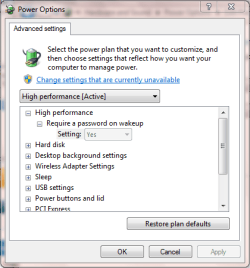
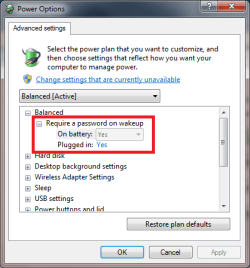
You may want to check User C's Power Settings.

Control Panel -> System and Security -> Power Options

Click 'Change plan settings' then 'Change advanced power settings' and check if Require a password on wakeup is set correctly.

Capture.PNG


OS
 

My Computer

Computer Manufacturer/Model Number
Compaq Desktop
OS
Windows 7 Ultimate x64
CPU
AMD Sempron Dual Core
Memory
3GB
Graphics Card(s)
NVIDIA GeForce 6150SE nForce 430
Screen Resolution
1024x768
Hard Drives
150GB Sata
OK, thanks. Will try this evening.
 

My Computer

Computer Manufacturer/Model Number
Home built
OS
Windows 7 32bit home premium
CPU
intel core i7 860
Motherboard
Asus P7P55D Rev 1.xx
Memory
4 GB DDR3
Graphics Card(s)
Radeon HD5770
Sound Card
None
Monitor(s) Displays
Samsung SyncMaster 930B
Hard Drives
2 Westen Digital 500GB in Raid 1
PSU
CoolerMaster 500w
Case
Kingwin
Cooling
Air
Keyboard
Memorex
Mouse
Microsoft optical
OK... Require a password on wakeup was set to NO for user C. I changed it to Yes, logged off user C and went into sleep mode. When I awoke, the same problem...computer automatically logged user C on.
 

My Computer

Computer Manufacturer/Model Number
Home built
OS
Windows 7 32bit home premium
CPU
intel core i7 860
Motherboard
Asus P7P55D Rev 1.xx
Memory
4 GB DDR3
Graphics Card(s)
Radeon HD5770
Sound Card
None
Monitor(s) Displays
Samsung SyncMaster 930B
Hard Drives
2 Westen Digital 500GB in Raid 1
PSU
CoolerMaster 500w
Case
Kingwin
Cooling
Air
Keyboard
Memorex
Mouse
Microsoft optical
Hello Plograsso, and welcome to Seven Forums.

Create a password for user C to see if it works properly afterwards.

Hope this helps,
Shawn
 

My Computer

Computer type
PC/Desktop
Computer Manufacturer/Model Number
Self built custom
OS
64-bit Windows 11 Pro for Workstations
CPU
Intel i7-8700K OC'd to 5 GHz
Motherboard
ASUS ROG Maximus XI Formula Z390
Memory
64 GB (4x16GB) G.SKILL TridentZ RGB DDR4 3600 MHz
Graphics Card(s)
ASUS ROG-STRIX-GTX1080TI-O11G-GAMING
Sound Card
Integrated
Monitor(s) Displays
2 x Samsung Odyssey G7 27"
Screen Resolution
2560x1440
Hard Drives
1TB Samsung 990 PRO M.2,
4TB Samsung 990 PRO PRO M.2,
TerraMaster F8 SSD Plus NAS
PSU
Seasonic Prime Titanium 850W
Case
Thermaltake Core P3
Cooling
Corsair Hydro H115i
Keyboard
Logitech wireless K800
Mouse
Logitech MX Master 4
Internet Speed
2 Gb/s Download and 100 Mb/s Upload
Antivirus
Malwarebyte Anti-Malware Premium
Browser
Google Chrome
Other Info
Logitech Z625 speaker system,
Logitech BRIO 4K Pro webcam,
HP Color LaserJet Pro MFP M477fdn,
APC SMART-UPS RT 1000 XL - SURT1000XLI,
Galaxy S23 Plus phone
Created a password for user C. After sleep, screen comes up for user C requesting password to log in. This work around does prevent the computer automatically logging in user C, however, it doesn't seem to solve the underlying problem since user C doen't want to have a password.
 

My Computer

Computer Manufacturer/Model Number
Home built
OS
Windows 7 32bit home premium
CPU
intel core i7 860
Motherboard
Asus P7P55D Rev 1.xx
Memory
4 GB DDR3
Graphics Card(s)
Radeon HD5770
Sound Card
None
Monitor(s) Displays
Samsung SyncMaster 930B
Hard Drives
2 Westen Digital 500GB in Raid 1
PSU
CoolerMaster 500w
Case
Kingwin
Cooling
Air
Keyboard
Memorex
Mouse
Microsoft optical
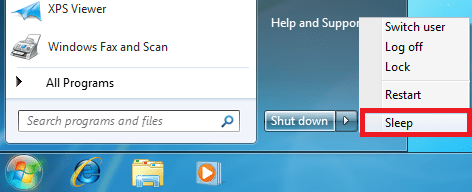
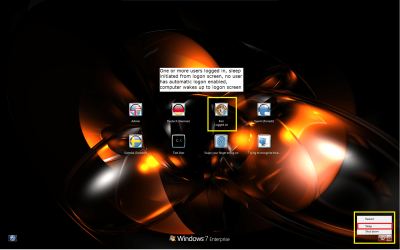
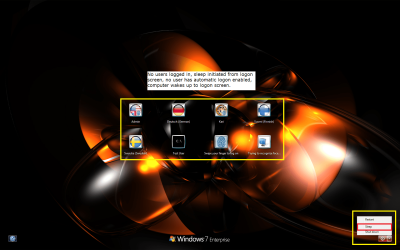
Important to notice is that requiring a password when waking up does not mean users must have passwords; it's a bit misleading named feature. It simply means that when waking up, Windows does not automatically log in the last user.

sleep_0.png

To achieve what you want, you must enable that setting, regardless if your user C has a password or not.

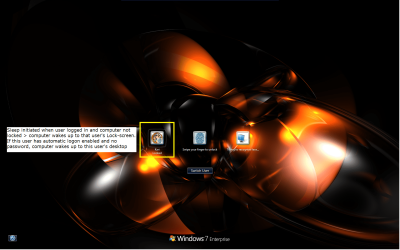
Here are the different wake up scenarios when the above mentioned setting is enabled and no user has automatic logon enabled:

1. Sleep initiated from a logged in user account > computer wakes up to that user's lock screen. (If the wake up password is not enabled and this user has no password or automatic logon is enabled > computer wakes up to this user's desktop):

sleep_1.png
sleep_2.png

2. Sleep initiated from logon screen when one or more users are logged in > computer wakes up to logon screen:

sleep_3.png

3. Sleep initiated from logon screen, no users logged in > computer wakes up to logon screen:

sleep_4.png

That's about it.

Kari
 

My Computer

Computer type
Laptop
Computer Manufacturer/Model Number
HP ENVY 17-1150eg
OS
Windows 10 Pro x64 EN-GB
CPU
1.6 GHz Intel Core i7-720QM Processor
Memory
6 GB
Graphics Card(s)
ATI Mobility Radeon HD 5850 Graphics
Sound Card
Beats sound system with integrated subwoofer
Monitor(s) Displays
17" laptop display, 22" LED and 32" Full HD TV through HDMI
Screen Resolution
1600*900 (1), 1920*1080 (2&3)
Hard Drives
Internal: 2 x 500 GB SATA Hard Disk Drive 7200 rpm
External: 2TB for backups, 3TB USB3 network drive for media
Cooling
As Envy runs a bit warm, I have it on a Cooler Master pad
Keyboard
Logitech diNovo Media Desktop Laser (bluetooth)
Mouse
Logitech Performance Mouse MX
Internet Speed
50/10 Mbps VDSL
Antivirus
Windows Defender 4.3.9431.0
Browser
Maxthon 3.5.2., IE11
Back
Top