Login pop up windows security

Jheroen

New member
Local time
5:38 PM
Messages
5
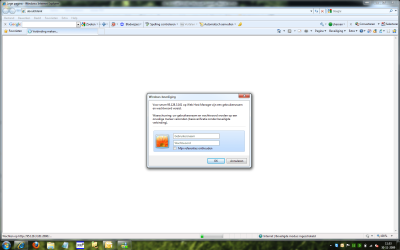
Hi all, when i try to login into several forums i get a windows security pop up telling me to fill out username and password.

when i fill them in i still get not logged in the site/forum etc. the pop up re appears blank and i will get not any further.

i will send a screenshot of this pop up so you can see what it's all about.

very annoying this pop up...

TIA

Jheroen
 

Attachments

  • inloggen.png
    inloggen.png
    81 KB · Views: 899

My Computer

OS
Windows 7 Ultimate X64
Hi, looks like you are logged on with a limited account and the administrator has set up Parental Control on your account hence you are receiving this pop ups. Try logging in with the administrator account or change your account type from limited to administrator.

Hope this helps,
Dinesh.
 

My Computer

Computer Manufacturer/Model Number
Samsung NP530U4B-S02IN
OS
Windows® 8 Pro (64-bit)
CPU
Intel® Core™ i5 Processor 2467M (1.60GHz, 3MB L3 Cache)
Motherboard
Samsung Electronics
Memory
6GB DDR3 System Memory at 1,333MHz (on BD 4GB + 2GB x 1)
Graphics Card(s)
AMD Radeon™ HD7550M 1GB DDR3 (Ext. Graphic)
Sound Card
Realtek High Definition Audio
Monitor(s) Displays
35.56cm (14.0) SuperBright 300nit HD LED Display
Screen Resolution
1366x768
Hard Drives
1TB S-ATA II Hard Drive (5400RPM) with ExpressCache 16GB SSD
Internet Speed
sucks
Antivirus
Microsoft Security Essentials
Browser
Google Chrome (Sync enabled)
Hi, looks like you are logged on with a limited account and the administrator has set up Parental Control on your account hence you are receiving this pop ups. Try logging in with the administrator account or change your account type from limited to administrator.

Hope this helps,
Dinesh.

Hi Dinesh,

I am logged on as admin with no parental control activated.....:rolleyes:
 

My Computer

OS
Windows 7 Ultimate X64
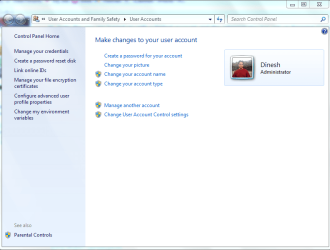
Go to Control Panel\User Accounts and Family Safety\User Accounts and see if it shows as an Administrator account.

Capture.PNG
 

My Computer

Computer Manufacturer/Model Number
Samsung NP530U4B-S02IN
OS
Windows® 8 Pro (64-bit)
CPU
Intel® Core™ i5 Processor 2467M (1.60GHz, 3MB L3 Cache)
Motherboard
Samsung Electronics
Memory
6GB DDR3 System Memory at 1,333MHz (on BD 4GB + 2GB x 1)
Graphics Card(s)
AMD Radeon™ HD7550M 1GB DDR3 (Ext. Graphic)
Sound Card
Realtek High Definition Audio
Monitor(s) Displays
35.56cm (14.0) SuperBright 300nit HD LED Display
Screen Resolution
1366x768
Hard Drives
1TB S-ATA II Hard Drive (5400RPM) with ExpressCache 16GB SSD
Internet Speed
sucks
Antivirus
Microsoft Security Essentials
Browser
Google Chrome (Sync enabled)
yes, i get the same screen as you have attached here...
 

My Computer

OS
Windows 7 Ultimate X64
Hi there
From the Dutch translation it appears THE ISP SERVER is asking you for a password -- looks like an ISP not a HOME LAN address of a router. Not your W7 Permissions or your own Router.

Nothing to do with ADMIN account -- check first you aren't going through a PROXY but in any case this seems much more like an ISP / Provider problem.

(Dinesh -- HOME LAN's usually start 198.X.X.X or in rare cases 10.10.X.X)

Router addresses are normally 198.168.x.1 for around 95% of typical "Domestic" home routers.

Phone nrs etc are in the WHOIS listing below. I'd contact the ISP - maybe the setup needs to be changed.


From the WHOIS


OrgName: RIPE Network Coordination Centre
OrgID: RIPE
Address: P.O. Box 10096
City: Amsterdam
StateProv:
PostalCode: 1001EB
Country: NL​

ReferralServer: whois://whois.ripe.net:43​

NetRange: 95.0.0.0 - 95.255.255.255
CIDR: 95.0.0.0/8
NetName: 95-RIPE
NetHandle: NET-95-0-0-0-1
Parent:
NetType: Allocated to RIPE NCC
NameServer: NS-PRI.RIPE.NET
NameServer: SEC1.APNIC.NET
NameServer: SEC3.APNIC.NET
NameServer: TINNIE.ARIN.NET
NameServer: NS2.LACNIC.NET
Comment: These addresses have been further assigned to users in
Comment: the RIPE NCC region. Contact information can be found in
Comment: the RIPE database at Query the RIPE Database
RegDate: 2007-07-30
Updated: 2009-05-18​

== Additional Information From whois://whois.ripe.net:43 ==​

inetnum: 95.128.3.160 - 95.128.3.191
netname: ZENID-EMANGO
descr: ZENID.NET - Webhosting & Community
country: NL
admin-c: RAZE2-RIPE
tech-c: RAZE1-RIPE
status: ASSIGNED PA
mnt-by: MNT-EMANGO
mnt-lower: MNT-EMANGO
mnt-routes: MNT-EMANGO
source: RIPE # Filtered​

person: Danielle Jacobs
address: Emango Internet Services BV
address: Breinder 24
address: 6365 CX Schinnen
address: The Netherlands
phone: +31 46 443 5242
fax-no: +31 46 443 3787
nic-hdl: RAZE2-RIPE
source: RIPE # Filtered​

person: Ralph Zeetsen
address: Emango Internet Services BV
address: Breinder 24
address: 6365 CX Schinnen
address: The Netherlands
phone: +31 46 443 5242
fax-no: +31 46 443 3787
e-mail:
nic-hdl: RAZE1-RIPE
source: RIPE # Filtered​

route: 95.128.0.0/21
descr: Emango Network
origin: AS15966
mnt-by: MNT-EMANGO
source: RIPE # Filtered​

1) Check first -- Is the Bill paid (sorry for asking but sometimes this CAN happen)​

2) Is there any thing they've done such as check what sites are allowed to be visited.​

IMO from the data you've given this is an ISP question rather than a W7 problem.​

If you have something like a Vodafone Mobile connect can you try logging on with that and see if you get unrestricted Net access.​

Cheers​

Tot Ziens​

(In my experience Holland is usually a pretty free country - I don't think there should be too much DELIBERATE restriction on what sites you visit.​

Could do with some more of that "Funny smelling Tobacco from an Amsterdam Coffee Shop").​

jimbo​
 

My Computer

Computer type
PC/Desktop
Computer Manufacturer/Model Number
Custom built, several laptops HP/ASUS
OS
Linux CENTOS 7 / various Windows OS'es and servers
CPU
Intel i7 Intel i5
Memory
8GB, 16GB
Graphics Card(s)
On Motherboard
Sound Card
Realtek HD audio
Monitor(s) Displays
Apple Cinema display, Samsung LCD
Screen Resolution
1920 X 1080
Hard Drives
4 X 1TB SATA
Mouse
Toshiba wireless laser
Internet Speed
> 20MB up
Hi Jimbo,

well until a few weeks ago i could login through the standard cpanel/whm login pop up. when i started with Win7 the original pop up seems to be overruled by the windows pop up.

when i fill in that pop up with the right credentials i still keep not logged in, the pop up re appears with the same question (fill in etc).

for instance when i try to login into the members section of vbulletin i cannot pass this pop up so i cannot login in IE8. In FF the problem doesn't show up so i guess it will be a specific IE8 problem, but which one and how so solve...... :huh:
 

My Computer

OS
Windows 7 Ultimate X64
Hi there

I'm not an expert in IE8 but try switch off ALL accelerators / plugins / whatever.
Also see if you can change the Security level in IE8 -- not sure how to do that but I've seen there are ways to lower or even disable any of the security settings in IE8.

My experience in testing is always to SWITCH OFF every possible security "thingy" while testing and then gradually tighten up the levels until you get what you want.

I should just google or search the Forum on IE8 security --I'm out of my depth on that one.

Cheers
jimbo
 

My Computer

Computer type
PC/Desktop
Computer Manufacturer/Model Number
Custom built, several laptops HP/ASUS
OS
Linux CENTOS 7 / various Windows OS'es and servers
CPU
Intel i7 Intel i5
Memory
8GB, 16GB
Graphics Card(s)
On Motherboard
Sound Card
Realtek HD audio
Monitor(s) Displays
Apple Cinema display, Samsung LCD
Screen Resolution
1920 X 1080
Hard Drives
4 X 1TB SATA
Mouse
Toshiba wireless laser
Internet Speed
> 20MB up
I am having the same problem. Only when I try to access a particular site that I use on a regular basis. I can get into it if I am on a pc runiing XP or Vista. I purchased this Netbook with Windows 7 and when I try to open the site instead of getting the regular site login window I get a windows security login screen. I can't get by it to open the site.
Anybody get this figured out yet? I suspect that it is some setting put in by the website/ISP.I have gone through all my settings and lowered the security so I know that is not it.
 

My Computer

Computer Manufacturer/Model Number
e machine
OS
Windows 7 starter
hi !

in IE8 change: internet options→privacy, lower the settings for cookies,
try medium-high.
i have also had some problems logging in on some forums, as i had set cookies to "HIGH".

normally i use FF, but i also use IE8 & Opera, so i have noticed the problem.
 

My Computer

Computer Manufacturer/Model Number
Dell
OS
W7-Enterprise + WS-2008 (Converted to Workstation)
CPU
P4 2,4GHz (at 1,8GHz, "slow" RDRAM, only 400MHz FSB...)
Motherboard
Intel 850E
Memory
2GB
Graphics Card(s)
NVIDIA QUADRO2 PRO 64MB
Sound Card
Yes
Monitor(s) Displays
Dell 1702FP
Screen Resolution
1280x1024
Hard Drives
Yes
PSU
Yes
Case
Yes
Cooling
Yes
Keyboard
Yes
Mouse
Yes, and i also have Cats...
Internet Speed
University: 100 MBit/s, Home: UMTS 7,2 MBit/s
Other Info
W7 on a DINOSAUR: P2 with 266MHz CPU & 160MB RAM
windows 7

This problem with windows 7 is not a cookies thing. Somebody here must know what Jheroen and I are referring to.
 

My Computer

Computer Manufacturer/Model Number
e machine
OS
Windows 7 starter
Hi, Markey. There is no need to get snippy. Suggestions have been made and you will note that hackerman indicated he has seen this problem before. Since Jheroen indicated he has no problem with Firefox, it would appear to be an add-on, privacy setting or cookie/cache in IE.

To eliminate add-ons, click Start and type Internet Explorer (No Add-ons) and see if you have the issue. If no, then you will need to eliminate all add-ons as suggested previously and re-add one at a time until the problem returns. That will tell you which add-on is causing the problem.

However, if using No Add-ons mode does not solve the problem, I suggest you clear the cache and cookies, close the browser and then run CCleaner.

It could also be that the sites you are accessing are not compatible with IE8. You could try Compatibility Mode. Go to Internet Explorer 8: Features and select Compatibility Mode for information.
 

My Computer

OS
Windows 7 & Windows Vista Ultimate
I'm having the same problem. Works fine with IE 8 & XP but not Win7
If you bypass the windows/IE8 login (username / pw / remember credentials) and hit cancel. You can then login using the WHM/CPanel window.

Compatibility Mode, nor addons has any affect on this.
It is a pain and I'm looking for a solution. If I find one I'll post it here.
 

My Computer

Computer Manufacturer/Model Number
CyberPower
OS
XP & Win 7
CPU
DUO E6550 2.33 GHz
Motherboard
Asus P5N-E SLI
Memory
2 GB
Graphics Card(s)
NVIDIA GeForce 8400 GS
Monitor(s) Displays
DELL 1907FP
internet security pop up started Jan 20

Last week when I shut down my computer running windows 7, it automatically downloaded some updates before closing. The next morning I tried to link to a file on a website that I was already logged into by VPN and I got this popup security window for the first time. The day before I was able to get there without problems. I tried to figure out what happened and eventually bailed to restoring my computer to an earlier date in January. That fixed the problem until I logged off that night and the downloads ran again. How do I get rid of this new security feature?

I "uploaded" a screenshot, but don't know how to paste it into this note. This is my first forum engagement so be nice to me - I'm a newbie :)
 

My Computer

Computer Manufacturer/Model Number
Lenovo T400s
OS
windows 7
In IE8, under Tools, Internet Options, Security Tab I changed I changed from Security level for the Internet from Medium High to Medium. Open a new IE instance. When I try to login to my Cpanel, the Windows Security Popup still comes up, but I can Cancel out of the popup and enter my login credentials into the login in the browser and it takes it and displays my CPanel's first screen.

You may want to try this.

John
 

My Computer

OS
windows 7
I have this same problem. I think I may have got it when I downloaded a file from cnet. The only thing I could do was download Firefox and use it as my browser.
 

My Computer

OS
windows 7 home premium 32bit
I just found out that when you enter your user name you need to first enter the domain name of the site you are connecting to. So when I log on to my work web site my user name is entered as: COMPANY\username then password this work.:D
 

My Computer

OS
windows 7 home premium 32bit
I figured out how to fix the issue.
Internet options --> Security Tab --> Custom Level --> Under "Miscelaneous" select "Enable" under "Access data sources across domains"

Mine was previously set to "Prompt" and when I changed this setting and deleted cache/cookies, the pop-up issue was resolved.
 

My Computer

Computer Manufacturer/Model Number
HP
OS
Windows 7 Enterprise
Change your security Custom Level settings

In your browser go to:
Tools / Internet Options
Select the Security tab
Select 'Custom Level'
Scroll down to the bottom and look at the Logon section. Make sure you have 'Automatic logon with current user name and password' selected. Chances are you don't. Make this change and it should fix the issue. It worked for me.
 

My Computer

Computer type
PC/Desktop
OS
ON
Back
Top