
I have this drivers, When I click change files name just give me short time to do that.
Double clicking was another problem, I say "was" because it's not there like it just to be before.
Wanted to Install:
When I stract files it gives me allot option, I understand I need to run the one it say!
1. Should I installed Up date driver or NOT
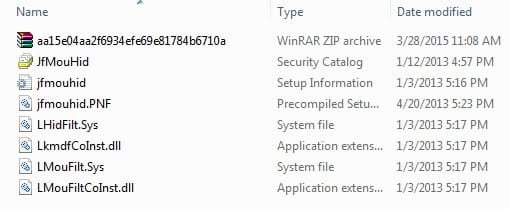
2. From file where do I needed to double click (Image posted)
3. Any suggestion how do do it properly and safe by
running W7 64bite
Thank you for you effort!
Note:
from device manager I have done Uninstalled and Installed Driver, Search Windows Updates drivers
Double clicking was another problem, I say "was" because it's not there like it just to be before.
★Logitech HiD-compliant Unifying Mouse
v5.33.10.0 Date: 9.1.2011
Wanted to Install:
Logitech HiD-compliant Unifying Mouse
v5.52.22 Date_1.03.2013 W764bit
When I stract files it gives me allot option, I understand I need to run the one it say!
Could you please hel me out If am wrong BySet-Up Information
1. Should I installed Up date driver or NOT
2. From file where do I needed to double click (Image posted)
3. Any suggestion how do do it properly and safe by
running W7 64bite
Thank you for you effort!
Note:
from device manager I have done Uninstalled and Installed Driver, Search Windows Updates drivers
Attachments
My Computer
At a glance
Windows 10 Pro Version 22H2 64-bit EditionIntel(R) Core(TM) i7-10875H CPU @ 2.30GHz 2.3...2.0 GB (31.8 GB usable)
- Computer type
- Laptop
- Computer Manufacturer/Model Number
- Azure Blade 15.6
- OS
- Windows 10 Pro Version 22H2 64-bit Edition
- CPU
- Intel(R) Core(TM) i7-10875H CPU @ 2.30GHz 2.30 GHz
- Memory
- 2.0 GB (31.8 GB usable)
- Monitor(s) Displays
- 4K UHD OLED TOUCH
- Screen Resolution
- 3840 x 2160
- Hard Drives
- 1 TB
- Mouse
- Logitech MX Master 3S
- Antivirus
- Windows Security
- Browser
- Google Chrome
- Other Info
- ______________________________________________
______________________________________________


