
logitech v MS Driver issues

DustyV

New member
Member
Local time
11:17 PM
Messages
81
Location
Coeur d'Alene, Idaho
I've been using the same Logitech F710 gamepad to play "The Golf Club" on Steam for almost 2 years with no issues (well, none to speak of anyway). The other day, on a whim, I also got MS Flight Simulator X also on Steam. I started having problems with the golf game & controller. One of the key elements of the golf game is a "shot modifier" enabled by keying the left trigger. I lost this function but everything else works fine. After 2 days of fiddling with it I gave up and uninstalled the flight simulator , still no LT. Short version is I ended up uninstalling Steam and reinstalling clean. Same issues. While playing with this I found that a Microsoft driver was installed with the Logitech device driver. This is not an area that I'm well versed in (read: stupid) Any comments or ideas are most welcome. Maybe how to delete this MS driver? I haven't a clue. BTW Steam & Logitech are less than really helpful.
Tnx,
Dusty
 

My Computer

Computer Manufacturer/Model Number
Alert Micro D67
OS
Win 7 Pro 64 bit
CPU
Intel i7
Motherboard
Intel DQ67SW
Memory
8 Gb
Graphics Card(s)
Intel Processor Integrated Graphics & Geforce GTX670
Sound Card
On Mothernoard
Monitor(s) Displays
28" LG
Hard Drives
Intel 200Gb SSD C drive
500 GB WD
Seagate GoFlex 2TB
Not sure i can help but will have a look.

Try the following with the Logitech driver installed
1. What makes you think/where do you see an MS driver installed?
2. Right click the device in device manager->Properties. Click Driver tab. Click Driver Details button. Give me a screen shot of what's displayed
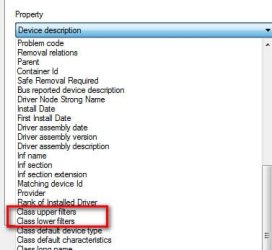
3. Now go to the Details tab. Use pull down menu and carefully look if Class upper or Class lower filter is listed. If yes, select it. You can select the display window and copy/paste the file(s) that appear
 

Attachments

  • Filters.jpg
    Filters.jpg
    18.7 KB · Views: 18

My Computer

Computer type
PC/Desktop
Computer Manufacturer/Model Number
Dell Optiplex 360 and Optiplex 755
OS
Desk 1: Win 7 Pro x32; Desk 2: Windows 10 x64
Hard Drives
500GB Crucial SSD in both Desktops
Other Info
Buffalo 6TB NAS, Raid 1
>> 1. What makes you think/where do you see an MS driver installed?

Progress in the overnight hours. It appears to make some difference if I plug the dongle into a USB 2 or a USB 3 port. Lol, anyway here's a screenshot of the installed drivers with the dongle plugged into a USB 3 port. Notice that the last entry is the MS XB360 driver. For some reason the shot modification is working now. There are a couple of minor glitches with other controls but nothing I can't live with. I'm going to leave it alone for now and get a couple hours sleep <grin>.
Tnx,
Dusty
 

Attachments

My Computer

Computer Manufacturer/Model Number
Alert Micro D67
OS
Win 7 Pro 64 bit
CPU
Intel i7
Motherboard
Intel DQ67SW
Memory
8 Gb
Graphics Card(s)
Intel Processor Integrated Graphics & Geforce GTX670
Sound Card
On Mothernoard
Monitor(s) Displays
28" LG
Hard Drives
Intel 200Gb SSD C drive
500 GB WD
Seagate GoFlex 2TB
Thanks for answering #1.

I might have an answer but need, at minimum, my request #2 to know if my guess might be correct - show me the Driver details info i requested.

/* EDIT */
I do have a guess to your problem but please provide both #2 and #3 I requested before. My guess may (or may not) be the cause of your problem - but need the info to know
 

My Computer

Computer type
PC/Desktop
Computer Manufacturer/Model Number
Dell Optiplex 360 and Optiplex 755
OS
Desk 1: Win 7 Pro x32; Desk 2: Windows 10 x64
Hard Drives
500GB Crucial SSD in both Desktops
Other Info
Buffalo 6TB NAS, Raid 1
Back
Top