Logitech Webcam communicate STX

JP83

New member
Local time
6:15 PM
Messages
39
hello,
any idea how I can get my webcam to work in win7 RC 7100 64 bits
the only way I got the drivers to install was to execute them in vista SP3 mode and I get a message like : these drivers are not made for this windows and then I click continue anyway, everything looks like it's working but once it's installed it asks me to plug-in the webcam and then win7 looks for the drivers on windows update and once this is done I can't see the webcam on my computer, huh?

sorry that sentence was horrible
 

My Computer

OS
windows 7 pro 64 bits
CPU
i7-920 stock
Motherboard
Asus P6t
Memory
12 gig OCZ @1600mhz (stock)
Graphics Card(s)
evga 275 GTX FTW
Screen Resolution
1600x1200
Hard Drives
500gb sata 2
PSU
corsair 750W
Keyboard
G15
Mouse
MX518
Internet Speed
cable 30MB
hello,
any idea how I can get my webcam to work in win7 RC 7100 64 bits
the only way I got the drivers to install was to execute them in vista SP3 mode and I get a message like : these drivers are not made for this windows and then I click continue anyway, everything looks like it's working but once it's installed it asks me to plug-in the webcam and then win7 looks for the drivers on windows update and once this is done I can't see the webcam on my computer, huh?

sorry that sentence was horrible


lol yeah it was hard to follow....

I am surprised that Windows doesn't have these drivers...


What I did to get my webcam (old one) installed was to focrce the install Windows Vista 32 bit drivers.

Have you tried installing the Windows Vista 64bit drivers?

Also, you can take the application downloaded, extract it, then use just the drivers only.

If you download the 64-bit application for Vista, save it to a temp location. The use an archiver like 7-zip to extract it. After you extract it you can see the drivers in there. Point the device manager there to look for them. If it doesn't install automatically, force it to by manually selecting it.

If you have absolutely no idea what I am talking about I think I can zip up the driver set contained in the setup file.
 

My Computer

Computer Manufacturer/Model Number
Built Myself
OS
Windows 7 7600.16384 x64
CPU
Intel Core i7 OC'd to 3.20 GHz
Motherboard
Gigabyte
Memory
6GB GSkillz Triple Channel DDR3 OC'd to 1600 MHz
Graphics Card(s)
Nvidia GTX 280
Sound Card
X-Fi Platinum
Monitor(s) Displays
Dual 2001FWP
Screen Resolution
1680x1050 x 2
Hard Drives
System - Dual 150GB Raptors Raid0
Doc Storage - 1TB SATA 32MB cache Samsung
TV Recordings - 1TB SATA 32MB cache Samsung
PSU
Gigawatt Antec
Case
Antec 900
Keyboard
Saitek
Mouse
logitech MX 10000
Internet Speed
30 mb/s
Keep in mind with my method above, it will only provide core functionality of the web cam, and not all of the features provided in the original app. However it will allow you to use video with Live Messenger, Skype, or any other apps that can call on the web cam for imaging or streaming.
 

My Computer

Computer Manufacturer/Model Number
Built Myself
OS
Windows 7 7600.16384 x64
CPU
Intel Core i7 OC'd to 3.20 GHz
Motherboard
Gigabyte
Memory
6GB GSkillz Triple Channel DDR3 OC'd to 1600 MHz
Graphics Card(s)
Nvidia GTX 280
Sound Card
X-Fi Platinum
Monitor(s) Displays
Dual 2001FWP
Screen Resolution
1680x1050 x 2
Hard Drives
System - Dual 150GB Raptors Raid0
Doc Storage - 1TB SATA 32MB cache Samsung
TV Recordings - 1TB SATA 32MB cache Samsung
PSU
Gigawatt Antec
Case
Antec 900
Keyboard
Saitek
Mouse
logitech MX 10000
Internet Speed
30 mb/s
yep I tried vista 64 bits
I'll try the 32 bits before trying the complicated procedure
 

My Computer

OS
windows 7 pro 64 bits
CPU
i7-920 stock
Motherboard
Asus P6t
Memory
12 gig OCZ @1600mhz (stock)
Graphics Card(s)
evga 275 GTX FTW
Screen Resolution
1600x1200
Hard Drives
500gb sata 2
PSU
corsair 750W
Keyboard
G15
Mouse
MX518
Internet Speed
cable 30MB
Did this fix your issue?
 

My Computer

Computer Manufacturer/Model Number
Built Myself
OS
Windows 7 7600.16384 x64
CPU
Intel Core i7 OC'd to 3.20 GHz
Motherboard
Gigabyte
Memory
6GB GSkillz Triple Channel DDR3 OC'd to 1600 MHz
Graphics Card(s)
Nvidia GTX 280
Sound Card
X-Fi Platinum
Monitor(s) Displays
Dual 2001FWP
Screen Resolution
1680x1050 x 2
Hard Drives
System - Dual 150GB Raptors Raid0
Doc Storage - 1TB SATA 32MB cache Samsung
TV Recordings - 1TB SATA 32MB cache Samsung
PSU
Gigawatt Antec
Case
Antec 900
Keyboard
Saitek
Mouse
logitech MX 10000
Internet Speed
30 mb/s
I forgot =/
I tried the 32 bits it says this program has known compatibilities issues
I tried to execute in win XP mode win vista mode it will just not work
I'll try to extract the stuff out of the .exe
 

My Computer

OS
windows 7 pro 64 bits
CPU
i7-920 stock
Motherboard
Asus P6t
Memory
12 gig OCZ @1600mhz (stock)
Graphics Card(s)
evga 275 GTX FTW
Screen Resolution
1600x1200
Hard Drives
500gb sata 2
PSU
corsair 750W
Keyboard
G15
Mouse
MX518
Internet Speed
cable 30MB
now that's weird
I tried a last time with the vista 64 bits drivers executing as vista (no service pack) I ignored all the warnings and on MSN Messenger my cam is there
thanks
qc1150_x64.exe if someone wants to know
 

My Computer

OS
windows 7 pro 64 bits
CPU
i7-920 stock
Motherboard
Asus P6t
Memory
12 gig OCZ @1600mhz (stock)
Graphics Card(s)
evga 275 GTX FTW
Screen Resolution
1600x1200
Hard Drives
500gb sata 2
PSU
corsair 750W
Keyboard
G15
Mouse
MX518
Internet Speed
cable 30MB
How do I extract the drivers out of the -exe.
Do I need some special tool for that?
 

My Computer

OS
Windows 7 RC 7100 X64
CPU
Intel Q9550
Motherboard
Asus P5Q3
Memory
OCZ 4GB
Graphics Card(s)
Asus ENGTX275
I have this webcam, Get the official drivers via Windows Update ;)

do you have RC 7100? I don't know if it changes anything, but when windows tried to get them on windows update the install failed each single time
 

My Computer

OS
windows 7 pro 64 bits
CPU
i7-920 stock
Motherboard
Asus P6t
Memory
12 gig OCZ @1600mhz (stock)
Graphics Card(s)
evga 275 GTX FTW
Screen Resolution
1600x1200
Hard Drives
500gb sata 2
PSU
corsair 750W
Keyboard
G15
Mouse
MX518
Internet Speed
cable 30MB
do you have RC 7100? I don't know if it changes anything, but when windows tried to get them on windows update the install failed each single time

FYI. I could not get the Logitech drivers for my QuickCam Pro 9000 to work correctly until I upgraded from Win7 7100/7127 to 7232. I had similar results with the Realtek ALC888 drivers.

And believe me when I say I tried MANY different install methods with 7100/7127.
 

My Computer

OS
XP Pro & Vista Home Premium (x86); Windows Ultimate 7600 x64 Retail
do you have RC 7100? I don't know if it changes anything, but when windows tried to get them on windows update the install failed each single time

Yes I do and its worked on every build of Windows 7 that Ive used ;) the official drivers for this webcam are on Windows Update so what type of error are you getting when Windows attempts to install the driver software? :confused:

Steven
 
I, too, am using a Logitech Webcam communicate STX. And I, too, can't get it to work in Win 7 (64-bit, build 7100). I've done all the updates I can and still no love. I've tried installing Logitech's drivers in WinXP and Vista modes and still nada. I have an older scanner that is facing extinction on Win7, too. Good thing I love WinXP - cuz it looks like I'm going back. So far, no compelling reason to "upgrade" to Win7. Too bad I'll be forced to someday.
 

My Computer

Computer Manufacturer/Model Number
Homemade
OS
Win7 - 64 Bit
CPU
Intel Quad Q6600, 2.4GHz
Motherboard
Gigabyte EP45-UD3R
Memory
OCZ Platinum (2 x 2GB) DDR2 1066 (PC2 8500)
Graphics Card(s)
NVIDIA GeForce 8600 GT
Sound Card
Onboard Realtec
Monitor(s) Displays
Acer 22"
Screen Resolution
1680x1050
Hard Drives
Total size of hard disk(s) 1360 GB
(C:) 60 GB Total (Sata Part:1, Win7 64bit OS)
(D:) 180 GB Total (Sata Part:2)
(E:) 500 GB Total (Sata)
(F:) 500 GB Total (Sata)
(G:) 1 TB Total (Sata)
(H:) 64 GB SSD (OCZ Solid Series MLC - WinXP SP3 32bit OS)
(
PSU
Enermax 450W
Case
COOLER MASTER Centurion 5 CAC-T05-UW
Cooling
MASSCOOL 8WA741 92mm Ball CPU Cooler
Keyboard
MS
Mouse
MS Wireless
Internet Speed
Comcast
I, too, am using a Logitech Webcam communicate STX. And I, too, can't get it to work in Win 7 (64-bit, build 7100). I've done all the updates I can and still no love. I've tried installing Logitech's drivers in WinXP and Vista modes and still nada. I have an older scanner that is facing extinction on Win7, too. Good thing I love WinXP - cuz it looks like I'm going back. So far, no compelling reason to "upgrade" to Win7. Too bad I'll be forced to someday.

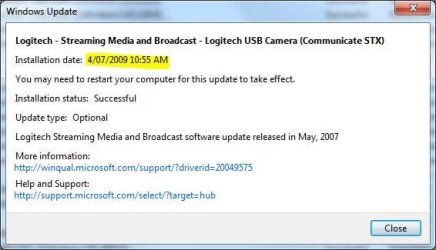
Is this the driver update you installed via Windows Update? :huh:

STxDriver.JPG
 
dmex,

I have no idea where you got the screenshot. When I go to Windows Update, it tells me there are no updates for me - except language packs. The Device Stage shows a "Camera" with a red X on it. When I try to update the driver for it, I get "Sorry, there are no updates available... blah blah blah..." Am I missing something here? Is there somewhere else to look for compatible drivers? I'd love to use both my webcam and my scanner. BTW, the scanner worked in builds before 7100.
 

My Computer

Computer Manufacturer/Model Number
Homemade
OS
Win7 - 64 Bit
CPU
Intel Quad Q6600, 2.4GHz
Motherboard
Gigabyte EP45-UD3R
Memory
OCZ Platinum (2 x 2GB) DDR2 1066 (PC2 8500)
Graphics Card(s)
NVIDIA GeForce 8600 GT
Sound Card
Onboard Realtec
Monitor(s) Displays
Acer 22"
Screen Resolution
1680x1050
Hard Drives
Total size of hard disk(s) 1360 GB
(C:) 60 GB Total (Sata Part:1, Win7 64bit OS)
(D:) 180 GB Total (Sata Part:2)
(E:) 500 GB Total (Sata)
(F:) 500 GB Total (Sata)
(G:) 1 TB Total (Sata)
(H:) 64 GB SSD (OCZ Solid Series MLC - WinXP SP3 32bit OS)
(
PSU
Enermax 450W
Case
COOLER MASTER Centurion 5 CAC-T05-UW
Cooling
MASSCOOL 8WA741 92mm Ball CPU Cooler
Keyboard
MS
Mouse
MS Wireless
Internet Speed
Comcast
dmex,

I have no idea where you got the screenshot. When I go to Windows Update, it tells me there are no updates for me - except language packs. The Device Stage shows a "Camera" with a red X on it. When I try to update the driver for it, I get "Sorry, there are no updates available... blah blah blah..." Am I missing something here? Is there somewhere else to look for compatible drivers? I'd love to use both my webcam and my scanner. BTW, the scanner worked in builds before 7100.


What Windows 7 build are you using? RTM 7600 comes out today ;)

When you have installed the RTM, let me know if your able to install the STX update :geek:
 
What Windows 7 build are you using? RTM 7600 comes out today ;)

When you have installed the RTM, let me know if your able to install the STX update :geek:

Win 7 download page still downloads build 7100, which is what I am currently running. I've experienced some BSOD, too. That worries me some.
 

My Computer

Computer Manufacturer/Model Number
Homemade
OS
Win7 - 64 Bit
CPU
Intel Quad Q6600, 2.4GHz
Motherboard
Gigabyte EP45-UD3R
Memory
OCZ Platinum (2 x 2GB) DDR2 1066 (PC2 8500)
Graphics Card(s)
NVIDIA GeForce 8600 GT
Sound Card
Onboard Realtec
Monitor(s) Displays
Acer 22"
Screen Resolution
1680x1050
Hard Drives
Total size of hard disk(s) 1360 GB
(C:) 60 GB Total (Sata Part:1, Win7 64bit OS)
(D:) 180 GB Total (Sata Part:2)
(E:) 500 GB Total (Sata)
(F:) 500 GB Total (Sata)
(G:) 1 TB Total (Sata)
(H:) 64 GB SSD (OCZ Solid Series MLC - WinXP SP3 32bit OS)
(
PSU
Enermax 450W
Case
COOLER MASTER Centurion 5 CAC-T05-UW
Cooling
MASSCOOL 8WA741 92mm Ball CPU Cooler
Keyboard
MS
Mouse
MS Wireless
Internet Speed
Comcast
Win 7 download page still downloads build 7100, which is what I am currently running. I've experienced some BSOD, too. That worries me some.

If you have the BSOD information it will help isolate the cause, you also cant download the RTM from Microsoft ;)
 
dmex,

Laughs on me - I read your reply as "RC 7600 available..." - breezed right on over the "RTM" part. D'oh! As for the BSOD, they happened quickly and the computer restarted before I could investigate. I assumed at first it was due to an underpowered PSU, but after replacing the PSU, I still got BSOD. I haven't seen BSOD since Win98 days. I run WinXP SP3 32-bit on a SSD drive and a 5GB ramdisk - it's smoking fast and stable as hell. I'm running Win7 RC1 (build 7100) 64-bit on a HDD because running it on the SSD was unbelieveably slow.
 

My Computer

Computer Manufacturer/Model Number
Homemade
OS
Win7 - 64 Bit
CPU
Intel Quad Q6600, 2.4GHz
Motherboard
Gigabyte EP45-UD3R
Memory
OCZ Platinum (2 x 2GB) DDR2 1066 (PC2 8500)
Graphics Card(s)
NVIDIA GeForce 8600 GT
Sound Card
Onboard Realtec
Monitor(s) Displays
Acer 22"
Screen Resolution
1680x1050
Hard Drives
Total size of hard disk(s) 1360 GB
(C:) 60 GB Total (Sata Part:1, Win7 64bit OS)
(D:) 180 GB Total (Sata Part:2)
(E:) 500 GB Total (Sata)
(F:) 500 GB Total (Sata)
(G:) 1 TB Total (Sata)
(H:) 64 GB SSD (OCZ Solid Series MLC - WinXP SP3 32bit OS)
(
PSU
Enermax 450W
Case
COOLER MASTER Centurion 5 CAC-T05-UW
Cooling
MASSCOOL 8WA741 92mm Ball CPU Cooler
Keyboard
MS
Mouse
MS Wireless
Internet Speed
Comcast
So the conclusion is that the drivers are installed through windows update but you can't install any fully working software ...
 

My Computer

Computer Manufacturer/Model Number
Custom
OS
Windows 7 Ultimate
CPU
Intel i7 920
Motherboard
GA-EX58-EXTREME
Memory
CORSAIR TR3X3G1600C9 XMS3 DDR3 6GB
Graphics Card(s)
Saphire Ati 4870 1GB Ram
Sound Card
SoundBlaster X-Fi Platinum
Monitor(s) Displays
2 x Samsung T260
Hard Drives
4 x Samsung 1Tb
PSU
Hiper Type R II 680W
Case
Thermaltake Shark
Cooling
Zalman Reserator 1+, extra VGA waterblock, Radiator
Back
Top