Logmein - performance problems?

schnoid

New member
Local time
2:21 PM
Messages
11
I love Logmein. I use it more than physically sitting at my desktop. Actually, I'm using it even now to write this. What's strange is that when I made the leap to Windows 7 Ultimate x64 a few days ago, it seems that Logmein performance took a huge turn for the worst. As far as I can tell all my settings are exactly identical to how they were on my Windows XP setup. It also seems there is no additional load on my home network that wasn't there before. I can't quantify it, but there is definitely a noticeable lag when I'm signing into my Windows 7 box from the same places as before. If anyone has an idea it would really be appreciated..

Thanks.
 

My Computer

OS
Windows 7
CPU
Intel Core 2 Duo e6300
Motherboard
Gigabyte GA-965P-DS3 (rev. 3.3)
Memory
4GB
Sound Card
NVIDIA GeForce 7950 GX2
PSU
Corsair HX520W PSU
Case
Antec P180b
I love Logmein. I use it more than physically sitting at my desktop. Actually, I'm using it even now to write this. What's strange is that when I made the leap to Windows 7 Ultimate x64 a few days ago, it seems that Logmein performance took a huge turn for the worst. As far as I can tell all my settings are exactly identical to how they were on my Windows XP setup. It also seems there is no additional load on my home network that wasn't there before. I can't quantify it, but there is definitely a noticeable lag when I'm signing into my Windows 7 box from the same places as before. If anyone has an idea it would really be appreciated..

Thanks.

I dont have much in the way of log me in, but teamview is used extensively in win 7 and is free for home use.

good luck and hope this helps

ken
 

My Computer

Computer Manufacturer/Model Number
HP Pavillion dv-7 1005 Tx
OS
Win 8 Release candidate 8400
CPU
[email protected]
Memory
4 gigs
Graphics Card(s)
Nvidia 9600M
Sound Card
HD built-in
Monitor(s) Displays
17" Wxga
Screen Resolution
1440x900
Cooling
none
Internet Speed
45Mb down 5Mb up
I dont have much in the way of log me in, but teamview is used extensively in win 7 and is free for home use.

good luck and hope this helps

ken


Thanks for the suggestion. I can't seem to create a user account for some strange reason, but I'll definitely see if I can figure it out. I've been very happy with logmein, so if I can continue to use it I'd like to stick with it.
 

My Computer

OS
Windows 7
CPU
Intel Core 2 Duo e6300
Motherboard
Gigabyte GA-965P-DS3 (rev. 3.3)
Memory
4GB
Sound Card
NVIDIA GeForce 7950 GX2
PSU
Corsair HX520W PSU
Case
Antec P180b
i use logmein quite often, but I'm usually remoting from my windows 7 box, not to it. I notice no issues with slowdown when remoting into my other boxes.
 

My Computer

Computer Manufacturer/Model Number
Black_Box (homebuilt)
OS
windows 7 RTM x64
CPU
Phenom II 965 Quad Core 3.4Ghz
Motherboard
Asus M4A79T Deluxe
Memory
Mushkin Blackline 8GB (4x2gb)
Graphics Card(s)
XFX Radeon 5970 Black Edition
Sound Card
onboard
Monitor(s) Displays
Dell 2408WPF-main Dell E248WFP-secondary
Screen Resolution
1920x1200-main 1920x1200-secondary
Hard Drives
OCZ Vertex Limited Edition 100GB (OS)
x1 WD Black Edition 500GB drive (Storage)
PSU
XFX 850w Black Edition (Modular)
Case
Mountian Mods H2go
Cooling
CoolITSystems ECO A.L.C.
Keyboard
Logitech MX 5500 wireless keyboard
Mouse
Razor Copperhead
Internet Speed
16Mb down/2Mb up Wowway Cable Internet
i use logmein quite often, but I'm usually remoting from my windows 7 box, not to it. I notice no issues with slowdown when remoting into my other boxes.

yea, I'd never had a problem before remoting from ANY type of box to my Windows XP box. Everything changed when I installed Win 7. I love Win 7 for many reasons, but not having LMI work well could potentially be a huge deal killer since I use it so often.
 

My Computer

OS
Windows 7
CPU
Intel Core 2 Duo e6300
Motherboard
Gigabyte GA-965P-DS3 (rev. 3.3)
Memory
4GB
Sound Card
NVIDIA GeForce 7950 GX2
PSU
Corsair HX520W PSU
Case
Antec P180b
i use logmein quite often, but I'm usually remoting from my windows 7 box, not to it. I notice no issues with slowdown when remoting into my other boxes.

yea, I'd never had a problem before remoting from ANY type of box to my Windows XP box. Everything changed when I installed Win 7. I love Win 7 for many reasons, but not having LMI work well could potentially be a huge deal killer since I use it so often.


Just a Question

Why use something like Logmein when RDP works just fine and you aren't dependent on any 3rd party application.

If you have a dynamic IP and behind a router you can use something like no-ip to get a free domain name so you can always access your remote computer.

Just allow RDP through your firewall and open port 3389.

If you've got a work firewall blocking this just "Tunnel" using putty.

Google for this -- I won't describe it here as some admins might regard it as "hacking" - bypassing a firewall but tunelling is a perfectly legit procedure -- all you want to do is logon to your own box. Installing Putty as well dosn't need admin rights either.

cheers
jimbo
 

My Computer

Computer type
PC/Desktop
Computer Manufacturer/Model Number
Custom built, several laptops HP/ASUS
OS
Linux CENTOS 7 / various Windows OS'es and servers
CPU
Intel i7 Intel i5
Memory
8GB, 16GB
Graphics Card(s)
On Motherboard
Sound Card
Realtek HD audio
Monitor(s) Displays
Apple Cinema display, Samsung LCD
Screen Resolution
1920 X 1080
Hard Drives
4 X 1TB SATA
Mouse
Toshiba wireless laser
Internet Speed
> 20MB up
i use logmein quite often, but I'm usually remoting from my windows 7 box, not to it. I notice no issues with slowdown when remoting into my other boxes.

yea, I'd never had a problem before remoting from ANY type of box to my Windows XP box. Everything changed when I installed Win 7. I love Win 7 for many reasons, but not having LMI work well could potentially be a huge deal killer since I use it so often.


Just a Question

Why use something like Logmein when RDP works just fine and you aren't dependent on any 3rd party application.

If you have a dynamic IP and behind a router you can use something like no-ip to get a free domain name so you can always access your remote computer.

Just allow RDP through your firewall and open port 3389.

If you've got a work firewall blocking this just "Tunnel" using putty.

Google for this -- I won't describe it here as some admins might regard it as "hacking" - bypassing a firewall but tunelling is a perfectly legit procedure -- all you want to do is logon to your own box. Installing Putty as well dosn't need admin rights either.

cheers
jimbo

i get where you're coming from, but personally there's two main reasons I use logmein. 1) i can use it from ANY browser on any OS, and 2) I don't have to deal with any tunneling. Also i used to use a dynamic dns server with VNC, but you'd have to count on BOTH VNC to stay active AND the dynamic DNS server to auto update if your IP address changes. Needless to say I had many days I went without access because of a problem somewhere. Logmein has been secure, convenient, and very smooth for as long as I've used it, and until I went to Win 7, I was thrilled with it.
 

My Computer

OS
Windows 7
CPU
Intel Core 2 Duo e6300
Motherboard
Gigabyte GA-965P-DS3 (rev. 3.3)
Memory
4GB
Sound Card
NVIDIA GeForce 7950 GX2
PSU
Corsair HX520W PSU
Case
Antec P180b
Hi there
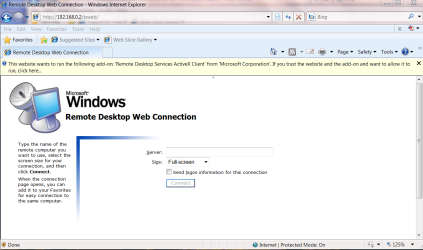
You can also set up the Web interface version of RDP - although you would have to allow the ActiveX application to run on the client computer as shown in the diagram. This means that you will have to use IE as the browser of course.

You don't need VNC however. I only need VNC if I want to remotely access the GUI on a Linux box such as the KDE / GNOME desktop.

As far as Dynamic IP addresses are concerned I use the NO-IP system - this runs every so often on the remote computer and updates the DNS if the Ip has changed. Free service and is ideal for acessing a remote system behind a Router that has a dynamic IP address.

No-IP - Dynamic DNS, Static DNS for Your Dynamic IP

In the 3 years I've used this service - never a problem.


Cheers
jimbo
 

Attachments

  • webrdp.png
    webrdp.png
    59.7 KB · Views: 115

My Computer

Computer type
PC/Desktop
Computer Manufacturer/Model Number
Custom built, several laptops HP/ASUS
OS
Linux CENTOS 7 / various Windows OS'es and servers
CPU
Intel i7 Intel i5
Memory
8GB, 16GB
Graphics Card(s)
On Motherboard
Sound Card
Realtek HD audio
Monitor(s) Displays
Apple Cinema display, Samsung LCD
Screen Resolution
1920 X 1080
Hard Drives
4 X 1TB SATA
Mouse
Toshiba wireless laser
Internet Speed
> 20MB up
Back
Top