Logon Screen Logo

j7ody

New member
Local time
10:00 PM
Messages
8
Good Morning to all,

Came across this site today, and would like to say thank you, thank you, thank you. I have already downloaded the thundercats clocks... big smile on my face lol

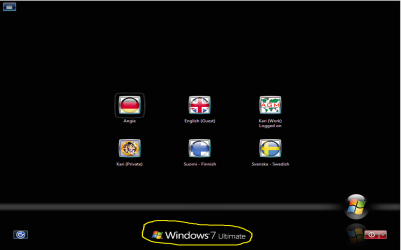
Anyway, back to my point. I have changed the logon screen background to an awesome image, I was just wondering, is there anyway of getting rid of the 'Windows 7' logo/word across the center bottom?

Thanks

Jody
 

My Computer

Computer Manufacturer/Model Number
Custom
OS
Windows 7 64bit
CPU
i7
Memory
6GB
Monitor(s) Displays
Dual 24"
Screen Resolution
1920*1080
Hard Drives
OS: 150GB Raptop
Data: 600GB RAID 5
PSU
850W
Case
Coolermaster HAT
Cooling
Corsair H50
click start and in the search box, type msconfig and press Enter. Now in the System Configuration Utility, click Boot, check NO GUI BOOT and click Apply and OK. Restart.

However, it may also stop your own custom background. Worth a try.
 

My Computer

Computer Manufacturer/Model Number
Samsung NP530U4B-S02IN
OS
Windows® 8 Pro (64-bit)
CPU
Intel® Core™ i5 Processor 2467M (1.60GHz, 3MB L3 Cache)
Motherboard
Samsung Electronics
Memory
6GB DDR3 System Memory at 1,333MHz (on BD 4GB + 2GB x 1)
Graphics Card(s)
AMD Radeon™ HD7550M 1GB DDR3 (Ext. Graphic)
Sound Card
Realtek High Definition Audio
Monitor(s) Displays
35.56cm (14.0) SuperBright 300nit HD LED Display
Screen Resolution
1366x768
Hard Drives
1TB S-ATA II Hard Drive (5400RPM) with ExpressCache 16GB SSD
Internet Speed
sucks
Antivirus
Microsoft Security Essentials
Browser
Google Chrome (Sync enabled)
First "Welcome to the Seven Forums." :thumbsup:
There are several applications for removing the water mark. The one I use is RemoveWatermark_20090314.
 

My Computer

Computer Manufacturer/Model Number
HP Pavilion a4302f
OS
Win 7 Pro x64, VM Win XP, Win7 Pro Sandbox, Kubuntu 11
CPU
AMD Athlon(tm) II X4 640 @ 3.0 Gbz
Memory
12GB 1066MHz DDR3 SDRAM - 2x4GB, 2x2GB
Graphics Card(s)
ATI Radeon HD 4350 HD Graphics/Audio with 512MB
Sound Card
Realtek High Definition Audio
Monitor(s) Displays
1. Dell 23" SP2307, 2. Mitsublishi 40" HDTV, Hannspree 25"
Screen Resolution
1. 2048x1152, 2. 1920-1080, 3. 1920x1200
Hard Drives
Int: 1 120 Gig SSD i
1 - 2.5" 500 USB External HDD
1 -1 Tb USB External HDD
Case
Mid Tower
Cooling
Standard Fans - 5 fans (very quiet)
Keyboard
Microsoft Wireless 2000
Mouse
Microsoft Wireless Mouse 5000
Internet Speed
10 Mbit (realistically 500 Kbit - 1.2 Mbit)
Other Info
Speakers - Bose Desktop (Excellent Sound)
1 external CD|DVD\Blue-ray Recorders/Players (Sony)
Thanks for the prompt responses. WIll have to try this at home as the link to the app is blocked on work network :( suppose I should be doing work :)
 

My Computer

Computer Manufacturer/Model Number
Custom
OS
Windows 7 64bit
CPU
i7
Memory
6GB
Monitor(s) Displays
Dual 24"
Screen Resolution
1920*1080
Hard Drives
OS: 150GB Raptop
Data: 600GB RAID 5
PSU
850W
Case
Coolermaster HAT
Cooling
Corsair H50
The OP is asking about the logo and text on logon screen (marked with yellow outline in the attached image), so NO GUI BOOT and / or watermark remover don't work.

To my knowledge there's no tools to remove the Windows logo and text from logon screen.

Kari

logon_7_2.png
 

My Computer

Computer type
Laptop
Computer Manufacturer/Model Number
HP ENVY 17-1150eg
OS
Windows 10 Pro x64 EN-GB
CPU
1.6 GHz Intel Core i7-720QM Processor
Memory
6 GB
Graphics Card(s)
ATI Mobility Radeon HD 5850 Graphics
Sound Card
Beats sound system with integrated subwoofer
Monitor(s) Displays
17" laptop display, 22" LED and 32" Full HD TV through HDMI
Screen Resolution
1600*900 (1), 1920*1080 (2&3)
Hard Drives
Internal: 2 x 500 GB SATA Hard Disk Drive 7200 rpm
External: 2TB for backups, 3TB USB3 network drive for media
Cooling
As Envy runs a bit warm, I have it on a Cooler Master pad
Keyboard
Logitech diNovo Media Desktop Laser (bluetooth)
Mouse
Logitech Performance Mouse MX
Internet Speed
50/10 Mbps VDSL
Antivirus
Windows Defender 4.3.9431.0
Browser
Maxthon 3.5.2., IE11
Thanks Kari, that is EXACTLY what I am after removing. So great response, even if it is to say no go lol
 

My Computer

Computer Manufacturer/Model Number
Custom
OS
Windows 7 64bit
CPU
i7
Memory
6GB
Monitor(s) Displays
Dual 24"
Screen Resolution
1920*1080
Hard Drives
OS: 150GB Raptop
Data: 600GB RAID 5
PSU
850W
Case
Coolermaster HAT
Cooling
Corsair H50
Whoever did windows 7 eternity edition did it


PbDp6Y7z.png
 

My Computer

OS
Windows 7 x64 Bit
Whoever did windows 7 eternity edition did it
I don't normally comment pirated, illegal versions of Windows or any other OS and software.

However, I have to admit I can not understand what you are saying. The screenshot you provided clearly shows the Windows logo and text. The only difference with a screen from a normal, legal Windows is the size and the font.

Kari
 

My Computer

Computer type
Laptop
Computer Manufacturer/Model Number
HP ENVY 17-1150eg
OS
Windows 10 Pro x64 EN-GB
CPU
1.6 GHz Intel Core i7-720QM Processor
Memory
6 GB
Graphics Card(s)
ATI Mobility Radeon HD 5850 Graphics
Sound Card
Beats sound system with integrated subwoofer
Monitor(s) Displays
17" laptop display, 22" LED and 32" Full HD TV through HDMI
Screen Resolution
1600*900 (1), 1920*1080 (2&3)
Hard Drives
Internal: 2 x 500 GB SATA Hard Disk Drive 7200 rpm
External: 2TB for backups, 3TB USB3 network drive for media
Cooling
As Envy runs a bit warm, I have it on a Cooler Master pad
Keyboard
Logitech diNovo Media Desktop Laser (bluetooth)
Mouse
Logitech Performance Mouse MX
Internet Speed
50/10 Mbps VDSL
Antivirus
Windows Defender 4.3.9431.0
Browser
Maxthon 3.5.2., IE11
hmm well in that case just find where they changed it and change the pixel size to 0?

Thanks,
Kukag
 

My Computer

Computer Manufacturer/Model Number
Custom
OS
Windows 7
CPU
AMD Phenom II X4 940 3.0 Stock
Motherboard
Gigabyte GA-MA78GM-S2H
Memory
G.SKILL DDR2 800 PI Black 4GB+Corsair XMS2 Xtrm Gaming 2GB
Graphics Card(s)
ASUS EN8800GT TOP (Fact OC)
Monitor(s) Displays
Optiquest 20" Flatscreen
Screen Resolution
1680x1050
Hard Drives
Seagate 3.5' 7200RPM 750GB HDD
PSU
Antec NeoHE 550W
Cooling
Stock AMD Phenom HSF
Keyboard
Logitech G15
Internet Speed
Charter HighSpeed 10 Down / 5 Up
They will probably be located in a dll file. You could find and ask the creator of Win 7 eternity edition.
 
I thought this could not be done. I still can not understand why somebody wants to remove this information but if you still want to, here's how. Dridzz posted instructions today.

Kari
 
Last edited by a moderator:

My Computer

Computer type
Laptop
Computer Manufacturer/Model Number
HP ENVY 17-1150eg
OS
Windows 10 Pro x64 EN-GB
CPU
1.6 GHz Intel Core i7-720QM Processor
Memory
6 GB
Graphics Card(s)
ATI Mobility Radeon HD 5850 Graphics
Sound Card
Beats sound system with integrated subwoofer
Monitor(s) Displays
17" laptop display, 22" LED and 32" Full HD TV through HDMI
Screen Resolution
1600*900 (1), 1920*1080 (2&3)
Hard Drives
Internal: 2 x 500 GB SATA Hard Disk Drive 7200 rpm
External: 2TB for backups, 3TB USB3 network drive for media
Cooling
As Envy runs a bit warm, I have it on a Cooler Master pad
Keyboard
Logitech diNovo Media Desktop Laser (bluetooth)
Mouse
Logitech Performance Mouse MX
Internet Speed
50/10 Mbps VDSL
Antivirus
Windows Defender 4.3.9431.0
Browser
Maxthon 3.5.2., IE11
Thanks for the update. My honest reason for doing so is that I have changed the background and really like it, it just so happens the text across the middle writes across part of the image and I just really wanted to clean it up a bit :)
 

My Computer

Computer Manufacturer/Model Number
Custom
OS
Windows 7 64bit
CPU
i7
Memory
6GB
Monitor(s) Displays
Dual 24"
Screen Resolution
1920*1080
Hard Drives
OS: 150GB Raptop
Data: 600GB RAID 5
PSU
850W
Case
Coolermaster HAT
Cooling
Corsair H50
Back
Top