Look what I found

jaypels

New member
Power User
Local time
12:26 AM
Messages
162
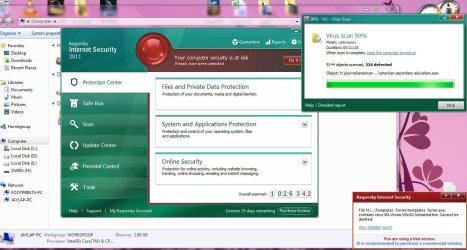
I scanned a customer's USB drive yesterday and found this.

I know some might say it is absurd or even riddled with false positives but he has installers from torrents in his drive so I believe the find was legit.

Bottom line is, false positive or not, I'm thankful I'm using Kaspersky. :D
 

Attachments

  • kasper.JPG
    kasper.JPG
    129.9 KB · Views: 240

My Computer

Computer Manufacturer/Model Number
Desktop is a DIY and laptop is an Acer Aspire 4745
OS
7 all the way!
CPU
core 2 duo (desktop) i5 (laptop)
Motherboard
asus for desktop
Memory
2gb for both machines
Graphics Card(s)
nvidia 512mb GS for desktop; hd 5470 for laptop
Monitor(s) Displays
19" AOC 913fw
Probably really slowly....
 

My Computer

Computer Manufacturer/Model Number
Alienware
OS
Windows 7 Ultimate x64
CPU
I7
Motherboard
GA-X58-USB3
Memory
6 x 1.5V DDR3 DIMM sockets supporting up to 24 GB of system
Graphics Card(s)
GeForce GTX 580
Sound Card
Realtek ALC892 codec 2/4/5.1/7.1-channel
Monitor(s) Displays
NEC Display Solutions E321 Black 32"
Screen Resolution
1366 x 768
Hard Drives
OCZ Colossus LT Series OCZSSD2-1CLSLT1T 3.5" 1TB SATA II MLC Internal Solid State Drive
PSU
XFX Black Edition XPS-850W-BES 850W ATX12V
Case
Antec
Cooling
Zalman
Keyboard
Microsoft
Mouse
Microsoft
That I don't know. And some even complain that it takes a long time to scan their USB drive. They bring an 8gb USB drive full of installers (probably from torrent sites) and all I need to open is a PSD or CDR file. While the file I want is only small, I would not risk opening the drive without finishing the scan first (again). Why again? I did that before just to satisfy an irritating customer (who was whining why 10mins have passed and Kaspersky is still scanning). What did I get? I had to reformat my computer the next day. :(

They ask me why is it long? I ask them which is longer - a scan or a reformat? :p
 

My Computer

Computer Manufacturer/Model Number
Desktop is a DIY and laptop is an Acer Aspire 4745
OS
7 all the way!
CPU
core 2 duo (desktop) i5 (laptop)
Motherboard
asus for desktop
Memory
2gb for both machines
Graphics Card(s)
nvidia 512mb GS for desktop; hd 5470 for laptop
Monitor(s) Displays
19" AOC 913fw
That I don't know. And some even complain that it takes a long time to scan their USB drive. They bring an 8gb USB drive full of installers (probably from torrent sites) and all I need to open is a PSD or CDR file. While the file I want is only small, I would not risk opening the drive without finishing the scan first (again). Why again? I did that before just to satisfy an irritating customer (who was whining why 10mins have passed and Kaspersky is still scanning). What did I get? I had to reformat my computer the next day. :(

They ask me why is it long? I ask them which is longer - a scan or a reformat? :p
Advice him (for the future) to make image backup his system (clean) parition. Reformat in that case scenario is outdated these days ;)
 

My Computer

Computer type
PC/Desktop
Computer Manufacturer/Model Number
Self Built
OS
Windows 7 Home Premium x32 SP1
CPU
x2 2.6 GHz
Motherboard
Asus
Memory
A-Data 2GB DDR2-800
Graphics Card(s)
ATI X1250
Sound Card
SB 5.1 Live!
Hard Drives
WD and Seagate FAP
PSU
Tagan TG-480-U01
Keyboard
BTC 6300
Mouse
Logitech VX Nano
Antivirus
None
Hope they don't share the drive :eek:
 

My Computer

Computer Manufacturer/Model Number
Home Built
OS
Windows 7 Professional 64-bit SP1
CPU
Intel E8400
Motherboard
MSI P35 Neo
Memory
4GB Crucial Ballistix
Graphics Card(s)
ATI ASUS Radeon HD 4830
Sound Card
Realtek ALC888 on Board
Monitor(s) Displays
Asus 22-inch VH226H Widescreen
Screen Resolution
1920 x 1080
Hard Drives
Two Western Digital 500GB
PSU
Hiper HPU-4M 530W
Case
Thermaltake Tsunami Dream Black
Cooling
Air/Fans
Keyboard
Saitek Eclipse
Mouse
Razer
Internet Speed
Sky Broadband
Other Info
USB Hub/Card Reader - 2 Pen Drives, 1 Phone Dock
Unfortunately, this is becoming more and more commonplace. I've seen it too many times when I go to look at someones PC and they have no AV, or the defs are out of date by months, or in one case, 1 1/2 years.

A decade ago, you could barely get away with relying on the "automated scans" to take care of everything. That's not the case nowadays. Owning a PC in today's hostile web environments demands vigilance on your part.

One of my Wife's family members had a PC with approx 700 infections on it. They did not have a Windows Disk and the recovery sector was corrupted, so my options were limited. It took a recovery boot disk approximately 6 hours to clean it.
 

My Computer

Computer type
PC/Desktop
Computer Manufacturer/Model Number
Dell Hell oh Well
OS
Win 7 32 Home Premium, Win 7 64 Pro, Win 8.1, Win 10
CPU
Intel Core 2 Duo 2.93GHz
Memory
Not much with my ADHD
Graphics Card(s)
ATI Radeon HD 4350
Monitor(s) Displays
24" HDTV/Monitor
Screen Resolution
Blurry after a Scotch or 2
Hard Drives
1 HDD 250 GB, 1 HDD 1 TB, 3 - 1 TB Externals
Case
Don't get on my case...man :D
Cooling
I have an Air Conditioner & Diet Pepsi
Keyboard
Saitek Cyborg
Mouse
10 yr old MS optical mouse that still works
Internet Speed
Never fast enough
Antivirus
Various
Browser
Various
Well in my part, vigilance is my key in keeping my system clean. I cannot lecture my customers regarding computer security for they mostly are noobs (not in a bad way of saying it). All they use the computer for is do some Office documents and surf the internet. They think they are protected just because they have an AV installed (which they don't update or scan).

My mom has a government issued laptop and she always comes to me and complain why her laptop is so slow when I just cleaned and performed maintenance on it a few weeks ago. The culprit? Their network. As she logs on to work using her laptop, she connects to their network (along with her co-workers who are also noobs) and immediately gets infected immediately.

Why does she come to me when they have their own IT department? They have to make an appointment first before the IT department can clean her laptop as they have their hands full with her co-worker's laptops. No matter how much the IT department lecture them or give tips on how to maintain their laptops, they fall on deaf ears or they are too busy with their work to take time to learn them.
 

My Computer

Computer Manufacturer/Model Number
Desktop is a DIY and laptop is an Acer Aspire 4745
OS
7 all the way!
CPU
core 2 duo (desktop) i5 (laptop)
Motherboard
asus for desktop
Memory
2gb for both machines
Graphics Card(s)
nvidia 512mb GS for desktop; hd 5470 for laptop
Monitor(s) Displays
19" AOC 913fw

My Computer

Computer type
PC/Desktop
Computer Manufacturer/Model Number
Bruce ... somewhere in his 40's
OS
Windows 7 Ultimate 32bit SP1
CPU
Intel(R) Core(TM)2 Quad CPU @ 2.40GHz, 2400 MHz
Motherboard
INTEL/D975XBX2
Memory
4 GB
Graphics Card(s)
ATI Radeon HD 2600 Pro
Monitor(s) Displays
Samsung SyncMaster 914v
Screen Resolution
1280 x 1024
Hard Drives
2/500GB each ... ST3500630AS ATA Device.
One is not connected
PSU
Rocketfish 700 W
Case
G.Skill Gigabyte Chassis
Keyboard
Standard PS/2 Keyboard
Mouse
Microsoft PS/2 Mouse
Internet Speed
DSL
Antivirus
Avira Internet Security
Browser
IE 11
Other Info
ATI HDMI Audio
Blacklisting is really becoming a lost art because so many new forms of malware and viruses are created every day, and many big companies still focusing on blacklisting. Of course no AV is 100%, but since so many threats surface at a high rate AV's that focus on a blacklist really aren't that effective as they use to be.

Whitelisting and prevention is the key. It's much more effective to whitelist all known safe applications, and then block everything else.

Prevention and whitelisting is why I use Comodo. The Defense + and Sandbox features really add more proactive security that prevent a lot of bad things from installing, damaging essential registry keys and windows files, and etc. Of course a lot of people complain about the constant notifications and firewall popups for permission and such - but I'd rather do all that then coming to my PC one day and having 500+ infections like in your situation.
 

My Computer

Computer Manufacturer/Model Number
Custom
OS
Windows 7 Professional 64 bit
CPU
AMD Phenom X4 925 @ 2.8ghz
Motherboard
Gigabyte GA-MA785GT-UD3H AM3
Memory
4GB DDR3 1600mhz A-DATA gaming series
Graphics Card(s)
Dual HIS Radeon HD 5770
Sound Card
Asus Xonar D1
Monitor(s) Displays
Samsung Syncmaster EX2220
Screen Resolution
1920x1080
Hard Drives
Dual Hitatchi 500GB Sata
PSU
Thermaltake Toughpower Grand 1200w A+ certified Gold.
Case
Thermaltake V3 Black
Cooling
Watercooler with Radiator on CPU, with 4 120mm case fans.
Keyboard
Thermaltake Challenger Pro
Mouse
Death Adder
Internet Speed
10mbps/1mbps
That's good catch by Kaspersky here, though I've seen worse as full 16 GB filled with (similar) torrent downloads & customer threatened by the number of infected found (almost 1050 files), and what I was shocked about is amount of data got infected... (just under 2 GB)! Though, these were combined results from Bidefender & Malwarebytes AntiMalware. Always good to have secondary defense, here, best would be MBAM / SUPERAntiSpyware.

Also, I'd rather avoid inserting a flash drive before my desktop loads completely & my AV takes full control of defense system. Many people makes mistake by engaging their flash device before / while booting & giving malware / virus a warm welcome...!!!
 

My Computer

Computer Manufacturer/Model Number
CHIP (Custom)
OS
Windows 7 Pro. 64 Bit + Back|Track 5 (Both Updated)
CPU
AMD FX 4100 (3.6GHz, 2 x 2MB L2, 8MB L3) Socket AM3
Motherboard
Biostar A880GZ (AM3+)
Memory
Kingmax DDR3 - 2 x 2GB (1333 MHz)
Graphics Card(s)
XFX ATi Radeon HD 5570 (1GB DDR3)
Sound Card
On Board (Realtec HD Codec)
Monitor(s) Displays
Samsung SyncMaster 2033sw (20") : DVI Connected
Screen Resolution
1600 x 900 (60Hz)
Hard Drives
Seagate 500GB SATA 2.0
PSU
UMAX 550W
Case
Basic White
Cooling
AMD Stock
Keyboard
Logitech
Mouse
Logitech Mouse
Internet Speed
BSNL DataOne 512KB/s
Other Info
Protected with.....
Bitdefender Internet Security 2012
SUPERAntiSpyware
Malwarebytes Anti Malware
OpenDNS
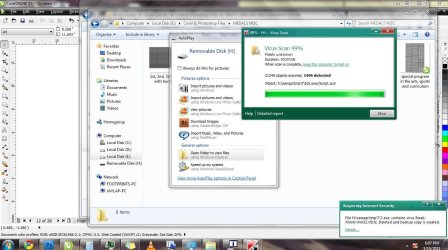
Kaspersky does it again!!

Just scanned a customer's USB drive. Will do a complete scan later tonight on my machine just to be sure I did not get infected. :p
 

Attachments

  • ghg.JPG
    ghg.JPG
    138.8 KB · Views: 22

My Computer

Computer Manufacturer/Model Number
Desktop is a DIY and laptop is an Acer Aspire 4745
OS
7 all the way!
CPU
core 2 duo (desktop) i5 (laptop)
Motherboard
asus for desktop
Memory
2gb for both machines
Graphics Card(s)
nvidia 512mb GS for desktop; hd 5470 for laptop
Monitor(s) Displays
19" AOC 913fw
Back
Top