Hi,As some of you know over the past 10 days I had help from here with changing my old sata drive to a SSD drive.
Now what I wish to know how to look after this SSD I know that it must not be defraged,What about other functions ie:disc cleanup scannow etc.Should they not to be used on it??.After a good job done with help from WHS I don't want to make a mess of things.
Thanks.
David.
My Computer
Computer type
PC/Desktop
Computer Manufacturer/Model Number
Home Build windows 7 Home premium.Built by a local computer shop.
OS
Summary Operating System Windows 7 Home Premium 64-bit SP1 CPU AMD Athlon II X2 250 23 °C
CPU
AMD Athlon II X2 250
Motherboard
Manufacturer BIOSTAR Group Model N61PB-M2S (Socket AM2 )
Memory
Total memory slots 4 Used memory slots 2 Free memory slots 2
Graphics Card(s)
Name Generic Non-PnP Monitor on NVIDIA GeForce 6150SE nForce
Sound Card
Realtek High Definition Audio Playback Devices Realtek Dig
Monitor(s) Displays
Acer
Hard Drives
Main C drive is now a 120GB SSD With only operating system and programs.
Second HDD 1TB with all documents etc.
Keyboard
HID Keyboard Device Device Kind Keyboard Device Name HID K
Antivirus
Karsersky
Browser
Google
Other Info
Summary
Operating System
Windows 7 Home Premium 64-bit SP1
CPU
AMD Athlon II X2 250 23 °C
Regor 45nm Technology
RAM
4.00GB Dual-Channel DDR2 @ 401MHz (6-6-6-18)
Motherboard
BIOSTAR Group N61PB-M2S (Socket AM2 ) 40 °C
Graphics
Generic Non-PnP Monitor (1024x768@60Hz)
128MB NVIDIA GeForce 6150SE nForce 430 (Biostar Microtech Int'l)
Storage
1863GB West
I use Disc Clean up on my SSD. Not everyday of course but perhaps once a week.
Generally treat your SSD the same as a HDD & you should not have any problems. I see you are aware of not using Defrag, which is a no non with SSD's.
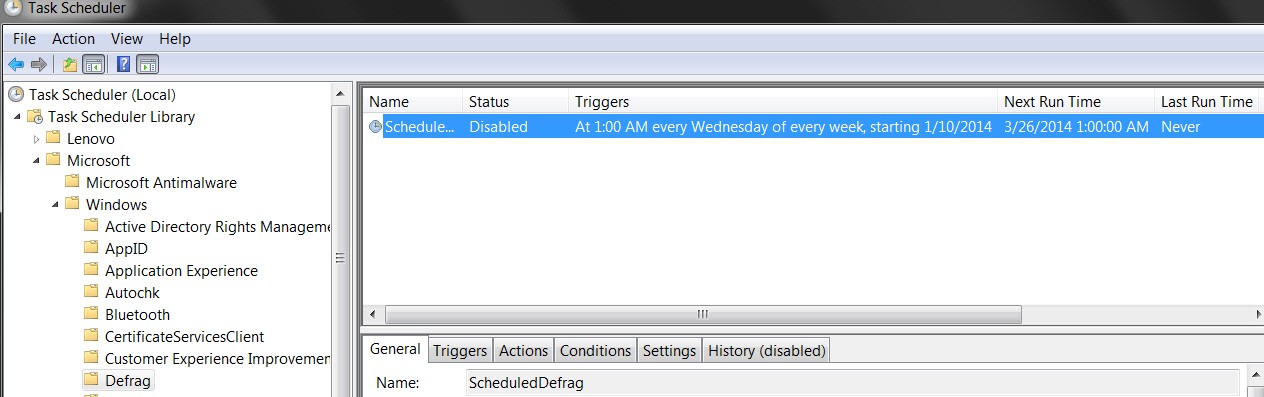
When I transferred a W7 OS from a HD to an SSD, it automatically turned off defrag for the SSD.
All my HD partitions still get defrag'd with the default W7 scheduled defrag ...
Gyration wireless, Logitech wireless, Dell USB wired
Mouse
Gyration wireless, Logitech wireless, V7 USB wired
Internet Speed
Spectrum - 100Mbps D / 10Mbps U
Antivirus
Avast, MBAM3, EMET, WinPatrol
Browser
Pale Moon, Firefox, IE
Other Info
2 multi-boot PC's
Mainly HTPC/Office/Gen purpose (no gaming).
Trendnet USB KVM.
LG DVD burner/Blue Ray Player.
Tray system for removable SATA backup drives.
Not currently OCd, under-volted.
I use Hybrid sleep, rarely re-boot or shutdown.
Hauppauge HD-PVR, Avermedia PCIe TV Tuner, Hauppauge PCI TV Tuner.
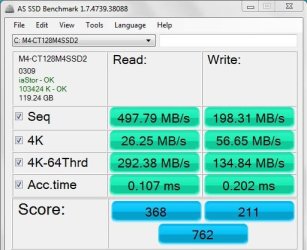
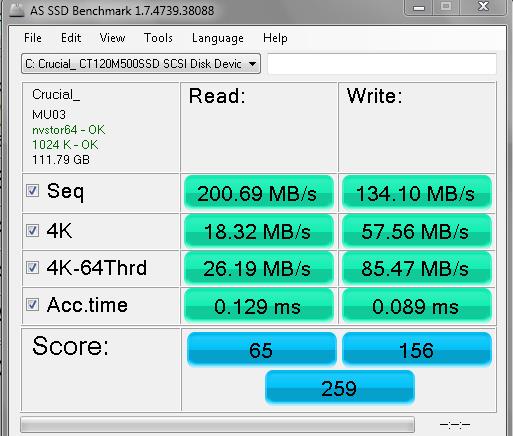
The attached screen shot is a sample of what it shows you. Note that the "1024 K - OK" indicates proper alignment.
Does your particular SSD manufacturer offer any "toolbox"or programs designed to check that it is in good order? You should find info on that with the documentation you received with the drive or at the manufacturer's web site.
Try to keep it under say 80 or 85 percent of capacity.
Other than that it's pretty much like any regular hard drive--periodic anti-virus scans, anti-malware scans, disk cleanup.
Attachments
AS SSD benchmark.jpg
67.5 KB
· Views: 40
My Computer
Computer type
PC/Desktop
Computer Manufacturer/Model Number
Ignatz Special; 4 speed manual gearbox; factory air conditioning; one of one
OS
Windows 7 Home Premium SP1, 64-bit
CPU
Intel Skylake i5-6600K, not overclocked
Motherboard
AsRock Z170M Extreme 4, micro ATX
Memory
8 GB HyperX DDR4-2666 (2 x 4 GB)
Graphics Card(s)
none; graphics are integrated on CPU
Sound Card
onboard: Realtek ALC1150; external: USB Behringer UF0-202
Monitor(s) Displays
Dell S2340M 23 inch IPS
Screen Resolution
1600 x 900
Hard Drives
System: Crucial MX100 series SSD, 128 GB;
Data: Samsung Spinpoint 103SJ, 1 TB;
Backup: WD Caviar Green WD30EZRX-00D8PB0, 3 TB
Microsoft Security Essentials and Malwarebytes Premium
Browser
Pale Moon
Other Info
All fans PWM; speeds at idle: CPU circa 500 rpm; intake circa 600 rpm; exhaust circa 600 rpm; CPU temps 27 idle and 47 C load in a warm room (27 C/81 F) when running Intel Extreme Tuning Utility stress test.
Seagate ST3160815AS(Vostro)/Western Digital Blue(Satellite)
External:
Western Digital My Passport 0748
Samsung HM121HC
Keyboard
Dell L100)(Vostro)/Dell KB2133p(XPS)
Mouse
Dell M-UAV-DEL8(XPS)
Internet Speed
100 Mbit/s(Only when IPTV is plugged out)
Antivirus
Avast, Malwarebytes PRO
Browser
Internet Explorer 11
Other Info
Note: Names with slashes between two different parts mean that the left is my old desktop and the right is my old laptop and the middle is my new desktop.(Unless specified)
Ping is horrible for servers overseas in US and Europe.
New laptop:LG Gram(Not available in US) Processor:Intel Core i3 4th Gen Ultra Low Power RAM:4GB Hard Drive:SK Hynix OEM MSATA or M.2 Graphics:Intel HD
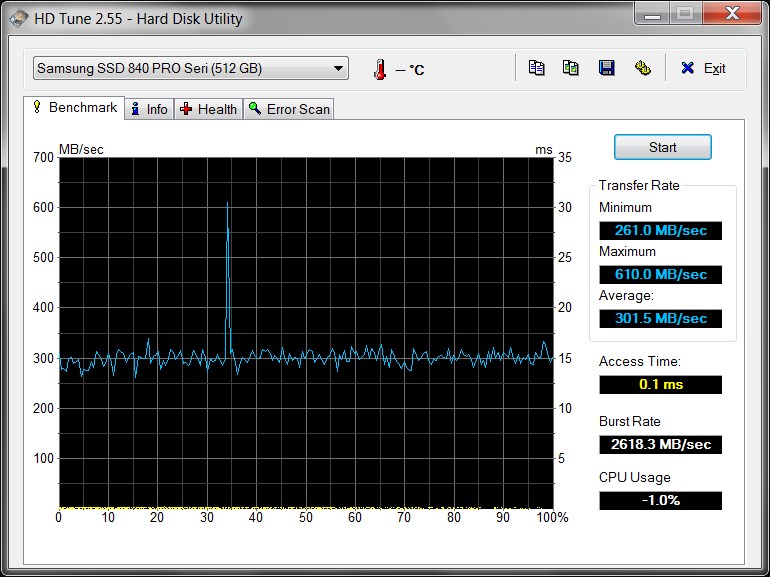
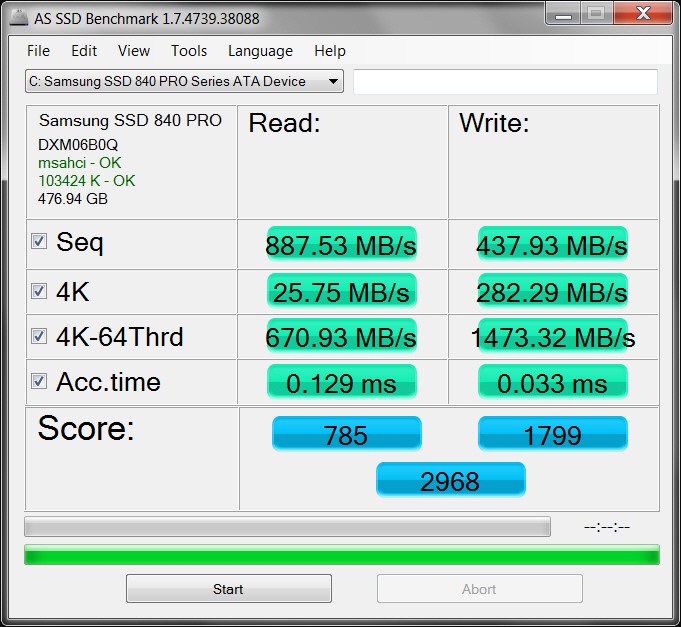
Did the performance of my 512GB Samsung 840 Pro actually get measured correctly, or did it exceed the expected value range of the test?
I suspect the "4K Read" number wrapped around the maximum number of digits allowed in the answer, as 25MB/s is obviously incorrect given the super-high values of everything else. So the whole READ-side set of numbers is probably missing 1000.
Or what??
(Lenovo W530 laptop, i7-3740QM, 8GB PC3-12800 memory, Samsung Magician running with just under 10% over-provisioning and "rapid mode" enabled)
Microsoft Security Essentials and Malwarebytes Premium
Browser
Pale Moon
Other Info
All fans PWM; speeds at idle: CPU circa 500 rpm; intake circa 600 rpm; exhaust circa 600 rpm; CPU temps 27 idle and 47 C load in a warm room (27 C/81 F) when running Intel Extreme Tuning Utility stress test.
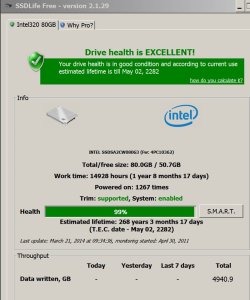
He was referring you to a program called SSD Life. There's a free version and a paid version. It makes an estimate of remaining life based on how much has been written to the drive. I have the free version on my PC and below is a screen shot, but I don't pay much attention to it. If your drive fails, it's not likely to be because of the amount you've written to it. With reasonable luck, it will last many years.
It says mine is supposedly good till 2282. It's 3 years old now, so 99% life remaining. But that's not very useful. It doesn't tell me when the drive might fail for other or unknown reasons.
Attachments
Untitled-1.jpg
93.6 KB
· Views: 1
My Computer
Computer type
PC/Desktop
Computer Manufacturer/Model Number
Ignatz Special; 4 speed manual gearbox; factory air conditioning; one of one
OS
Windows 7 Home Premium SP1, 64-bit
CPU
Intel Skylake i5-6600K, not overclocked
Motherboard
AsRock Z170M Extreme 4, micro ATX
Memory
8 GB HyperX DDR4-2666 (2 x 4 GB)
Graphics Card(s)
none; graphics are integrated on CPU
Sound Card
onboard: Realtek ALC1150; external: USB Behringer UF0-202
Monitor(s) Displays
Dell S2340M 23 inch IPS
Screen Resolution
1600 x 900
Hard Drives
System: Crucial MX100 series SSD, 128 GB;
Data: Samsung Spinpoint 103SJ, 1 TB;
Backup: WD Caviar Green WD30EZRX-00D8PB0, 3 TB
Microsoft Security Essentials and Malwarebytes Premium
Browser
Pale Moon
Other Info
All fans PWM; speeds at idle: CPU circa 500 rpm; intake circa 600 rpm; exhaust circa 600 rpm; CPU temps 27 idle and 47 C load in a warm room (27 C/81 F) when running Intel Extreme Tuning Utility stress test.
Best is to do nothing. You stopped the defrag and that is really all you need to do. Leave appr. 10 to 15% free space on the SSD so that the Garbage Collection can do it's job.
If you don't use hibernation, get rid of the hiberfile. That saves some space on the SSD. The command is:
powercfg -h off
And don't run those stupid performance programs. The nums mean nothing.
My Computer
Computer Manufacturer/Model Number
HP, Dell, Gateway, Toshiba - 4 laptops and 2 desktops
I'm not an expert on AS SSD, but I believe the HIGHER the score the better. Somebody please confirm or deny my hunch.
Which brings me back to my own 512GB Samsung 840 Pro results (which nobody's commented on), which appear to be EXTRAORDINARILY HIGH compared to others!
Are these numbers reasonable? VERY good (as I suspect), or just the opposite (please don't tell me this)?
High performance is also confirmed by HD Tune, so I guess the above AS SSD results must be correct.
The drive is on a SATA-III controller in the W530 laptop, replacing the original spinner. Brand new fresh from-scratch Win7 reinstall, producing 100MB "system reserved".
Seagate ST3160815AS(Vostro)/Western Digital Blue(Satellite)
External:
Western Digital My Passport 0748
Samsung HM121HC
Keyboard
Dell L100)(Vostro)/Dell KB2133p(XPS)
Mouse
Dell M-UAV-DEL8(XPS)
Internet Speed
100 Mbit/s(Only when IPTV is plugged out)
Antivirus
Avast, Malwarebytes PRO
Browser
Internet Explorer 11
Other Info
Note: Names with slashes between two different parts mean that the left is my old desktop and the right is my old laptop and the middle is my new desktop.(Unless specified)
Ping is horrible for servers overseas in US and Europe.
New laptop:LG Gram(Not available in US) Processor:Intel Core i3 4th Gen Ultra Low Power RAM:4GB Hard Drive:SK Hynix OEM MSATA or M.2 Graphics:Intel HD





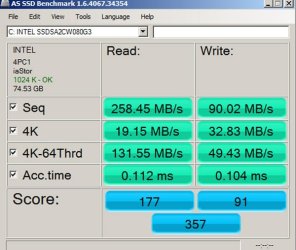


 I'm assuming the lower the Score: the better.