looking for a cookie toggle on/off add on f/ firefox palemoon waterfox

rocketman122

New member
Member
VIP
Local time
8:39 AM
Messages
106
so in the past ff had an option where you went to a site, it gives you a prompt to what cookies to allow or deny from being put on your computer.

Im looking for a toggle switch add on like "no script" where I can toggle on and off and build a database of cookies are are and not allowed.

cue the ones who say, well just have the browser delete it when you close the browser. yea, I dont want them on my computers at all. once their on your pc, the point of blocking cookies is lost.

I have a strong feeling this was removed purposely, just like how ff out of the box has no security whatsoever.

most cookies need to be blocked. there are just a small amount that are needed.
 

My Computers My Computers

  • At a glance

    win 7 pro 648320fx8gbgtx 660
    Computer type
    PC/Desktop
    Computer Manufacturer/Model Number
    custom
    OS
    win 7 pro 64
    CPU
    8320fx
    Memory
    8gb
    Graphics Card(s)
    gtx 660
    Hard Drives
    ssd hdd
    Antivirus
    none
  • Computer type
    PC/Desktop
[h=1]Yes, browser manufacturers spy themselves and allow others to do it. Only recently they began to prohibit the installation of cookies from non-visited sites.

A special addon will probably help you - for example, for the Pale Moon 27.0 to 28 browser, there are Cookie Masters:
Comprehensive management of cookies, by site and by domain, from the browser toolbar.
The toolbar icon changes to indicate whether cookies are allowed for each website as you visit, allowed for the session, or blocked.
Pale Moon Add-ons - Cookie Masters
[/h]
 

My Computer My Computer

At a glance

Windows 7 Home Premium 32bit
Computer type
PC/Desktop
OS
Windows 7 Home Premium 32bit
yea, they all leak data. so posted this in a different pro privacy site. got the FF/google pr rep saying I dont need to be obsessed with blocking cookies. haha

they need the cookies on your computers for profit so they are trying to downplay the cookie as no big deal but there are tons of cookies that steal my data with 3rd party companies and they must be stopped.

im certain ff stopped their feature they had previously because it was hurting googles sales. and googles paying them to exist.

with this add on, how do I block cookies on and off for sites? I dont care for deleting them after theyve already installed. they need to be blocked from even sitting on my computers
 

My Computers My Computers

  • At a glance

    win 7 pro 648320fx8gbgtx 660
    Computer type
    PC/Desktop
    Computer Manufacturer/Model Number
    custom
    OS
    win 7 pro 64
    CPU
    8320fx
    Memory
    8gb
    Graphics Card(s)
    gtx 660
    Hard Drives
    ssd hdd
    Antivirus
    none
  • Computer type
    PC/Desktop
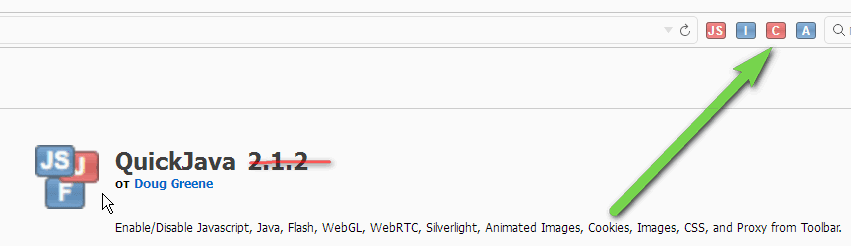
with this add on, how do I block cookies on and off for sites?
I almost don't remember how to use it.
I always use manual control (also an addon).
It definitely doesn't miss what I'm disabling.
ScreenShot00414.png
 

My Computer My Computer

At a glance

Windows 7 Home Premium 32bit
Computer type
PC/Desktop
OS
Windows 7 Home Premium 32bit
Back
Top