looking for an answer to a Dos question

mipak

New member
Member
Local time
2:46 AM
Messages
61
Location
The Outer Hebrides
I'm using W7 Professional 64bit and sometimes I have the need to use a Dos command.

I use Microsoft Publisher 2002 and, despite it's age, it works perfectly and gives me no problems. When using Publisher and want to save the work I've been doing, every time I press 'save', the files go to the default folder which is c:\users\name\my documents. Now I never use that route, preferring to use another location. I assume that the coding for Microsoft's choice of default is probably deeply embedded in W7 and is way beyond my knowledge of trying to interfere with it. Would be nice to change the default though.

Anyway, because of this and after some thought, my plan is to continue to use MS's default folder and also write a small Dos programme that would allow me to move whatever files were in 'my documents' to another more suitable location with a single click. The programme I've come up with is as follows:
echo off
move c:\users\name\"my documents"\*.pub g:\00-preparation\02-writing

All the above 5 folders are already set in place.

The trouble is, it won't activate so it's obvious I've done something wrong somewhere along the line despite my attempts to make it work. Sadly, my knowledge of Dos is somewhat lacking

If there is anyone with Dos experience able to help please, I'd be very grateful.
My thanks in advance.
 

My Computer

Computer type
PC/Desktop
Computer Manufacturer/Model Number
Custom build based on Asus
OS
W7Pro-64bit
CPU
INTEL G4400 SKYLAKE 3.3GHZ 3MBCACHE LGA1151
Motherboard
ASUS H110M-PLUS INTEL SKT1151 (25-03-2017)
Memory
2 X 8.00Gb DDR4 DIMM
Graphics Card(s)
NVIDIA GeForce GT430
Sound Card
Included on-board MB
Monitor(s) Displays
HP 1530
Screen Resolution
1024 x 768
Hard Drives
C: 120Gb SANDISK SATA3 SSD+
D: 160Gb SAMSUNG SATA
E: 500Gb WESTEN DIGITAL SATA
PSU
500w
Case
ATX Micro Tower
Cooling
2 fans (incl 1 in PSU)
Keyboard
Logitech K120
Mouse
Logitech B100
Internet Speed
D/L 38.5Mb // U/L 8.3
Browser
Pale Moon 28.16
Other Info
LAN ... Realtek 811H Gigabit LAN Controller
I don't have access to MS Publisher 2002 but I believe the default save location is configurable since other MS Office products I have used have had that ability. Try looking to see if there is an Options link somewhere (perhaps in the File menu). Look for Save under Options and you may find a setting for Default Save location.

Maybe someone else has access to Publisher and can tell you the exact location of the setting.

Good luck!
 

My Computer

Computer type
PC/Desktop
Computer Manufacturer/Model Number
Home Built desktop, Dell G15 5511 Gaming laptop,MS Surface Pro 7 tablet
OS
W10 Pro desktop, W11 laptop, W11 Pro tablet (all 64-bit)
CPU
3.7Ghz 8700K i7, i7-11800H, i7-1065G7
Motherboard
ASUS TUF Z370-Pro Gaming in desktop
Memory
16G desktop, 16G laptop, 4G tablet
Graphics Card(s)
AMD Radeon RX580, RTX 3060, Intel Iris Plus
Sound Card
High Definition Audio (Built-in to mobo)
Monitor(s) Displays
Samsung U32J59 32" (2x), 15.6", 12"
Screen Resolution
3840x2160, 3840x2160, 1920x1080, 2160x1440
Hard Drives
500G SSD for OS; 2T, 10T & 15T HDDs for Data on Desktop, 1TB SSD laptop, 128G SSD tablet.
PSU
Corsair CX 750M
Case
Antec 100
Cooling
CM 212+
Keyboard
IBM Model M - used continuously since 1986
Mouse
Microsoft Pro IntelliMouse
Internet Speed
400M down 8M up
Antivirus
Windows Defender
Browser
FireFox
Other Info
Built my first computer (8Mhz 8088cpu, 640K RAM, 20MB HDD, 2 360K floppy drives) in 1985 and have been building them for myself, relatives and friends ever since.
Use built in robocopy to copy or mirror


robocopy c:\docs d:\doc /mir


TechNet Wiki
 

My Computer

Computer type
PC/Desktop
OS
win 8 32 bit
The syntax of the command is incorrect. Put the double quotes round the pathname and file extension so that it looks like this:
move "c:\users\name\my documents\*.pub" g:\00-preparation\02-writing
 

My Computer

Computer type
PC/Desktop
OS
Windows 7 x64, Vista x64, 8.1 smartphone
CPU
Intel E8400 65W 64-bit
Motherboard
Gigabyte EP45-UD3LR
Memory
DDR2 2 x 2GB, 1GB x 2
Graphics Card(s)
XFX Radeon HD5750
Sound Card
AMD High Definition Audio; Realtek High Definition Audio
Monitor(s) Displays
iiyama prolite X2377HDS
Screen Resolution
1920 x 1080
Hard Drives
500GB 7200 rpm Seagate ST3500413AS 16MB, 500GB 5400 rpm Toshiba MQ02ABF050H 32MB, 200GB 7200 rpm Seagate ST3200820AS 8MB, 2TB 7200 rpm Western Digital WD20EZRX 64MB
PSU
Enermax Liberty Modular
Case
Antec P193 Midi Tower
Keyboard
Mionix ZIBAL 60
Mouse
Razer USB 2.0 Diamondback Mouse or Huion Graphics Tablet
Browser
Internet Explorer, Lunascape, Firefox, Opera, Avast Safezone
I use Microsoft Publisher 2002 and [...] every time I press 'save', the files go to the default folder which is c:\users\name\my documents. Now I never use that route, preferring to use another location. I assume that the coding for Microsoft's choice of default is probably deeply embedded in W7 and is way beyond my knowledge of trying to interfere with it. Would be nice to change the default though.
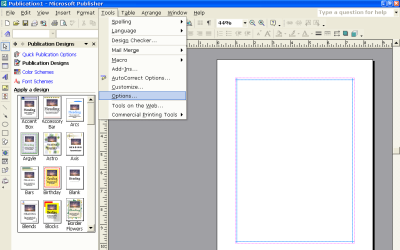
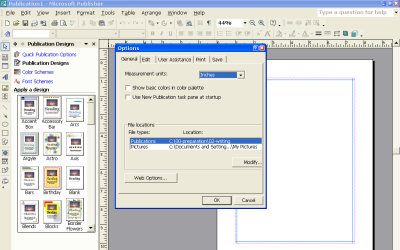
Easily done. In the 2002 version of Publisher, just change the default file location under Tools->Options:

mspub2002-1.png

mspub2002-2.png
 

My Computer

Computer type
PC/Desktop
Computer Manufacturer/Model Number
Dell Optiplex 7050
OS
Windows 7/8.1/10 multiboot
CPU
Intel Core i7-7700
Motherboard
Dell, Intel Q270 chipset
Memory
48GB (2x16GB Crucial DDR4-3200 + 2x8GB Hynix DDR4-2400)
Graphics Card(s)
Intel HD630 + AMD Radeon R7 450 PCIe
Monitor(s) Displays
Asus VC279 (27")
Screen Resolution
1920x1080
Hard Drives
Toshiba M.2 NVMe (256GB),
Samsung 960 Evo (500GB),
WD Red Plus 80EFBX (8TB)
sorry for the delay ....
had an unexpected stay in hospital ...

@ strollin ... good suggestion but as i started to search for 'options', i had a reply from dg1261 who gave me the complete answer starting in the TOOLS tab. All I had to do was to go into TOOLS > OPTIONS > then scroll down to FILE LOCATIONS. The answer had been staring me in the face for years! My thanks to both of you.

@ samuria ... I had never heard of the DOS command robocopy or of its switch /mir so deceided to investigate. Read a few pages in Google that implied that it might not be a safe thing to to do so I backed off on the side of caution. My thanks to you as well but I've made a note of the command and will get more info.

@ iko22 ... your suggestion interested me very much and I noticed my mistake immediately so I made the correction in the batch file, saved it and hit enter. Nothing happened. After running a lot of tests, I still got no responses despite even using SAVE for a files in the same folder then I thought that it might be to do with my W7 which in turn, had 2 different 'bit' ratings. So I Googled the question, 'Is DOS compatiable with W7 Professional 64-bit?' which generated quite a lot of pages. The first one said that whilst the 32-bit is compatiable, 64-bit is not. On reading over the other pages, I found that it was still possible but appeared to be a little complicated so I stopped ... for now anyway.

Returning to @ dg1261's suggestion, I changed the default setting to my own choice of folder but it didn't work. I'll have to investigate and let you know.

My thanks to all of you ... I'll continue investigating particularly regarding the last two suggestions.

Michael ...
 

My Computer

Computer type
PC/Desktop
Computer Manufacturer/Model Number
Custom build based on Asus
OS
W7Pro-64bit
CPU
INTEL G4400 SKYLAKE 3.3GHZ 3MBCACHE LGA1151
Motherboard
ASUS H110M-PLUS INTEL SKT1151 (25-03-2017)
Memory
2 X 8.00Gb DDR4 DIMM
Graphics Card(s)
NVIDIA GeForce GT430
Sound Card
Included on-board MB
Monitor(s) Displays
HP 1530
Screen Resolution
1024 x 768
Hard Drives
C: 120Gb SANDISK SATA3 SSD+
D: 160Gb SAMSUNG SATA
E: 500Gb WESTEN DIGITAL SATA
PSU
500w
Case
ATX Micro Tower
Cooling
2 fans (incl 1 in PSU)
Keyboard
Logitech K120
Mouse
Logitech B100
Internet Speed
D/L 38.5Mb // U/L 8.3
Browser
Pale Moon 28.16
Other Info
LAN ... Realtek 811H Gigabit LAN Controller
Robocopy is 109% safe it's made by ms and has been around for years designed for servers
 

My Computer

Computer type
PC/Desktop
OS
win 8 32 bit
Hello. Hope you are well,
I'm using W7 Professional 64bit and sometimes I have the need to use a Dos command.

...

Anyway, ..., my plan is to continue to use MS's default folder and also write a small Dos programme that would allow me to move whatever files were in 'my documents' to another more suitable location with a single click. The programme I've come up with is as follows:
echo off
move c:\users\name\"my documents"\*.pub g:\00-preparation\02-writing

All the above 5 folders are already set in place.

The trouble is, it won't activate so it's obvious I've done something wrong somewhere along the line despite my attempts to make it work. Sadly, my knowledge of Dos is somewhat lacking

If there is anyone with Dos experience able to help please, I'd be very grateful.
My thanks in advance.

@ iko22 ... your suggestion interested me very much and I noticed my mistake immediately so I made the correction in the batch file, saved it and hit enter. Nothing happened. After running a lot of tests, I still got no responses despite even using SAVE for a files in the same folder then I thought that it might be to do with my W7 which in turn, had 2 different 'bit' ratings. So I Googled the question, 'Is DOS compatiable with W7 Professional 64-bit?' which generated quite a lot of pages. The first one said that whilst the 32-bit is compatiable, 64-bit is not. On reading over the other pages, I found that it was still possible but appeared to be a little complicated so I stopped ... for now anyway.

1) If you delete or comment out the "echo off" then you might see some error messages that can help you diagnose what is wrong with the commands that the batch file is issuing.
When you say "nothing happened" I am thinking that this is because your inclusion of "echo off" is suppressing any message that the command may issue.

2) Although people know what you mean by "DOS program", the term "DOS" or "Disk Operating System" is no longer the correct term under Windows. The correct term is now "Command Prompt", "Elevated Command Prompt", or "CMD" for short.
The Command Prompt is a type of Command-line Interface that is backward compatible with DOS, but additionally includes new features with each new Edition of Windows.
The "bitness" of the Operating System/Processor(s) does not matter here, as all 32-bit instructions are included in the 64-bit versions of the Software/Hardware. So, you should be able to Move files using a 64-bit OS, that had been created under a 32-bit OS.

I hope that helps.
 

My Computer

Computer type
PC/Desktop
OS
Windows 7 x64, Vista x64, 8.1 smartphone
CPU
Intel E8400 65W 64-bit
Motherboard
Gigabyte EP45-UD3LR
Memory
DDR2 2 x 2GB, 1GB x 2
Graphics Card(s)
XFX Radeon HD5750
Sound Card
AMD High Definition Audio; Realtek High Definition Audio
Monitor(s) Displays
iiyama prolite X2377HDS
Screen Resolution
1920 x 1080
Hard Drives
500GB 7200 rpm Seagate ST3500413AS 16MB, 500GB 5400 rpm Toshiba MQ02ABF050H 32MB, 200GB 7200 rpm Seagate ST3200820AS 8MB, 2TB 7200 rpm Western Digital WD20EZRX 64MB
PSU
Enermax Liberty Modular
Case
Antec P193 Midi Tower
Keyboard
Mionix ZIBAL 60
Mouse
Razer USB 2.0 Diamondback Mouse or Huion Graphics Tablet
Browser
Internet Explorer, Lunascape, Firefox, Opera, Avast Safezone
Back
Top