
Looking for help with screen freezing BSOD issues

Planetspectra

New member
Member
Local time
2:52 PM
Messages
57
Hi, I've been getting regular occurrences of my PC simply freezing at random for the last 10 days or so, occasionally a BSOD or two.

I'm at a loss as to what it could be but Firefox has been acting even slower than usual and I've also been having trouble with video playback (vlc & BBC iPlayer)

I suspect I have some kind of infection that Security Essentials has only partially quarantined(?)

Other than (yet again) cleaning house with another full re-install I'm not sure what to do next.

Any suggestions gratefully received!
 

My Computer

Computer type
PC/Desktop
Computer Manufacturer/Model Number
HP xw4600 Workstation
OS
Windows 7 64bit
CPU
Intel Core 2 Duo E6850 @3GHz 3 Ghz
Memory
6.00 GB
Graphics Card(s)
NVIDIA Quadro FX 3700
Sound Card
SB Audigy Creative Technology Ltd.
Monitor(s) Displays
Samsung SyncMaster 2232BW & LG L226W
Screen Resolution
1680x1050
Hard Drives
120Gb Samsung SSD 840 Series & 1Tb WD Caviar Black (internal)

+ some 1Tb WD My Books (external)
Keyboard
basic HP (Model SK.2880)
Mouse
basic HP laser mouse
Internet Speed
up to 4MBPS, usually around 2MBPS
Antivirus
MS Essentials
Browser
Chrome
Other Info
Zune, Microsoft Security Essentials, Libre Office, Chrome, Adobe CS6, CCleaner, Radio Downloader, vlc
Hi Planetspectra. :)
Please update these drivers:
Code:
[FONT=Book Antiqua][SIZE=3]
ASACPI   ASACPI.sys   Sun Mar 27 23:30:36 [COLOR=Red]2005[/COLOR]

wacommousefilter wacommousefilter.sys Fri Feb 16 16:12:17 [COLOR=Red]2007[/COLOR]

secdrv   secdrv.SYS   Wed Sep 13 10:18:38 [COLOR=Red]2006[/COLOR]

pcouffin pcouffin.sys Tue Dec 05 12:39:30 [COLOR=Red]2006[/COLOR][/SIZE][/FONT]

Here is how we recommend updating drivers:

- search Google for the name of the driver
- compare the Google results with what's installed on your system to figure out which device/program it belongs to
- visit the web site of the manufacturer of the hardware/program to get the latest drivers (DON'T use Windows Update or the Update driver function of Device Manager).
- if there are difficulties in locating them, post back with questions and someone will try and help you locate the appropriate program.
- - The most common drivers are listed on this page: Driver Reference
- - Driver manufacturer links are on this page: Drivers and Downloads
 

My Computer

Computer Manufacturer/Model Number
WALLONN7 / LIN BLACK SERIES II
OS
Windows 7 Ultimate x64 SP1
CPU
AMD PHENOM II X6 1090T 3.2GHz
Motherboard
GIGABYTE GA-890FXA-UD7
Memory
8GB G.SKILL RIPJAWS - F3-10666CL7D
Graphics Card(s)
SAPPHIRE ATI RADEON HD 5870 VAPOR X OC
Sound Card
REALTEK DOLBY HOME THEATER
Monitor(s) Displays
LED LG W2486L
Screen Resolution
1080p
Hard Drives
SEAGATE 1TB -ST31000528AS - AHCI MODE - AS SATA
PSU
ZALMAN ZM1000-HP 1000W
Case
THERMALTAKE XASER VI VG4000SWA
Cooling
140MM x3 / 120MM x1 AIR COOLING - THERMALTAKE
Keyboard
MICROSOFT DIGITAL MEDIA KEYBOARD 3000 - USB
Mouse
MICROSOFT BASIC OPTICAL MOUSE 2.0 - USB
Internet Speed
600KBPS
Other Info
MICROSOFT XBOX 360 CONTROLLER
Many thanks for the reply.

wacommousefilter.sys:
I have updated the Wacom drivers from their website.

ASACPI.sys:
I visited the ASUS website but I could not find any information for my motherboard.
I visited the AMD website and found some downloads for the Athlon series but I am not sure which of these, if any I need? [LINK]

secdrv.SYS & pcouffin.sys:
I am unsure how I update either of these. pcouffin is linked to certain disc burning software is that right?

Please advise.
 

My Computer

Computer type
PC/Desktop
Computer Manufacturer/Model Number
HP xw4600 Workstation
OS
Windows 7 64bit
CPU
Intel Core 2 Duo E6850 @3GHz 3 Ghz
Memory
6.00 GB
Graphics Card(s)
NVIDIA Quadro FX 3700
Sound Card
SB Audigy Creative Technology Ltd.
Monitor(s) Displays
Samsung SyncMaster 2232BW & LG L226W
Screen Resolution
1680x1050
Hard Drives
120Gb Samsung SSD 840 Series & 1Tb WD Caviar Black (internal)

+ some 1Tb WD My Books (external)
Keyboard
basic HP (Model SK.2880)
Mouse
basic HP laser mouse
Internet Speed
up to 4MBPS, usually around 2MBPS
Antivirus
MS Essentials
Browser
Chrome
Other Info
Zune, Microsoft Security Essentials, Libre Office, Chrome, Adobe CS6, CCleaner, Radio Downloader, vlc
Many thanks for the reply.

ASACPI.sys:
I visited the ASUS website but I could not find any information for my motherboard.

ATK ACPI for 64-bit - if setup does not work properly, use device manager do update drivers

secdrv.SYS
Secdrv files - copies of my system

I am unsure how I update either of these. pcouffin is linked to certain disc burning software is that right?
Right. VSO, DVDFab, etc. Determine which of these you have installed, if you even need to keep it ... I recommend that you uninstall the program. Go to "Windows\system32\ drivers\" and delete any "pcouffin .*" file. Use CCleaner Slim to clean related registry entries. Reinstall the program by choosing the custom installation and uncheck the box related to "pcouffin."

Let us know the results.
 

My Computer

Computer Manufacturer/Model Number
WALLONN7 / LIN BLACK SERIES II
OS
Windows 7 Ultimate x64 SP1
CPU
AMD PHENOM II X6 1090T 3.2GHz
Motherboard
GIGABYTE GA-890FXA-UD7
Memory
8GB G.SKILL RIPJAWS - F3-10666CL7D
Graphics Card(s)
SAPPHIRE ATI RADEON HD 5870 VAPOR X OC
Sound Card
REALTEK DOLBY HOME THEATER
Monitor(s) Displays
LED LG W2486L
Screen Resolution
1080p
Hard Drives
SEAGATE 1TB -ST31000528AS - AHCI MODE - AS SATA
PSU
ZALMAN ZM1000-HP 1000W
Case
THERMALTAKE XASER VI VG4000SWA
Cooling
140MM x3 / 120MM x1 AIR COOLING - THERMALTAKE
Keyboard
MICROSOFT DIGITAL MEDIA KEYBOARD 3000 - USB
Mouse
MICROSOFT BASIC OPTICAL MOUSE 2.0 - USB
Internet Speed
600KBPS
Other Info
MICROSOFT XBOX 360 CONTROLLER
Many thanks.

For now I have completely removed pcouffin and my DVD software.

I'm not 100% convinced that I successfully updated ASACPI.sys but Device Manager says it's up to date when I checked it against the processors.

You gave me two places to install the Secdrv files, alas my system would not give me permission to over write the second of those (C:\Windows\winsxs\amd64_macrovision-protection-safedisc_31bf3.......etc) even though I am administrator.

Any advice on how to overcome this last issue?
 

My Computer

Computer type
PC/Desktop
Computer Manufacturer/Model Number
HP xw4600 Workstation
OS
Windows 7 64bit
CPU
Intel Core 2 Duo E6850 @3GHz 3 Ghz
Memory
6.00 GB
Graphics Card(s)
NVIDIA Quadro FX 3700
Sound Card
SB Audigy Creative Technology Ltd.
Monitor(s) Displays
Samsung SyncMaster 2232BW & LG L226W
Screen Resolution
1680x1050
Hard Drives
120Gb Samsung SSD 840 Series & 1Tb WD Caviar Black (internal)

+ some 1Tb WD My Books (external)
Keyboard
basic HP (Model SK.2880)
Mouse
basic HP laser mouse
Internet Speed
up to 4MBPS, usually around 2MBPS
Antivirus
MS Essentials
Browser
Chrome
Other Info
Zune, Microsoft Security Essentials, Libre Office, Chrome, Adobe CS6, CCleaner, Radio Downloader, vlc
Additional:

I am still getting the same freezing issues as before. I notice they seem to be happening when I'm using Firefox (was FF4 but FF5 since that was released) so I have also uninstalled it for now.
 

My Computer

Computer type
PC/Desktop
Computer Manufacturer/Model Number
HP xw4600 Workstation
OS
Windows 7 64bit
CPU
Intel Core 2 Duo E6850 @3GHz 3 Ghz
Memory
6.00 GB
Graphics Card(s)
NVIDIA Quadro FX 3700
Sound Card
SB Audigy Creative Technology Ltd.
Monitor(s) Displays
Samsung SyncMaster 2232BW & LG L226W
Screen Resolution
1680x1050
Hard Drives
120Gb Samsung SSD 840 Series & 1Tb WD Caviar Black (internal)

+ some 1Tb WD My Books (external)
Keyboard
basic HP (Model SK.2880)
Mouse
basic HP laser mouse
Internet Speed
up to 4MBPS, usually around 2MBPS
Antivirus
MS Essentials
Browser
Chrome
Other Info
Zune, Microsoft Security Essentials, Libre Office, Chrome, Adobe CS6, CCleaner, Radio Downloader, vlc
Additional:

I am still getting the same freezing issues as before. I notice they seem to be happening when I'm using Firefox (was FF4 but FF5 since that was released) so I have also uninstalled it for now.

Once we finish what we're doing, we will concentrate on this problem.
;)

You gave me two places to install the Secdrv files, alas my system would not give me permission to over write the second of those (C:\Windows\winsxs\amd64_macrovision-protection-safedisc_31bf3.......etc) even though I am administrator.

Any advice on how to overcome this last issue?

Use System File Replacer. Run it as administrator.
See how to use it below. Reboot when it prompts to.


My Computer

Computer Manufacturer/Model Number
WALLONN7 / LIN BLACK SERIES II
OS
Windows 7 Ultimate x64 SP1
CPU
AMD PHENOM II X6 1090T 3.2GHz
Motherboard
GIGABYTE GA-890FXA-UD7
Memory
8GB G.SKILL RIPJAWS - F3-10666CL7D
Graphics Card(s)
SAPPHIRE ATI RADEON HD 5870 VAPOR X OC
Sound Card
REALTEK DOLBY HOME THEATER
Monitor(s) Displays
LED LG W2486L
Screen Resolution
1080p
Hard Drives
SEAGATE 1TB -ST31000528AS - AHCI MODE - AS SATA
PSU
ZALMAN ZM1000-HP 1000W
Case
THERMALTAKE XASER VI VG4000SWA
Cooling
140MM x3 / 120MM x1 AIR COOLING - THERMALTAKE
Keyboard
MICROSOFT DIGITAL MEDIA KEYBOARD 3000 - USB
Mouse
MICROSOFT BASIC OPTICAL MOUSE 2.0 - USB
Internet Speed
600KBPS
Other Info
MICROSOFT XBOX 360 CONTROLLER
OK I tried that but the folder C:\Windows\winsxs\amd64_macrovision-protection-safedisc_31bf3... appears empty to me when using System File Replacer. :confused:
 

My Computer

Computer type
PC/Desktop
Computer Manufacturer/Model Number
HP xw4600 Workstation
OS
Windows 7 64bit
CPU
Intel Core 2 Duo E6850 @3GHz 3 Ghz
Memory
6.00 GB
Graphics Card(s)
NVIDIA Quadro FX 3700
Sound Card
SB Audigy Creative Technology Ltd.
Monitor(s) Displays
Samsung SyncMaster 2232BW & LG L226W
Screen Resolution
1680x1050
Hard Drives
120Gb Samsung SSD 840 Series & 1Tb WD Caviar Black (internal)

+ some 1Tb WD My Books (external)
Keyboard
basic HP (Model SK.2880)
Mouse
basic HP laser mouse
Internet Speed
up to 4MBPS, usually around 2MBPS
Antivirus
MS Essentials
Browser
Chrome
Other Info
Zune, Microsoft Security Essentials, Libre Office, Chrome, Adobe CS6, CCleaner, Radio Downloader, vlc

My Computer

Computer Manufacturer/Model Number
WALLONN7 / LIN BLACK SERIES II
OS
Windows 7 Ultimate x64 SP1
CPU
AMD PHENOM II X6 1090T 3.2GHz
Motherboard
GIGABYTE GA-890FXA-UD7
Memory
8GB G.SKILL RIPJAWS - F3-10666CL7D
Graphics Card(s)
SAPPHIRE ATI RADEON HD 5870 VAPOR X OC
Sound Card
REALTEK DOLBY HOME THEATER
Monitor(s) Displays
LED LG W2486L
Screen Resolution
1080p
Hard Drives
SEAGATE 1TB -ST31000528AS - AHCI MODE - AS SATA
PSU
ZALMAN ZM1000-HP 1000W
Case
THERMALTAKE XASER VI VG4000SWA
Cooling
140MM x3 / 120MM x1 AIR COOLING - THERMALTAKE
Keyboard
MICROSOFT DIGITAL MEDIA KEYBOARD 3000 - USB
Mouse
MICROSOFT BASIC OPTICAL MOUSE 2.0 - USB
Internet Speed
600KBPS
Other Info
MICROSOFT XBOX 360 CONTROLLER
Learning a lot today!

OK that's done. I took ownership and pasted your newer version of Secdrv into the folder.
 

My Computer

Computer type
PC/Desktop
Computer Manufacturer/Model Number
HP xw4600 Workstation
OS
Windows 7 64bit
CPU
Intel Core 2 Duo E6850 @3GHz 3 Ghz
Memory
6.00 GB
Graphics Card(s)
NVIDIA Quadro FX 3700
Sound Card
SB Audigy Creative Technology Ltd.
Monitor(s) Displays
Samsung SyncMaster 2232BW & LG L226W
Screen Resolution
1680x1050
Hard Drives
120Gb Samsung SSD 840 Series & 1Tb WD Caviar Black (internal)

+ some 1Tb WD My Books (external)
Keyboard
basic HP (Model SK.2880)
Mouse
basic HP laser mouse
Internet Speed
up to 4MBPS, usually around 2MBPS
Antivirus
MS Essentials
Browser
Chrome
Other Info
Zune, Microsoft Security Essentials, Libre Office, Chrome, Adobe CS6, CCleaner, Radio Downloader, vlc
Well done. :) Follow step #23 and change the Owner back to the previous owner.
Assuming you have not applied any third party theme to Windows, do the following:
Run cmd as administrator and type "sfc / scannow" without quotes and hit
enter. Let it do its job. Did it find any violation?...
Let us know the results.
 

My Computer

Computer Manufacturer/Model Number
WALLONN7 / LIN BLACK SERIES II
OS
Windows 7 Ultimate x64 SP1
CPU
AMD PHENOM II X6 1090T 3.2GHz
Motherboard
GIGABYTE GA-890FXA-UD7
Memory
8GB G.SKILL RIPJAWS - F3-10666CL7D
Graphics Card(s)
SAPPHIRE ATI RADEON HD 5870 VAPOR X OC
Sound Card
REALTEK DOLBY HOME THEATER
Monitor(s) Displays
LED LG W2486L
Screen Resolution
1080p
Hard Drives
SEAGATE 1TB -ST31000528AS - AHCI MODE - AS SATA
PSU
ZALMAN ZM1000-HP 1000W
Case
THERMALTAKE XASER VI VG4000SWA
Cooling
140MM x3 / 120MM x1 AIR COOLING - THERMALTAKE
Keyboard
MICROSOFT DIGITAL MEDIA KEYBOARD 3000 - USB
Mouse
MICROSOFT BASIC OPTICAL MOUSE 2.0 - USB
Internet Speed
600KBPS
Other Info
MICROSOFT XBOX 360 CONTROLLER
Untitled-1-3.jpg
 

My Computer

Computer type
PC/Desktop
Computer Manufacturer/Model Number
HP xw4600 Workstation
OS
Windows 7 64bit
CPU
Intel Core 2 Duo E6850 @3GHz 3 Ghz
Memory
6.00 GB
Graphics Card(s)
NVIDIA Quadro FX 3700
Sound Card
SB Audigy Creative Technology Ltd.
Monitor(s) Displays
Samsung SyncMaster 2232BW & LG L226W
Screen Resolution
1680x1050
Hard Drives
120Gb Samsung SSD 840 Series & 1Tb WD Caviar Black (internal)

+ some 1Tb WD My Books (external)
Keyboard
basic HP (Model SK.2880)
Mouse
basic HP laser mouse
Internet Speed
up to 4MBPS, usually around 2MBPS
Antivirus
MS Essentials
Browser
Chrome
Other Info
Zune, Microsoft Security Essentials, Libre Office, Chrome, Adobe CS6, CCleaner, Radio Downloader, vlc
It's perfect. :)
Now:

  1. CCleaner
  2. Run cmd as administrator and type "chkdsk /f" without quotes. Reboot if it prompts to
  3. Auslogics Disk Defrag / Defraggler / Windows Built-in Defrag... you choose.
Then we'll continue with the remaining steps to solve your problem. ;)
 

My Computer

Computer Manufacturer/Model Number
WALLONN7 / LIN BLACK SERIES II
OS
Windows 7 Ultimate x64 SP1
CPU
AMD PHENOM II X6 1090T 3.2GHz
Motherboard
GIGABYTE GA-890FXA-UD7
Memory
8GB G.SKILL RIPJAWS - F3-10666CL7D
Graphics Card(s)
SAPPHIRE ATI RADEON HD 5870 VAPOR X OC
Sound Card
REALTEK DOLBY HOME THEATER
Monitor(s) Displays
LED LG W2486L
Screen Resolution
1080p
Hard Drives
SEAGATE 1TB -ST31000528AS - AHCI MODE - AS SATA
PSU
ZALMAN ZM1000-HP 1000W
Case
THERMALTAKE XASER VI VG4000SWA
Cooling
140MM x3 / 120MM x1 AIR COOLING - THERMALTAKE
Keyboard
MICROSOFT DIGITAL MEDIA KEYBOARD 3000 - USB
Mouse
MICROSOFT BASIC OPTICAL MOUSE 2.0 - USB
Internet Speed
600KBPS
Other Info
MICROSOFT XBOX 360 CONTROLLER
Done, done & done.
 

My Computer

Computer type
PC/Desktop
Computer Manufacturer/Model Number
HP xw4600 Workstation
OS
Windows 7 64bit
CPU
Intel Core 2 Duo E6850 @3GHz 3 Ghz
Memory
6.00 GB
Graphics Card(s)
NVIDIA Quadro FX 3700
Sound Card
SB Audigy Creative Technology Ltd.
Monitor(s) Displays
Samsung SyncMaster 2232BW & LG L226W
Screen Resolution
1680x1050
Hard Drives
120Gb Samsung SSD 840 Series & 1Tb WD Caviar Black (internal)

+ some 1Tb WD My Books (external)
Keyboard
basic HP (Model SK.2880)
Mouse
basic HP laser mouse
Internet Speed
up to 4MBPS, usually around 2MBPS
Antivirus
MS Essentials
Browser
Chrome
Other Info
Zune, Microsoft Security Essentials, Libre Office, Chrome, Adobe CS6, CCleaner, Radio Downloader, vlc
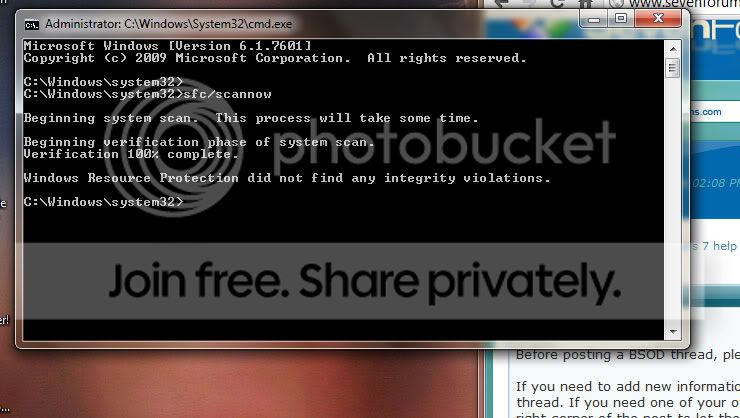
Done, done & done.

Now, I need you to verify if instabilities still persist.
You mentioned freezes while browsing with Firefox. Reinstall it and go to Mozilla Plugin Check.
Certified that all plugins are up to date, describe what types of content cause the issue.
 

My Computer

Computer Manufacturer/Model Number
WALLONN7 / LIN BLACK SERIES II
OS
Windows 7 Ultimate x64 SP1
CPU
AMD PHENOM II X6 1090T 3.2GHz
Motherboard
GIGABYTE GA-890FXA-UD7
Memory
8GB G.SKILL RIPJAWS - F3-10666CL7D
Graphics Card(s)
SAPPHIRE ATI RADEON HD 5870 VAPOR X OC
Sound Card
REALTEK DOLBY HOME THEATER
Monitor(s) Displays
LED LG W2486L
Screen Resolution
1080p
Hard Drives
SEAGATE 1TB -ST31000528AS - AHCI MODE - AS SATA
PSU
ZALMAN ZM1000-HP 1000W
Case
THERMALTAKE XASER VI VG4000SWA
Cooling
140MM x3 / 120MM x1 AIR COOLING - THERMALTAKE
Keyboard
MICROSOFT DIGITAL MEDIA KEYBOARD 3000 - USB
Mouse
MICROSOFT BASIC OPTICAL MOUSE 2.0 - USB
Internet Speed
600KBPS
Other Info
MICROSOFT XBOX 360 CONTROLLER
I will get right on that.

In the meantime I have noticed I'm getting freezes when playing certain types of video file. I generally use vlc player or my Zune desktop software to watch video podcasts. I have got freezing events when viewing MP4 files whilst using those applications. Other file types mkv, avi may be ok but I doubt I've tested enough to prove that theory outright.
 

My Computer

Computer type
PC/Desktop
Computer Manufacturer/Model Number
HP xw4600 Workstation
OS
Windows 7 64bit
CPU
Intel Core 2 Duo E6850 @3GHz 3 Ghz
Memory
6.00 GB
Graphics Card(s)
NVIDIA Quadro FX 3700
Sound Card
SB Audigy Creative Technology Ltd.
Monitor(s) Displays
Samsung SyncMaster 2232BW & LG L226W
Screen Resolution
1680x1050
Hard Drives
120Gb Samsung SSD 840 Series & 1Tb WD Caviar Black (internal)

+ some 1Tb WD My Books (external)
Keyboard
basic HP (Model SK.2880)
Mouse
basic HP laser mouse
Internet Speed
up to 4MBPS, usually around 2MBPS
Antivirus
MS Essentials
Browser
Chrome
Other Info
Zune, Microsoft Security Essentials, Libre Office, Chrome, Adobe CS6, CCleaner, Radio Downloader, vlc
I've now reinstalled Firefox 5 and things have gone from bad to worse, I'm still trying to run the plugin checker (some will be out of date I'm sure) before FF freezes my system. It freezes occasionally as FF is booting up but it mostly seems to happen when switching between and closing tabs.
 

My Computer

Computer type
PC/Desktop
Computer Manufacturer/Model Number
HP xw4600 Workstation
OS
Windows 7 64bit
CPU
Intel Core 2 Duo E6850 @3GHz 3 Ghz
Memory
6.00 GB
Graphics Card(s)
NVIDIA Quadro FX 3700
Sound Card
SB Audigy Creative Technology Ltd.
Monitor(s) Displays
Samsung SyncMaster 2232BW & LG L226W
Screen Resolution
1680x1050
Hard Drives
120Gb Samsung SSD 840 Series & 1Tb WD Caviar Black (internal)

+ some 1Tb WD My Books (external)
Keyboard
basic HP (Model SK.2880)
Mouse
basic HP laser mouse
Internet Speed
up to 4MBPS, usually around 2MBPS
Antivirus
MS Essentials
Browser
Chrome
Other Info
Zune, Microsoft Security Essentials, Libre Office, Chrome, Adobe CS6, CCleaner, Radio Downloader, vlc
This only occurs when using Firefox? If so:

Start Firefox in Safe Mode to check if one of the extensions is causing the problem ( switch to the DEFAULT theme: Firefox ( Tools ) > Add-ons > Appearance/Themes ).


Also check for "Corrupt extension files":

Create a new profile as a test to check if your current profile is causing the problems.
See:

There may be extensions and plugins installed by default in a new profile, so check that in "Tools > Add-ons > Extensions & Plugins" in case there are still problems.
If that new profile works then you can transfer some files from the old profile to that new profile ( be careful not to copy corrupted files )
See:


Update plugins manually below:

Adobe Flash Player
Adobe Reader X
Adobe Shockwave Player
Microsoft Silverlight
Java Runtime - Offline
Windows Media Player Firefox Plugin
 

My Computer

Computer Manufacturer/Model Number
WALLONN7 / LIN BLACK SERIES II
OS
Windows 7 Ultimate x64 SP1
CPU
AMD PHENOM II X6 1090T 3.2GHz
Motherboard
GIGABYTE GA-890FXA-UD7
Memory
8GB G.SKILL RIPJAWS - F3-10666CL7D
Graphics Card(s)
SAPPHIRE ATI RADEON HD 5870 VAPOR X OC
Sound Card
REALTEK DOLBY HOME THEATER
Monitor(s) Displays
LED LG W2486L
Screen Resolution
1080p
Hard Drives
SEAGATE 1TB -ST31000528AS - AHCI MODE - AS SATA
PSU
ZALMAN ZM1000-HP 1000W
Case
THERMALTAKE XASER VI VG4000SWA
Cooling
140MM x3 / 120MM x1 AIR COOLING - THERMALTAKE
Keyboard
MICROSOFT DIGITAL MEDIA KEYBOARD 3000 - USB
Mouse
MICROSOFT BASIC OPTICAL MOUSE 2.0 - USB
Internet Speed
600KBPS
Other Info
MICROSOFT XBOX 360 CONTROLLER
OK I will try that.

Freezing also seems to happen when I try to play MP4 video files.
 

My Computer

Computer type
PC/Desktop
Computer Manufacturer/Model Number
HP xw4600 Workstation
OS
Windows 7 64bit
CPU
Intel Core 2 Duo E6850 @3GHz 3 Ghz
Memory
6.00 GB
Graphics Card(s)
NVIDIA Quadro FX 3700
Sound Card
SB Audigy Creative Technology Ltd.
Monitor(s) Displays
Samsung SyncMaster 2232BW & LG L226W
Screen Resolution
1680x1050
Hard Drives
120Gb Samsung SSD 840 Series & 1Tb WD Caviar Black (internal)

+ some 1Tb WD My Books (external)
Keyboard
basic HP (Model SK.2880)
Mouse
basic HP laser mouse
Internet Speed
up to 4MBPS, usually around 2MBPS
Antivirus
MS Essentials
Browser
Chrome
Other Info
Zune, Microsoft Security Essentials, Libre Office, Chrome, Adobe CS6, CCleaner, Radio Downloader, vlc

My Computer

Computer Manufacturer/Model Number
WALLONN7 / LIN BLACK SERIES II
OS
Windows 7 Ultimate x64 SP1
CPU
AMD PHENOM II X6 1090T 3.2GHz
Motherboard
GIGABYTE GA-890FXA-UD7
Memory
8GB G.SKILL RIPJAWS - F3-10666CL7D
Graphics Card(s)
SAPPHIRE ATI RADEON HD 5870 VAPOR X OC
Sound Card
REALTEK DOLBY HOME THEATER
Monitor(s) Displays
LED LG W2486L
Screen Resolution
1080p
Hard Drives
SEAGATE 1TB -ST31000528AS - AHCI MODE - AS SATA
PSU
ZALMAN ZM1000-HP 1000W
Case
THERMALTAKE XASER VI VG4000SWA
Cooling
140MM x3 / 120MM x1 AIR COOLING - THERMALTAKE
Keyboard
MICROSOFT DIGITAL MEDIA KEYBOARD 3000 - USB
Mouse
MICROSOFT BASIC OPTICAL MOUSE 2.0 - USB
Internet Speed
600KBPS
Other Info
MICROSOFT XBOX 360 CONTROLLER
Back
Top