
Looking for Software (Sound Volume)

OODonut

New member
Local time
10:31 PM
Messages
5
Hello,

I have always wanted a piece of software that when I change the volume via the keyboard it gives me a notification above the volume Icon on the task bar. (see pictures below)

An example of this would be on a mac, When you change the volume or the screen brightness it brings an overlay with that information on it. below is a link to what I am talking about.

page0_blog_entry211_1.jpg


Today when I muted my volume it came up with a bar notifying me the volume was muted and it is something exactly like what I would want to see when changing the volume. here is a link of the notification. (I don't know why it came up today, I didn't change anything and I use my mute button on my keyboard all the time)
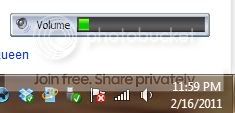
Capture.jpg


I am using windows 7

Do you know of any programs to do this? and what is what I am looking for commonly called?

And in general does anyone know of a program that does this for more then just volume, such as screen brightness.

Please if you have anything let me know!!!

Nathan

(It you find a solution to this I will always remember you. Kinda like that time Happyfeet helped me with a problem about ubuntu... I wont forget!)
 
Last edited by a moderator:

My Computer

OS
Windows 7 pro 64bit
control panel/audio and sound devices/check the box that says show in task bar.

This should show a generic but functional volume control
 

My Computer

Computer Manufacturer/Model Number
Insane hobo technologies. ;-)
OS
Windows 7 x64
CPU
Intel i7 2600k
Motherboard
Asrock z68 extreme 4 gen 3
Memory
G.skill Ripjaw 16gigs @ 1866
Graphics Card(s)
Nvidia gtx580 (evga)
Sound Card
Integrated HD audio + hdmi
Monitor(s) Displays
24" ASUS widescreen + 42" insignia
Screen Resolution
1080p (1920x1080)
Hard Drives
128 Samsung 830
256 Samsung 840
3 x 1tb storage drive (various)
1 western digital 1tb (eSATA)
1 Seagate 1tb (eSATA)
PSU
1 kilowatt SLI/Crossfire rated Silverstone modular
Case
NZXT Phantom + additional 220 fan
Cooling
Zalmann
Keyboard
Microsoft wireless 3000 (v2)
Mouse
MS - wireless 5000 (bluetrack)
Internet Speed
depends on if you ask me or my provider.
Other Info
The above information is provided as is, and the author assumes no responsibility for issues it may cause with your sanity or fanboyism.
What computer brand are you using?

Some computer manufacturers provide volume control similar to that OS X volume control image.
 

My Computer

Computer Manufacturer/Model Number
Macbook Pro 15" (2011) (Matte Version)
OS
Win 7 Pro x64 SP1 OS X Snow Leopard 10.6.7
CPU
Intel Core i7 2820QM 2.3GHz (Quad-Core)
Motherboard
N/A
Memory
8GB 1333 MHz PC3-10600 DDR3 SDRAM
Graphics Card(s)
ATI Radeon HD 6750M (1GB, GDDR5)
Sound Card
N/A
Monitor(s) Displays
1 Display
Screen Resolution
1,680 x 1050 (Matte Screen, Anti-Glare)
Hard Drives
750GB SATA (5400 rpm)
WD My Passport Essential 1TB Portable Hard Drive
PSU
N/A
Case
N/A
Cooling
N/A
Keyboard
Apple Wireless Keyboard
Mouse
Apple Wireless Magic Mouse
Internet Speed
Max - 2.2MB/sec; DSL provided by Telecom NZ
Other Info
MS Office Professional 2010
McAfee Total Protection 2011
On a Laptop Stand (Hand-Built)
Wow quick responses!!!!

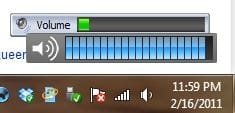
@maguscreed - I have the taskbar icon (It does change the number of lines coming from the speaker icon see second picture)

@DeanP - I am looking for multiple computers, as once I get an answer all of my computers will be using it. But I am using a Toshiba Laptop, acer aspire one netbook and a custom built computer.

I have been looking for ages, I just cant find a program.
 

My Computer

OS
Windows 7 pro 64bit
Hey there, if you are looking for something like the OSX bezel, 3RVX is the way to go forward. It's a skinnable volume level overlay, and the default skin is the one from OSX. Best thing about it is it's freeware. I've been usisng it for a while now, don't know what I'd do if I had to go back to the one HP bundled with the computer :). It is available all over the web, but here is the software informer link
Edit: It's commonly known as an On-Screen Volume Controller/Control/Notifier/Indicator and other similar combinations.
 
Last edited:

My Computer

Computer Manufacturer/Model Number
Custom Build
OS
Windows 7 Ultimate 64bit
CPU
Intel Core i5 2500k @ 3.3GHz (soon to change)
Motherboard
ASUS P8Z 68-V LX
Memory
8GB 1333MHz DDR3 (Generic)
Graphics Card(s)
MSI Nvidia GTX 550 Ti 1024MB GDDR5
Monitor(s) Displays
Bush TV
Screen Resolution
1920x1080
Hard Drives
OCZ Agility 3 60GB SSD
Seagate Barracuda Sata 3 500GB HDD
PSU
EZCOOL Ambience 80+ 700W
Case
Coolermaster 430 Elite
Cooling
Air
Keyboard
Tesco Multimedia Keyboard
Mouse
Technika wireless mouse
Thank you!

Thank you Ozzy441, This is exactly what I was looking for.

Now I have another question. How do I get rid of the previous on-screen overlay that was coming up before?

This is an image of what it looks like now. How would I find out what is creating the green volume bar to remove it?

http://i4.photobucket.com/albums/y112/kittlylink/Problem.jpg
 

Attachments

  • Problem.jpg
    Problem.jpg
    13.8 KB · Views: 514

My Computer

OS
Windows 7 pro 64bit
What make of machine are you using? For example, mine is HP, so the offending bar was HP tone control. Also, can you post a screen of task manager showing applications, and showing processes, whilst this bar is active?
 

My Computer

Computer Manufacturer/Model Number
Custom Build
OS
Windows 7 Ultimate 64bit
CPU
Intel Core i5 2500k @ 3.3GHz (soon to change)
Motherboard
ASUS P8Z 68-V LX
Memory
8GB 1333MHz DDR3 (Generic)
Graphics Card(s)
MSI Nvidia GTX 550 Ti 1024MB GDDR5
Monitor(s) Displays
Bush TV
Screen Resolution
1920x1080
Hard Drives
OCZ Agility 3 60GB SSD
Seagate Barracuda Sata 3 500GB HDD
PSU
EZCOOL Ambience 80+ 700W
Case
Coolermaster 430 Elite
Cooling
Air
Keyboard
Tesco Multimedia Keyboard
Mouse
Technika wireless mouse
Back
Top