Have had a look at Paint Net and Gimp but am not sure if they will do what I want to do.
I haven't had much to do with graphics per se' and haven't got a really decent GPU and I don't mind a paid for app as long as it isn't going to break the bank.
So any suggestions please?
My Computer
Computer type
PC/Desktop
Computer Manufacturer/Model Number
Own build (new) Desk1 / Asus ROG Win 7 / Desk2 1st build
OS
Desk1 7 Home Prem / Desk2 10 Pro / Main lap Asus ROG 10 Pro 2 laptop Toshiba 7 Pro Asus P2520 7 & 10
One other Desktop (tester) and spare Toshba laptop both with SSD's
Running Kaspersky 2016 ISS on all machines config'd identically
Logitec audio stereo systems on each machine (x3)
Canon MG5250MFC
Router/modem TP-Link running WPA2SK
If you want a freebie you might want to consider Google's Picasa: Picasa
If you don't mind paying, Adobe Photoshop Elements 10 would fit the bill. Obviously, it's not as powerful as its big brother, Photoshop CS5, but it's a hell of a lot cheaper.
Thanks Andrew and Arc I am just starting to get an interest in doing some of the fancier stuff as in the sigs and also retouching photos.
The latter I have done some simple stuff in the past with photos mainly and feel like I would like to move on a bit. I have Picasa and I haven't really done much with it except as I said photos.
I have done quite a bit of water colour painting in the past ie paintings that reflect precisely the object, person, or scene in question. But this "electronic" method offers a bit of a challenge and results that I find appealing.
Anyway I might try out those two paid for and see what I can do with them and any others that you might suggest.
My Computer
Computer type
PC/Desktop
Computer Manufacturer/Model Number
Own build (new) Desk1 / Asus ROG Win 7 / Desk2 1st build
OS
Desk1 7 Home Prem / Desk2 10 Pro / Main lap Asus ROG 10 Pro 2 laptop Toshiba 7 Pro Asus P2520 7 & 10
One other Desktop (tester) and spare Toshba laptop both with SSD's
Running Kaspersky 2016 ISS on all machines config'd identically
Logitec audio stereo systems on each machine (x3)
Canon MG5250MFC
Router/modem TP-Link running WPA2SK
Gimp can do just about anything PS can do. It's a matter of learning to use it. The UI feels a bit different to Windows users. But it's very powerful. I messed with it a bit myself. But I really don't have a need for heavy graphics editing. The stuff I want to do I can do with Paint.NET. But if I had occasion to use it more and I wanted to use free software, I'd go with Gimp.
My Computer
Computer Manufacturer/Model Number
HP Media Center
OS
Windows 7 32 bit
CPU
AMD 5200+ dual core
Memory
2 GB
Graphics Card(s)
NVidia GeForce 6150SE 128 MB
Monitor(s) Displays
CRT
Screen Resolution
1280x1024
Hard Drives
500 GB Sata internal :
SIIG USB 3.0 docking stations w/WD Caviar Black 6 Gb/s drives
One other Desktop (tester) and spare Toshba laptop both with SSD's
Running Kaspersky 2016 ISS on all machines config'd identically
Logitec audio stereo systems on each machine (x3)
Canon MG5250MFC
Router/modem TP-Link running WPA2SK
Yes, John! GIMP is absolutely free. Almost as powerful as photoshop is, and a huge lot of professionals use gimp only. Miles said it right that you are to practice a bit. Moreover, if anything troubles , we all are here...our gfx team .
you might like to have a look at ChasysDraw. It's free.
My Computer
Computer type
Laptop
Computer Manufacturer/Model Number
Hewlett-Packard/G62-107SA Notebook
OS
Microsoft Windows 7 Home Premium 64-bit Service Pack 1
CPU
Intel(R) Core(TM) i3 CPU M 330 @ 2.13GHz
Motherboard
Hewlett-Packard 1425
Memory
8 GB DDR3
Graphics Card(s)
Intel(R) HD Graphics
Sound Card
Realtek High Definition Audio
Monitor(s) Displays
Builtin
Screen Resolution
1366 x 768 x 32 bits (4294967296 colors) @ 60 Hz
Hard Drives
250 GB SATA Hard Disk Drive 7200 rpm
2TB Seagate GoFlex USB 2 Drive
1TB Iomega Prestige USB 2 Drive
1.5TB Iomega Prestige USB 2 Drive (Samsung)
2TB WD MyBook Live NAS.
Yup. Plus it's my understanding you can use many PS plugins with it. It's been a few years since I checked it out. Also once you learn it, if you ever do Linux you'll know that graphics app already.
My Computer
Computer Manufacturer/Model Number
HP Media Center
OS
Windows 7 32 bit
CPU
AMD 5200+ dual core
Memory
2 GB
Graphics Card(s)
NVidia GeForce 6150SE 128 MB
Monitor(s) Displays
CRT
Screen Resolution
1280x1024
Hard Drives
500 GB Sata internal :
SIIG USB 3.0 docking stations w/WD Caviar Black 6 Gb/s drives
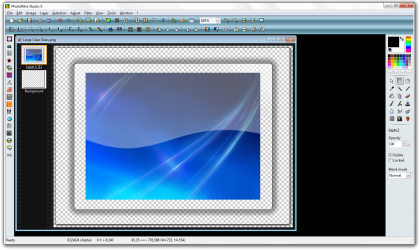
Have you ever tried PhotoFiltre ? It's a freeware program (actually there are two versions: PhotoFiltre which is free and PhotoFiltre StudioX which is a paid version. Honestly though they really are twin programs - the free version was updated this year and has all of the effects, tools, and support for layers and alpha transparency that the paid version has.
It's similar to Paint.NET but I find it a lot more comfortable to work with. You can download it at Major Geeks if interested... PhotoFiltre 6.5.3 Download
Also included a screenshot so you have an idea of what the program looks like.
GOOD LUCK!
-Tagen
Attachments
PhotoFiltre Studio X.png
660.6 KB
· Views: 10
My Computer
Computer Manufacturer/Model Number
Hewlett Packard G71-340US
OS
windows 7 64 Bit
CPU
Intel(R) Core(TM)2 Duo CPU T6600 @ 220GHz
Memory
4 GB (2) 2 GB SODIMM DDR-2 800MHz Kinston
Graphics Card(s)
(2) Mobile Intell (R) 4 Series Express Chipset Family
Screen Resolution
1600 X 900 HD TrueBrite
Keyboard
IBM enhanced (101 or 102 key) keyboard
Mouse
Logitech Cordless and Microsoft Intelipoint 5000 Wireless