Losing Access to Control Panel

DavidSkilton

New member
Local time
4:27 AM
Messages
7
I had an issue in the Beta vertsion where any user who was not the "administrator account" lost access to control panel or any enhanced rights application, such as mail setup. The issue still happens on a clean install with no connection to the internet. It is still happening on build 7100.
if I create a brand new standard user then things work fine for a few minutes but then they break. The symptoms are if I click on control panel, there is no error, no prompt for the admin password but control panel never launches.

any ideas anyone?
 

My Computer

OS
Windows 7 -64
DS
Welcome to SF. there ar a bunch of friendly, smart folks here so dont hesitate to ask
Was it a Clean install, not upgrade? When std user tries to goto cpanel start>cpanel what happens? does it not let you go there, display a uac prohibition, or give you a dialog box/ error?

ken
 

My Computer

Computer Manufacturer/Model Number
HP Pavillion dv-7 1005 Tx
OS
Win 8 Release candidate 8400
CPU
[email protected]
Memory
4 gigs
Graphics Card(s)
Nvidia 9600M
Sound Card
HD built-in
Monitor(s) Displays
17" Wxga
Screen Resolution
1440x900
Cooling
none
Internet Speed
45Mb down 5Mb up
It was a clean install of both the Beta and the RC. I formatted the C drive between each one. You get no error's it just basically ignore's the request to open control panel.
I experimented a little this time:
1. I enabled the genuine admin account, and that login NEVER has the issue.
2. A standard user gets the problem the problem soon after creation.
3. A created user with admin rights also gets the problem soon after creation.
4. Once a user has the issue, I can't seem to recover from it.

I run an i7-920 with 6gb ram and 2 hard disks and it's 64bit.
 

My Computer

OS
Windows 7 -64
Just as a note, I am using control panel as an example; If I try to go to the network and sharing centre from the icon in the system tray, I get the same problem. I intrepret it as anything that would require enhanced rights to launch.
 

My Computer

OS
Windows 7 -64
Hi David, welcome to the forums.

Did you get the RC from Microsoft? It sounds like the install has either missed files or corruption has occurred.
 

My Computer

Computer Manufacturer/Model Number
Compaq Desktop
OS
Windows 7 Ultimate x64
CPU
AMD Sempron Dual Core
Memory
3GB
Graphics Card(s)
NVIDIA GeForce 6150SE nForce 430
Screen Resolution
1024x768
Hard Drives
150GB Sata
Yes; I did download direct from the Microsoft site both times; I held out for the official releases, and avoided the bittorrents. I downloaded the ISO files. I have a feeling that a service is shutting something down on me, because it works briefly then gives up on me.

BTW- Thanks everyone for your prompt attention on this one, this forum rocks.
 

My Computer

OS
Windows 7 -64
I have a feeling that a service is shutting something down on me, because it works briefly then gives up on me.
sounds about right by this from MS on Win7

std user account:
A standard user account lets a person use most of the capabilities of the computer, but permission from an administrator is required if you want to make changes that affect other users or the security of the computer.
When you use a standard account, you can use most programs that are installed on the computer, but you can't install or uninstall software and hardware, delete files that are required for the computer to work, or change settings on the computer that affect other users. If you're using a standard account, some programs might require you to provide an administrator password before you can perform certain tasks.
 
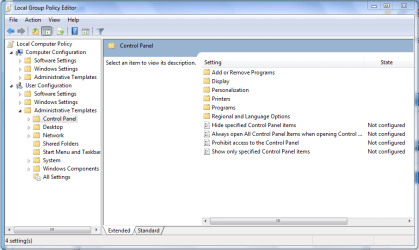
If you click the Start orb and type edit group then click on the Edit group policy. Navigate to User Configuration\Administrative Templates\Control Panel
Capture.PNG

What does it say next to 'Prohibit access to the Control Panel' ?
 

My Computer

Computer Manufacturer/Model Number
Compaq Desktop
OS
Windows 7 Ultimate x64
CPU
AMD Sempron Dual Core
Memory
3GB
Graphics Card(s)
NVIDIA GeForce 6150SE nForce 430
Screen Resolution
1024x768
Hard Drives
150GB Sata
results:
1. In my admin account that item is "not configured".
2. I had to elevate my standard account tob admin level to run the edit group item. I tried "run as admin", but it was not an option.
3. I then managed to run the policy app and the item is also set as "not configured".
4. While I had elevated the rights i tried control panel again, and still nothing, i also typed control in the start cmmand box, but that would not run either.
 

My Computer

OS
Windows 7 -64
have you got access to command prompt? Type CMD in the Start Menu, when it comes up right-click & 'Run as administrator'

When/if it runs type sfc /scannow this will run a system file integrity check to see if any of your system files are corrupt or damaged.
 

My Computer

Computer Manufacturer/Model Number
Compaq Desktop
OS
Windows 7 Ultimate x64
CPU
AMD Sempron Dual Core
Memory
3GB
Graphics Card(s)
NVIDIA GeForce 6150SE nForce 430
Screen Resolution
1024x768
Hard Drives
150GB Sata
If you had the group policy editor open then you might want to check 'All Settings' under User Configuration\Administrative Templates and see if anything is set to 'Enabled' or 'Disabled' and change to 'Not Configured'
 

My Computer

Computer Manufacturer/Model Number
Compaq Desktop
OS
Windows 7 Ultimate x64
CPU
AMD Sempron Dual Core
Memory
3GB
Graphics Card(s)
NVIDIA GeForce 6150SE nForce 430
Screen Resolution
1024x768
Hard Drives
150GB Sata
Wow, that took a long time to run.....but the results are just in..
Microsoft Windows [Version 6.1.7100]
Copyright (c) 2009 Microsoft Corporation. All rights reserved.
C:\Windows\system32>sfc /scannow
Beginning system scan. This process will take some time.
Beginning verification phase of system scan.
Verification 100% complete.
Windows Resource Protection did not find any integrity violations.
C:\Windows\system32>
 

My Computer

OS
Windows 7 -64
Back
Top