losing data after check disk

Karaljev

New member
Local time
1:27 PM
Messages
4
After copying my win7 on ssd drive i perform install of Ubuntu, after login on ubuntu i have trouble to view data on my ntfs hard disk drive, first it was visible and then it show that a folder is empty. Before booting on win 7, check disk started to perform some fixes, after that i lose on one partition 20 gb, on other 80 gb. My mistake is that i have low disk space on evry partition and i didnt perform restore point. Did my data is lose for ever or is posible to recover. And my trouble is after login Ubuntu, win 7 perform disk check every time ...what that can mean? Btw, when i restart in win 7 its boot normal without any changes on data or starting check disk.But when i log on win7 after ubuntu i lose again some data. Some of data is placed in found win folder but some is reduced to 0 kb.

Is any way to recover data?
 

My Computer

Computer type
PC/Desktop
OS
Windows 7 Ultimate x64
CPU
amd fx-420
Motherboard
gigabyte 970 a-ds3p
Memory
8 gb kingston
Graphics Card(s)
nvidia gforce gt-740
Hard Drives
ssd samsung 850 evo 250gb
wdc wd2003 2tb
Antivirus
avast
Browser
chrome
In witch disk you are having problem, the SSD or HDD?
Did you install Win 7 and Ubuntu on the SSD?
Did you detach the other drive (HDD) when you installed Ubuntu?

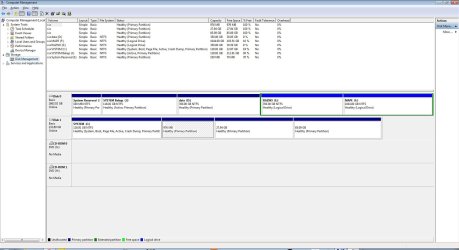
Boot from win 7, open disk management, expand the columns so we can read them and, with the sniping tool, take a hole screen snapshot and post it here as an attachment.
 

My Computers

System One System Two

  • Computer type
    PC/Desktop
    Computer Manufacturer/Model Number
    custom build
    OS
    Windows 7 HP 64
    CPU
    i5 6600K - 800MHz to 4200MHz
    Motherboard
    GA-Z170-HD3P
    Memory
    4+4G GSkill DDR4 3000
    Graphics Card(s)
    IG - Intel 530
    Monitor(s) Displays
    Samsung 226BW
    Screen Resolution
    1680x1050
    Hard Drives
    (1) -1 SM951 – 128GB M.2 AHCI PCIe SSD drive for Windows 7 and Lubuntu
    (2) -1 WD SATA 3 - 1T for Data
    (3) -1 WD SATA 3 - 1T for backup
    PSU
    Thermaltake 450W TR2 gold
    Keyboard
    Old and good Chicony mechanical keyboard
    Mouse
    Logitech mX performance - 9 buttons (had to disable some)
    Internet Speed
    500Mb/s
    Browser
    Firefox 64
    Other Info
    TinyWall firewall
  • Computer type
    Laptop
    System Manufacturer/Model Number
    Asus Q550LF
    OS
    Windows 7 Pro
    CPU
    i7-4500U 800MHz to 3.0GHz
    Motherboard
    Asus Q550LF
    Memory
    (4+4)G DDR3 1600
    Graphics Card(s)
    IG intel 4400 + NVIDIA GeForce GT 745M
    Sound Card
    Realtek
    Monitor(s) Displays
    LG Display LP156WF4-SPH1
    Screen Resolution
    1920 x 1080
    Hard Drives
    BX500 120G SSD for Windows and programs +
    1T HDD for data
    Internet Speed
    500 Mb/s
    Browser
    Firefox
    Other Info
    TinyWall firewall
I have trouble on hd. And i install both system on ssd and i didnt detach hdd before install and one important thing on D, E and F partition was low disk space. after i install ubuntu i perform restart in win 7 on start win7 is start check disk and after that free space on hd partition d,e and f is expanded on current state.
 

Attachments

  • disk manager.jpg
    disk manager.jpg
    165.8 KB · Views: 7

My Computer

Computer type
PC/Desktop
OS
Windows 7 Ultimate x64
CPU
amd fx-420
Motherboard
gigabyte 970 a-ds3p
Memory
8 gb kingston
Graphics Card(s)
nvidia gforce gt-740
Hard Drives
ssd samsung 850 evo 250gb
wdc wd2003 2tb
Antivirus
avast
Browser
chrome
You have partition J: set as active. Do you still have OS in the HDD?
Detach the HDD disk and see if it boots (Win 7 and Ubuntu).
 

My Computers

System One System Two

  • Computer type
    PC/Desktop
    Computer Manufacturer/Model Number
    custom build
    OS
    Windows 7 HP 64
    CPU
    i5 6600K - 800MHz to 4200MHz
    Motherboard
    GA-Z170-HD3P
    Memory
    4+4G GSkill DDR4 3000
    Graphics Card(s)
    IG - Intel 530
    Monitor(s) Displays
    Samsung 226BW
    Screen Resolution
    1680x1050
    Hard Drives
    (1) -1 SM951 – 128GB M.2 AHCI PCIe SSD drive for Windows 7 and Lubuntu
    (2) -1 WD SATA 3 - 1T for Data
    (3) -1 WD SATA 3 - 1T for backup
    PSU
    Thermaltake 450W TR2 gold
    Keyboard
    Old and good Chicony mechanical keyboard
    Mouse
    Logitech mX performance - 9 buttons (had to disable some)
    Internet Speed
    500Mb/s
    Browser
    Firefox 64
    Other Info
    TinyWall firewall
  • Computer type
    Laptop
    System Manufacturer/Model Number
    Asus Q550LF
    OS
    Windows 7 Pro
    CPU
    i7-4500U 800MHz to 3.0GHz
    Motherboard
    Asus Q550LF
    Memory
    (4+4)G DDR3 1600
    Graphics Card(s)
    IG intel 4400 + NVIDIA GeForce GT 745M
    Sound Card
    Realtek
    Monitor(s) Displays
    LG Display LP156WF4-SPH1
    Screen Resolution
    1920 x 1080
    Hard Drives
    BX500 120G SSD for Windows and programs +
    1T HDD for data
    Internet Speed
    500 Mb/s
    Browser
    Firefox
    Other Info
    TinyWall firewall
I dont have os on hdd, i erase after i cloning os on ssd. Here is checkdisk summary after scanning D:Btw thats second time og starting checkdisk on startup after i rebooting from ubuntu. In case i reboot from win7 checkdisk doesnt appear..
 

Attachments

My Computer

Computer type
PC/Desktop
OS
Windows 7 Ultimate x64
CPU
amd fx-420
Motherboard
gigabyte 970 a-ds3p
Memory
8 gb kingston
Graphics Card(s)
nvidia gforce gt-740
Hard Drives
ssd samsung 850 evo 250gb
wdc wd2003 2tb
Antivirus
avast
Browser
chrome
Detach the HDD disk and see if it boots (Win 7 and Ubuntu).
 

My Computers

System One System Two

  • Computer type
    PC/Desktop
    Computer Manufacturer/Model Number
    custom build
    OS
    Windows 7 HP 64
    CPU
    i5 6600K - 800MHz to 4200MHz
    Motherboard
    GA-Z170-HD3P
    Memory
    4+4G GSkill DDR4 3000
    Graphics Card(s)
    IG - Intel 530
    Monitor(s) Displays
    Samsung 226BW
    Screen Resolution
    1680x1050
    Hard Drives
    (1) -1 SM951 – 128GB M.2 AHCI PCIe SSD drive for Windows 7 and Lubuntu
    (2) -1 WD SATA 3 - 1T for Data
    (3) -1 WD SATA 3 - 1T for backup
    PSU
    Thermaltake 450W TR2 gold
    Keyboard
    Old and good Chicony mechanical keyboard
    Mouse
    Logitech mX performance - 9 buttons (had to disable some)
    Internet Speed
    500Mb/s
    Browser
    Firefox 64
    Other Info
    TinyWall firewall
  • Computer type
    Laptop
    System Manufacturer/Model Number
    Asus Q550LF
    OS
    Windows 7 Pro
    CPU
    i7-4500U 800MHz to 3.0GHz
    Motherboard
    Asus Q550LF
    Memory
    (4+4)G DDR3 1600
    Graphics Card(s)
    IG intel 4400 + NVIDIA GeForce GT 745M
    Sound Card
    Realtek
    Monitor(s) Displays
    LG Display LP156WF4-SPH1
    Screen Resolution
    1920 x 1080
    Hard Drives
    BX500 120G SSD for Windows and programs +
    1T HDD for data
    Internet Speed
    500 Mb/s
    Browser
    Firefox
    Other Info
    TinyWall firewall
I detached and their boot fine. on ubuntu forum think its becose of ubuntu bad ntfs driver that causses starting of check disk . but that i have to fix errors from windows7 of missing data. i try some recovery tools like recuva but they find only deleted files that i deleted earlier myself, nothing of data that gone missing after chdsk..
.
 

My Computer

Computer type
PC/Desktop
OS
Windows 7 Ultimate x64
CPU
amd fx-420
Motherboard
gigabyte 970 a-ds3p
Memory
8 gb kingston
Graphics Card(s)
nvidia gforce gt-740
Hard Drives
ssd samsung 850 evo 250gb
wdc wd2003 2tb
Antivirus
avast
Browser
chrome
I have Ubuntu and It works fine. Never had a problem with the NTFS disk.
As your HDD doesn't have the OS there is no need for the System Reserved partition on the HDD.
This is what I would do.
- Put the SSD on SATA 0 and the HDD on SATA 1
- Copy the all data (7G) you have on drive J: and on I: to another drive
- Delete both partitions (J: and I:)

I think that you've done something wrong when installing Ubuntu.
As the Windows doesn't see Linux partition, download and install MiniTool Free Partition Manager for Window 8/7/vista/xp | Partition Wizard Free Edition
Run minitool and expand the columns so we can read them and, with the sniping tool, take a hole screen snapshot and post it here as an attachment.

- Create a new partition and be sure it's not set as Active
 

My Computers

System One System Two

  • Computer type
    PC/Desktop
    Computer Manufacturer/Model Number
    custom build
    OS
    Windows 7 HP 64
    CPU
    i5 6600K - 800MHz to 4200MHz
    Motherboard
    GA-Z170-HD3P
    Memory
    4+4G GSkill DDR4 3000
    Graphics Card(s)
    IG - Intel 530
    Monitor(s) Displays
    Samsung 226BW
    Screen Resolution
    1680x1050
    Hard Drives
    (1) -1 SM951 – 128GB M.2 AHCI PCIe SSD drive for Windows 7 and Lubuntu
    (2) -1 WD SATA 3 - 1T for Data
    (3) -1 WD SATA 3 - 1T for backup
    PSU
    Thermaltake 450W TR2 gold
    Keyboard
    Old and good Chicony mechanical keyboard
    Mouse
    Logitech mX performance - 9 buttons (had to disable some)
    Internet Speed
    500Mb/s
    Browser
    Firefox 64
    Other Info
    TinyWall firewall
  • Computer type
    Laptop
    System Manufacturer/Model Number
    Asus Q550LF
    OS
    Windows 7 Pro
    CPU
    i7-4500U 800MHz to 3.0GHz
    Motherboard
    Asus Q550LF
    Memory
    (4+4)G DDR3 1600
    Graphics Card(s)
    IG intel 4400 + NVIDIA GeForce GT 745M
    Sound Card
    Realtek
    Monitor(s) Displays
    LG Display LP156WF4-SPH1
    Screen Resolution
    1920 x 1080
    Hard Drives
    BX500 120G SSD for Windows and programs +
    1T HDD for data
    Internet Speed
    500 Mb/s
    Browser
    Firefox
    Other Info
    TinyWall firewall
Back
Top