- Local time
- 11:01 AM
- Messages
- 135
I have a Dell Optiplex 7010 MT dual-booting Win 7 Pro SP1 64-bit and Win 10 Pro 64-bit.
On every reboot into Win 7, my Win 7 System Restore Points are deleted. (Haven't checked Win 10,which I barely use.)
In the Win 7 Event Viewer, I see: Error - volsnapp - Event ID 29 - "The shadow copies of volume C: were aborted during detection."
What should I do to fix?
[FYI - the Win 7 and 10 installations are UEFI, with Secure Boot NOT enabled (don't want it), and my BIOS points to boot-up using Windows Boot Manager, and the next BIOS sub-window has Enable Legacy Option ROMs ENABLED. Don't particularly want to change this and might not be relevant anyway.]
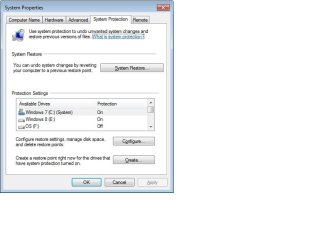
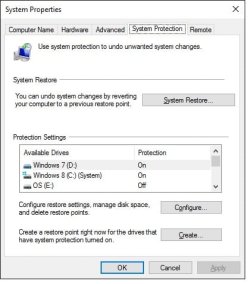
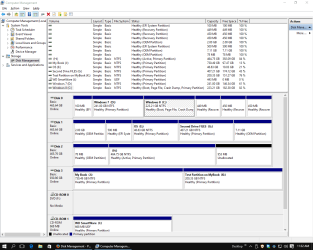
[Also FYI - there are other internal hard drives connected in the additional SATA sockets in my motherboard and an external drive is connected to a USB socket, but they are not intended to be bootable OSes, although one of the internal drives was my very original Win 8 OS that I don't use and that does NOT appear as a boot choice in EasyBCD. In System Properties, Protection Settings for the Win 7 and 10 partitions are ON, and for the other partitions (the other hard drives) are OFF. This seems correct to me, but what do I know?]
Thanks.
On every reboot into Win 7, my Win 7 System Restore Points are deleted. (Haven't checked Win 10,which I barely use.)
In the Win 7 Event Viewer, I see: Error - volsnapp - Event ID 29 - "The shadow copies of volume C: were aborted during detection."
What should I do to fix?
[FYI - the Win 7 and 10 installations are UEFI, with Secure Boot NOT enabled (don't want it), and my BIOS points to boot-up using Windows Boot Manager, and the next BIOS sub-window has Enable Legacy Option ROMs ENABLED. Don't particularly want to change this and might not be relevant anyway.]
[Also FYI - there are other internal hard drives connected in the additional SATA sockets in my motherboard and an external drive is connected to a USB socket, but they are not intended to be bootable OSes, although one of the internal drives was my very original Win 8 OS that I don't use and that does NOT appear as a boot choice in EasyBCD. In System Properties, Protection Settings for the Win 7 and 10 partitions are ON, and for the other partitions (the other hard drives) are OFF. This seems correct to me, but what do I know?]
Thanks.
My Computer
At a glance
Dual boot - Win 10 Pro 64-bit (good) and Win ...Intel Core i5 3470 @ 3.2GHz16GB RAM DDR3 (Four x 4GB)Intel HD Graphics (on the CPU)
- Computer type
- PC/Desktop
- Computer Manufacturer/Model Number
- Dell Optiplex 7010 MT
- OS
- Dual boot - Win 10 Pro 64-bit (good) and Win 7 Pro 64-bit (won't boot on the NVMe)
- CPU
- Intel Core i5 3470 @ 3.2GHz
- Motherboard
- Dell 0GY6Y8 - what would the Intel number be? - Q77 chipset
- Memory
- 16GB RAM DDR3 (Four x 4GB)
- Graphics Card(s)
- Intel HD Graphics (on the CPU)
- Sound Card
- Realtek High Definition Audio - and Intel Display Audio
- Monitor(s) Displays
- Dell E176FP - nothing fancy
- Screen Resolution
- 1280 x 1024 @ 60 Hz
- Hard Drives
- Now a Samsung 970 EVO Plus SSD NVMe, which works for the Win 10 only
Used to be two 500GB WDC WD5000AAKX (SATA @ 6GB/sec)
- External WD My Book 1110 USB device
- PSU
- What means PSU? I'm at sea level
- Cooling
- Ice cubes
- Keyboard
- Noisy
- Mouse
- Micky
- Internet Speed
- Verizon FIOS 500 Mbps (was 1Gbps but I can't type that fast)
- Antivirus
- Win 10 Windows Defender - Win 7 Avast Free
- Browser
- Firefox only with lots of security drives my wife crazy
- Other Info
- Also I still have an old but important XP SP3 machine that can run - Optiplex 755 Desktop w 4GB RAM and Momentus XT hybrid HD-SSD 500 GB hard drive. Used the registry hack to get more updates through "XP Embedded" or "POS" so now the machine rings like a cash register and the CD drawer opens to give change.