Solved Loss of Mouse and Keyboard control.

Fesgen

New member
Local time
5:45 AM
Messages
2
Hey everyone.

I hope this is the correct place for this kind of problem.

I would say, about two months or so ago, i starten having the problem where devices that are plugged in to the USB ports stopped responding.

Mouse went dead (Using the Logitech G9x, and the "sensitivity" light would start flashing)
Keyboard went dead
Headset sort of died, i still had sound, but i am unable to use voice.

Only solution was a "hard shutdown" of the computer.

The problem have been there since then, with an average crash every other day, and some days up to 3-4 times.

I'm not sure what other information i should add, but let me know and i will supply it.

Thanks in advance
- Fesgen

p.s. Might also add that during this time i have also had quite a few randomly apearing BSOD
 

Attachments

My Computer My Computer

At a glance

Windows 7 x64Intel Core i5 2500k8GB (cant remember name)NVIDIA GeForce GTX 770
Computer type
PC/Desktop
OS
Windows 7 x64
CPU
Intel Core i5 2500k
Motherboard
Gigabyte Z77P-D3
Memory
8GB (cant remember name)
Graphics Card(s)
NVIDIA GeForce GTX 770
Keyboard
Logitech K120
Mouse
Logitech G9X
Hello and welcome Fesgen mate I am wondering if you have checked the drivers for updates if not have a look at these
GIGABYTE - Motherboard - Socket 1155 - GA-Z77P-D3 (rev. 1.0)

You mention you cannot remember what memory you have so have a read of this

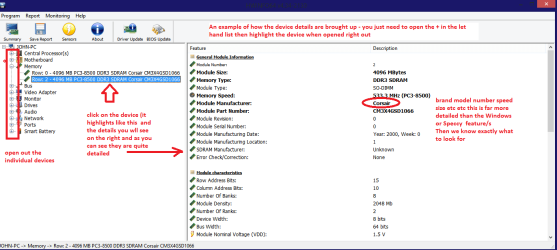
Using HW Info general components

DownloadHW Info and pick the right bit version - HWiNFO, HWiNFO32/64 - Download - (copy andpaste this site into the search bar) If you do not need the running informationin the smaller right hand panel close it. In the left hand window click on the+ for the individual device groupings and they will open out to the variouscomponents.

Goon opening out further until you get to the device itself. click on it and itwill highlight. In the right hand window there will be a very detaileddescription of that device as in brand, speeds model number etc etc These arevery detailed and are just what is needed for searching for drivers etc.

Seemy pic for an example - in this I have opened out one my components and then highlighted one of the one you need andyou can see the detail. (It is a pic of my RAM)
Now I am not good at reading those dump files but a frequent problem is a memory one so read this


MEMTEST

http://www.sevenforums.com/tutorials/105647-ram-test-memtest86.htmlthis one you will need to make a bootable disk set theBIOS to optical (or USB if preferred) boot the machine and let it run for at LEAST 8passes unless the errors come up straight away. Takes fair timeto complete and some leave it running overnight.

When yourun the memtest if the errors come up straight away a in my pic thenyou will need to test each stick if you have more than one and if it is onlyone then test again in another slot because it could also be a fault on theboard.
Remember 8 passes minimum


Attachments

  • HW DEVICES INFO  RAM.PNG
    HW DEVICES INFO RAM.PNG
    34.2 KB · Views: 0

My Computer My Computer

At a glance

Desk1 7 Home Prem / Desk2 10 Pro / Main lap A...Desk1 i5 3750K / Laptop i7 GTX 860M / Desk2 i...Desk1 8GB (1866) / Desk2 16GB (1333) / Laptop...Desk 1& 2NVidia GTX 650 & Laptops on board Intel
Computer type
PC/Desktop
Computer Manufacturer/Model Number
Own build (new) Desk1 / Asus ROG Win 7 / Desk2 1st build
OS
Desk1 7 Home Prem / Desk2 10 Pro / Main lap Asus ROG 10 Pro 2 laptop Toshiba 7 Pro Asus P2520 7 & 10
CPU
Desk1 i5 3750K / Laptop i7 GTX 860M / Desk2 i5 2500
Motherboard
Desk1 Asus P877-V / Desk2 Gigabyte H67 UD3H / Laptop ?
Memory
Desk1 8GB (1866) / Desk2 16GB (1333) / Laptop 8Gb DDR3
Graphics Card(s)
Desk 1& 2NVidia GTX 650 & Laptops on board Intel
Sound Card
Desk 1 & 2 -XONAR DG Realtek High Def audio Laptop
Monitor(s) Displays
Desk 1 Benq HD 2450 / Desk2 Philips 24" / Laptop 17.5"
Screen Resolution
1920x1080 D1 & D2 & Laptop 1
Hard Drives
Desk1 Samsung 120GB 830 SSD
Asus ROG 256GB 850 Pro SSD
Desk2 Samsung 840 256 SSD
Toshiba 120GB EVO
PSU
Desk 1 Corsair HX 1050/ Laptop ? / Desk 2 Corsair HX 650
Case
Desk 1 Cooler HAF XM ? Toshiba laptop / Desk2 Coolermaster
Cooling
Fans on all Desk1 -2 Desk2 - all Coolermasters 5 Laptop ?
Keyboard
Desk 1 MS Sidewinder X6 Desk 2 MS Sidewinder X 4
Mouse
Desk 1&2 - Gigabyte MS 900 gamer - laptop - Logitec wireless
Internet Speed
ADSL2+
Other Info
One other Desktop (tester) and spare Toshba laptop both with SSD's
Running Kaspersky 2016 ISS on all machines config'd identically
Logitec audio stereo systems on each machine (x3)
Canon MG5250MFC
Router/modem TP-Link running WPA2SK
I should have added it might even be worth testing the PSU out mate

First see this

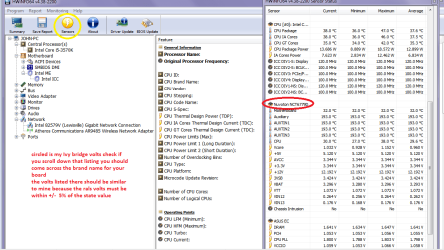
Using HW Info PSU

Download HW Info and pick the right bit version -
HWiNFO, HWiNFO32/64 -Download -(copy and paste thissite into the search bar) If you do not need the running information in thesmaller right hand panel close it. In the left hand window click on the + forthe individual device groupings and they will open out to the various components.

Go on opening out further until you get to the device itself. click on it andit will highlight. In the right hand window there will be a very detaileddescription of that device as in brand, speeds model number etc etc These arevery detailed and are just what is needed for searching for drivers etc.


To get the PSU volts you need to select the Sensor buttoncircled in yellow in the pic

See my pic for an example - in this I have shown my power but it is a laptopand a desktop will show more details if you scroll down that listing.

PS the pic is new and one of my Asus board there will be a similar section for your board - not necessarily nuvoton


PSUTESTING

http://www.sevenforums.com/tutorials/301799-psu-test-dc-output-voltage.html

Testthe sockets and leads with a digital multimeter NOT an analogue one because ananalogue one injects 9v into a circuit which I am sure will know will do nogood the board!!

Somethinglike this is ideal Digital Multimeter - Newegg.com

Anothergood ref http://www.sevenforums.com/tutorials/301799-psu-test-dc-output-voltage.html
 

Attachments

  • HW Info PSU VOLTS DSEKTOP.PNG
    HW Info PSU VOLTS DSEKTOP.PNG
    51.7 KB · Views: 1

My Computer My Computer

At a glance

Desk1 7 Home Prem / Desk2 10 Pro / Main lap A...Desk1 i5 3750K / Laptop i7 GTX 860M / Desk2 i...Desk1 8GB (1866) / Desk2 16GB (1333) / Laptop...Desk 1& 2NVidia GTX 650 & Laptops on board Intel
Computer type
PC/Desktop
Computer Manufacturer/Model Number
Own build (new) Desk1 / Asus ROG Win 7 / Desk2 1st build
OS
Desk1 7 Home Prem / Desk2 10 Pro / Main lap Asus ROG 10 Pro 2 laptop Toshiba 7 Pro Asus P2520 7 & 10
CPU
Desk1 i5 3750K / Laptop i7 GTX 860M / Desk2 i5 2500
Motherboard
Desk1 Asus P877-V / Desk2 Gigabyte H67 UD3H / Laptop ?
Memory
Desk1 8GB (1866) / Desk2 16GB (1333) / Laptop 8Gb DDR3
Graphics Card(s)
Desk 1& 2NVidia GTX 650 & Laptops on board Intel
Sound Card
Desk 1 & 2 -XONAR DG Realtek High Def audio Laptop
Monitor(s) Displays
Desk 1 Benq HD 2450 / Desk2 Philips 24" / Laptop 17.5"
Screen Resolution
1920x1080 D1 & D2 & Laptop 1
Hard Drives
Desk1 Samsung 120GB 830 SSD
Asus ROG 256GB 850 Pro SSD
Desk2 Samsung 840 256 SSD
Toshiba 120GB EVO
PSU
Desk 1 Corsair HX 1050/ Laptop ? / Desk 2 Corsair HX 650
Case
Desk 1 Cooler HAF XM ? Toshiba laptop / Desk2 Coolermaster
Cooling
Fans on all Desk1 -2 Desk2 - all Coolermasters 5 Laptop ?
Keyboard
Desk 1 MS Sidewinder X6 Desk 2 MS Sidewinder X 4
Mouse
Desk 1&2 - Gigabyte MS 900 gamer - laptop - Logitec wireless
Internet Speed
ADSL2+
Other Info
One other Desktop (tester) and spare Toshba laptop both with SSD's
Running Kaspersky 2016 ISS on all machines config'd identically
Logitec audio stereo systems on each machine (x3)
Canon MG5250MFC
Router/modem TP-Link running WPA2SK
Hey ICit2lol and thanks for your answer.

I don't know what the problem was, but i havn't encountered it since i swapped my mouse for a new one <.<

I did the memory test, and update the drivers aswell, so that might have had something to say aswell..

Thanks again!
Fesgen
 

My Computer My Computer

At a glance

Windows 7 x64Intel Core i5 2500k8GB (cant remember name)NVIDIA GeForce GTX 770
Computer type
PC/Desktop
OS
Windows 7 x64
CPU
Intel Core i5 2500k
Motherboard
Gigabyte Z77P-D3
Memory
8GB (cant remember name)
Graphics Card(s)
NVIDIA GeForce GTX 770
Keyboard
Logitech K120
Mouse
Logitech G9X

My Computer My Computer

At a glance

Desk1 7 Home Prem / Desk2 10 Pro / Main lap A...Desk1 i5 3750K / Laptop i7 GTX 860M / Desk2 i...Desk1 8GB (1866) / Desk2 16GB (1333) / Laptop...Desk 1& 2NVidia GTX 650 & Laptops on board Intel
Computer type
PC/Desktop
Computer Manufacturer/Model Number
Own build (new) Desk1 / Asus ROG Win 7 / Desk2 1st build
OS
Desk1 7 Home Prem / Desk2 10 Pro / Main lap Asus ROG 10 Pro 2 laptop Toshiba 7 Pro Asus P2520 7 & 10
CPU
Desk1 i5 3750K / Laptop i7 GTX 860M / Desk2 i5 2500
Motherboard
Desk1 Asus P877-V / Desk2 Gigabyte H67 UD3H / Laptop ?
Memory
Desk1 8GB (1866) / Desk2 16GB (1333) / Laptop 8Gb DDR3
Graphics Card(s)
Desk 1& 2NVidia GTX 650 & Laptops on board Intel
Sound Card
Desk 1 & 2 -XONAR DG Realtek High Def audio Laptop
Monitor(s) Displays
Desk 1 Benq HD 2450 / Desk2 Philips 24" / Laptop 17.5"
Screen Resolution
1920x1080 D1 & D2 & Laptop 1
Hard Drives
Desk1 Samsung 120GB 830 SSD
Asus ROG 256GB 850 Pro SSD
Desk2 Samsung 840 256 SSD
Toshiba 120GB EVO
PSU
Desk 1 Corsair HX 1050/ Laptop ? / Desk 2 Corsair HX 650
Case
Desk 1 Cooler HAF XM ? Toshiba laptop / Desk2 Coolermaster
Cooling
Fans on all Desk1 -2 Desk2 - all Coolermasters 5 Laptop ?
Keyboard
Desk 1 MS Sidewinder X6 Desk 2 MS Sidewinder X 4
Mouse
Desk 1&2 - Gigabyte MS 900 gamer - laptop - Logitec wireless
Internet Speed
ADSL2+
Other Info
One other Desktop (tester) and spare Toshba laptop both with SSD's
Running Kaspersky 2016 ISS on all machines config'd identically
Logitec audio stereo systems on each machine (x3)
Canon MG5250MFC
Router/modem TP-Link running WPA2SK
Back
Top