
Lost Admin. Account

CJW

New member
Power User
VIP
Local time
1:07 PM
Messages
439
Today I was doing some changes (changed Network name & re-asstablished Auto Logon) & restarted the comfuser. Well, screen came up asking for my password to my Standard Account (I always use Standard) & I got in no problem. But when I tried checking a few things, UAC came up asking for the Admin. Password w/o a box to type in; I closed everything & rebooted, but only Standard Account came up on the screen.

Once in comfuser, I checked Control Panel\User Accounts & Family Safety\User Accounts but only my Standard Account is there! I've checked the C:\Users folder & both my Admin. & Standard account folders show; so where is my Admin. Account log-in? This is the 1st time this has ever happened to me after setting-up Auto Logon.
 

My Computer

Computer type
PC/Desktop
Computer Manufacturer/Model Number
Self built comfuser
OS
10 Pro. 64Bit
CPU
AMD FX 4100, 4-Core Black Edition. Socket AM3+ ~ 3.60GHz
Motherboard
ASUS M5A97 LE R2.0
Memory
2x 4GB Kingston HyperX DDR3-1866 (PC3-14900) - 8GB Total
Graphics Card(s)
ASUS Radeon HD 6670-2GD3
Sound Card
Onboard High Definition Audio Device
Monitor(s) Displays
HP 2009m LCD
Screen Resolution
1600x900, True Color (32bit), 60Hertz
Hard Drives
WD Blue - 1TB, 3D NAND - SATA SSD
PSU
XFX Pro 450W Core Edition - Fully Wired
Case
Antec Super Lanboy
Cooling
Stock CPU fan + 2 (1 front, 1 back) 120mm Antec fans
Keyboard
Logitech MK700/MK710
Mouse
Logitech M705
Internet Speed
Frontier FiOS 50/50
Antivirus
Windows Security
Browser
Vivaldi
Other Info
1x ASUS DRW-24B1ST Multi-DVD Rewriter
1x RocketFish AIO Media Card Reader
1x WD 1TB Passport USB External Drive
Today I was doing some changes (changed Network name & re-asstablished Auto Logon) & restarted the comfuser. Well, screen came up asking for my password to my Standard Account (I always use Standard) & I got in no problem. But when I tried checking a few things, UAC came up asking for the Admin. Password w/o a box to type in; I closed everything & rebooted, but only Standard Account came up on the screen.

Once in comfuser, I checked Control Panel\User Accounts & Family Safety\User Accounts but only my Standard Account is there! I've checked the C:\Users folder & both my Admin. & Standard account folders show; so where is my Admin. Account log-in? This is the 1st time this has ever happened to me after setting-up Auto Logon.

Trying to understand what you mean here.

-You enabled autologon for a standard user account
-UAC is now prompting for authentication but does not allow you to enter the admin credentials?

- Auto logon is not functioning properly if you were prompted for your standard account password to log into windows

Your administrator account is still available, it sounds like may have been hidden by enabling auto logon.

I would try reverting the changes you made to enable autologon.


If that does not make your administrator account reappear:

Since UAC is not functioning properly, created an elevated shortcut to the local security policy.

To create an elevated shortcut:
-Right Click on your desktop, select "create new shortcut"
-In the shortcut path, copy and paste the following:
Code:
runas /user:youradminhere /savecred "%windir%\System32\Secpol.msc"
Replace "youradminhere" with your administrator account name
-Run the shortcut, when it prompts you for the administrator password, enter it (Note: You will not see anything in the command prompt when typing your password in, it will appear as if it is not recognizing your key strokes. This is normal.)


Once you have the local security policy open:

-Select Local Policies
-Select Security Options

Find the following entry:

-Interactive Logon: Do not require CTRL+ALT+DEL. Set this to disabled.

This should prompt you for both a username and password on your next logon and allow you to log in to your admin account.
 
Last edited:

My Computer

Computer Manufacturer/Model Number
Custom Rig
OS
Windows 7 Ultimate 64-Bit SP1
CPU
Intel Core i7-2600k OC'd @ 5.0Ghz
Motherboard
ASUS Maximus IV Extreme-Z
Memory
16 GB Corsair Vengeance PC3-12800 (4x4GB)
Graphics Card(s)
XFX 695X DD (x2) in Crossfire
Sound Card
Realtek ALC889 (Integrated)
Monitor(s) Displays
XFX Triple Monitor Display w/ 3 ASUS 23.6" LCD
Screen Resolution
5760x1080 (AMD Eyefinity)
Hard Drives
OCZ Vertex 3 SATA III (120GB)
WD Caviar Black 1.5 TB x2
PSU
XFX ProSeries Black Edition 1000w 80+ Platinum Certified
Case
Cooler Master HAF X Blue Edition
Cooling
Corsair H100 w/ Noctua NF-S12B FLX (x4) Push/Pull
Keyboard
Razer Lycosa
Mouse
Razer Naga & Razer Nostromo
Other Info
ASUS ROG G74SX
-240GB OCZ Vertex II x2 (Raid 0)
Right on the 1st part...
-I enabled autologon for my Standard User Account
-UAC is now prompting for authentication but does not allow me to enter Admin. credentials

I cannot revert the changes because I don't have any Restore Points (those seem to have been deleted by this problem somehow) & I can't input my Admin. password when going the regular route through Control Panel\User Accounts & Family Safety\User Accounts; so, as suggested, I made a shortcut using the code:
runas /user:C /savecred "%windir%\System32\Secpol.msc"

But I get the message (really quick) flash on the screen in the pic below...
 

Attachments

  • RunAs.jpg
    RunAs.jpg
    17 KB · Views: 30

My Computer

Computer type
PC/Desktop
Computer Manufacturer/Model Number
Self built comfuser
OS
10 Pro. 64Bit
CPU
AMD FX 4100, 4-Core Black Edition. Socket AM3+ ~ 3.60GHz
Motherboard
ASUS M5A97 LE R2.0
Memory
2x 4GB Kingston HyperX DDR3-1866 (PC3-14900) - 8GB Total
Graphics Card(s)
ASUS Radeon HD 6670-2GD3
Sound Card
Onboard High Definition Audio Device
Monitor(s) Displays
HP 2009m LCD
Screen Resolution
1600x900, True Color (32bit), 60Hertz
Hard Drives
WD Blue - 1TB, 3D NAND - SATA SSD
PSU
XFX Pro 450W Core Edition - Fully Wired
Case
Antec Super Lanboy
Cooling
Stock CPU fan + 2 (1 front, 1 back) 120mm Antec fans
Keyboard
Logitech MK700/MK710
Mouse
Logitech M705
Internet Speed
Frontier FiOS 50/50
Antivirus
Windows Security
Browser
Vivaldi
Other Info
1x ASUS DRW-24B1ST Multi-DVD Rewriter
1x RocketFish AIO Media Card Reader
1x WD 1TB Passport USB External Drive
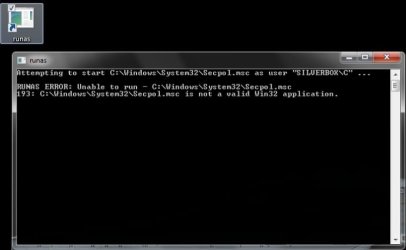
That's strange, code works for me on my test box. Same as before, create the shortcut using this instead, let me know if it works for you.


Code:
runas /user:youradminhere /savecred "mmc %windir%\System32\Secpol.msc"
 

My Computer

Computer Manufacturer/Model Number
Custom Rig
OS
Windows 7 Ultimate 64-Bit SP1
CPU
Intel Core i7-2600k OC'd @ 5.0Ghz
Motherboard
ASUS Maximus IV Extreme-Z
Memory
16 GB Corsair Vengeance PC3-12800 (4x4GB)
Graphics Card(s)
XFX 695X DD (x2) in Crossfire
Sound Card
Realtek ALC889 (Integrated)
Monitor(s) Displays
XFX Triple Monitor Display w/ 3 ASUS 23.6" LCD
Screen Resolution
5760x1080 (AMD Eyefinity)
Hard Drives
OCZ Vertex 3 SATA III (120GB)
WD Caviar Black 1.5 TB x2
PSU
XFX ProSeries Black Edition 1000w 80+ Platinum Certified
Case
Cooler Master HAF X Blue Edition
Cooling
Corsair H100 w/ Noctua NF-S12B FLX (x4) Push/Pull
Keyboard
Razer Lycosa
Mouse
Razer Naga & Razer Nostromo
Other Info
ASUS ROG G74SX
-240GB OCZ Vertex II x2 (Raid 0)
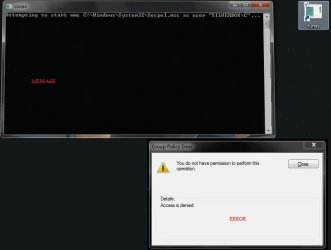
Dammit! No go. Made the shortcut on the desktop w/the code:
runas /user:C /savecred "mmc %windir%\System32\Secpol.msc" & ran it. I get the Message flash on the screen followed by the Error right after (pic below). I close the Error & Local Security Policy does come up, but all is Xed out & I don't have permission to do anything.

Think I have to do a complete format & reinstall ... :banghead:
 

Attachments

  • RunAs.jpg
    RunAs.jpg
    22.7 KB · Views: 15

My Computer

Computer type
PC/Desktop
Computer Manufacturer/Model Number
Self built comfuser
OS
10 Pro. 64Bit
CPU
AMD FX 4100, 4-Core Black Edition. Socket AM3+ ~ 3.60GHz
Motherboard
ASUS M5A97 LE R2.0
Memory
2x 4GB Kingston HyperX DDR3-1866 (PC3-14900) - 8GB Total
Graphics Card(s)
ASUS Radeon HD 6670-2GD3
Sound Card
Onboard High Definition Audio Device
Monitor(s) Displays
HP 2009m LCD
Screen Resolution
1600x900, True Color (32bit), 60Hertz
Hard Drives
WD Blue - 1TB, 3D NAND - SATA SSD
PSU
XFX Pro 450W Core Edition - Fully Wired
Case
Antec Super Lanboy
Cooling
Stock CPU fan + 2 (1 front, 1 back) 120mm Antec fans
Keyboard
Logitech MK700/MK710
Mouse
Logitech M705
Internet Speed
Frontier FiOS 50/50
Antivirus
Windows Security
Browser
Vivaldi
Other Info
1x ASUS DRW-24B1ST Multi-DVD Rewriter
1x RocketFish AIO Media Card Reader
1x WD 1TB Passport USB External Drive
I also tried to enable the built-in Administrator account as follows:
Booted the system w/my Win7 installation DVD, selected the default language, chose "Repair your computer" & then selected "Command Prompt". At the command prompt I typed:
net user administrator /active:yes [enter]

Removed the DVD, rebooted the computer & ... no go, no built-in Administrator Account showed up. Stumped to say the least.
 

My Computer

Computer type
PC/Desktop
Computer Manufacturer/Model Number
Self built comfuser
OS
10 Pro. 64Bit
CPU
AMD FX 4100, 4-Core Black Edition. Socket AM3+ ~ 3.60GHz
Motherboard
ASUS M5A97 LE R2.0
Memory
2x 4GB Kingston HyperX DDR3-1866 (PC3-14900) - 8GB Total
Graphics Card(s)
ASUS Radeon HD 6670-2GD3
Sound Card
Onboard High Definition Audio Device
Monitor(s) Displays
HP 2009m LCD
Screen Resolution
1600x900, True Color (32bit), 60Hertz
Hard Drives
WD Blue - 1TB, 3D NAND - SATA SSD
PSU
XFX Pro 450W Core Edition - Fully Wired
Case
Antec Super Lanboy
Cooling
Stock CPU fan + 2 (1 front, 1 back) 120mm Antec fans
Keyboard
Logitech MK700/MK710
Mouse
Logitech M705
Internet Speed
Frontier FiOS 50/50
Antivirus
Windows Security
Browser
Vivaldi
Other Info
1x ASUS DRW-24B1ST Multi-DVD Rewriter
1x RocketFish AIO Media Card Reader
1x WD 1TB Passport USB External Drive
I apologize for the delayed response, did not have a chance to check the forums last night.

After enabling the admin account, did you try to access the local security policy with the newly enabled default admin? (Enabling the account may have reset the UAC prompt)

-Click on the start orb, in the search box type "Secpol.msc"
-Right click on Secpol.msc, select run as administrator

The only other advice I can give would be to try a repair install. It sounds like some system files are corrupt.

If any of the senior members of the forums have been keeping tabs, someone please step in and help this gentleman, I've come up with no other solutions. :confused:
 

My Computer

Computer Manufacturer/Model Number
Custom Rig
OS
Windows 7 Ultimate 64-Bit SP1
CPU
Intel Core i7-2600k OC'd @ 5.0Ghz
Motherboard
ASUS Maximus IV Extreme-Z
Memory
16 GB Corsair Vengeance PC3-12800 (4x4GB)
Graphics Card(s)
XFX 695X DD (x2) in Crossfire
Sound Card
Realtek ALC889 (Integrated)
Monitor(s) Displays
XFX Triple Monitor Display w/ 3 ASUS 23.6" LCD
Screen Resolution
5760x1080 (AMD Eyefinity)
Hard Drives
OCZ Vertex 3 SATA III (120GB)
WD Caviar Black 1.5 TB x2
PSU
XFX ProSeries Black Edition 1000w 80+ Platinum Certified
Case
Cooler Master HAF X Blue Edition
Cooling
Corsair H100 w/ Noctua NF-S12B FLX (x4) Push/Pull
Keyboard
Razer Lycosa
Mouse
Razer Naga & Razer Nostromo
Other Info
ASUS ROG G74SX
-240GB OCZ Vertex II x2 (Raid 0)
No apology is necessary.

After booting off the 7 DVD & enabling the built-in Admin. Account, my comfuser still boots right into the Standard Account, I'm not even certain the built-in Admin. IS activated; how do I check?
 

My Computer

Computer type
PC/Desktop
Computer Manufacturer/Model Number
Self built comfuser
OS
10 Pro. 64Bit
CPU
AMD FX 4100, 4-Core Black Edition. Socket AM3+ ~ 3.60GHz
Motherboard
ASUS M5A97 LE R2.0
Memory
2x 4GB Kingston HyperX DDR3-1866 (PC3-14900) - 8GB Total
Graphics Card(s)
ASUS Radeon HD 6670-2GD3
Sound Card
Onboard High Definition Audio Device
Monitor(s) Displays
HP 2009m LCD
Screen Resolution
1600x900, True Color (32bit), 60Hertz
Hard Drives
WD Blue - 1TB, 3D NAND - SATA SSD
PSU
XFX Pro 450W Core Edition - Fully Wired
Case
Antec Super Lanboy
Cooling
Stock CPU fan + 2 (1 front, 1 back) 120mm Antec fans
Keyboard
Logitech MK700/MK710
Mouse
Logitech M705
Internet Speed
Frontier FiOS 50/50
Antivirus
Windows Security
Browser
Vivaldi
Other Info
1x ASUS DRW-24B1ST Multi-DVD Rewriter
1x RocketFish AIO Media Card Reader
1x WD 1TB Passport USB External Drive
Open an elevated command prompt and type 'net user'.

That will show you a list of accounts. Type the user account after net user and it will give you the details for the account, including active status.

i.e: 'net user Administrator'

Example output:
User name Administrator
Full Name
Comment Built-in account for administering the computer/dom
ain
User's comment
Country code 000 (System Default)
Account active No
Account expires Never

Password last set 14/07/2009 06:13:36
Password expires Never
Password changeable 14/07/2008 06:13:36
Password required Yes
User may change password Yes

Workstations allowed All
Logon script
User profile
Home directory
Last logon 14/07/2009 06:08:59

Logon hours allowed All

Local Group Memberships *Administrators *HomeUsers
Global Group memberships *None
The command completed successfully.


Dave
 

My Computer

Computer type
PC/Desktop
Computer Manufacturer/Model Number
Custom
OS
Windows 7 Ultimate x64
CPU
Intel Core i7 2600K (O/C 4.7GHz)
Motherboard
Asus ROG Maximus IV Extreme-Z - Intel Z68 Chipset
Memory
8GB Corsair Vengeance LP, DDR3, 1600Mhz
Graphics Card(s)
Nvidia GTX 460 Graphics Card
Sound Card
Onboard
Monitor(s) Displays
Dell E228WFP
Hard Drives
2 x 500GB Samsung SpinPoint Drives (1 for OS, 1 for Data and Apps)
PSU
CoolerMaster 1000W
Case
CoolerMaster HAF
Cooling
Air
Internet Speed
Fibre - 60MB Down, 30MB Up
Antivirus
ESET NOD32 Antivirus
Update everyone.

Thank you for responding & trying to help me, but a few other problems came up & I had to DBAN the comfuser. But now another problem has come up which I opened a new thread about that can be found here.

Again, thank you for all the responses & help.
 

My Computer

Computer type
PC/Desktop
Computer Manufacturer/Model Number
Self built comfuser
OS
10 Pro. 64Bit
CPU
AMD FX 4100, 4-Core Black Edition. Socket AM3+ ~ 3.60GHz
Motherboard
ASUS M5A97 LE R2.0
Memory
2x 4GB Kingston HyperX DDR3-1866 (PC3-14900) - 8GB Total
Graphics Card(s)
ASUS Radeon HD 6670-2GD3
Sound Card
Onboard High Definition Audio Device
Monitor(s) Displays
HP 2009m LCD
Screen Resolution
1600x900, True Color (32bit), 60Hertz
Hard Drives
WD Blue - 1TB, 3D NAND - SATA SSD
PSU
XFX Pro 450W Core Edition - Fully Wired
Case
Antec Super Lanboy
Cooling
Stock CPU fan + 2 (1 front, 1 back) 120mm Antec fans
Keyboard
Logitech MK700/MK710
Mouse
Logitech M705
Internet Speed
Frontier FiOS 50/50
Antivirus
Windows Security
Browser
Vivaldi
Other Info
1x ASUS DRW-24B1ST Multi-DVD Rewriter
1x RocketFish AIO Media Card Reader
1x WD 1TB Passport USB External Drive
Back
Top