JavaScript is disabled. For a better experience, please enable JavaScript in your browser before proceeding.
You are using an out of date browser. It may not display this or other websites correctly.
You should upgrade or use an
alternative browser .
Solved Lost all search/indexing after successfull Repair Install
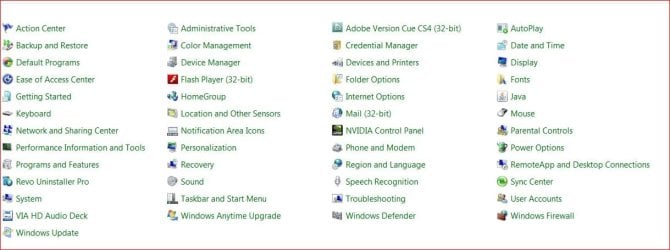
Ran my 1st repair install and was amazed at the smoothness and end results...but...I see I do not have a search box now in explorer and there is no "Indexing Options" in control panel.
indexing1.jpg
69.1 KB
· Views: 0
Windows 7 Pro 64bit SP1 AMD FX-6100 Six-Core Processor 2ea Corsair-1333MHz-PC3-10666-240-pin-CMX4GX3... NVIDIA GeForce GT 630 - 1023MB (EVGA) PC/Desktop Self built Windows 7 Pro 64bit SP1 AMD FX-6100 Six-Core Processor M5A78L-M LX PLUS 2ea Corsair-1333MHz-PC3-10666-240-pin-CMX4GX3M1A1333C9 NVIDIA GeForce GT 630 - 1023MB (EVGA) OnBoard Via High Def Audio Samsung 204B main - ASUS VS228 secondary 1920x1080 main - 1920x1080 secondary Samsung SSD 840 128GB Win7 Pro 64bit - Western Digital WDC 465GB - Seagate 640GB Sata B/U - Maxtor 500GB Sata B/U - Maxtor 200GB Sata Antec 650 watt Multiple case fans MS USB dual Wireless Keyboard - IntelliType Pro MS USB dual Wireless Mouse - IntelliPoint Cox Cable Bitdefender IS 2014 FireFox Primary - IE 11 Hauppaguge Win TV HVR-1250 (Model 22xxx, Hybrid ATSC/QAM)
New member
Member
VIP
Thread Starter
Never mind...found Brinks article on indexing/windows services...everything working now...index is building...
Windows 7 Pro 64bit SP1 AMD FX-6100 Six-Core Processor 2ea Corsair-1333MHz-PC3-10666-240-pin-CMX4GX3... NVIDIA GeForce GT 630 - 1023MB (EVGA) PC/Desktop Self built Windows 7 Pro 64bit SP1 AMD FX-6100 Six-Core Processor M5A78L-M LX PLUS 2ea Corsair-1333MHz-PC3-10666-240-pin-CMX4GX3M1A1333C9 NVIDIA GeForce GT 630 - 1023MB (EVGA) OnBoard Via High Def Audio Samsung 204B main - ASUS VS228 secondary 1920x1080 main - 1920x1080 secondary Samsung SSD 840 128GB Win7 Pro 64bit - Western Digital WDC 465GB - Seagate 640GB Sata B/U - Maxtor 500GB Sata B/U - Maxtor 200GB Sata Antec 650 watt Multiple case fans MS USB dual Wireless Keyboard - IntelliType Pro MS USB dual Wireless Mouse - IntelliPoint Cox Cable Bitdefender IS 2014 FireFox Primary - IE 11 Hauppaguge Win TV HVR-1250 (Model 22xxx, Hybrid ATSC/QAM)
Give a close look under Modify to what is selected to ask yourself if everything is checked that you might need to find in a Search.