lost disk space for system backup

allend66

Brit on the lam...
Guru
Local time
4:20 AM
Messages
385
Location
The Mighty Maspujols, Spain
Hello community..

New laptop Toshiba Satellite L500. 320Gb hard disk with 2 partitions, C + D (160Gb + 160Gb)

I used the windows7 home premium backup utility to make an image of my "C" drive. I saved the files on the separate partition "D".

The program advised me that although it was on a separate drive, it was actually on the same physical drive as my operating system and as such, in the event of hard disk failure, I would be boned. All logical stuff, and I accepted and went ahead knowing that I was about to buy a new external HD. So when I got my new USB external HD, I copied the backup files from D, pasted to X and then deleted the backup from D. (After a freak powercut once at a crucial time, I never move files, I always copy then delete the original).

Question: Why have I lost the 15Gb of space that was taken by the backup image of the C drive? I have system restore turned off on the D drive. I have run M$ disk cleanup utility, also CCleaner but I am mising 15Gb. I have also done: folder options --> view --> show hidden files and folders + Show protected sytem files, but cannot see anything on the drive. Any suggestions, please?

Thanks
D

EDIT: Also, when I right click on the backup image it says it has no size at all, so I only know how big it is from knowing the hard disk free space before and after. Why is this too?
 
Last edited:

My Computer

Computer Manufacturer/Model Number
Toshiba Satellite L500
OS
Windows 7 Home Premium x64 OEM --> RTM clean install
CPU
Intel T4400
Motherboard
? - laptop inbuilt ?
Memory
4Gb
Graphics Card(s)
? - Mobile Intel(R) 4 Series Express Chipset Family ?
Sound Card
Realtek
Monitor(s) Displays
? + extended to a 42" LG55PC plasma tele!
Screen Resolution
1366 * 768
Hard Drives
320Gb 5500rpm
PSU
?
Case
?
Cooling
?
Internet Speed
3Meg, when it works.
Other Info
A LOWLY LAPTOP!
Download windirstat and see for yourself
Ill get the link
http://download.cnet.com/WinDirStat/3000-2248_4-10614593.html

After you get to the segments on the HD, either click or put cursor (forget which) to get more information
Dont forget the worst case scenario.
Run anti virus scan
Download and scan with Malwarbytes, update before you scan
 

My Computer

Computer type
PC/Desktop
Computer Manufacturer/Model Number
Dell XPS 420
OS
Windows 10, Home Clean Install
CPU
Intel Core2 processsor Q8200(2.33Ghz 1333FSB) Quad Core Tech
Motherboard
Dell
Memory
6 gb
Graphics Card(s)
ATI Radeon 256MB HD3650
Sound Card
Intergrated 7.1 Channel Audio
Monitor(s) Displays
Dell SP2009W 20"
Hard Drives
640 GB Serial ATA Hard drive
Cooling
Fan
Keyboard
Dell USB Keyboard
Mouse
Dell Premium Optical USB
Internet Speed
DSL 2.85
Thanks, will do when I get home. Post tomorrow. :)
...
 

My Computer

Computer Manufacturer/Model Number
Toshiba Satellite L500
OS
Windows 7 Home Premium x64 OEM --> RTM clean install
CPU
Intel T4400
Motherboard
? - laptop inbuilt ?
Memory
4Gb
Graphics Card(s)
? - Mobile Intel(R) 4 Series Express Chipset Family ?
Sound Card
Realtek
Monitor(s) Displays
? + extended to a 42" LG55PC plasma tele!
Screen Resolution
1366 * 768
Hard Drives
320Gb 5500rpm
PSU
?
Case
?
Cooling
?
Internet Speed
3Meg, when it works.
Other Info
A LOWLY LAPTOP!
Thanks let us know either way.
If good news you will be helping others
If bad, we can give further help
Have a nice day.
 

My Computer

Computer type
PC/Desktop
Computer Manufacturer/Model Number
Dell XPS 420
OS
Windows 10, Home Clean Install
CPU
Intel Core2 processsor Q8200(2.33Ghz 1333FSB) Quad Core Tech
Motherboard
Dell
Memory
6 gb
Graphics Card(s)
ATI Radeon 256MB HD3650
Sound Card
Intergrated 7.1 Channel Audio
Monitor(s) Displays
Dell SP2009W 20"
Hard Drives
640 GB Serial ATA Hard drive
Cooling
Fan
Keyboard
Dell USB Keyboard
Mouse
Dell Premium Optical USB
Internet Speed
DSL 2.85
OK, an update: It's better, but still something isn't right... I'm only missing 8.5 Gb now, not the 15 from before.

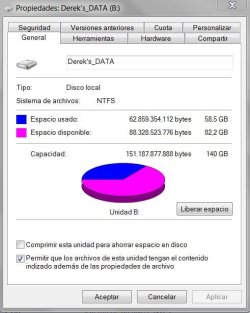
To explain, I have the partition empty with one * 50Gb TrueCrypt container for My Documents. Hence, I checked that WinDirStat (see screengrab) and it tells me what I would like and expect to see: But Windows is telling me:

(Virus scan revealed A-OK)
 

Attachments

  • 2.JPG
    2.JPG
    72.6 KB · Views: 39
  • 1.JPG
    1.JPG
    47 KB · Views: 25

My Computer

Computer Manufacturer/Model Number
Toshiba Satellite L500
OS
Windows 7 Home Premium x64 OEM --> RTM clean install
CPU
Intel T4400
Motherboard
? - laptop inbuilt ?
Memory
4Gb
Graphics Card(s)
? - Mobile Intel(R) 4 Series Express Chipset Family ?
Sound Card
Realtek
Monitor(s) Displays
? + extended to a 42" LG55PC plasma tele!
Screen Resolution
1366 * 768
Hard Drives
320Gb 5500rpm
PSU
?
Case
?
Cooling
?
Internet Speed
3Meg, when it works.
Other Info
A LOWLY LAPTOP!

My Computer

Computer type
PC/Desktop
Computer Manufacturer/Model Number
Dell XPS 420
OS
Windows 10, Home Clean Install
CPU
Intel Core2 processsor Q8200(2.33Ghz 1333FSB) Quad Core Tech
Motherboard
Dell
Memory
6 gb
Graphics Card(s)
ATI Radeon 256MB HD3650
Sound Card
Intergrated 7.1 Channel Audio
Monitor(s) Displays
Dell SP2009W 20"
Hard Drives
640 GB Serial ATA Hard drive
Cooling
Fan
Keyboard
Dell USB Keyboard
Mouse
Dell Premium Optical USB
Internet Speed
DSL 2.85
Thanks richc46, again, I'll have to wait to try this as I'm at work at the mo. Though I think I've tried disk cleanup AND system restore is turned off ( and always has been on this drive). Will post either way tomorrow.

Regards
D
 

My Computer

Computer Manufacturer/Model Number
Toshiba Satellite L500
OS
Windows 7 Home Premium x64 OEM --> RTM clean install
CPU
Intel T4400
Motherboard
? - laptop inbuilt ?
Memory
4Gb
Graphics Card(s)
? - Mobile Intel(R) 4 Series Express Chipset Family ?
Sound Card
Realtek
Monitor(s) Displays
? + extended to a 42" LG55PC plasma tele!
Screen Resolution
1366 * 768
Hard Drives
320Gb 5500rpm
PSU
?
Case
?
Cooling
?
Internet Speed
3Meg, when it works.
Other Info
A LOWLY LAPTOP!
If it did not work before, will probably not work now. You should not turn off System Restore on a permanent basis.

Try this
Control Panel>Administrative Tools>Computer Management>Storage>Disk Management
 

My Computer

Computer type
PC/Desktop
Computer Manufacturer/Model Number
Dell XPS 420
OS
Windows 10, Home Clean Install
CPU
Intel Core2 processsor Q8200(2.33Ghz 1333FSB) Quad Core Tech
Motherboard
Dell
Memory
6 gb
Graphics Card(s)
ATI Radeon 256MB HD3650
Sound Card
Intergrated 7.1 Channel Audio
Monitor(s) Displays
Dell SP2009W 20"
Hard Drives
640 GB Serial ATA Hard drive
Cooling
Fan
Keyboard
Dell USB Keyboard
Mouse
Dell Premium Optical USB
Internet Speed
DSL 2.85
System Restore is only turned off on this (and external USBs, because they are simply data stores with networked back ups). SysRestore is always on for C Drive.

I'll try the disk management, and post later - thanks!
 

My Computer

Computer Manufacturer/Model Number
Toshiba Satellite L500
OS
Windows 7 Home Premium x64 OEM --> RTM clean install
CPU
Intel T4400
Motherboard
? - laptop inbuilt ?
Memory
4Gb
Graphics Card(s)
? - Mobile Intel(R) 4 Series Express Chipset Family ?
Sound Card
Realtek
Monitor(s) Displays
? + extended to a 42" LG55PC plasma tele!
Screen Resolution
1366 * 768
Hard Drives
320Gb 5500rpm
PSU
?
Case
?
Cooling
?
Internet Speed
3Meg, when it works.
Other Info
A LOWLY LAPTOP!
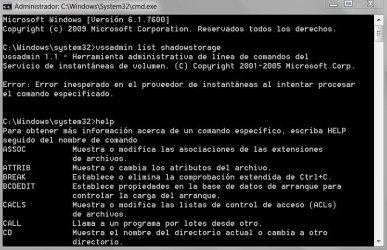
Here is how you determine the size of your shadowstorage: Open an elevated Command Prompt (run as admin) and type vssadmin list shadowstorage, then hit Enter. It will show you the shadowstorage of each Partition. The Allocated number is the amount that is currently used.
 

My Computer

Computer Manufacturer/Model Number
HP, Dell, Gateway, Toshiba - 4 laptops and 2 desktops
OS
Vista, Windows7, Mint Mate, Zorin, Windows 8
CPU
from 1.6GHz Duo to i7
Monitor(s) Displays
2x HP w2207
Hard Drives
5x HDD, 7x SSD, 12x Externals
Keyboard
with trackball - no mices
Mouse
Trackball mice
Internet Speed
DSL 6000
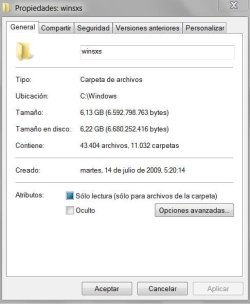
@allend66 - How big is your windows\winSxS ?

Most of the stuff in there is hard links to files that also have links elsewhere - eg the Driver Store in System 32.

WindirStat and everything else I know (including windows - see folder properties) will count each hard link as consuming real space, so a 50K file with 3 links will apparently consume 150Kb, where as in reality its only consuming 50K. My WinSxS is reported as being 6.5GB big, in reality it's probably closer to 6.5MB small.

pjd
 

My Computer

Computer type
PC/Desktop
Computer Manufacturer/Model Number
generic - made to spec
OS
Win 7 Professional 64bit
CPU
I5 650 @ 3.2GHz
Motherboard
Gigabyte H55M-UD2H
Memory
6G
Graphics Card(s)
AMD Radeon R7 200 Series
Sound Card
whatever is on mobo
Monitor(s) Displays
1 x 24" Samsung
Screen Resolution
1920x1200
Hard Drives
Internal 1x256GB Toshiba SSD
Internal 1x2TB
External 2 slot USB 3.0 dock (various drives)
External 1 500GB USB 2.0 drive
PSU
850W Antech Modular
Case
Shiny Black Aluminium
Cooling
extra fans - sucker in front, blower at back - noisy & cool
Keyboard
Microsoft USB Dual Receiver Wireless Keyboard
Mouse
Microsoft USB Dual Receiver Wireless Mouse
Internet Speed
20/1Mbps down/up
Antivirus
MSE
Browser
Firefox and Chrome
Other Info
Hitachi USB 3.0 adapter
@ whs - tried that thanks, but it throws this error at me. ( "unexpected error " )
 

Attachments

  • 1.JPG
    1.JPG
    76.5 KB · Views: 17

My Computer

Computer Manufacturer/Model Number
Toshiba Satellite L500
OS
Windows 7 Home Premium x64 OEM --> RTM clean install
CPU
Intel T4400
Motherboard
? - laptop inbuilt ?
Memory
4Gb
Graphics Card(s)
? - Mobile Intel(R) 4 Series Express Chipset Family ?
Sound Card
Realtek
Monitor(s) Displays
? + extended to a 42" LG55PC plasma tele!
Screen Resolution
1366 * 768
Hard Drives
320Gb 5500rpm
PSU
?
Case
?
Cooling
?
Internet Speed
3Meg, when it works.
Other Info
A LOWLY LAPTOP!
@ pjd - Windows tells me its 6.2Gb. WindirStat tries to analyse it but doesn't get anywhere. If I try to minimise the window --> Not Responding.
 

Attachments

  • 2.JPG
    2.JPG
    37.4 KB · Views: 3

My Computer

Computer Manufacturer/Model Number
Toshiba Satellite L500
OS
Windows 7 Home Premium x64 OEM --> RTM clean install
CPU
Intel T4400
Motherboard
? - laptop inbuilt ?
Memory
4Gb
Graphics Card(s)
? - Mobile Intel(R) 4 Series Express Chipset Family ?
Sound Card
Realtek
Monitor(s) Displays
? + extended to a 42" LG55PC plasma tele!
Screen Resolution
1366 * 768
Hard Drives
320Gb 5500rpm
PSU
?
Case
?
Cooling
?
Internet Speed
3Meg, when it works.
Other Info
A LOWLY LAPTOP!
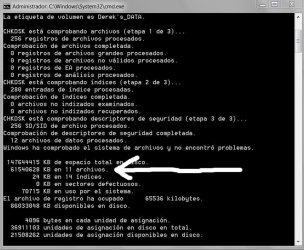
Hmm, if both vssadmin and WinDirStat don't work, then you have some other problem - possibly with your disk. I suggest you run a chkdsk /F in elevated cmd. Maybe there is an irregularity on the disk.
 

My Computer

Computer Manufacturer/Model Number
HP, Dell, Gateway, Toshiba - 4 laptops and 2 desktops
OS
Vista, Windows7, Mint Mate, Zorin, Windows 8
CPU
from 1.6GHz Duo to i7
Monitor(s) Displays
2x HP w2207
Hard Drives
5x HDD, 7x SSD, 12x Externals
Keyboard
with trackball - no mices
Mouse
Trackball mice
Internet Speed
DSL 6000
@ whs, chkdsk confirms I have 61540628KB in 11 files, but I only have the one 50Gb truecrypt file (52428800KB). I imagine it's also counting system volume information and $RECYCLE.BIN and their contents, but as I have said, system restore is turned off - and never been on on this new laptop, and I have run CCleaner ( interestingly, after I ran CCleaner then reran chkdsk, it gave me 61540632KB in 12 archives). State of play: Still missing 8.5Gb, and confused.

It's not the end of the world, I can live with it, obviously would prefer to solve it but...
 

Attachments

  • 1.JPG
    1.JPG
    91.7 KB · Views: 9

My Computer

Computer Manufacturer/Model Number
Toshiba Satellite L500
OS
Windows 7 Home Premium x64 OEM --> RTM clean install
CPU
Intel T4400
Motherboard
? - laptop inbuilt ?
Memory
4Gb
Graphics Card(s)
? - Mobile Intel(R) 4 Series Express Chipset Family ?
Sound Card
Realtek
Monitor(s) Displays
? + extended to a 42" LG55PC plasma tele!
Screen Resolution
1366 * 768
Hard Drives
320Gb 5500rpm
PSU
?
Case
?
Cooling
?
Internet Speed
3Meg, when it works.
Other Info
A LOWLY LAPTOP!
I assume you did account for the binary conversion. In binary Gigabytes are always 7% less than in decimal.
 

My Computer

Computer Manufacturer/Model Number
HP, Dell, Gateway, Toshiba - 4 laptops and 2 desktops
OS
Vista, Windows7, Mint Mate, Zorin, Windows 8
CPU
from 1.6GHz Duo to i7
Monitor(s) Displays
2x HP w2207
Hard Drives
5x HDD, 7x SSD, 12x Externals
Keyboard
with trackball - no mices
Mouse
Trackball mice
Internet Speed
DSL 6000

My Computer

Computer type
PC/Desktop
Computer Manufacturer/Model Number
Own build
OS
Windows 7x64 Home Premium SP1
CPU
Intel i7 2600k
Motherboard
ASUS P8Z68 Deluxe
Memory
G.Skill Ripjaws (DDR3-1600) 2x4GB
Graphics Card(s)
Nvidia GeForce GTS 450; Intel HD Graphics 3000(GT2+)
Monitor(s) Displays
Dell Ultrasharp IPS panel U2311H, Samsung SyncMaster P2350
Screen Resolution
1920x1080
Hard Drives
Samsung 850 Pro SSD 256GB, Samsung SSD 840 120GB, Seagates 1TB Barracuda ST31000528AS x2
PSU
Seasonic M12II 520W
Case
Lian Li Lancool PC-K60
Cooling
Case: 1x120mm, 3x140mm CPU: Hyper 212+
Keyboard
Logitech MK520 (wireless)
Mouse
Logitech MK520
Internet Speed
6-7 Mbps
Antivirus
Norton Security Premium, Malwarebytes on 2 (MSE on 3rd PC)
Browser
FireFox
Other Info
Audio: Logitech Z523 2.1

My Computer

Computer type
PC/Desktop
Computer Manufacturer/Model Number
Dell XPS 420
OS
Windows 10, Home Clean Install
CPU
Intel Core2 processsor Q8200(2.33Ghz 1333FSB) Quad Core Tech
Motherboard
Dell
Memory
6 gb
Graphics Card(s)
ATI Radeon 256MB HD3650
Sound Card
Intergrated 7.1 Channel Audio
Monitor(s) Displays
Dell SP2009W 20"
Hard Drives
640 GB Serial ATA Hard drive
Cooling
Fan
Keyboard
Dell USB Keyboard
Mouse
Dell Premium Optical USB
Internet Speed
DSL 2.85
thanks - looks usefull
 

My Computer

Computer type
PC/Desktop
Computer Manufacturer/Model Number
Own build
OS
Windows 7x64 Home Premium SP1
CPU
Intel i7 2600k
Motherboard
ASUS P8Z68 Deluxe
Memory
G.Skill Ripjaws (DDR3-1600) 2x4GB
Graphics Card(s)
Nvidia GeForce GTS 450; Intel HD Graphics 3000(GT2+)
Monitor(s) Displays
Dell Ultrasharp IPS panel U2311H, Samsung SyncMaster P2350
Screen Resolution
1920x1080
Hard Drives
Samsung 850 Pro SSD 256GB, Samsung SSD 840 120GB, Seagates 1TB Barracuda ST31000528AS x2
PSU
Seasonic M12II 520W
Case
Lian Li Lancool PC-K60
Cooling
Case: 1x120mm, 3x140mm CPU: Hyper 212+
Keyboard
Logitech MK520 (wireless)
Mouse
Logitech MK520
Internet Speed
6-7 Mbps
Antivirus
Norton Security Premium, Malwarebytes on 2 (MSE on 3rd PC)
Browser
FireFox
Other Info
Audio: Logitech Z523 2.1
When you get the pie chart, showing the segments, you put your cursor on the segment and you get the contents. It will help
 

My Computer

Computer type
PC/Desktop
Computer Manufacturer/Model Number
Dell XPS 420
OS
Windows 10, Home Clean Install
CPU
Intel Core2 processsor Q8200(2.33Ghz 1333FSB) Quad Core Tech
Motherboard
Dell
Memory
6 gb
Graphics Card(s)
ATI Radeon 256MB HD3650
Sound Card
Intergrated 7.1 Channel Audio
Monitor(s) Displays
Dell SP2009W 20"
Hard Drives
640 GB Serial ATA Hard drive
Cooling
Fan
Keyboard
Dell USB Keyboard
Mouse
Dell Premium Optical USB
Internet Speed
DSL 2.85
Back
Top