Lost Dual Boot Screen?...Lost Windows 7

Blackhawk7188

New member
Local time
5:23 PM
Messages
42
I have Vista Home Premium 64 bit and I downloaded 64 Bit RC Windows 7 and did a clean install on another partition of my hard drive. Dual boot was working for about 4 days then all of a sudden it doesnt come up any more. The partition is still there with Windows 7 installed on it but its not booting under it. I go into MSConfig and Windows 7 isnt even being detected, checked the advanced system options in the control panel and it isnt there either.

Any idea how to recover windows 7? I did not install it from dvd, I installed from Daemon Tools and worked fine.

Do I need to Burn the image to a DVD and run it on startup if I want to run Windows 7?
 

My Computer

Computer Manufacturer/Model Number
HP DV7-1129wm Laptop
OS
Vista Home Premium 64-bit SP2
CPU
AMD TurionX2 64 @ 2.1GHz
Memory
4GB DDR2 400MHz
Graphics Card(s)
256 MB Dedicated ATI Radeon HD 3200
Sound Card
IDT High Definition Audio/HDMI
Monitor(s) Displays
17" Laptop Screen
Screen Resolution
1440x900
Hard Drives
250GB SATA Hitachi
Keyboard
Full Keyboard with Full NumPad
Mouse
Microsoft Wireless Mobile Mouse 3000 / Touchpad
Internet Speed
Comact 12-20 Mbps
Other Info
Used Primarily for CAD Design/Engineering

My Computer

Computer Manufacturer/Model Number
Started out as an AST180
OS
Windows 7 Ultimate x64 | Windows XP Pro x86 | Windows Vista Ultimate x86
CPU
AMD Athlon 64 X2 Dual Core 5200 2.7 GHz
Motherboard
Acer EM61SM/EM61PM
Memory
3G RAM
Graphics Card(s)
ATI HD Radeon 4670
Screen Resolution
1280x1024
Hard Drives
Western Digital Caviar Black WD1001FALS 1TB 7200 RPM 32MB Cache, 160 GB Seagate
PSU
Corsair 450VX 450W
Keyboard
Microsoft Media Pro 3000
Mouse
Logitech MX310
That is one thing I dont want to do. There should be no reason why I need a secondary program to dual boot when I was able to. Anyone have any ideas on a system setting, not a 3RD part program to fix this issue. If there is no way to doing so then I wont be switching to Seven any time soon.
 

My Computer

Computer Manufacturer/Model Number
HP DV7-1129wm Laptop
OS
Vista Home Premium 64-bit SP2
CPU
AMD TurionX2 64 @ 2.1GHz
Memory
4GB DDR2 400MHz
Graphics Card(s)
256 MB Dedicated ATI Radeon HD 3200
Sound Card
IDT High Definition Audio/HDMI
Monitor(s) Displays
17" Laptop Screen
Screen Resolution
1440x900
Hard Drives
250GB SATA Hitachi
Keyboard
Full Keyboard with Full NumPad
Mouse
Microsoft Wireless Mobile Mouse 3000 / Touchpad
Internet Speed
Comact 12-20 Mbps
Other Info
Used Primarily for CAD Design/Engineering
That is one thing I dont want to do. There should be no reason why I need a secondary program to dual boot when I was able to. Anyone have any ideas on a system setting, not a 3RD part program to fix this issue. If there is no way to doing so then I wont be switching to Seven any time soon.

You know, you asked how to fix your problem.. And a way was offered to help.

Personally if you don't want to test 7 and all the things you might have to do to test it.. Don't.
 

My Computer

Computer Manufacturer/Model Number
Lenovo T60 TYPE 87414FU
OS
Windows 7 Profesional 32-bit (6.1, Build 7600) RTM - TechNet
CPU
Intel(R) Core(TM)2 CPU T7200 @ 2.00GHz (2 CPUs)
Memory
2gb
Graphics Card(s)
ATI Mobility Radeon X1400
Screen Resolution
1680 x 1050 (32 bit) (60Hz)
Mouse
ThinkPad UltraNav Pointing Device
Hi Blackhawk,

What does bcdedit reveal?

Open an elevated command prompt, type bcdedit, then press enter.

Post a screenshot, like this:

a102009-02-06_031225.jpg
 

My Computers

System One System Two

  • Computer type
    PC/Desktop
    OS
    7 X64
    CPU
    i5 8400
    Motherboard
    gigabyte b365m ds3h
    Memory
    2x8gb 3200mhz
    Hard Drives
    various
    PSU
    pure power 11 400w cm
    Case
    Coolermaster
    Cooling
    cryorig m9i
  • Computer type
    PC/Desktop
    OS
    7x64
    CPU
    g5400
    Motherboard
    ga b365m ds3h
    Memory
    8gb ddr4 2400
    PSU
    xfx pro 450w
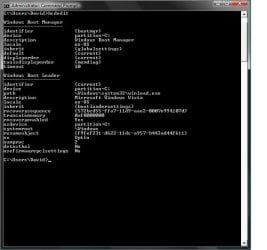
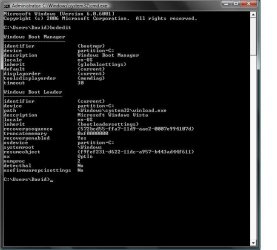
It doesnt come up like that here is the screenshot.
It seems that Windows 7 even on record anymore


Untitled.jpg
 

My Computer

Computer Manufacturer/Model Number
HP DV7-1129wm Laptop
OS
Vista Home Premium 64-bit SP2
CPU
AMD TurionX2 64 @ 2.1GHz
Memory
4GB DDR2 400MHz
Graphics Card(s)
256 MB Dedicated ATI Radeon HD 3200
Sound Card
IDT High Definition Audio/HDMI
Monitor(s) Displays
17" Laptop Screen
Screen Resolution
1440x900
Hard Drives
250GB SATA Hitachi
Keyboard
Full Keyboard with Full NumPad
Mouse
Microsoft Wireless Mobile Mouse 3000 / Touchpad
Internet Speed
Comact 12-20 Mbps
Other Info
Used Primarily for CAD Design/Engineering
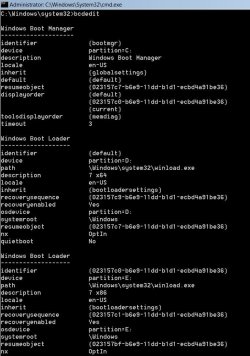
I have it right this time, sorry for running the command prompt incorrectly.
But the information still seems like Win7 is missing from the pc.

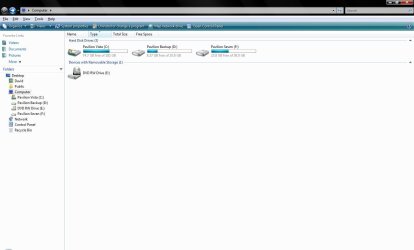
Second image is my computer drives. Pavilion Vista is Vista Home Prem., Pavilion Backup is my backup data partition, and Pavilion Seven was where I installed Win7 on.


Untitled2.jpg


View attachment 10120
 

Attachments

  • Untitled.jpg
    Untitled.jpg
    50.6 KB · Views: 172

My Computer

Computer Manufacturer/Model Number
HP DV7-1129wm Laptop
OS
Vista Home Premium 64-bit SP2
CPU
AMD TurionX2 64 @ 2.1GHz
Memory
4GB DDR2 400MHz
Graphics Card(s)
256 MB Dedicated ATI Radeon HD 3200
Sound Card
IDT High Definition Audio/HDMI
Monitor(s) Displays
17" Laptop Screen
Screen Resolution
1440x900
Hard Drives
250GB SATA Hitachi
Keyboard
Full Keyboard with Full NumPad
Mouse
Microsoft Wireless Mobile Mouse 3000 / Touchpad
Internet Speed
Comact 12-20 Mbps
Other Info
Used Primarily for CAD Design/Engineering
Ok,

I was looking for a screenie for Disk Management, but it looks ok from what you posted.

Try this:

Open elevated command prompt, type: (Press enter after each command)

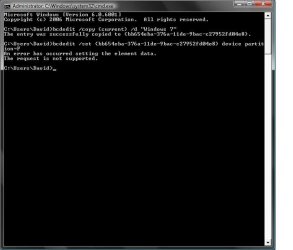
bcdedit /copy {current} /d "Windows 7"

It will return a long number in brackets - a GUID, or identifier.

Type that, including the brackets into the commands below

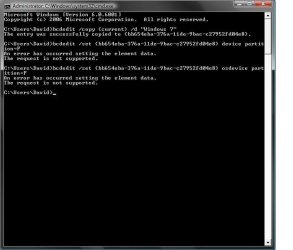
bcdedit /set {the-guid-you-got} device partition=F:

bcdedit /set {the guid-you-got} osdevice partition=F:

Reboot.
 

My Computers

System One System Two

  • Computer type
    PC/Desktop
    OS
    7 X64
    CPU
    i5 8400
    Motherboard
    gigabyte b365m ds3h
    Memory
    2x8gb 3200mhz
    Hard Drives
    various
    PSU
    pure power 11 400w cm
    Case
    Coolermaster
    Cooling
    cryorig m9i
  • Computer type
    PC/Desktop
    OS
    7x64
    CPU
    g5400
    Motherboard
    ga b365m ds3h
    Memory
    8gb ddr4 2400
    PSU
    xfx pro 450w
Hello Blackhawk,

In addition to SIW2's post, you should also be able to run a Startup Repair from the Windows 7 installation DVD to repair the boot file.

Hope this helps,
Shawn
 

My Computer

Computer type
PC/Desktop
Computer Manufacturer/Model Number
Self built custom
OS
64-bit Windows 11 Pro for Workstations
CPU
Intel i7-8700K OC'd to 5 GHz
Motherboard
ASUS ROG Maximus XI Formula Z390
Memory
64 GB (4x16GB) G.SKILL TridentZ RGB DDR4 3600 MHz
Graphics Card(s)
ASUS ROG-STRIX-GTX1080TI-O11G-GAMING
Sound Card
Integrated
Monitor(s) Displays
2 x Samsung Odyssey G7 27"
Screen Resolution
2560x1440
Hard Drives
1TB Samsung 990 PRO M.2,
4TB Samsung 990 PRO PRO M.2,
TerraMaster F8 SSD Plus NAS
PSU
Seasonic Prime Titanium 850W
Case
Thermaltake Core P3
Cooling
Corsair Hydro H115i
Keyboard
Logitech wireless K800
Mouse
Logitech MX Master 4
Internet Speed
2 Gb/s Download and 100 Mb/s Upload
Antivirus
Malwarebyte Anti-Malware Premium
Browser
Google Chrome
Other Info
Logitech Z625 speaker system,
Logitech BRIO 4K Pro webcam,
HP Color LaserJet Pro MFP M477fdn,
APC SMART-UPS RT 1000 XL - SURT1000XLI,
Galaxy S23 Plus phone
This what happened when I ran the command prompt. I rebooted, it said Windows 7 was an OS but it ran Vista instead even when i selected it. In the start-up repair do I need to make it into a DVD or can I mount it as an Image on Daemon Tools to run the repair? Do I have to run it on boot or while in Vista?
Untitled3.jpg
Untitled4.jpg
 

My Computer

Computer Manufacturer/Model Number
HP DV7-1129wm Laptop
OS
Vista Home Premium 64-bit SP2
CPU
AMD TurionX2 64 @ 2.1GHz
Memory
4GB DDR2 400MHz
Graphics Card(s)
256 MB Dedicated ATI Radeon HD 3200
Sound Card
IDT High Definition Audio/HDMI
Monitor(s) Displays
17" Laptop Screen
Screen Resolution
1440x900
Hard Drives
250GB SATA Hitachi
Keyboard
Full Keyboard with Full NumPad
Mouse
Microsoft Wireless Mobile Mouse 3000 / Touchpad
Internet Speed
Comact 12-20 Mbps
Other Info
Used Primarily for CAD Design/Engineering
Yeah, you would need to burn a Windows 7 installation DVD or USB key first, then you can run a Startup Repair from it to repair the boot file. :)
 
Last edited:

My Computer

Computer type
PC/Desktop
Computer Manufacturer/Model Number
Self built custom
OS
64-bit Windows 11 Pro for Workstations
CPU
Intel i7-8700K OC'd to 5 GHz
Motherboard
ASUS ROG Maximus XI Formula Z390
Memory
64 GB (4x16GB) G.SKILL TridentZ RGB DDR4 3600 MHz
Graphics Card(s)
ASUS ROG-STRIX-GTX1080TI-O11G-GAMING
Sound Card
Integrated
Monitor(s) Displays
2 x Samsung Odyssey G7 27"
Screen Resolution
2560x1440
Hard Drives
1TB Samsung 990 PRO M.2,
4TB Samsung 990 PRO PRO M.2,
TerraMaster F8 SSD Plus NAS
PSU
Seasonic Prime Titanium 850W
Case
Thermaltake Core P3
Cooling
Corsair Hydro H115i
Keyboard
Logitech wireless K800
Mouse
Logitech MX Master 4
Internet Speed
2 Gb/s Download and 100 Mb/s Upload
Antivirus
Malwarebyte Anti-Malware Premium
Browser
Google Chrome
Other Info
Logitech Z625 speaker system,
Logitech BRIO 4K Pro webcam,
HP Color LaserJet Pro MFP M477fdn,
APC SMART-UPS RT 1000 XL - SURT1000XLI,
Galaxy S23 Plus phone
That's curious - would indicate that it is more than just a missing bcd entry.

Try startup repair as Shawn suggested.
 

My Computers

System One System Two

  • Computer type
    PC/Desktop
    OS
    7 X64
    CPU
    i5 8400
    Motherboard
    gigabyte b365m ds3h
    Memory
    2x8gb 3200mhz
    Hard Drives
    various
    PSU
    pure power 11 400w cm
    Case
    Coolermaster
    Cooling
    cryorig m9i
  • Computer type
    PC/Desktop
    OS
    7x64
    CPU
    g5400
    Motherboard
    ga b365m ds3h
    Memory
    8gb ddr4 2400
    PSU
    xfx pro 450w
Doing the image on a disc and booting with it fixed the problem. In the repair it said that windows 7 has errors and will be fixed and must reboot. On reboot it said Windows Vista and Windows 7 Ultimate (recovered) - actually had that written-. It booted Win7 without a glitch. Actually I check the memory usage and it was at like 19% - before it was at like 27% at idle.

Thanks alot you guys, now I have it on disc for when I need to install on another PC I can.

Side question, do you know if Win7 is compatible with the ATI Radeon Xpress 200m graphics on a Compaq Presario Notebook. I want to install the 64 bit on that but I am unsure if graphics drivers are available or not. Anyone have an insight/ideas if that would work. And secondly is 2GB of RAM ok to run Win7 64 bit?

Thanks,
 

My Computer

Computer Manufacturer/Model Number
HP DV7-1129wm Laptop
OS
Vista Home Premium 64-bit SP2
CPU
AMD TurionX2 64 @ 2.1GHz
Memory
4GB DDR2 400MHz
Graphics Card(s)
256 MB Dedicated ATI Radeon HD 3200
Sound Card
IDT High Definition Audio/HDMI
Monitor(s) Displays
17" Laptop Screen
Screen Resolution
1440x900
Hard Drives
250GB SATA Hitachi
Keyboard
Full Keyboard with Full NumPad
Mouse
Microsoft Wireless Mobile Mouse 3000 / Touchpad
Internet Speed
Comact 12-20 Mbps
Other Info
Used Primarily for CAD Design/Engineering
Hi Black Hawk,

Glad it did the job.:D

Don't suppose you made a note of what the errors were?

7 x64 runs great on 2gb Ram.

Don't know about the ATI card as I don't have one - probably be fine - are Vista drivers available for it?
 

My Computers

System One System Two

  • Computer type
    PC/Desktop
    OS
    7 X64
    CPU
    i5 8400
    Motherboard
    gigabyte b365m ds3h
    Memory
    2x8gb 3200mhz
    Hard Drives
    various
    PSU
    pure power 11 400w cm
    Case
    Coolermaster
    Cooling
    cryorig m9i
  • Computer type
    PC/Desktop
    OS
    7x64
    CPU
    g5400
    Motherboard
    ga b365m ds3h
    Memory
    8gb ddr4 2400
    PSU
    xfx pro 450w
You're welcome Blackhawk. I'm happy to hear that you got it sorted out. :)

If you wanted to change the name in the Windows Boot Manager to remove the "Recovered" part in Windows 7, then this tutorial will show you how to.

Yes, Windows 7 should work with the ATI Radeon Xpress 200m with the default drivers. I didn't see any specific Windows 7 drivers for it at ATI, but there are Vista drivers that you may need to install using compatibility mode though.
 

My Computer

Computer type
PC/Desktop
Computer Manufacturer/Model Number
Self built custom
OS
64-bit Windows 11 Pro for Workstations
CPU
Intel i7-8700K OC'd to 5 GHz
Motherboard
ASUS ROG Maximus XI Formula Z390
Memory
64 GB (4x16GB) G.SKILL TridentZ RGB DDR4 3600 MHz
Graphics Card(s)
ASUS ROG-STRIX-GTX1080TI-O11G-GAMING
Sound Card
Integrated
Monitor(s) Displays
2 x Samsung Odyssey G7 27"
Screen Resolution
2560x1440
Hard Drives
1TB Samsung 990 PRO M.2,
4TB Samsung 990 PRO PRO M.2,
TerraMaster F8 SSD Plus NAS
PSU
Seasonic Prime Titanium 850W
Case
Thermaltake Core P3
Cooling
Corsair Hydro H115i
Keyboard
Logitech wireless K800
Mouse
Logitech MX Master 4
Internet Speed
2 Gb/s Download and 100 Mb/s Upload
Antivirus
Malwarebyte Anti-Malware Premium
Browser
Google Chrome
Other Info
Logitech Z625 speaker system,
Logitech BRIO 4K Pro webcam,
HP Color LaserJet Pro MFP M477fdn,
APC SMART-UPS RT 1000 XL - SURT1000XLI,
Galaxy S23 Plus phone
It didnt say what the errors where, it just said that it must reboot to repair the OS, I am not worried about the (recovered) being on the boot screen, doesnt affect me at all.

Thanks alot again, I can probably assume that the errors that occurred are due to Win7 still being in testing and that may be an issue that is resolved.
 

My Computer

Computer Manufacturer/Model Number
HP DV7-1129wm Laptop
OS
Vista Home Premium 64-bit SP2
CPU
AMD TurionX2 64 @ 2.1GHz
Memory
4GB DDR2 400MHz
Graphics Card(s)
256 MB Dedicated ATI Radeon HD 3200
Sound Card
IDT High Definition Audio/HDMI
Monitor(s) Displays
17" Laptop Screen
Screen Resolution
1440x900
Hard Drives
250GB SATA Hitachi
Keyboard
Full Keyboard with Full NumPad
Mouse
Microsoft Wireless Mobile Mouse 3000 / Touchpad
Internet Speed
Comact 12-20 Mbps
Other Info
Used Primarily for CAD Design/Engineering
Back
Top