JavaScript is disabled. For a better experience, please enable JavaScript in your browser before proceeding.
You are using an out of date browser. It may not display this or other websites correctly.
You should upgrade or use an
alternative browser .
lost function - scroll buttons on keypad
can anyone advise what button I may have pressed or what i might do to bring back the scroll up / down / left / right buttons on the keyboard and their function? it cant be a keyboard thing because all 4 are out...
Computer Manufacturer/Model Number HP pavilion dv9000 OS windows 7 home premium - 32 bit CPU AMD Turion 64x2 mobile technology TL-58 1.90 GH Memory 2.00 GB Graphics Card(s) NVIDIA nforce PCI system management Sound Card conexant high definition smartaudio HD2 Monitor(s) Displays generic pnp monitor Screen Resolution 1440 x 900 Hard Drives toshiba MK 1637 GSx ATA device PSU HP A/C adaptor HP PPP012 H-S wide range input 1-240V 90 watt Case plastic Cooling none Keyboard HID keyboard device - standard PS/2 keyboard Mouse none Internet Speed extreme high speed Other Info ACPIx86 based PC
unlock the scroll key. Top right of keyboard.
Computer type PC/Desktop Computer Manufacturer/Model Number Dell XPS 420 OS Windows 10, Home Clean Install CPU Intel Core2 processsor Q8200(2.33Ghz 1333FSB) Quad Core Tech Motherboard Dell Memory 6 gb Graphics Card(s) ATI Radeon 256MB HD3650 Sound Card Intergrated 7.1 Channel Audio Monitor(s) Displays Dell SP2009W 20" Hard Drives 640 GB Serial ATA Hard drive Cooling Fan Keyboard Dell USB Keyboard Mouse Dell Premium Optical USB Internet Speed DSL 2.85
New member
Thread Starter
Ive got : insert [ scroll defil ] press it nothing happens.
Computer Manufacturer/Model Number HP pavilion dv9000 OS windows 7 home premium - 32 bit CPU AMD Turion 64x2 mobile technology TL-58 1.90 GH Memory 2.00 GB Graphics Card(s) NVIDIA nforce PCI system management Sound Card conexant high definition smartaudio HD2 Monitor(s) Displays generic pnp monitor Screen Resolution 1440 x 900 Hard Drives toshiba MK 1637 GSx ATA device PSU HP A/C adaptor HP PPP012 H-S wide range input 1-240V 90 watt Case plastic Cooling none Keyboard HID keyboard device - standard PS/2 keyboard Mouse none Internet Speed extreme high speed Other Info ACPIx86 based PC
My keyboard says scroll lock. you have nothing like that?
Computer type PC/Desktop Computer Manufacturer/Model Number Dell XPS 420 OS Windows 10, Home Clean Install CPU Intel Core2 processsor Q8200(2.33Ghz 1333FSB) Quad Core Tech Motherboard Dell Memory 6 gb Graphics Card(s) ATI Radeon 256MB HD3650 Sound Card Intergrated 7.1 Channel Audio Monitor(s) Displays Dell SP2009W 20" Hard Drives 640 GB Serial ATA Hard drive Cooling Fan Keyboard Dell USB Keyboard Mouse Dell Premium Optical USB Internet Speed DSL 2.85
If that does not work hit the f7 key.
Computer type PC/Desktop Computer Manufacturer/Model Number Dell XPS 420 OS Windows 10, Home Clean Install CPU Intel Core2 processsor Q8200(2.33Ghz 1333FSB) Quad Core Tech Motherboard Dell Memory 6 gb Graphics Card(s) ATI Radeon 256MB HD3650 Sound Card Intergrated 7.1 Channel Audio Monitor(s) Displays Dell SP2009W 20" Hard Drives 640 GB Serial ATA Hard drive Cooling Fan Keyboard Dell USB Keyboard Mouse Dell Premium Optical USB Internet Speed DSL 2.85
New member
Thread Starter
nothing like that. other than : num lock ( and ) insert [ scroll ]
Computer Manufacturer/Model Number HP pavilion dv9000 OS windows 7 home premium - 32 bit CPU AMD Turion 64x2 mobile technology TL-58 1.90 GH Memory 2.00 GB Graphics Card(s) NVIDIA nforce PCI system management Sound Card conexant high definition smartaudio HD2 Monitor(s) Displays generic pnp monitor Screen Resolution 1440 x 900 Hard Drives toshiba MK 1637 GSx ATA device PSU HP A/C adaptor HP PPP012 H-S wide range input 1-240V 90 watt Case plastic Cooling none Keyboard HID keyboard device - standard PS/2 keyboard Mouse none Internet Speed extreme high speed Other Info ACPIx86 based PC
Try this if you use Internet explorer Go to tools ...internet options...advanced...allow smooth scrolling should be checked. If that does not work.
Computer type PC/Desktop Computer Manufacturer/Model Number Dell XPS 420 OS Windows 10, Home Clean Install CPU Intel Core2 processsor Q8200(2.33Ghz 1333FSB) Quad Core Tech Motherboard Dell Memory 6 gb Graphics Card(s) ATI Radeon 256MB HD3650 Sound Card Intergrated 7.1 Channel Audio Monitor(s) Displays Dell SP2009W 20" Hard Drives 640 GB Serial ATA Hard drive Cooling Fan Keyboard Dell USB Keyboard Mouse Dell Premium Optical USB Internet Speed DSL 2.85
New member
Thread Starter
allow smooth scrolling - num lock...is not even on the list of advanced. cant I just press the num lock key if thats the issue?
Computer Manufacturer/Model Number HP pavilion dv9000 OS windows 7 home premium - 32 bit CPU AMD Turion 64x2 mobile technology TL-58 1.90 GH Memory 2.00 GB Graphics Card(s) NVIDIA nforce PCI system management Sound Card conexant high definition smartaudio HD2 Monitor(s) Displays generic pnp monitor Screen Resolution 1440 x 900 Hard Drives toshiba MK 1637 GSx ATA device PSU HP A/C adaptor HP PPP012 H-S wide range input 1-240V 90 watt Case plastic Cooling none Keyboard HID keyboard device - standard PS/2 keyboard Mouse none Internet Speed extreme high speed Other Info ACPIx86 based PC
Yes you can just unlock the number key. The other things are other things to try. Just try number key lock first. I only know the things that can cause the problem, I do not know which one will work.
Computer type PC/Desktop Computer Manufacturer/Model Number Dell XPS 420 OS Windows 10, Home Clean Install CPU Intel Core2 processsor Q8200(2.33Ghz 1333FSB) Quad Core Tech Motherboard Dell Memory 6 gb Graphics Card(s) ATI Radeon 256MB HD3650 Sound Card Intergrated 7.1 Channel Audio Monitor(s) Displays Dell SP2009W 20" Hard Drives 640 GB Serial ATA Hard drive Cooling Fan Keyboard Dell USB Keyboard Mouse Dell Premium Optical USB Internet Speed DSL 2.85
New member
Thread Starter
pressing num lock worked. thanks for your help sensei ( japanese for martial arts master ).
Computer Manufacturer/Model Number HP pavilion dv9000 OS windows 7 home premium - 32 bit CPU AMD Turion 64x2 mobile technology TL-58 1.90 GH Memory 2.00 GB Graphics Card(s) NVIDIA nforce PCI system management Sound Card conexant high definition smartaudio HD2 Monitor(s) Displays generic pnp monitor Screen Resolution 1440 x 900 Hard Drives toshiba MK 1637 GSx ATA device PSU HP A/C adaptor HP PPP012 H-S wide range input 1-240V 90 watt Case plastic Cooling none Keyboard HID keyboard device - standard PS/2 keyboard Mouse none Internet Speed extreme high speed Other Info ACPIx86 based PC
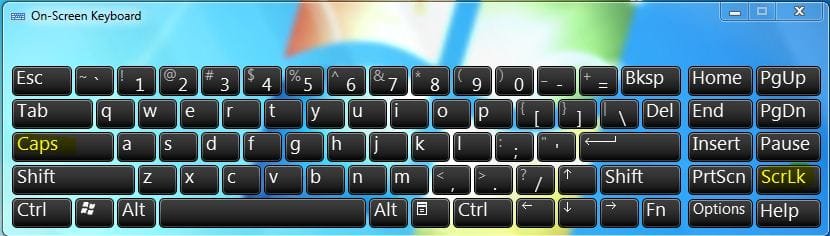
You could try the On-screen Keyboard to see whether something is wrong with your Keyboard or not
Start under search type
OSK
Try to Turn on Scroll Lock from there.
Hope this helps,
Captain
Edit: I guess i was a little late.. Glad that Rich took care of you
.. Good job Rich
Computer Manufacturer/Model Number Samsung NP550P5C-S02IN OS Windows 7 Ultimate - 64-bit | Windows 8 Pro - 64-bit CPU Intel® Core™ i7 Processor 3,610QM (2.30Hz, 6MB L3 Cach Memory 8 GB Graphics Card(s) NVIDIA® GeForce® GT 650M 2GB Graphics, Optimus™ techno Sound Card SoundAlive™ JBL 3 Speakers (With sub-Woofer) Monitor(s) Displays 39.62cm (15.6) SuperBright 300nit HD+ LED Display Screen Resolution 1,600 x 900, Anti-Reflective Hard Drives 1TB S-ATA II Hard Drive (5,400RPM)
Glad to help
Computer type PC/Desktop Computer Manufacturer/Model Number Dell XPS 420 OS Windows 10, Home Clean Install CPU Intel Core2 processsor Q8200(2.33Ghz 1333FSB) Quad Core Tech Motherboard Dell Memory 6 gb Graphics Card(s) ATI Radeon 256MB HD3650 Sound Card Intergrated 7.1 Channel Audio Monitor(s) Displays Dell SP2009W 20" Hard Drives 640 GB Serial ATA Hard drive Cooling Fan Keyboard Dell USB Keyboard Mouse Dell Premium Optical USB Internet Speed DSL 2.85



 .. Good job Rich
 Glad to help