
Solved lost gb on my ssd upon win7 reinstall

CeeJayy

New member
Local time
7:45 PM
Messages
11
Hello,
Thank you for reading my entry...

I have a new factory fresh intel160ssd - I used my Gateway, Win7 cd to install Win7 onto the drive.


In a matter of days I had to unfortunately uninstall that fresh install and do a full install windows 7 a second time.


This second install is different - The available gb on my SSD is less than before -

Attached is a screenshot from Active partition manager (found the info about this program on this forum!!) So you can see what partitions I have on my ssd

  1. Can you please tell me if I can safely delete anything
  2. Or how to repartition the ssd to recover my missing gb's
  3. Or how to format this drive since it is my main c drive and make it factory fresh then do a new install of windows like my first attempt.
I have no personal files on this drive - I will lose nothing with a format or reinstall - but I don't want to render the drive inaccessible... so I am asking for your assistance.
:D

PS : I would like the drive to not have partitions except where absolutely necessary for system, or whatever - I am going to use it to install my main art programs so they work fast. All data and non essential programs will go to my data drive. So I want the most usable space as possible on this ssd.
Thank you so much!
 

Attachments

  • cj_rider partitionCapture.JPG
    cj_rider partitionCapture.JPG
    43.7 KB · Views: 160
Last edited:

My Computer My Computer

At a glance

windows7 home premium 64bit
Computer Manufacturer/Model Number
gateway fx 680005
OS
windows7 home premium 64bit
Hard Drives
Intel X25-M 160 GB, (SSDSA2M160G2GC)
Can you post another pic, this time of Windows Disk Management, showing your partition details?

That's what most of us are familar with examining.

Normally, with a defaut fresh install onto a new disk, you would end up with a maximum of 2 partitions and no unallocated space.

Do you want to end up with a single C partition on which you keep both data and Windows?
 

My Computer My Computer

At a glance

Windows 7 Home Premium SP1, 64-bitIntel Skylake i5-6600K, not overclocked8 GB HyperX DDR4-2666 (2 x 4 GB)none; graphics are integrated on CPU
Computer type
PC/Desktop
Computer Manufacturer/Model Number
Ignatz Special; 4 speed manual gearbox; factory air conditioning; one of one
OS
Windows 7 Home Premium SP1, 64-bit
CPU
Intel Skylake i5-6600K, not overclocked
Motherboard
AsRock Z170M Extreme 4, micro ATX
Memory
8 GB HyperX DDR4-2666 (2 x 4 GB)
Graphics Card(s)
none; graphics are integrated on CPU
Sound Card
onboard: Realtek ALC1150; external: USB Behringer UF0-202
Monitor(s) Displays
Dell S2340M 23 inch IPS
Screen Resolution
1600 x 900
Hard Drives
System: Crucial MX100 series SSD, 128 GB;
Data: Samsung Spinpoint 103SJ, 1 TB;
Backup: WD Caviar Green WD30EZRX-00D8PB0, 3 TB
PSU
Rosewill SilentNight 500 watt fanless, semi-modular
Case
Antec Solo II
Cooling
Noctua NH-U12S; Noctua F12 intake, Noctua S12A exhaust
Keyboard
Microsoft 200 6JH-00001 USB
Mouse
Dell or Microsoft optical wired; USB
Antivirus
Microsoft Security Essentials and Malwarebytes Premium
Browser
Pale Moon
Other Info
All fans PWM; speeds at idle: CPU circa 500 rpm; intake circa 600 rpm; exhaust circa 600 rpm; CPU temps 27 idle and 47 C load in a warm room (27 C/81 F) when running Intel Extreme Tuning Utility stress test.
Thank you for your prompt response!
Yes, I want to end up with a single C partition on which you keep both data and Windows.

But in reality, if I can get this straightened up, I will be re-attaching my regular non-ssd data drive to use for data, like artwork, photos, etc.

Thank you -
CJ

ps - is this the image you were looking for?
 

Attachments

  • cj_rider win disk.JPG
    cj_rider win disk.JPG
    44.7 KB · Views: 115
Last edited:

My Computer My Computer

At a glance

windows7 home premium 64bit
Computer Manufacturer/Model Number
gateway fx 680005
OS
windows7 home premium 64bit
Hard Drives
Intel X25-M 160 GB, (SSDSA2M160G2GC)
Yes, that is the pic I meant.

Offhand, I don't see anything wrong.

You have a system reserved partition and a C; that is normal.

Total space on the drive is about 149 GB; that's normal. The formatted capacity of a 160 GB drive is about 149 GB.

What do you mean by "lost space"??

The earlier pic you posted showed some unallocated space that I don't see in the second pic. I can't explain that, but I don't know anything about that first application you used--that's why I asked for Disk Management.

More details needed about the lost space.

Is everything working OK?
 

My Computer My Computer

At a glance

Windows 7 Home Premium SP1, 64-bitIntel Skylake i5-6600K, not overclocked8 GB HyperX DDR4-2666 (2 x 4 GB)none; graphics are integrated on CPU
Computer type
PC/Desktop
Computer Manufacturer/Model Number
Ignatz Special; 4 speed manual gearbox; factory air conditioning; one of one
OS
Windows 7 Home Premium SP1, 64-bit
CPU
Intel Skylake i5-6600K, not overclocked
Motherboard
AsRock Z170M Extreme 4, micro ATX
Memory
8 GB HyperX DDR4-2666 (2 x 4 GB)
Graphics Card(s)
none; graphics are integrated on CPU
Sound Card
onboard: Realtek ALC1150; external: USB Behringer UF0-202
Monitor(s) Displays
Dell S2340M 23 inch IPS
Screen Resolution
1600 x 900
Hard Drives
System: Crucial MX100 series SSD, 128 GB;
Data: Samsung Spinpoint 103SJ, 1 TB;
Backup: WD Caviar Green WD30EZRX-00D8PB0, 3 TB
PSU
Rosewill SilentNight 500 watt fanless, semi-modular
Case
Antec Solo II
Cooling
Noctua NH-U12S; Noctua F12 intake, Noctua S12A exhaust
Keyboard
Microsoft 200 6JH-00001 USB
Mouse
Dell or Microsoft optical wired; USB
Antivirus
Microsoft Security Essentials and Malwarebytes Premium
Browser
Pale Moon
Other Info
All fans PWM; speeds at idle: CPU circa 500 rpm; intake circa 600 rpm; exhaust circa 600 rpm; CPU temps 27 idle and 47 C load in a warm room (27 C/81 F) when running Intel Extreme Tuning Utility stress test.
Lost space = lost GB on my ssd -I did not observe closely enough to have a number, but I know I had more GB free to use on the HD after the first install than after the second.

Is there a way to retrieve those unallocated areas for use on the main partition i.e. c:\ ?

I read about the first program on this site while trying to find someone with my same or similar issue:
Active@ Partition Manager. Freeware disk partitioning for Windows. It seems to offer more detail about the partitioning.

Yes, everything seems to be working ok with only win7 installed, no other programs except winmail- which is also working.

I have several art and photo editing programs I want to install on this drive - when I had them installed on the first instance of win7 - they did eat up the space rather quickly. I will direct as much data as allowed to a second "data drive" (which is not an ssd)

I would like to get this drive as efficient as possible before putting my programs back on. - And then, if I may, I do have a couple of other questions on issues related to the first crash.

Thank you,
CJ
 
Last edited:

My Computer My Computer

At a glance

windows7 home premium 64bit
Computer Manufacturer/Model Number
gateway fx 680005
OS
windows7 home premium 64bit
Hard Drives
Intel X25-M 160 GB, (SSDSA2M160G2GC)
Clarification needed:

Do you mean less total space now on the hard drive?

Or do you mean that there is less FREE space available on C after the Windows installation than previously?

I assumed the former. Maybe you mean the latter?

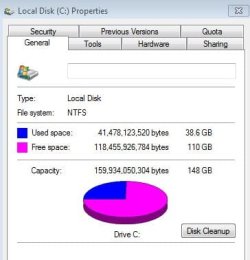
You have about 39 GB space occupied. That is higher than I would expect on a fresh install, unless you have installed quite a few apps.

149 GB total space on the drive is absolutely normal.

The unallocated space shown in your first pic totals only about 3 MB---very very small. I have no idea why it shows with that app and not with Disk Management, but that's so tiny I wouldn't worry about it. There may be a way to get at it if you use a third party app like Partition Wizard, but why bother for that tiny sliver?

Do you by any chance have a Windows.old folder?
 

My Computer My Computer

At a glance

Windows 7 Home Premium SP1, 64-bitIntel Skylake i5-6600K, not overclocked8 GB HyperX DDR4-2666 (2 x 4 GB)none; graphics are integrated on CPU
Computer type
PC/Desktop
Computer Manufacturer/Model Number
Ignatz Special; 4 speed manual gearbox; factory air conditioning; one of one
OS
Windows 7 Home Premium SP1, 64-bit
CPU
Intel Skylake i5-6600K, not overclocked
Motherboard
AsRock Z170M Extreme 4, micro ATX
Memory
8 GB HyperX DDR4-2666 (2 x 4 GB)
Graphics Card(s)
none; graphics are integrated on CPU
Sound Card
onboard: Realtek ALC1150; external: USB Behringer UF0-202
Monitor(s) Displays
Dell S2340M 23 inch IPS
Screen Resolution
1600 x 900
Hard Drives
System: Crucial MX100 series SSD, 128 GB;
Data: Samsung Spinpoint 103SJ, 1 TB;
Backup: WD Caviar Green WD30EZRX-00D8PB0, 3 TB
PSU
Rosewill SilentNight 500 watt fanless, semi-modular
Case
Antec Solo II
Cooling
Noctua NH-U12S; Noctua F12 intake, Noctua S12A exhaust
Keyboard
Microsoft 200 6JH-00001 USB
Mouse
Dell or Microsoft optical wired; USB
Antivirus
Microsoft Security Essentials and Malwarebytes Premium
Browser
Pale Moon
Other Info
All fans PWM; speeds at idle: CPU circa 500 rpm; intake circa 600 rpm; exhaust circa 600 rpm; CPU temps 27 idle and 47 C load in a warm room (27 C/81 F) when running Intel Extreme Tuning Utility stress test.
I had more free space and less used space as in relation to the image attached of my HD properties from this current install of win7. I have no programs installed on this drive. the 38+ gb is all windows.
harddrive.JPG

responses:
I did the complete and fresh install the first time and the second. I did not do the upgrade option.
I have not installed any programs or apps or anything (well, just now I have installed that partition program)
I did all of the cleanup work including a system cleanup via Disk cleanup from the properties area (as seen in pic) It made no difference, the files were very small.
 

My Computer My Computer

At a glance

windows7 home premium 64bit
Computer Manufacturer/Model Number
gateway fx 680005
OS
windows7 home premium 64bit
Hard Drives
Intel X25-M 160 GB, (SSDSA2M160G2GC)
Your installation appears normal as far as partitions go.

How the space is being used is another matter.

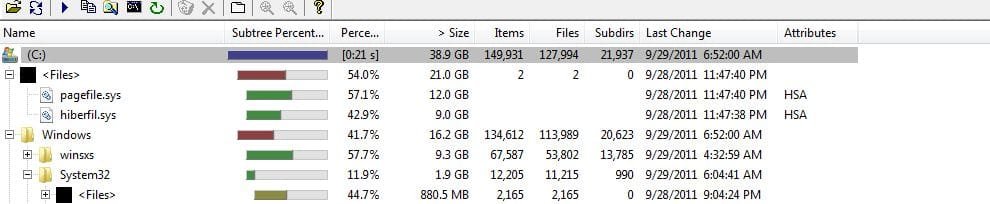
You can run a program called WinDirStat that will show you what is taking up the space.

39 gigs occupied for a bare installation is higher than I can recall from others, so I would run that app and find out what is using the space.

Some of the usual suspects include System Restore, a hibernation file, or maybe a page file.

http://windirstat.info/
 

My Computer My Computer

At a glance

Windows 7 Home Premium SP1, 64-bitIntel Skylake i5-6600K, not overclocked8 GB HyperX DDR4-2666 (2 x 4 GB)none; graphics are integrated on CPU
Computer type
PC/Desktop
Computer Manufacturer/Model Number
Ignatz Special; 4 speed manual gearbox; factory air conditioning; one of one
OS
Windows 7 Home Premium SP1, 64-bit
CPU
Intel Skylake i5-6600K, not overclocked
Motherboard
AsRock Z170M Extreme 4, micro ATX
Memory
8 GB HyperX DDR4-2666 (2 x 4 GB)
Graphics Card(s)
none; graphics are integrated on CPU
Sound Card
onboard: Realtek ALC1150; external: USB Behringer UF0-202
Monitor(s) Displays
Dell S2340M 23 inch IPS
Screen Resolution
1600 x 900
Hard Drives
System: Crucial MX100 series SSD, 128 GB;
Data: Samsung Spinpoint 103SJ, 1 TB;
Backup: WD Caviar Green WD30EZRX-00D8PB0, 3 TB
PSU
Rosewill SilentNight 500 watt fanless, semi-modular
Case
Antec Solo II
Cooling
Noctua NH-U12S; Noctua F12 intake, Noctua S12A exhaust
Keyboard
Microsoft 200 6JH-00001 USB
Mouse
Dell or Microsoft optical wired; USB
Antivirus
Microsoft Security Essentials and Malwarebytes Premium
Browser
Pale Moon
Other Info
All fans PWM; speeds at idle: CPU circa 500 rpm; intake circa 600 rpm; exhaust circa 600 rpm; CPU temps 27 idle and 47 C load in a warm room (27 C/81 F) when running Intel Extreme Tuning Utility stress test.
Offhand I'd guess that the Page File settings may be different, for whatever reason. Have you made any adjustments to Hibernation?
 

My Computer My Computer

At a glance

Main - Windows 7 Pro SP1 64-Bit; 2nd - Window...Main - Core i7 2600K; 2nd - Core i7 920Main - 16GB Corsair Vengeance; 2nd - 12GB Cor...Main - XFX Radeon 6870 1GB; 2nd - XFX Radeon ...
Computer Manufacturer/Model Number
Self
OS
Main - Windows 7 Pro SP1 64-Bit; 2nd - Windows Server 2008 R2
CPU
Main - Core i7 2600K; 2nd - Core i7 920
Motherboard
Main - Asus P8Z68-V Pro/Gen3; 2nd - Gigabyte GA-EX58-UDR3
Memory
Main - 16GB Corsair Vengeance; 2nd - 12GB Corsair Vengeance
Graphics Card(s)
Main - XFX Radeon 6870 1GB; 2nd - XFX Radeon 4870 1GB
Sound Card
Both: Onboard Realtek Azalia
Monitor(s) Displays
Main - Hann 25" + I-INC 25" + Acer 23"; 2nd - Upgrading Soon
Screen Resolution
Main - 1920x1080 (All Three Monitors); 2nd - Upgrading Soon
Hard Drives
Main - (1) Crucial M4 128GB (Boot)
Main - (1) Seagate 2TB 64MB Cache (Data)
Main - (1) Seagate 2TB 64MB Cache (Data Backup)
2nd - (1) Intel X25-M SSD 80GB (Boot)
2nd - (3) Seagate 1TB 32MB Cache (Data Backup)
2nd - (1) Seagate 320GB (Because)
PSU
Main - OCZ 600W Modular; 2nd - OCZ 600W
Case
Main - Thermaltake Element G; 2nd - NZXT something or other
Cooling
Main - Corsair H80; 2nd - Prolimatech Megahalems
Keyboard
Main - Razer Reclusa; 2nd - Old MS Keyboard
Mouse
Main - Logitech MX Revolution; 2nd - Old MS Mouse
Internet Speed
20Mbps Time-Warner Cable
@Ignatzatsonic - I am downloading the program and will let you know what i find.

@Prof - I noted that several in the forums here spoke of the hibernation file, but in inspecting, I found that Hibernation option was not on my start button. I read other areas to mean that if it is not found on the start menu then it is not running?

Hopefully WinDirStat will locate some fat unwanted files!!
cj
 

My Computer My Computer

At a glance

windows7 home premium 64bit
Computer Manufacturer/Model Number
gateway fx 680005
OS
windows7 home premium 64bit
Hard Drives
Intel X25-M 160 GB, (SSDSA2M160G2GC)
You can try to turn hibernate off with this command:

powercfg -hibernate off

No harm done if it does nothing.
 

My Computer My Computer

At a glance

Windows 7 Home Premium SP1, 64-bitIntel Skylake i5-6600K, not overclocked8 GB HyperX DDR4-2666 (2 x 4 GB)none; graphics are integrated on CPU
Computer type
PC/Desktop
Computer Manufacturer/Model Number
Ignatz Special; 4 speed manual gearbox; factory air conditioning; one of one
OS
Windows 7 Home Premium SP1, 64-bit
CPU
Intel Skylake i5-6600K, not overclocked
Motherboard
AsRock Z170M Extreme 4, micro ATX
Memory
8 GB HyperX DDR4-2666 (2 x 4 GB)
Graphics Card(s)
none; graphics are integrated on CPU
Sound Card
onboard: Realtek ALC1150; external: USB Behringer UF0-202
Monitor(s) Displays
Dell S2340M 23 inch IPS
Screen Resolution
1600 x 900
Hard Drives
System: Crucial MX100 series SSD, 128 GB;
Data: Samsung Spinpoint 103SJ, 1 TB;
Backup: WD Caviar Green WD30EZRX-00D8PB0, 3 TB
PSU
Rosewill SilentNight 500 watt fanless, semi-modular
Case
Antec Solo II
Cooling
Noctua NH-U12S; Noctua F12 intake, Noctua S12A exhaust
Keyboard
Microsoft 200 6JH-00001 USB
Mouse
Dell or Microsoft optical wired; USB
Antivirus
Microsoft Security Essentials and Malwarebytes Premium
Browser
Pale Moon
Other Info
All fans PWM; speeds at idle: CPU circa 500 rpm; intake circa 600 rpm; exhaust circa 600 rpm; CPU temps 27 idle and 47 C load in a warm room (27 C/81 F) when running Intel Extreme Tuning Utility stress test.
winderstatpic.JPG

So, I can see a lot of files, two of which are the afore mentioned Hiberfil.sys and another is the pagefile.sys -
  1. can these safely be deleted?
  2. and how then do I keep that hiberfil.sys form recurring?
  3. what about the pagefile? what is it and does it need this space for my system to work correctly?
Thanks!
 

My Computer My Computer

At a glance

windows7 home premium 64bit
Computer Manufacturer/Model Number
gateway fx 680005
OS
windows7 home premium 64bit
Hard Drives
Intel X25-M 160 GB, (SSDSA2M160G2GC)
You don't need hiberfile.sys unless you use hibernation. I think it is about equal in size to the amount of RAM you have.

If you use the command I mentioned in prior post, I think it will disappear and you should reclaim that space.

You do need a pagefile.sys, but it certainly doesn't have to be that size.

You can change its size using instructions that pop up when you enter "page file" in the start menu. Best idea is to let Windows control it. It shouldn't be anywhere near 12 GB if you let Windows control it.

I have no idea why those settings may have been smaller on your previous installation and have mysteriously grown on this installation.
 

My Computer My Computer

At a glance

Windows 7 Home Premium SP1, 64-bitIntel Skylake i5-6600K, not overclocked8 GB HyperX DDR4-2666 (2 x 4 GB)none; graphics are integrated on CPU
Computer type
PC/Desktop
Computer Manufacturer/Model Number
Ignatz Special; 4 speed manual gearbox; factory air conditioning; one of one
OS
Windows 7 Home Premium SP1, 64-bit
CPU
Intel Skylake i5-6600K, not overclocked
Motherboard
AsRock Z170M Extreme 4, micro ATX
Memory
8 GB HyperX DDR4-2666 (2 x 4 GB)
Graphics Card(s)
none; graphics are integrated on CPU
Sound Card
onboard: Realtek ALC1150; external: USB Behringer UF0-202
Monitor(s) Displays
Dell S2340M 23 inch IPS
Screen Resolution
1600 x 900
Hard Drives
System: Crucial MX100 series SSD, 128 GB;
Data: Samsung Spinpoint 103SJ, 1 TB;
Backup: WD Caviar Green WD30EZRX-00D8PB0, 3 TB
PSU
Rosewill SilentNight 500 watt fanless, semi-modular
Case
Antec Solo II
Cooling
Noctua NH-U12S; Noctua F12 intake, Noctua S12A exhaust
Keyboard
Microsoft 200 6JH-00001 USB
Mouse
Dell or Microsoft optical wired; USB
Antivirus
Microsoft Security Essentials and Malwarebytes Premium
Browser
Pale Moon
Other Info
All fans PWM; speeds at idle: CPU circa 500 rpm; intake circa 600 rpm; exhaust circa 600 rpm; CPU temps 27 idle and 47 C load in a warm room (27 C/81 F) when running Intel Extreme Tuning Utility stress test.
Thank you,

Sorry for the newbie questions:

I went to "start" then cmd then entered "powercfg -hibernate off" and it responds that I do not have admn. permission. My sign on states I am admin - so I don't quite get that.

so then, I simply entered the "powercfg -hibernate off" command in the search line on the start button, and the powercnfg icon came up.

I right clicked it and selected "run as administrator". .. It seemed as if nothing happened.. is this usual or did I miss something?

thx
 

My Computer My Computer

At a glance

windows7 home premium 64bit
Computer Manufacturer/Model Number
gateway fx 680005
OS
windows7 home premium 64bit
Hard Drives
Intel X25-M 160 GB, (SSDSA2M160G2GC)
You need to run it from a command prompt:

powercfg -h off

You don't need the full word 'hibernate".

You running it as admin may have worked.

Did your occupied space decline after the command was issued?

Does WinDirStat no longer find the file?

If not, run the command again from an administrator's command prompt and reboot and recheck.

You can turn hibernation back on with:

powercfg -h on
 

My Computer My Computer

At a glance

Windows 7 Home Premium SP1, 64-bitIntel Skylake i5-6600K, not overclocked8 GB HyperX DDR4-2666 (2 x 4 GB)none; graphics are integrated on CPU
Computer type
PC/Desktop
Computer Manufacturer/Model Number
Ignatz Special; 4 speed manual gearbox; factory air conditioning; one of one
OS
Windows 7 Home Premium SP1, 64-bit
CPU
Intel Skylake i5-6600K, not overclocked
Motherboard
AsRock Z170M Extreme 4, micro ATX
Memory
8 GB HyperX DDR4-2666 (2 x 4 GB)
Graphics Card(s)
none; graphics are integrated on CPU
Sound Card
onboard: Realtek ALC1150; external: USB Behringer UF0-202
Monitor(s) Displays
Dell S2340M 23 inch IPS
Screen Resolution
1600 x 900
Hard Drives
System: Crucial MX100 series SSD, 128 GB;
Data: Samsung Spinpoint 103SJ, 1 TB;
Backup: WD Caviar Green WD30EZRX-00D8PB0, 3 TB
PSU
Rosewill SilentNight 500 watt fanless, semi-modular
Case
Antec Solo II
Cooling
Noctua NH-U12S; Noctua F12 intake, Noctua S12A exhaust
Keyboard
Microsoft 200 6JH-00001 USB
Mouse
Dell or Microsoft optical wired; USB
Antivirus
Microsoft Security Essentials and Malwarebytes Premium
Browser
Pale Moon
Other Info
All fans PWM; speeds at idle: CPU circa 500 rpm; intake circa 600 rpm; exhaust circa 600 rpm; CPU temps 27 idle and 47 C load in a warm room (27 C/81 F) when running Intel Extreme Tuning Utility stress test.
Ok, Hibernation taken care of. I gained 9gb!

the pagefile is set to 12mb in the controls
- Should I disable it, restart then re-enable it so it will then drop from the 12 gb to 12 mb and windows managed?

edit: oops - pagefile is actually set to 12279mb - what do you recommend?
 
Last edited:

My Computer My Computer

At a glance

windows7 home premium 64bit
Computer Manufacturer/Model Number
gateway fx 680005
OS
windows7 home premium 64bit
Hard Drives
Intel X25-M 160 GB, (SSDSA2M160G2GC)
12 MB is too small.

Let Windows manage it.

On the virtual memory page, put a checkmark in the box "automatically manage paging file for all drives".

Choose OK, reboot, and then recheck pagefile.sys size through WinDirStat. It should be found, but with a size considerably smaller than 12 GB.

Then recheck total occupied size again.
 

My Computer My Computer

At a glance

Windows 7 Home Premium SP1, 64-bitIntel Skylake i5-6600K, not overclocked8 GB HyperX DDR4-2666 (2 x 4 GB)none; graphics are integrated on CPU
Computer type
PC/Desktop
Computer Manufacturer/Model Number
Ignatz Special; 4 speed manual gearbox; factory air conditioning; one of one
OS
Windows 7 Home Premium SP1, 64-bit
CPU
Intel Skylake i5-6600K, not overclocked
Motherboard
AsRock Z170M Extreme 4, micro ATX
Memory
8 GB HyperX DDR4-2666 (2 x 4 GB)
Graphics Card(s)
none; graphics are integrated on CPU
Sound Card
onboard: Realtek ALC1150; external: USB Behringer UF0-202
Monitor(s) Displays
Dell S2340M 23 inch IPS
Screen Resolution
1600 x 900
Hard Drives
System: Crucial MX100 series SSD, 128 GB;
Data: Samsung Spinpoint 103SJ, 1 TB;
Backup: WD Caviar Green WD30EZRX-00D8PB0, 3 TB
PSU
Rosewill SilentNight 500 watt fanless, semi-modular
Case
Antec Solo II
Cooling
Noctua NH-U12S; Noctua F12 intake, Noctua S12A exhaust
Keyboard
Microsoft 200 6JH-00001 USB
Mouse
Dell or Microsoft optical wired; USB
Antivirus
Microsoft Security Essentials and Malwarebytes Premium
Browser
Pale Moon
Other Info
All fans PWM; speeds at idle: CPU circa 500 rpm; intake circa 600 rpm; exhaust circa 600 rpm; CPU temps 27 idle and 47 C load in a warm room (27 C/81 F) when running Intel Extreme Tuning Utility stress test.
Drat - pagefile remains at 12 gb - ideas?
 

My Computer My Computer

At a glance

windows7 home premium 64bit
Computer Manufacturer/Model Number
gateway fx 680005
OS
windows7 home premium 64bit
Hard Drives
Intel X25-M 160 GB, (SSDSA2M160G2GC)
Go back to the virtual memory (paging file) settings.

Uncheck the automatic setting.

Choose "no paging file" radio button.

Apply and OK your way out.

Reboot.

Now you should not have any page file at all. Confirm this with WinDirStat. Confirm your occupied space has fallen.

Then you can go back to the virtual memory page and recreate a page file by re-choosing that automatic setting.

Windows will run without it, but you will occasionally run into problems if you don't have a page file.

If that does not work, I am pretty much out of ideas.
 

My Computer My Computer

At a glance

Windows 7 Home Premium SP1, 64-bitIntel Skylake i5-6600K, not overclocked8 GB HyperX DDR4-2666 (2 x 4 GB)none; graphics are integrated on CPU
Computer type
PC/Desktop
Computer Manufacturer/Model Number
Ignatz Special; 4 speed manual gearbox; factory air conditioning; one of one
OS
Windows 7 Home Premium SP1, 64-bit
CPU
Intel Skylake i5-6600K, not overclocked
Motherboard
AsRock Z170M Extreme 4, micro ATX
Memory
8 GB HyperX DDR4-2666 (2 x 4 GB)
Graphics Card(s)
none; graphics are integrated on CPU
Sound Card
onboard: Realtek ALC1150; external: USB Behringer UF0-202
Monitor(s) Displays
Dell S2340M 23 inch IPS
Screen Resolution
1600 x 900
Hard Drives
System: Crucial MX100 series SSD, 128 GB;
Data: Samsung Spinpoint 103SJ, 1 TB;
Backup: WD Caviar Green WD30EZRX-00D8PB0, 3 TB
PSU
Rosewill SilentNight 500 watt fanless, semi-modular
Case
Antec Solo II
Cooling
Noctua NH-U12S; Noctua F12 intake, Noctua S12A exhaust
Keyboard
Microsoft 200 6JH-00001 USB
Mouse
Dell or Microsoft optical wired; USB
Antivirus
Microsoft Security Essentials and Malwarebytes Premium
Browser
Pale Moon
Other Info
All fans PWM; speeds at idle: CPU circa 500 rpm; intake circa 600 rpm; exhaust circa 600 rpm; CPU temps 27 idle and 47 C load in a warm room (27 C/81 F) when running Intel Extreme Tuning Utility stress test.
Ok, Pagefile is under control! Thank you so very much for your invaluable assistance!

I have to sign off now for the night - but thank you again - I am in a much better place.
CJ

pS- FYI: when I go back into the settings after zeroing out pagefile and reset it to automatic, it goes right back up to 12gb! I guess that is ok as long as I continue to have room for it - but if my programs start taking up space, I may need to bounce this down a bit. Wouldn't you think 1gb would be more than enough? Is it just taking a percent whether I actually need it or not?

Ok, I just wanted to give you a final update... g'nite and thanks - cj
 

My Computer My Computer

At a glance

windows7 home premium 64bit
Computer Manufacturer/Model Number
gateway fx 680005
OS
windows7 home premium 64bit
Hard Drives
Intel X25-M 160 GB, (SSDSA2M160G2GC)
Back
Top