Hello all,
I recently reformatted my computer (from and to the same OS- Windows 7 HP) and noticed most of my Google Chrome bookmarks are gone. The only ones that synced when I signed in were to bookmarks on my toolbar. All the others ones are not there. I know for a fact that I was always signed into Chrome when I added a new bookmark. However, I never manually synced before the reformat but I didn't think I needed to, I thought Chrome automatically synced but when I signed in after the reformat they weren't there.
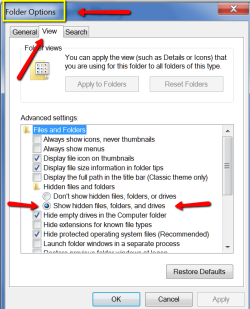
I still have access to the "windows.old" folder but I haven't had any luck finding the bookmarks and even if I did find them I don't know how to import them into Chrome. The other threads I've read say to go to "Drive:\Users\USER NAME\AppData\Local\Google\Chrome\User Data\Default" but the problem for me is that I don't have the "AppData" folder as an option when I select the "USER NAME" folder.
Any help would be appreciated
Thanks
I recently reformatted my computer (from and to the same OS- Windows 7 HP) and noticed most of my Google Chrome bookmarks are gone. The only ones that synced when I signed in were to bookmarks on my toolbar. All the others ones are not there. I know for a fact that I was always signed into Chrome when I added a new bookmark. However, I never manually synced before the reformat but I didn't think I needed to, I thought Chrome automatically synced but when I signed in after the reformat they weren't there.
I still have access to the "windows.old" folder but I haven't had any luck finding the bookmarks and even if I did find them I don't know how to import them into Chrome. The other threads I've read say to go to "Drive:\Users\USER NAME\AppData\Local\Google\Chrome\User Data\Default" but the problem for me is that I don't have the "AppData" folder as an option when I select the "USER NAME" folder.
Any help would be appreciated
Thanks
My Computer
- Computer type
- PC/Desktop
- Computer Manufacturer/Model Number
- HP
- OS
- Windows 7 Home Premium - 64 bit