
Charles120463
New member
- Local time
- 12:46 AM
- Messages
- 17
Hi there,
I downloaded a screen saver that must of had what I believe would be a malware of some kind.
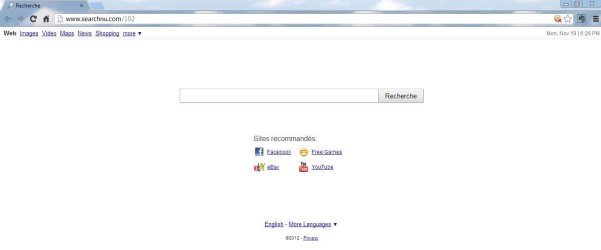
every time I want to go on my google home page, I always end up on this crapy page with the following adresse which I can't seem to get rid of :
Search No matter what I do I cant seem to get back on my google home page.
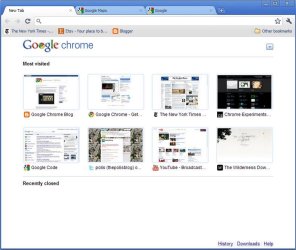
Also, when I go on the Google chrome favorites pages, I seem to have lost all my windows and end up with this crapy looking list of my favorit sites.
Here is the first attachment, describing my new (unwanted homepage). the second attachement is the type favorites page I had before, and finaly the third attachement is the new page I am left with
How can I find my old pages back ?
Thanks
I downloaded a screen saver that must of had what I believe would be a malware of some kind.
every time I want to go on my google home page, I always end up on this crapy page with the following adresse which I can't seem to get rid of :
Search No matter what I do I cant seem to get back on my google home page.
Also, when I go on the Google chrome favorites pages, I seem to have lost all my windows and end up with this crapy looking list of my favorit sites.
Here is the first attachment, describing my new (unwanted homepage). the second attachement is the type favorites page I had before, and finaly the third attachement is the new page I am left with
How can I find my old pages back ?
Thanks
Attachments

My Computer
- Computer Manufacturer/Model Number
- HP Pavilon g6 Notebook Pc
- OS
- Windows 7, 64 bit, premium family edition
- CPU
- Intel(R) Core(TM) i3 CPU M370 @ 2.40 GHz 2.40 GHz
- Motherboard
- carte intégré
- Memory
- 6,00 Go ( 5,80 Go utilisable )
- Graphics Card(s)
- Intel(R) HD Graphics
- Sound Card
- Son Intel(R) pour écrans + IDT High Definition Audio CODEC
- Monitor(s) Displays
- Moniteur Plug-and-Play générique
- Screen Resolution
- 1 366 X 768
- Hard Drives
- Hitachi HTS 547575A9E384
- PSU
- inconnu
- Case
- Portable
- Cooling
- inconnu
- Keyboard
- intégré
- Mouse
- Microsoft USB dual reciever wirlesse mouse (inteli point)
- Internet Speed
- Haute Vitesse


